

Forum Replies Created
-
AuthorPosts
-
Geoff B.
MemberGood evening Michelle and welcome to the Events Calendar Support forum!
Thank you for reaching out to us.
We are sorry to hear about your challenges changing the input box colours.
I would love to help you with this topic.Because the display is deeply impacted by both your theme and your specific settings, would it be possible to get an example URL that includes such input fields on your site ?
This way, we will be able to minimize the back and forth.
Hang in there and have a good weekend,
Geoff B.
MemberGood evening Joan and welcome to the Events Calendar Support forum!
Thank you for reaching out to us.
I would love to help you with this topic.I believe this is because you are using our pro widget shortcodes.
You might want to try our full calendar view shortcodes: https://theeventscalendar.com/knowledgebase/embedding-calendar-views-tribe_events-shortcode/
As you can see, the full list view shortcode is slightly different and should provide you with the featured images you are looking for.
Have a good weekend,
Geoff B.
MemberGood evening Kelly and welcome to the Events Calendar Support forum!
Thank you for reaching out to us.
I would love to help you with this topic.As you might guess, these showcase examples are using a variety of themes with very different CSS rulesets.
With that in mind, I am pretty sure I can help you accomplish what you are looking for.
But, to be able to do that, I would need to be able to view your actual website.From what I gather, your site is currently password protected.
Would it be possible to gain temporary access (using a private reply) ?Have a good weekend,
Geoff B.
MemberBonsoir Thierry,
Merci de nous écrire.
Je comprends très bien à quel point cette situation peut être frustrante, et ce bien malgré nos meilleures intentions.Pour cette raison, je crois qu’il est à propos de clarifier certaines choses:
- Le bogue d’affichage lorsque l’on clique sur le bouton “Email” en utilisant un appareil mobile traverse actuellement notre cycle complet de développement.
En résumé, cela signifie simplement que ce dernier sera ajouté à une de nos prochaines mises à jour de “maintenance”.
Tel que promis, vous serez avisé dès que ça sera le cas.
À titre informatif, nous sommes présentement dans une phase où nous tentons de régler une foule de petits irritants accumulés au fil du temps, plutôt que de travailler sur de nouvelles fonctionnalités.
Bref, cela ne devrait pas tarder (en tenant compte du fait que nous devons jongler avec de nombreux correctifs aux priorités différentes et que nos mises à jour sont environ toutes les 2 semaines).
- Pour ce qui est de la compatibilité avec WC vendor, c’est un peu plus complexe.
Bien que nous fassions notre possible pour offrir la meilleure compatibilité possible avec le plus grand nombre de plug-ins disponibles, nous ne pouvons garantir que cela sera le cas.
Autrement dit, il nous est bien difficile d’être imputables du code écrit par un autre développeur.
Cela dit, nous tentons toujours de jeter un coup d’oeil à ces derniers pour voir si cette compatibilité est possible avec quelques ajustements simples.
À ce propos, j’aurais bien aimé jeter un coup d’oeil au code, mais n’ayant pas accès à ce plug-in spécifique, j’ai les mains quelque peu liées.
Je réitère donc mon invitation à partager une copie de ce plug-in via une réponse privée (lien vers un fichier .zip).
Autrement, j’ai bien peur que je ne puisse vous aider davantage pour cet irritant.
Si ce n’est déjà fait, vous pourriez également en glisser un mot au développeur du plug-in.
Bon week-end,
Geoff B.MemberGood evening Laura,
I am glad this was helpful to you.
The warnings come from that plugin language files or perhaps from WooCommerce itself.
So in short, this is slightly outside of the scope of support we are able to provide.
But, I would totally recommend reaching out to the plugin’s author.Have a good weekend,
Geoff B.
February 17, 2017 at 2:28 pm in reply to: Event cost filed after installing event ticket – now remove the mention "FREE" #1240405MemberGood afternoon Vanina,
Somehow, it looks like your system information did not make it through unfortunately.
Would you mind simply copying and pasting it in a private reply ?Furthermore, would it be possible to get an example URL of the issue you are facing, just to make sure we are indeed talking about the same thing?
Finally, to leave no stone unturned, if possible, it would be great to have screenshots of your Edit Ticket section.
In the meantime, I went ahead and tested the following snippet with Avada: https://gist.github.com/GeoffEW/a63180206b4ebb3a1f30511228816652
It works great except if you are using free WooCommerce events.
Best regards,
Geoff B.
MemberGood afternoon Jordan,
I am super stoked that you are making good progress on this.
For your final question, I believe the following snippet will be helpful: https://gist.github.com/cliffordp/298b904e5f902a7b09e28c7a8bc7b592
You need to paste it in your theme’s functions.php file (without the opening php tag).
It will redirect the links to whatever you have put in the event URL field.Have a good weekend,
Geoff B.
MemberThis reply is private.
MemberThis reply is private.
MemberGood evening Gisela,
Thank you for writing back.
I believe we are getting closer to a solution that works for you.But before that, I would just like to clarify something about my proposed solutions if you follow them to the letter (field by field). Here is what the net result is (see screenshot)
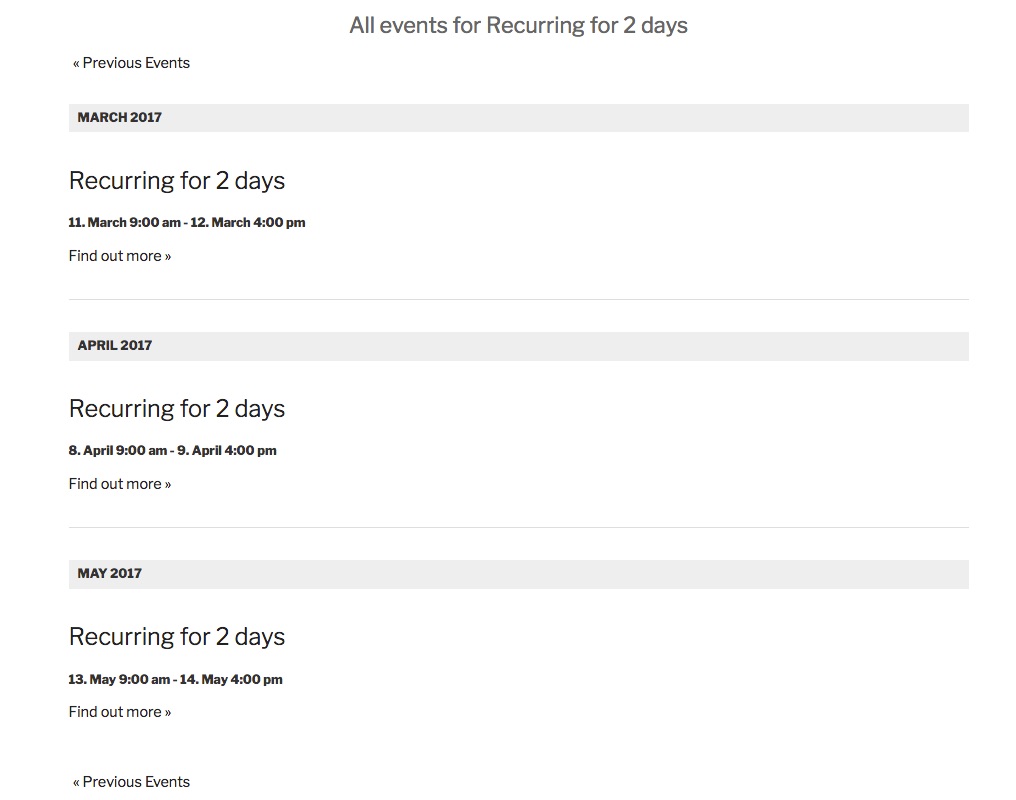
So in short, I believe it does exactly what you are looking for.
This works because the initial event being repeated lasts 2 days (from 2017-03-11 9 am to 2017-03-12 4 pm).The first solution is more flexible because it lets you choose which weekend you want the 2 day event to repeat in any given month. So for now, I would forget about the second solution altogether.
Your solution is also interesting, but I do not believe it meets all of your requirements.
In other words, I think you should give solution 1 another chance 🙂
Let me know how that goes.
Best regards,
Geoff B.MemberGood evening Phil and welcome back!
Thank you for reaching out to us.
We are sorry to hear about the issues you have bumped into while using our plugins with WPML.
I would love to help you with this topic.The first thing you should know is that we do not fully support Event Tickets Plus integration with WPML yet: https://theeventscalendar.com/knowledgebase/wpml-support/
This feature is scheduled to be release later this year.
Initially we planned for spring, but there might be some pushback.In the meantime, you could get it to partially work, but this is unsupported.
To achieve that, you will need:
- WooCommerce multilingual
- Some manual intervention
After creating the ticket AND saving the event, head over to WPML > Support > Troubleshooting page.
Once you are there, you should see several cleanup buttons. I would recommend:
- Clearing WPML cache
- Using the button that forces language assignment to items (which is what is creating the issue). This can also be accomplished by deactivating and reactivating WPML.
Your ticket will now magically appear.
The only downside is that the tickets you create in other languages are not really translations of the initial ticket. They are completely independent new tickets.
Let me know if that helps.
Have a great day!
Geoff B.
p.s.: we can continue this conversation in French if you prefer.
MemberGood evening Garnet and welcome to the Events Calendar Support forum!
Thank you for reaching out to us and for your great words.
It is truly appreciated.I would love to help you with this topic.
The short answer is yes. You can limit the numbers of subscriptions.
There are 2 ways to do this:
- Using our Event Tickets free plugin: https://theeventscalendar.com/product/wordpress-event-tickets/
This lets your customer RSVP, but there is no transactional aspect to it
- Using our Event Tickets Plus premium add-on: https://theeventscalendar.com/product/wordpress-event-tickets-plus/
This lets you add a transactional aspect to the subscriptions AND gives you the ability to have custom registration forms.
Let me know if that helps.
Have a great day!
Geoff B.
MemberGood evening Frank and welcome to the Events Calendar forum!
Thank you for your interest in our products.
We’ll be glad to answer your question.Would it be possible with your codex to create a custom search for the calendar? I.E. add other search options like event category, state, etc.
Absolutely.
We have built this plugin in a way that makes it easy to customize.
I would recommend looking at this link for that very purpose: https://theeventscalendar.com/customizations/Let me know if that helps.
Have a great day!
Geoff B.
MemberThis reply is private.
MemberThis reply is private.
- Le bogue d’affichage lorsque l’on clique sur le bouton “Email” en utilisant un appareil mobile traverse actuellement notre cycle complet de développement.
-
AuthorPosts