

Forum Replies Created
-
AuthorPosts
-
Geoff B.
MemberGood evening Fero,
The setting I am referring to lives in Events -> Settings -> Tickets
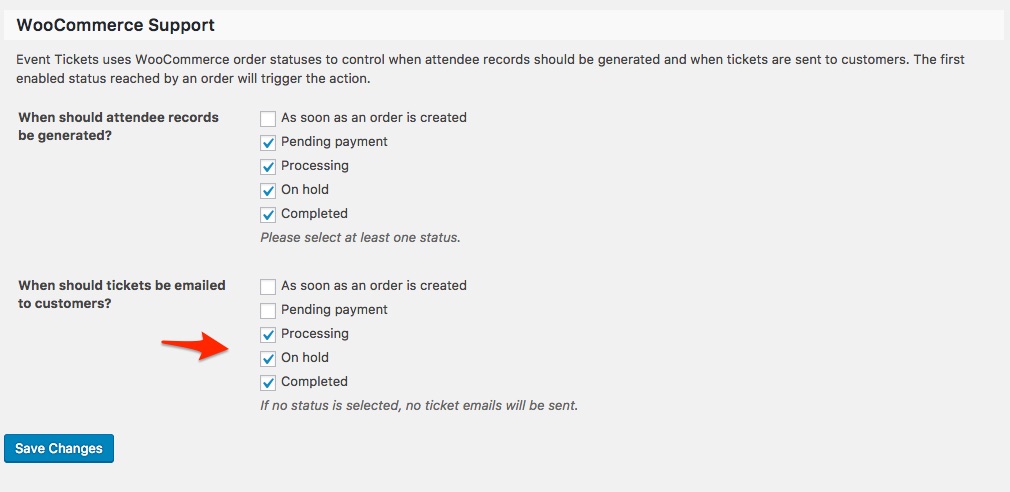
As requested before, as a first troubleshooting step, could you please provide us with your complete system information in a private reply using the instructions found in the following link?
https://theeventscalendar.com/knowledgebase/sharing-sys-info/
This way I will be able to reproduce your setting better.
Best regards,
Geoff B.
August 8, 2017 at 8:38 pm in reply to: Series Link still not working after permalink update #1332580MemberThis reply is private.
August 8, 2017 at 8:27 pm in reply to: Show price from WooCommerce instead of price on Event #1332577MemberGood evening Matt and welcome back!
Thank you for reaching out to us.
I would love to help you with this topic.The short answer is yes.
Pretty much everything is customizable in our plugins.Either through the use of code snippets or of some template/view customization.
You can read about that here: https://theeventscalendar.com/customizations/
If coding is not really your cup of tea, you could always hire one of our recommended customizers to do the customization for you.
You might also want to read our Themer’s guide to get a sense of how view customization works.
Just to set expectations, the scope of our support is mostly to get our customers started on the right track and to help them in case of issues. We unfortunately do not provide complete support for customization.
With that in mind, the following snippets should provide you some inspiration to achieve what you are looking for, a starting point of sorts:
- https://gist.github.com/GeoffEW/69f8a033fb614c78b3de45a197431135
- https://gist.github.com/GeoffEW/ef196ef3154a747a851c771ae45fdecd
Let me know if that helps.
Have a great day!
Geoff B.
MemberGood evening Rich and welcome back!
Thank you for reaching out to us.
I would love to help you with this topic.The simplest way to achieve that is to make a ticket type using WooCommerce tickets.
Once the ticket is created, you can control quantity rules using a WooCommerce third-party plugin.There are a few out there, but check out https://wordpress.org/plugins/quantities-and-units-for-woocommerce/
Please note that you will have to Edit the ticket in WooCommerce directly to access those rules.
Let me know how that goes.
Best regards,
Geoff B.MemberGood evening Geoff and welcome back!
Thank you for reaching out to us.
We are sorry to hear about malicious files ending up on your site.
I would love to help you with this topic.By the sounds of that email, your WordPress install was compromised.
In turn that might have resulted in several files being “taken over” or corrupted.Several of the above mentioned files actually belong to WordPress’ core.
Although it is possible that they have been infected, simply deleting them will most likely “break something”.
The safe way to tackle this is to “delete and replace”.
For example, after deactivating the Events Calendar and the Events Calendar Pro, you can safely delete all files found in ./wp-content/plugins/the-events-calendar/
Simply reinstall our plugin from scratch and you will be sure that you have brand new non-infected files.
The same principle applies to the other recommended files.
Let me know if that helps.
Have a great day!
Geoff B.
August 8, 2017 at 7:50 pm in reply to: Remove links to previous / next events on evant view page #1332556MemberGood evening Adam and welcome to the Events Calendar Support forum!
Thank you for reaching out to us.
I would love to help you with this topic.Since the photo and the map views are deactivated on your site, it makes it a bit difficult to troubleshoot.
However, could you please send me a copy of the latest version of your WordPress theme / child theme via a link to a .zip file link (stored Dropbox or Google Drive) so that I can run some tests on my end ? I recommend a private reply for that purpose.
Please ensure you are using the latest files as found on your actual website.
This way I will get access to any updates or customizations you might have made.This way I will have a better idea of what is going on.
As for the custom CSS, have you tried placing it in Appearance > Customize > Additional CSS ?
Hang in there!
Geoff B.
MemberGood evening Kyle and welcome back!
Thank you for reaching out to us.
We are sorry to hear about the 404 errors you have been getting. Yikes!
I would love to help you with this topic.By all solutions, I assume you are referring to this: https://theeventscalendar.com/knowledgebase/fixing-http-404-errors/
If none of these steps worked, here are a couple of other things to try:
- Please update the Events Calendar Pro and Event Tickets Plus to their latest versions. They are both a few versions behind.
- Head over to Events -> Settings -> General and hit the “Save Changes” button
- Re-save your permalinks.
If none of this works, Try temporarily reverting back to a default WordPress theme such as twenty-sixteen to see if that changes anything.
@Matthew, although the symptoms are similar, I would recommend you open a separate thread for this issue. This way you will receive personalized support.
Let me know how that goes.
Best regards,
Geoff B.MemberGood evening Clinton and welcome back!
Thank you for reaching out to us.
We are sorry to hear about the tickets not showing up on certain events.
I would love to help you with this topic.The most likely cause of that would be if the tickets in question have a start sale date.
Simply put, the tickets will not show up until that date is met.Removing the start sale date usually fixes this issue.
Otherwise, would you mind sharing some screenshots of the Edit ticket screens for some of the tickets that are not appearing ?
As per the other issue, would you mind providing me with a specific example (I could not find one). Perhaps an event in the very distant future (to hide it) ?
Hang in there!
Geoff B.
August 8, 2017 at 7:26 pm in reply to: adding an single event to an already translated series #1332543MemberGood evening Michael and welcome back!
Thank you for reaching out to us.
We are sorry to hear about the challenges you have met while trying to use recurring events alongside WPML. I would love to help you with this topic.
As a first troubleshooting step, could you please provide us with your complete system information in a private reply using the instructions found in the following link?
https://theeventscalendar.com/knowledgebase/sharing-sys-info/
Your process seems really great.
I might recommend 2 extra steps to see if that helps:- After adding your new date, head over to the translation of the event and simply click on “Update”
- Head over to WPML > Support > Troubleshooting page.
Once you are there, you should see several cleanup buttons. I would recommend:
- Clearing WPML cache
- Using ALL the cleanup buttons on that page
- Re-saving your permalinks
Hang in there!
Geoff B.
August 8, 2017 at 7:21 pm in reply to: Tribe__Events__Pro__Integrations__WPML__Defaults Error! #1332542MemberGood evening Alex and welcome back!
Thank you for reaching out to us.
We are sorry to hear about the ugly error message you are getting.
I would love to help you with this topic.You mentioned that you are moving the site “the hard way”. Would you mind expanding a bit ?
More specifically, how are you handling the SQL databases in the process ?The reason I am asking is because sites that have WPML installed on them need some extra attention when it comes to database tables.
As a first troubleshooting step, could you please provide us with your complete system information in a private reply using the instructions found in the following link?
https://theeventscalendar.com/knowledgebase/sharing-sys-info/
Secondly, head over to WPML > Support > Troubleshooting page.
Once you are there, you should see several cleanup buttons. I would recommend:
- Clearing WPML cache
- Using ALL the cleanup buttons on that page
- Re-saving your permalinks
Let me know how that goes.
Best regards,
Geoff B.MemberGood evening Matthew and welcome to the Events Calendar Support forum!
Thank you for reaching out to us.
We are sorry to hear about the message you have received. Our apologies.
I would love to help you with this topic.These messages can show up when there is a system glitch.
The good news is that this is usually temporary.In other words, you should now be able to download your plugins by going to https://theeventscalendar.com/my-account/downloads/
In fact, it looks like you already did.
Can you confirm ?
Best regards,
Geoff B.
MemberGood evening Janine and welcome to the Events Calendar Support forum!
Thank you for reaching out to us.
We are sorry to hear about the conflict you have experienced while using our plugins alongside the Piklist framework.
As my colleague Victor found out in https://theeventscalendar.com/support/forums/topic/500-error-after-updating-recurring-events/ thread, we were able to reproduce this on our end.
We apologize for the inconvenience caused by this glitch and we are actively working on a solution for this.
Alas, I cannot guarantee when it will be fixed, as it’s in the development team’s hands now.
They need to assign it, code it, test it, and schedule it for release.The good news is that you will be contacted as soon as a fix is available.
Thank you for your patience as we see this through.In the meantime, you might want to reach out to the plugin’s author in case they see something obvious we might have missed at first glance.
Best regards,
Geoff B.MemberGood evening Rob,
I am super stoked you managed to fix things to your liking.
You are welcome back in our support forums any time 🙂
For now, I am going to close this thread.
Have a great week!
Geoff B.
MemberGood afternoon Joseph,
Awesome!
I am super stoked.
You are welcome back in our support forums any time 🙂
For now, I am going to close this thread.
Have a great week!
Geoff B.
MemberGood evening Doron,
First off, I would like to apologize for the delay answering.
We are currently experiencing a higher level of requests than usual.Please rest assured that we are working hard at correcting this situation.
We appreciate your patience while we try to normalize things.Thank you for the offer of the maintenance time, however, our company policy does not allow us to login and change anything on a live site unfortunately.
Perhaps you could use something like https://local.getflywheel.com/ and enable the live link.
That could double up as your staging environment.Another possibility would be to simply setup a copy of your site (as a “normal” site) under a subdomain (e.g. test.dialogtogether.com). Just make sure you block the search engines on that copy.
In other words, if your webhost does not let you set up a staging environment, chances are they will let you setup another “normal” website.
I wish I had a better answer for you, but for now it’s the best one I have unfortunately.
Best regards,
Geoff B.
-
AuthorPosts