

Forum Replies Created
-
AuthorPosts
-
Geoff B.
MemberThis reply is private.
MemberGood evening Joseph and welcome back!
The short answer is that the number of events appearing in the list view is set by a setting from your WordPress theme (Extra).
More specifically, navigate to Extra > Theme options and look for Number of Posts displayed on Archive pages
Let me know how that goes.
Best regards,
Geoff B.MemberGood evening Rob and welcome back!
Thank you for reaching out to us.
We are sorry to hear about the tickets not being sent.
I would love to help you with this topic.The first thing you should check is the settings at the bottom of the page of Events -> Settings -> Tickets.
Simply put, the tickets are sent following the checkbox selected here. In some cases, that means that the tickets only get sent once the order is set to “complete”.
If that does not help. You can have the system send tickets from any chosen email address by simply installing, configuring and testing the following plugin: https://wordpress.org/plugins/easy-wp-smtp/
Using a real SMTP server with authentication will bypass the built-in WP mail functionality altogether.
Please make sure you configure and test the settings using the plugin’s built-in tool.
This normally solves any issue sending the tickets.
Let me know how that goes.
Best regards,
Geoff B.MemberGood evening Sven and welcome back!
Thank you for reaching out to us.
I would love to help you with this topic.The short answer is yes. You can do just that with the help of code snippets.
Depending on your scenario, you will want to use one of the following:
- https://gist.github.com/GeoffEW/a63180206b4ebb3a1f30511228816652
- https://gist.github.com/GeoffEW/b440feef873af841d023c0bf0839e93f
Simply apply one of the preceding snippet in the functions.php file of your theme (without the PHP tag at the top).
Let me know how that goes.
Best regards,
Geoff B.MemberGood evening Joe and welcome back!
Thank you for reaching out to us.
I would love to help you with this topic.Yes, Event aggregator does replace the FB plugin.
However, it is not a plugin per se.It is a service that gets activated once you input your license key under Events -> Settings -> Licenses.
You can read about this here: https://theeventscalendar.com/knowledgebase/new-user-primer-event-aggregator/
Let me know how that goes.
Best regards,
Geoff B.MemberGood evening Adam and welcome back!
Thank you for reaching out to us.
We are sorry to hear about an event’s stock being inaccurate on your site.
I would love to help you with this topic.The good news is that I ran some tests and I was not able to reproduce the issue with a free WooCommerce event on a basic WordPress install.
Can you tell me if there were any tickets sold for that event at any point in time ?
If so, were there any cancelled or deleted tickets along the way ?As a first troubleshooting step, could you please provide us with your complete system information in a private reply using the instructions found in the following link?
https://theeventscalendar.com/knowledgebase/sharing-sys-info/
Secondly, can you please provide me with a screenshot of the Edit Ticket section of that event.
Hang in there!
Geoff B.
MemberGood evening Hyla and welcome back!
Thank you for reaching out to us.
We are sorry to hear about your CSV uploads not working as expected. Yikes!
I would love to help you with this topic.Based on what I am seeing, the issue is either caused by:
- The fact that the date and time format are different than the ones found in your settings (for example, you might not be using 7/2/20107 for the date)
- The fact that all the start sale dates are in the past
- The use of “tricky” characters such as “/” and “&” in some of the titles
My recommendation would be to try the import with either no start and end sale dates or temporarily remove entries containing the above mentioned characters.
Let me know how that goes.
Best regards,
Geoff B.MemberGood evening and welcome back!
Thank you for reaching out to us.
I would love to help you with this topic.If I understand correctly, you are mostly interested in the appearance of the featured image in the context of sharing it on Facebook. Can you confirm ?
Since it looks like you are using Yoast SEO, the easiest way to get precisely the image you are after would be to use its built-in FB thumbnail functionality.
This way each image can be cropped to your liking while not upsetting the event’s Featured Image (unless you want to do that as well).
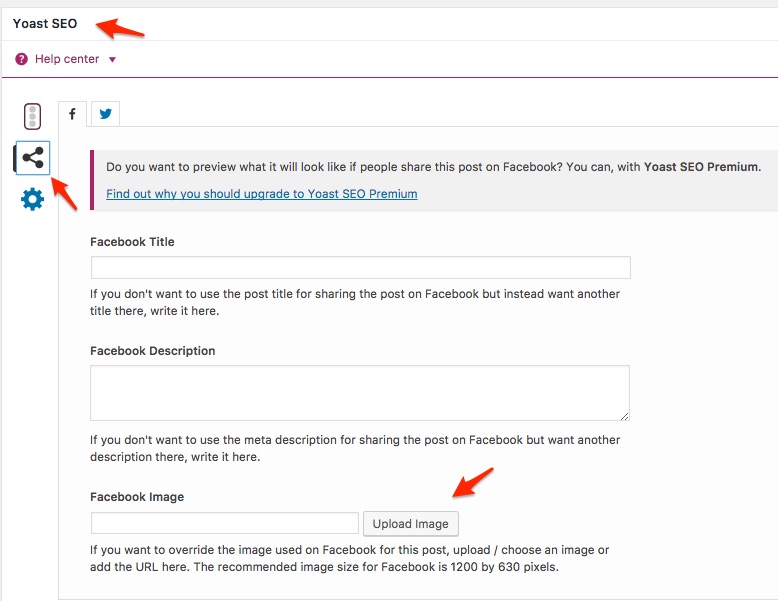
As for your other question, the featured image from Events is controlled by the exact same process as Featured images in WordPress.
I would recommend reading the following:
- https://themezee.com/docs/change-size-of-featured-images/
- https://slocumthemes.com/2014/05/adjust-set-size-featured-image-size-wordpress/
Let me know if that helps.
Have a great day!
Geoff B.
MemberGood evening Rae and welcome to the Events Calendar Support forum!
Thank you for reaching out to us.
Major kudos on the troubleshooting!You are welcome back in our support forums any time 🙂
For now, I am going to close this thread.
Have a great week!
Geoff B.
August 7, 2017 at 8:58 pm in reply to: Recurring events when viewed showing a not found, error 404 page #1331915MemberGood evening Olivia,
I am super stoked to hear that.
You are welcome back in our support forums any time 🙂
For now, I am going to close this thread.
Have a great week!
Geoff B.
MemberGood evening Philipp and welcome back!
Thank you for reaching out to us.
I would love to help you with this topic.As a first troubleshooting step, could you please provide us with your complete system information in a private reply using the instructions found in the following link?
https://theeventscalendar.com/knowledgebase/sharing-sys-info/
In order to change the sequence of the elements on the page, you will need to do a custom view template. You might want to read our Themer’s guide to get a sense of how that works.
Simply put, you make your own version of the view and upload it back in the appropriate folder located in the /tribe-events/ folder of your WordPress theme.
As for the language files, some of the strings are located in Community Events, while others come straight from the Events Calendar (even though they appear on the Community Events page).
This probably explains why you are not able to find them.
I highly recommend reading the 3 following articles on translation:
- https://theeventscalendar.com/knowledgebase/translating-the-events-calendar/
- https://theeventscalendar.com/knowledgebase/how-to-override-plugin-language-files/
- https://theeventscalendar.com/knowledgebase/incomplete-translations/
With that in mind, there is a different approach to changing strings: a code snippet.
You could apply the following snippet in the functions.php file of your theme (without the PHP tag at the top) after entering your modified strings: https://gist.github.com/andrasguseo/29903a974cb84060957881c17613c278
Let me know if that helps.
Have a great day!
Geoff B.
MemberThis reply is private.
MemberGood evening Fero and welcome back!
Thank you for reaching out to us.
We are sorry to hear about the snippet no longer working.
I would love to help you with this topic.Perhaps you could try updating it to its latest version: https://gist.github.com/jesseeproductions/9ff8863230e5a05b9303
If that does not work, as a first troubleshooting step, could you please provide us with your complete system information in a private reply using the instructions found in the following link?
https://theeventscalendar.com/knowledgebase/sharing-sys-info/
As per your question, depending on your setup, you could try simply unselecting the different checkboxes found under Events -> Settings -> Tickets (at the very bottom of the screen).
Let me know how that goes.
Best regards,
Geoff B.MemberGood evening Pascal and welcome back!
Thank you for reaching out to us.
We are sorry to hear about the issues you have encountered.
I would love to help you with this topic.As a first troubleshooting step, could you please provide us with your complete system information in a private reply using the instructions found in the following link?
https://theeventscalendar.com/knowledgebase/sharing-sys-info/
The first thing you should know is that we do not fully support Event Tickets Plus integration with WPML yet: https://theeventscalendar.com/knowledgebase/wpml-support/
This feature is scheduled to be released later this year. Initially we planned for spring, but there was some pushback.
In the meantime, you could get it to partially work, but this is unsupported.
To achieve that, you will need:
- WooCommerce multilingual
- Some manual intervention
After creating the ticket AND saving the event, head over to WPML > Support > Troubleshooting page.
Once you are there, you should see several cleanup buttons. I would recommend:
- Clearing WPML cache
- Using the button that forces language assignment to items (which is what is creating the issue). This can also be accomplished by deactivating and reactivating WPML.
Your ticket will now magically appear.
The only downside is that the tickets you create in other languages are not really translations of the initial ticket. They are completely independent new tickets.
As per your second question, would you mind expanding on how you added the custom email text exactly ?
Could you please send me a copy of the latest version of your WordPress theme / child theme via a link to a .zip file link (stored Dropbox or Google Drive) so that I can run some tests on my end ? I recommend a private reply for that purpose.
Please ensure you are using the latest files as found on your actual website.
This way I will get access to any updates or customizations you might have made.Let me know if that helps.
Have a great day!
Geoff B.
August 7, 2017 at 1:49 pm in reply to: Conflict between Events Calendar and Woocommerce variations #1331805MemberThis reply is private.
-
AuthorPosts