

Forum Replies Created
-
AuthorPosts
-
August 30, 2017 at 10:47 pm in reply to: WPML + Recurring Events – They have fixed the problems !!? #1342878
Geoff B.
MemberGood evening Miquel and welcome back!
Thank you for reaching out to us.
I would love to help you with this topic.Recurring events doubled and it was impossible for them to show up correctly.
At the time of writing WPML works perfectly with recurring events.
Of course, that is as long as the following instructions are being followed.
I highly recommend reading and using the following guides:- https://theeventscalendar.com/knowledgebase/setting-up-the-events-calendar-with-wpml/
- https://theeventscalendar.com/knowledgebase/creating-translations-for-events-using-wpml/
If you bump into any issue, please reach out to us so that we can help you.
Have a great day!
Geoff B.
MemberHello again Michelle,
I believe this is a duplicate of https://theeventscalendar.com/support/forums/topic/purchased-3-licenses-of-incorrect-add-ons/
I will therefore close this ticket and continue helping you in the other one.
Best regards,
Geoff B.
MemberGood evening Michelle and welcome to the Events Calendar Support forum!
Thank you for reaching out to us.
We are sorry to hear about the confusion during the purchase process.
I would love to help you with this topic.I just went ahead and swapped your license.
Additionally, I processed a $50 refund to your account since Event Tickets Plus is actually less expensive than Community Tickets.Let me know if that helps.
Have a great day!
Geoff B.
MemberGood evening Matt and welcome to the Events Calendar Support forum!
Thank you for reaching out to us.
We are sorry to hear about the map view not working on your site.
I would love to help you with this topic.My best guess is that this has to do with some type of conflict.
This is usually because of:
- A conflict with another plugin
- A conflict with your WordPress theme
- A template customization for the Events Calendar that requires updating
When it comes to that type of issue, it is preferable to troubleshoot in a staging environment if you have one.
A first quick test is to simply temporarily revert back to a default WordPress theme such as twenty-sixteen to see if the issue persists.
The next step would be to go through our testing for conflicts procedure and let us know what you find out.
Basically the goal here is to revert back to a bare WordPress installation to see if the problem persists. It also allows us to pinpoint what the cause of the issue is.
But, before you do that, there are 2 things I would advise:
- Make a backup of your database
- Consider activating a “Maintenance Page” plugin if you are doing this on your live site (to minimize impact on your visitors)
Let me know how that goes.
Geoff B.
MemberGood evening Jennifer and welcome back!
Thank you for reaching out to us.
We are sorry to hear about the monthly pagination not working on your site. Yikes!
I would love to help you with this topic.We apologize for the inconvenience caused by this glitch. We are actively working on a solution for this.
Alas, I cannot guarantee when it will be fixed, as it’s in the development team’s hands now.
They need to assign it, code it, test it, and schedule it for release.The good news is that you will be contacted as soon as a fix is available.
Thank you for your patience as we see this through.The other good news is that we have a workaround. You simply need to downgrade to the Events Calendar (4.5.10.1). This should instantly fix the issue.
You can read about downgrading here: https://theeventscalendar.com/knowledgebase/downgrading-plugin-past-version/
Best regards,
Geoff B.MemberGood evening Jess and welcome to the Events Calendar forum!
Thank you for your interest in our products.
We’ll be glad to answer your questions.If we had a reoccuring event – like a talk that is given twice a month, can we change the description of each event in the series or would it have to stay the same?
This is a great question.
The short answer is yes. You can change the description of each event in the series.
However, doing so will break the events from the series.
In other words, everything will still work perfectly, but each of these events, after editing the description, has a life of its own.You can read about that here: https://theeventscalendar.com/knowledgebase/pro-recurring-events/
Let me know if that helps.
Have a great day!
Geoff B.
MemberGood evening Chris and welcome to the Events Calendar Support forum!
Thank you for reaching out to us.
We are sorry to hear about this error message creeping up on you.
I would love to help you with this topic.As a first troubleshooting step, could you please provide us with your complete system information in a private reply using the instructions found in the following link?
https://theeventscalendar.com/knowledgebase/sharing-sys-info/
Could you also please send me a copy of the latest version of your WordPress theme / child theme via a link to a .zip file link (stored Dropbox or Google Drive) so that I can run some tests on my end ? I recommend a private reply for that purpose.
Please ensure you are using the latest files as found on your actual website.
This way I will get access to any updates or customizations you might have made.Hang in there!
Geoff B.
MemberGood evening William and welcome to the Events Calendar forum!
Thank you for your interest in our products.
We’ll be glad to answer your questions.with Event Calendar Pro, can we customize/style the calendar to look like what we already have?
Good news! You can style our plugins to your exact requirements.
Not only the Events Calendar Pro, but the Events Calendar (free) as well.In order to gain full power on your site’s look and feel, I would highly recommend reading the following articles:
- https://theeventscalendar.com/knowledgebase/wordpress-customizer/
- https://theeventscalendar.com/knowledgebase/using-google-chrome-developer-tools/
- https://theeventscalendar.com/knowledgebase/changing-fonts-and-colours/
- https://theeventscalendar.com/knowledgebase/styling-events-widgets/
You can even customize each view’s content. You might want to read our Themer’s guide to get a sense of how that works.
With that in mind, a lot of users coming from time.ly really like the look of our calendar, they simply adjust the colours. But I guess that is a matter of personal preference.
Also, for days that have multiple events on the same day, is there a way to change the font color or background color for the 2nd and 3rd events of the day?
You could achieve that using CSS or by adding categories to these events and using something like http://wordpress.org/plugins/the-events-calendar-category-colors/
In this example you could use categories for 1st, 2nd and 3rd events of the day.
Also, does Event Tickets Plus have inventory control? We currently sell 16 seats per class and need it to cut off at 16 so we don’t oversell.
Absolutely. This is because Event Tickets Plus lets WooCommerce handle all of the transactional aspect of things. In other words, you get all of WooCommerce’s power at your disposal.
Let me know if that helps.
Have a great day!
Geoff B.
MemberGood evening Benjamin and welcome back!
Thank you for reaching out to us.
We are sorry to hear about the tickets not showing up on your site.
I would love to help you with this topic.This can happen when you have selected a start sale date for your tickets.
Simply put, the tickets will not show until that date is met.Try removing the start sale date.
Let me know how that goes.
Best regards,
Geoff B.MemberGood evening Brandon and welcome back!
Thank you for reaching out to us.
I would love to help you with this topic.Actually, the best way to do this is to use the Other URL (beta) option.
You can read about it here: https://theeventscalendar.com/knowledgebase/import-from-feed-or-url/Ideally, both calendars should have more or less matching versions.
Both should be 4.4 +Let me know how that goes.
Best regards,
Geoff B.MemberGood evening Scott and welcome to the Events Calendar Support forum!
Thank you for reaching out to us.
We are sorry to hear about the lack of pop-up when you click on the button.
I would love to help you with this topic.By the sound of it, it looks like there is some type of conflict at play.
This is usually because of:- A conflict with another plugin
- A conflict with your WordPress theme
- A template customization for the Events Calendar that requires updating
When it comes to that type of issue, it is preferable to troubleshoot in a staging environment if you have one.
A first quick test is to simply temporarily revert back to a default WordPress theme such as twenty-sixteen to see if the issue persists.
The next step would be to go through our testing for conflicts procedure and let us know what you find out.
Basically the goal here is to revert back to a bare WordPress installation to see if the problem persists. It also allows us to pinpoint what the cause of the issue is.
But, before you do that, there are 2 things I would advise:
- Make a backup of your database
- Consider activating a “Maintenance Page” plugin if you are doing this on your live site (to minimize impact on your visitors)
Secondly, try using Google Chrome’s console from the developper tools to see if any Javascript or JQuery warning pops-up on that page in the admin section.
Let me know how that goes.
Geoff B.
MemberGood evening Molly and welcome to the Events Calendar Support forum!
Thank you for reaching out to us.
We are sorry to hear about the issues you have encountered while trying to download the plugin. Yikes!
I would love to help you with this topic.
First off, you might want to try reinstalling the Community plugin “Manually” (deactivate and delete – then download the latest zip file here: https://theeventscalendar.com/my-account/downloads/)
With that in mind, I believe that the Event Tickets Plus message stems from the fact that Community Tickets actually extends Event Tickets Plus, not Event Tickets.
Alas, that means that even if you are only using RSVP tickets, you will indeed need Event Tickets Plus.
With that in mind, I would like to bring this point to our team meeting this week.
Let me know how that goes.
Best regards,
Geoff B.MemberThis reply is private.
MemberThis reply is private.
August 29, 2017 at 11:06 pm in reply to: Shipping Address For Events Not Populating in Woocommerce #1342199MemberGood evening Christopher,
Thank you for writing back and running those tests.
Based on this, what we need to do is change all of your tickets to physical products instead of the default Virtual ones.
You can:
- Read the following to make all tickets “non-virtual” by default: https://theeventscalendar.com/support/forums/topic/how-to-create-the-tickets-as-products-ready-for-shipping-not-virtual/#post-1222837 . You need to apply that snippet in the functions.php file of your theme (without the PHP tag at the top)
- Click on “Edit in WooCommerce” and change the product type for each ticket manually
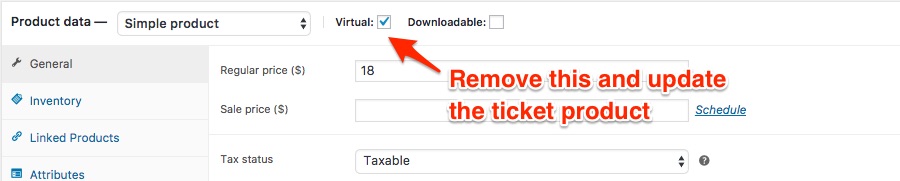
Let me know how that goes.
Best regards,
Geoff B. -
AuthorPosts