
Home › Forums › Ticket Products › Event Tickets Plus › Shipping Address For Events Not Populating in Woocommerce
- This topic has 9 replies, 2 voices, and was last updated 9 years, 1 month ago by
Christopher Sandstedt.
-
AuthorPosts
-
August 25, 2017 at 9:19 am #1340290
Christopher Sandstedt
ParticipantThe shipping address is no longer showing up from order for tickets purchase with Events Tickets Plus. This information used to be collected on all orders. Now it is just blank in the system.
Is there a new setting or something that I need to update to have the system collect shipping addresses?
August 25, 2017 at 12:32 pm #1340458Geoff B.
MemberGood afternoon Christopher and welcome to the Events Calendar Support forum!
Thank you for reaching out to us.
We are sorry to hear about the shipping address no longer appearing. Yikes!
I would love to help you with this topic.Could you please send me a copy of the latest version of your WordPress theme / child theme via a link to a .zip file link (stored Dropbox or Google Drive) so that I can run some tests on my end ? I recommend a private reply for that purpose.
Please ensure you are using the latest files as found on your actual website.
This way I will get access to any updates or customizations you might have made.That being said, I believe that what might be going on is that by default tickets are virtual products. This is why there is no shipping address typically attached to them.
You can of course workaround this as discussed by my colleague Cliff: https://theeventscalendar.com/support/forums/topic/proceed-ticket-checkout-but-not-showing-shipping-address-column-filled/#post-1246547
Let me know if that helps.
Have a great day!
Geoff B.
August 25, 2017 at 1:01 pm #1340470ParticipantThis reply is private.
August 28, 2017 at 11:22 pm #1341591MemberThis reply is private.
August 29, 2017 at 3:38 am #1341646ParticipantI’ve shared access to the zip drive. Also, I’ve added the shipping setting you’ve suggested and the shipping address is now showing up on the test physical product at checkout. However, it is still not showing up for the events when I checkout.
August 29, 2017 at 11:06 pm #1342199MemberGood evening Christopher,
Thank you for writing back and running those tests.
Based on this, what we need to do is change all of your tickets to physical products instead of the default Virtual ones.
You can:
- Read the following to make all tickets “non-virtual” by default: https://theeventscalendar.com/support/forums/topic/how-to-create-the-tickets-as-products-ready-for-shipping-not-virtual/#post-1222837 . You need to apply that snippet in the functions.php file of your theme (without the PHP tag at the top)
- Click on “Edit in WooCommerce” and change the product type for each ticket manually
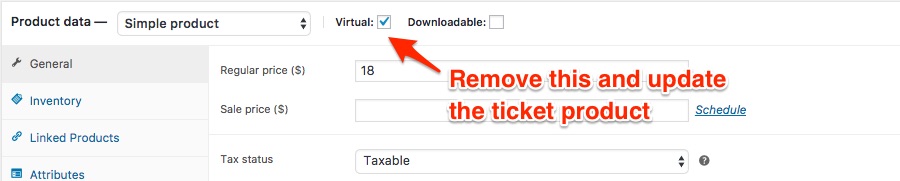
Let me know how that goes.
Best regards,
Geoff B.August 30, 2017 at 5:07 am #1342265ParticipantHello Geoff,
Thank you for all of your help in running this down. I’ve taken those steps and the shipping address appears to be working now for all events.
August 30, 2017 at 10:55 pm #1342880MemberGood evening Christopher,
I am super stoked to hear that things are now working to your exact specifications.
You are welcome back in our support forums any time 🙂
For now, I am going to close this thread.
Have a great week!
Geoff B.
September 21, 2017 at 9:36 am #1352781Support Droid
KeymasterHey there! This thread has been pretty quiet for the last three weeks, so we’re going to go ahead and close it to avoid confusion with other topics. If you’re still looking for help with this, please do open a new thread, reference this one and we’d be more than happy to continue the conversation over there.
Thanks so much!
The Events Calendar Support Team -
AuthorPosts
- The topic ‘Shipping Address For Events Not Populating in Woocommerce’ is closed to new replies.