

Forum Replies Created
-
AuthorPosts
-
Victor
MemberHi Nathan!
Thanks for getting in touch with us!
By default, past events show a message in the single event page that states that.
In the month view, past events are also shown greyed out, so they differentiate from upcoming events. But, I can see in your site for the month view, that the upcoming events are also grey and it’s hard to tell the difference between past and upcoming.
Having a closer inspection, I can see the grey color is being applied by your theme, so you should check out your theme settings and see if there is any one to select this color.
I hope that helps. Let me know if any follow up question.
Best,
VictorMemberHi Eric!
I’m sorry to hear you are experiencing that problem. Let me help you with it.
I have just checked your Event Aggregator license and seems to be active and working fine.
Could you please navigate to your wp-admin > Events > Settings > Licenses tab and delete your license key and save? After that, re-enter the license and save again.
Does it work after that? Please let me know about it.
Thanks,
VictorMemberHi Pressley!
I’m sorry to hear you are experiencing that problem. Let me help you with the troubleshooting.
First, Could you please share with us your system information by following this guide > https://theeventscalendar.com/knowledgebase/sharing-sys-info/ ? We’ll see if there is anything strange that would indicate an error from there.
This can be related to a theme or plugin conflict, so to narrow the problem down please go through the steps provided in the testing for conflicts guide > https://theeventscalendar.com/knowledgebase/testing-for-conflicts/ and let us know what you find in the process.
We always suggest to setup a dev/staging site so you can test things without disrupting the live site.
Let me know how that goes.
Thanks,
VictorMemberHi Greg!
Thanks for reaching out to us!
It is possible to embed a map view of your events with the tribe_events shortcode.
You will find all the available attributes in the following article > https://theeventscalendar.com/knowledgebase/embedding-calendar-views-tribe_events-shortcode/
For your specific need, you might want to use the date attribute that allows for specific dates to be shown.
The number of events to show per page is something you can customize in wp-admin > Events > Settings > General tab.
I hope that helps. Let me know if any follow up questions 🙂
Best,
VictorMemberHi Kathryn!
Thanks for reaching out to us and for your interest in Community Events.
All the events generated by our plugins are a ‘tribe_events’ custom post type, so you should be able to access them like any other regular post type for a WordPress site, in the wp_posts table.
I’m not familiar with Tableau and not exactly sure about the implementation you need to accomplish with it. But, let also point you to the following article that explains how you can create cutom queries for our events using the tribe_get_events function > https://theeventscalendar.com/knowledgebase/using-tribe_get_events/
I hope that helps. Let me know if any follow up questions.
Best,
VictorMarch 5, 2018 at 4:52 am in reply to: Support ticket history and new support tickets not showing up #1469879MemberHi Alyson!
I’m sorry you are experiencing those problems with your support tickets.
I have been able to spot a bug with the way your “My Support Tickets” link is generated. I will create a bug report for this to be fixed in our site.
In the meantime, you can see your support tickets in the following link > https://theeventscalendar.com/support/forums/users/education-kmcsouthamptongmail-com/support/topics/
For support ticket emails, could you please check your spam folder to see if they where somehow flagged as spam by your email client?
Thanks,
VictorMemberHi Gretchen!
Thanks for getting in touch with us.
Unfortunately, there is no default feed to only fetch a specific category of events. You can customize the RSS feed for your events with some custom coding.
The following article is a good starting point you can take as a reference to customize the RSS feed > https://theeventscalendar.com/knowledgebase/customize-rss-feed/
I hope that helps. Is there anything else I can help you with? Let me know.
Best,
VictorMarch 5, 2018 at 4:13 am in reply to: Tickets and normal woocommerce products in the same checkout #1469860MemberHi ilkka!
Thanks for following up with this.
I truly understand your situation with this issue. Unfortunately, we don’t have a workaround at the moment for this.
We can’t commit to a date for a fix as it’s in the developers hands now. However, I have just checked the report and it’s already assigned to one of our devs to be fixed in our maintenance release of our plugins in about three weeks.
We’ll keep you posted about it.
Best,
VictorMarch 5, 2018 at 3:47 am in reply to: WordPress database error: [Unknown column 'wpno_postmeta.meta_value' in 'field l #1469841MemberHello Roger,
Thanks for performing those tests and for following up with this.
I’m sorry to hear that you feel that way with our support responses.
We strive to make our plugins broadly compatible. However, sometimes “conflicts” can occur. This happens when code from one plugin or theme conflicts with another plugin or theme.
To identify the source of the conflict, we always ask to test for conflicts first. This allows to narrow the problem down to a specific theme or plugin, so we can help find a solution for the conflict.
In your specific case, it seems you could narrow the error down to the WP Mailster Free plugin. Besides the database error, are there any functionalities of our plugins being affected? If so, please let us know which ones so we can try to reproduce the error on our end and help you find a solution for it.
If no functionality is being affected by this error, you can prevent the error (and any other errors that might occur) from showing up in the frontend of your site by disabling WP_DEBUG_DISPLAY > https://codex.wordpress.org/Debugging_in_WordPress#WP_DEBUG_DISPLAY.
To accomplish this, you need to edit your wp-config.php file and under:
$table_prefix = 'wp_';paste the following code:
define( 'WP_DEBUG_DISPLAY', false );The above is a recommended setting for live sites so that end users don’t see any errors showing up in your site.
Please let me know how that goes and if you have any questions.
Best,
VictorMemberYou’re welcome Matt!
Since you marked this thread “Resolved I’ll go ahead and close it, but feel free to open a new topic if anything comes up and we’ll be happy to help.
Cheers,
VictorMemberHi Corry!
Thank for checking that out.
The only setting that could be limiting this is the import range, but I can see from your system information that it’s set to fetch 3 months in advance.
Could you please enable WP_DEBUG and WP_DEBUG_LOG ? This will create a debug.log file inside the /wp-content directory.
After that, try reproducing the issue a few times, so that in case there is an error, it will be saved into the debug.log file. Please share that log file with us so we can see if any problem from there.
Thanks,
VictorMemberHi Helen!
Thanks for reaching out to us!
This is our pre-sales forum. For questions about using The Events Calendar please post in our free forum > https://wordpress.org/support/plugin/the-events-calendar
If you own one of our premium plugins license, please log in to your account and post in our Help Desk > https://theeventscalendar.com/help-desk/
As a reference, you can edit your already posted events information, by navigating to your wp-admin > Events and clicking the event you need to edit.
Learn more about it > https://theeventscalendar.com/knowledgebase/new-user-primer-the-events-calendar-and-events-calendar-pro/
Best,
VictorMemberSure thing Julie. No hurries, we’ll be here when you get back.
Please note that the thread will auto close after three weeks of inactivity, in which case you can open a new topic referencing this one and we’ll continue helping.
Best,
VictorMarch 2, 2018 at 4:11 am in reply to: Link to specific event url in meetup, and import thumbnail image #1468040MemberHi Jenny,
I’ve just checked the report and it has already been assigned to one of our developers.
We can’t really commit to a date for a fix, but it generally takes a few weeks to get into a maintenance release cycle of our plugins.
With this error specifically, there is a chance of taking less time, as it may only need a fix on the Event Aggregator server side of things, which won’t need an update of your plugins.
Rest assured we will let you know once fixed.
Best,
VictorMemberHi Corry,
That’s strange, as I can confirm they are importing on my end.
Could you please navigate to your wp-admin > Events and see if the events missing are listed there? Please also check if there are under Ignored:
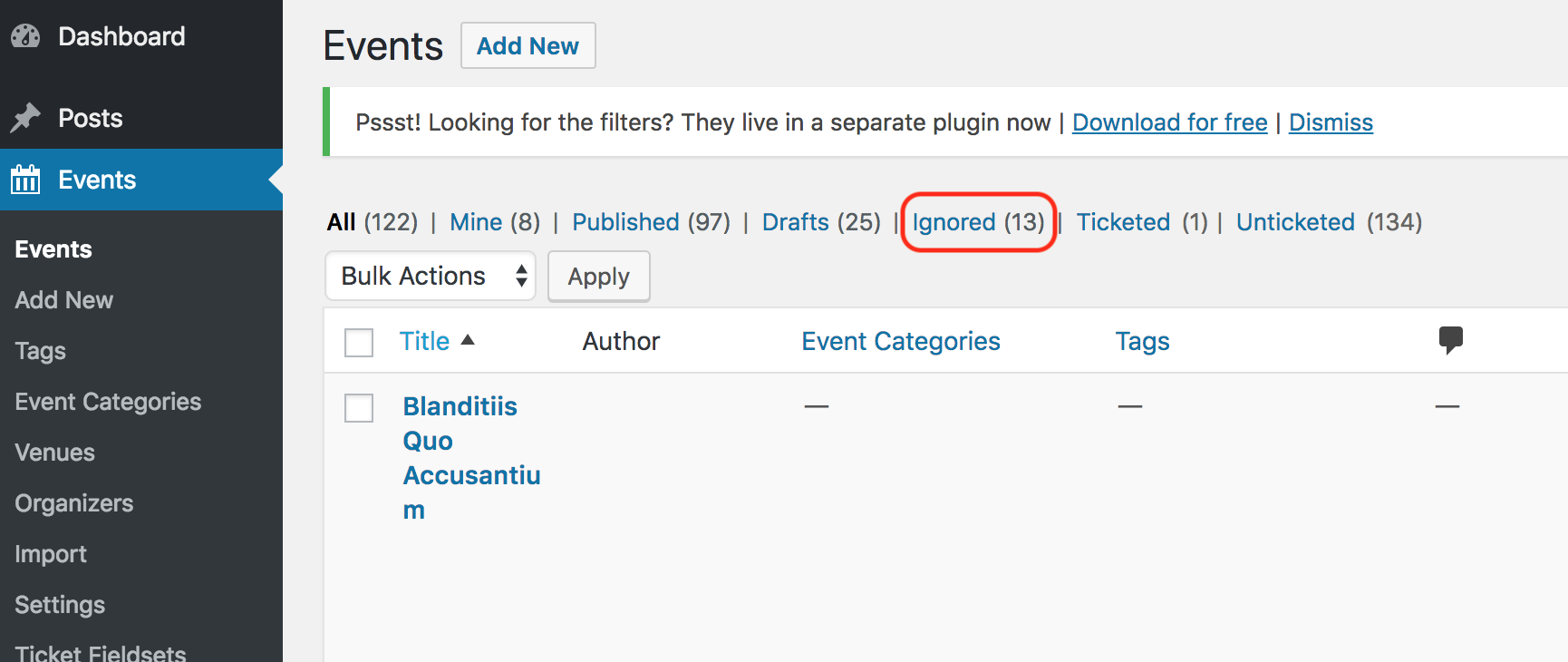
Let me know about it.
Thanks,
Victor -
AuthorPosts