Forum Replies Created
-
AuthorPosts
-
Jennifer
KeymasterHi John,
That’s awesome that you’re writing a tutorial on this, I’m sure it will be helpful to many other users!
Did the tribe_tickets_get_ticket_stock_message function work out for you?
KeymasterHi Myriam,
Thanks for checking out our plugins!
There are a few ways that you could go about making a private event…I would recommend taking a look at the following articles:
Making a Members-Only Calendar
You can also set specific events to “Private”, just like other post types, and only logged-in users will be able to see them.
There is not an out-of-the-box way to send out “invitations” to events, but you can require users to be logged in to RSVP for tickets (with Event Tickets) or purchase tickets (with Event Tickets Plus).
We do offer full refunds within 30 days of purchase, so if you’d like to take Event Tickets Plus for a test run, feel free to do so! Please let me know if you have any additional questions.
Thanks,
Jennifer
February 12, 2018 at 12:12 pm in reply to: Event ticket Plus : Integration with WooCommerce and Paid Membership Pro? #1450999KeymasterHi Francois,
Thanks for checking out our plugins!
Event Tickets Plus does not currently have the ability to set different pricing for members. However, tickets are essentially WooCommerce simple products, so WooCommerce add-ons typically work pretty well with tickets. To make sure that it is going to work the way you want it to, you would really need to test it out.
Event Tickets Plus does come with the ability to add custom fields (like text and checkboxes) to tickets, allowing you to collect additional information from each attendee.
We do offer full refunds within 30 days of purchase, so if you’d like to take Event Tickets Plus for a test run, feel free to do so! Please let me know if you have any additional questions.
Thanks,
Jennifer
KeymasterHi Tony!
You can force mobile view with the snippet in this post. Can you give this a try and let me know if it works for you?
Thanks,
Jennifer
KeymasterHi Patrick,
The screen reader text should be hidden by default, but you can hide it by adding the following CSS to the Additional CSS area under Appearance > Customize (if you have one) or to the style.css file of your child theme:
.screen-reader-text {

    display: none !important

}
To remove the title, you can either hide it with CSS:
.tribe-events-list .tribe-events-page-title {

    display: none;

}
Or, you can remove it from the template. We have instructions here on how to edit our templates, and the file you’ll want is wp-content/plugins/the-events-calendar/src/views/list/content.php. You’ll want to remove this line from your copy:
Let me know if you have any other questions!
KeymasterHi Patrick,
You can remove the related events section by going to Events > Settings > Display and checking the “Hide related events” setting.
Please let me know if you have any other questions!
Thanks,
Jennifer
KeymasterHi Clay!
There is not an option in the settings to turn this off, but you can remove them by editing the single-event.php template found at wp-content/plugins/the-events-calendar/src/views – our themer’s guide has instructions on editing templates.
In your copy, you’ll want to remove this from the “Event header” section:
- « %title%' ) ?>
- »' ) ?>
February 12, 2018 at 12:07 pm in reply to: Editing Attendee details after ticket has been bought…again #1450985KeymasterHi William,
This feature is actually part of a free extension (Attendee Data Editor) that lets you edit attendee info after the ticket has been purchased. You can download it here, but as Geoff mentioned in the post you referenced, it is not currently up to date with the latest versions of our plugins.
Our extensions are free add-ons that we create to add some additional features whenever we can, but they are technically not supported. However, we do try our best to keep them up to date and fix issues with them when they do crop up. Until then, you can downgrade Event Tickets and Event Tickets Plus to versions 4.5.7 and 4.5.6 respectively to get this working again.
I’m sorry I don’t have a better answer for you at the moment, but I hope this helps for the time being! Please let me know if you have any questions.
Thanks,
Jennifer
KeymasterHi Cesar!
Unfortunately this is not currently a built-in feature. I would recommend exporting the attendee list after the event and then using that with a third-party email/survey platform to send out the surveys for the event. You might try Ninja Forms or this plugin to create the survey on your site.
If this is a feature that you would like to see added in the future, please do let us know over in our Feature Ideas Forum! This is what we use to gauge user interest in new features and help guide future development efforts.
I’m sorry I don’t have a better answer for you at the moment, but please let me know if you have any questions!
Thanks,
Jennifer
February 12, 2018 at 12:06 pm in reply to: How to list tickets for multiple events under same event? #1450983KeymasterHi Jaakko!
Just to make sure I understand correctly, you want to create separate events with their own tickets, but then list them all together on one page?
If this is what you’re looking for, there is not currently an out of the box way to do this. We do have a shortcode that lets you embed the details for individual events wherever you would like on a page. There is also a shortcode that will let you embed full calendar views on one page – using this method, you could assign a category to all of the individual events and then display all events in that category. However, these will not let you include ticket forms with the event details.
Another option would be to customize the plugin. If you’d like to give it a shot, our themer’s guide is the place to start. We also have a list of recommended developers that you could contact if you would like to get help with the code.
I’m sorry I don’t have a better answer for you here, but please let me know if I’ve misunderstood what you’re looking for or if you have any questions!
Thanks,
Jennifer
KeymasterHi Mike,
Thanks for checking out our plugins!
Organizers are a feature that is included with the free version (The Events Calendar), and Event Tickets Plus will let you sell tickets. Events Calendar Pro has some cool features like additional views (photo, map, and week), but it is not required for organizers or selling tickets.
We do offer full refunds within 30 days of purchase, so if you’d like to take Event Tickets Plus (or Events Calendar Pro) for a test run, feel free to do so! Please let me know if you have any additional questions.
Thanks,
Jennifer
February 12, 2018 at 12:04 pm in reply to: Wrong number of available tickets due to cancelling #1450976KeymasterHi Edouard,
Thanks for reaching out!
After cancelling an order through WooCommerce, you will need to go back and adjust the stock manually. You can do this directly in the ticket edit form – this article has some instructions and screenshots.
Can you give this a try and let me know if it works for you?
Thanks,
Jennifer
KeymasterHello,
Thanks for reaching out!
Are you trying to sell tickets to each individual date, or are you trying to sell one ticket for all of the dates?
If you want to sell tickets to the individual dates, then you will first need to create an event for each date, then create the tickets on each event.
If you’re looking to sell the series as a whole, then I believe your best bet would be the recurring events feature that comes with Events Calendar Pro. You can set specific recurrence rules for when you would like the event to repeat, and when you add a ticket to a recurring event series, the tickets for the entire series, not the individual dates.
I would recommend taking a look at the following articles, which have some good info on getting up and running with Event Tickets Plus:
New User Primer: Event Tickets and Event Tickets Plus
Settings Overview: Event Tickets and Event Tickets Plus
Managing Your Orders and Attendees
Please let me know if you have any questions!
Thanks,
Jennifer
KeymasterHi Peter,
Thanks for reaching out!
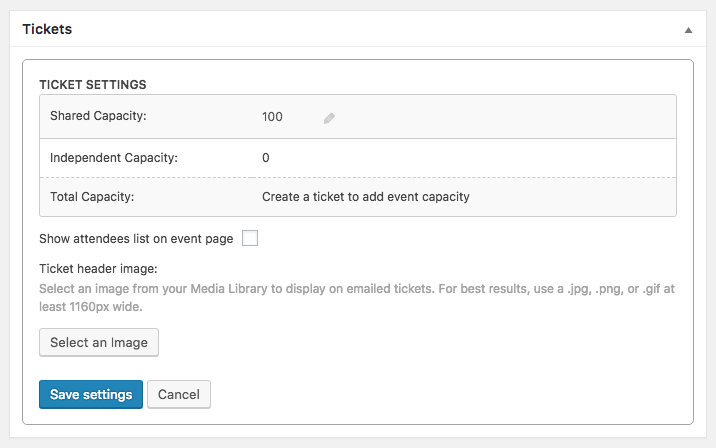
Displaying an attendee list on the front end of the event is a feature of Event Tickets Plus. Once this is installed and activated, then you will see an option in the ticket settings section to display the attendees on the front end (see screenshot).
If you have any other questions, please let me know.
Thanks,
Jennifer
February 8, 2018 at 11:56 pm in reply to: We are not receiving attendee metadata in confirmation emails #1448613KeymasterHi Brent,
Thanks for sending that screenshot! I see now that you are referring to the Additional Email Options extension – it’s possible that this version is not 100% compatible with the latest versions of Event Tickets and Event Tickets Plus. I will check with our developers on this and get back to you with an update.
In the meantime, you might want to try out this extension instead. If this doesn’t work for you, can you please send me a copy of the extension that you’re currently using via a Dropbox link? Our extensions are technically not supported, but I’ll be happy to take a look and see what I can recommend.
Thanks,
Jennifer
AuthorPosts