

Forum Replies Created
-
AuthorPosts
-
Hunter
ModeratorHi Matthew,
Welcome to our premium plugin support forums and thank you for your purchase! There is no built-in feature at this time which does what you’ve described. There might be plugins by other authors which do, though I’m uncertain of any off the top of my head.
We are always incorporating the most popular and useful submissions from our UserVoice Feature Ideas, so please take a moment to share your thoughts. Hopefully we can get this feature built into an upcoming feature release.
Sorry I don’t have a better answer for you at this time and if it’s a must-have feature, you might want to check out our list of customizers for further assistance.
Let me know if you’ve got any more questions. Thanks again and have a great week ahead. Cheers!
ModeratorHi and welcome 🙂
Sorry to see you’ve run into troubles. As always, it’s best you have backups prior to overwriting files via FTP. Your host might have a backup of your site that contains the overwritten files.
In this instance, it’s required you review our Testing for conflicts guide and reply back with what you find out.
Lastly, I notice you have version 4.3.2 of PRO installed. It’s recommended you update to the latest version (4.3.4) and retest to see if the behavior persists.
Please keep me updated and have a great evening. Cheers!
ModeratorHi Nicolas,
Welcome to our premium plugin support forums and thank you for your purchase! Would you mind trying a plugin like Bulk Delete to see if it helps delete the ignored events? I’d also like to provide this Ignored Events Knowledgebase article in case you weren’t already aware of it.
Let me know how it works out and have a great rest of the weekend. Cheers!
ModeratorHello 🙂
Thank you for reaching out via our Pre-Sales Questions Channel! At this time, there is no feature available which enables the syncing of events listed on your WordPress site to your personal calendar.
Please let me know if this helps answer your question and if you’d like to see the feature you’ve described included in an upcoming feature release, I invite you to submit the request to our UserVoice Feature Ideas. We are always incorporating the most popular ideas into our plugins!
Have a great week ahead and thanks again. Cheers!
ModeratorHi and welcome 🙂
Thank you for your purchase! Please review our Using One License for Live and Dev Sites Knowledgebase article for instructions. If you’re still experiencing issues, please review our Testing for conflicts guide and reply back with what you learn.
Please include your System Information as a private reply. Make sure it’s the System Information for the site you’re having issues on.
Thanks again and have a great evening. Cheers!
ModeratorHi and welcome back 🙂
The best route at this time would be for you to purchase a new license for Events Calendar PRO. Once you’ve done that, you’ll be granted a new license key which will appear on your License Keys page.
Let me know if this helps clear up any confusion and have a great week ahead. Cheers!
ModeratorHi and welcome 🙂
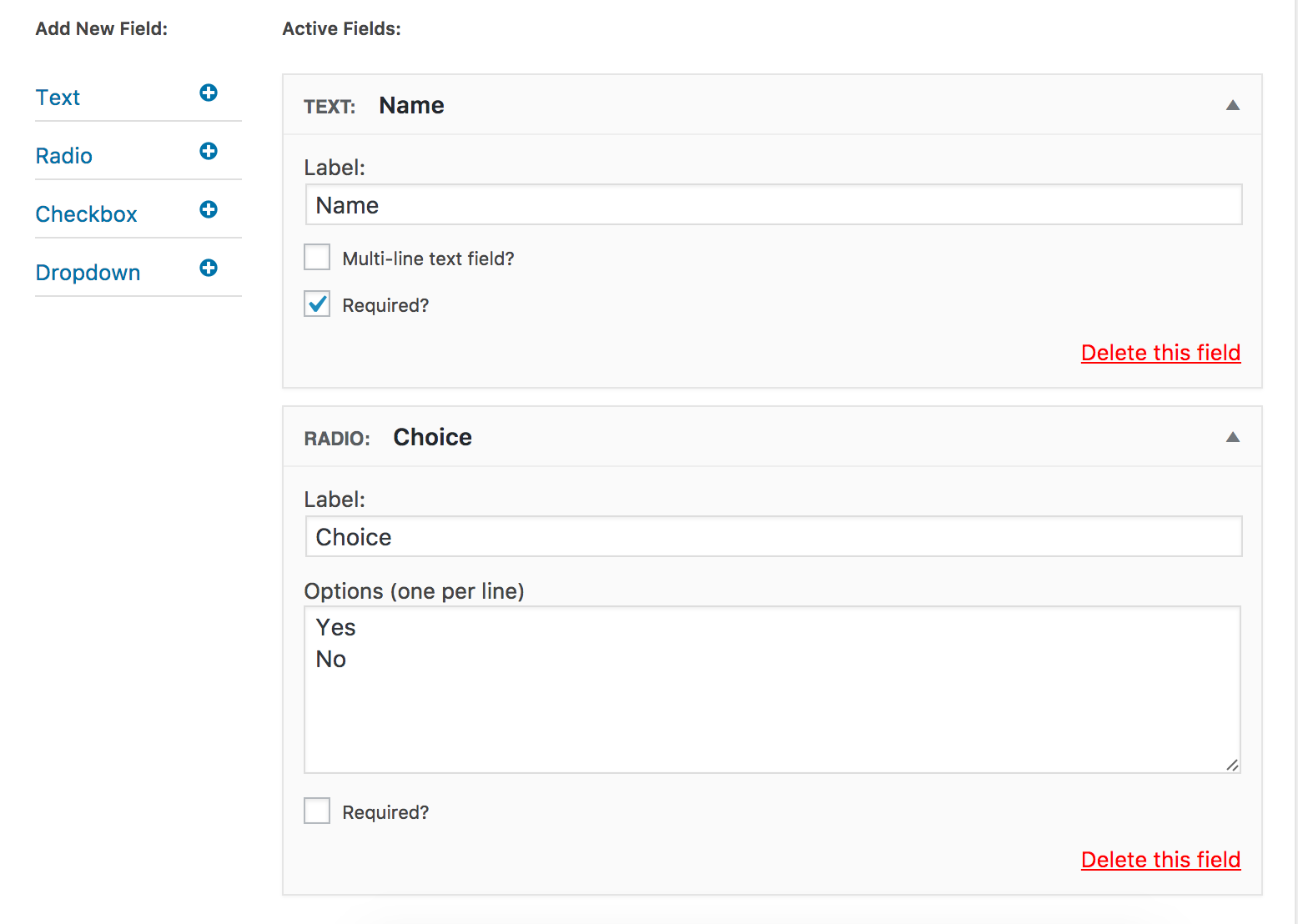
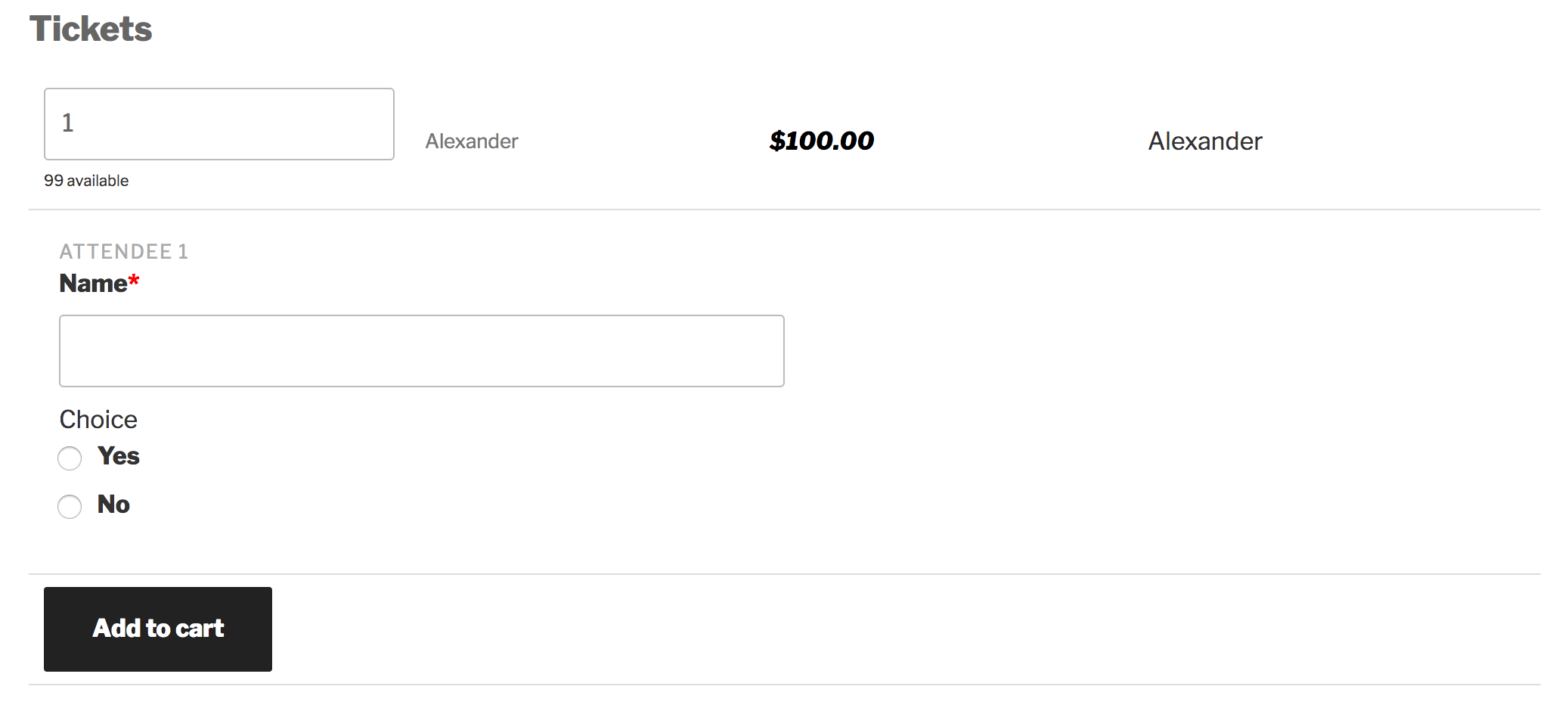
Thank you for your purchase and sorry to see you’re experiencing issues. I went ahead and created a test event with a ticket and additional fields:
As you can see, the additional fields are displaying correctly:
Please make sure WP_DEBUG and WP_DEBUG_LOG are enabled on your site’s wp-config.php file. Any errors will display at the top of your page as you try to reproduce the conflict. Note what you find and please include it in your reply. I’d also use your browser’s ‘Inspect’ tool to see if any errors display in the console. Again, if any do, please share them in your reply.
Thanks again and have a great rest of the day. Cheers!
January 8, 2017 at 7:05 pm in reply to: There wasn't a way to upgrade my order from single to three websites #1214935ModeratorHey Karen 🙂
I hope you had a great holiday season and your New Year is off to a great start! Please review our Upgrade a license Knowledgebase article and if you have any issues or the dollar amounts don’t end up correct after the upgrade processes, visit our Contact page and we’d be happy to make sure things get worked out. Feel free to link to this thread when completing the contact form.
Also, I installed Community Events and Community Tickets on my klpn.net website, but it turns out that I will not need it there, and prefer to move those licenses to my website at http://lakemerrittdance.comteams.com website. Can you help me move the license? Time is of essence.
Please review our Moving Your License Keys Knowledgebase article for more information. Please let me know if you have any troubles along the way and I’d be happy to help further assist.
Thank you and have a wonderful week ahead. Cheers!
ModeratorHi and welcome 🙂
Thank you for posting to our Pre-Sales Questions Channel. I hope you’ve had a great weekend. Based on the limited information provided, it sounds like you might benefit from Community Events which allows users to submit events (or bookings in your case).
If you wanted to allow users to add monetized tickets for their bookings, Community Tickets does just that. You would also need Event Tickets (free) and Event Tickets Plus if you purchase Community Tickets. The Community Manager Bundle would be a great option depending on what you need.
There is an email function available with Event Tickets and Event Tickets Plus. When a user RSVPs or purchases a ticket for an event, a confirmation email and RSVP/ticket information automatically sent to the user. More info can be found here.
We offer a 30-day money back Refund policy which allows ample time to test things out and make sure they’re going to work for your project.
Please let me know if you have any more questions and have a great week ahead. Cheers!
ModeratorHey Sarah,
Welcome back 🙂
You are unfortunately experiencing the effects of a known bug. I’ve gone ahead and added this forum thread to the ticket which helps expedite the process of getting a fix included in an upcoming release. I don’t have a precise date when it will be available, but please stay tuned to our Release Notes and the plugin changelogs for more information. The good news is, it’s set to be included in the next maintenance release which should be available any day now.
We have a bit of code which should help address the faulty code here, so please give it a try and let me know if it works out. If not, you might need to use some custom CSS. This Customizing WordPress #2 – Using Chrome Developers Tools is a great example on using your browser’s ‘Inspect’ tool to identify and make changes using CSS.
Thanks again and let me know if you’ve got any additional questions or comments. Cheers!
ModeratorHi Belinda 🙂
Welcome to our Pre-Sales Questions channel and thank you for considering our plugins for your project! We don’t currently have any demo where you can view an event with tickets and since you’ve already seen the screenshots I normally link to in this case, the best answer I can provide is that we have a 30-day money back Refunds policy which allows plenty of time to test things out and make sure they’re going to work for you.
If you get caught up along the way, our support team is here to help assist nearly 24/7! We’ve got a support team meeting tomorrow, so I’ll bring up the fact we don’t currently have a place to view the ticketing feature so users can get a better idea of the process before pulling the trigger on a purchase. I’ll find out and reply back with what I learn.
I’ll set a reminder to respond once I know more, but if it goes beyond 24 hours since you’ve heard from me, please feel free to reply back so this thread appears in the queue where I’ll be sure to see it. Thanks again and have a pleasant evening. Cheers!
ModeratorHey Gregg 🙂
Thank you for posting to our Pre-Sales Questions channel and I hope you’re having a great weekend! I took a quick look at the site you linked to and didn’t see any obvious ways to import their events using Event Aggregator, but it might be worth contacting them to see if they have any lists of their events on the platforms Event Aggregator currently works with.
Sorry I don’t have a better answer for you and best of luck with the project. Please let me know if you have any more questions and have a great week. Cheers!
January 7, 2017 at 6:17 pm in reply to: Aggregator not importing location or event description #1214806ModeratorHello!
First off, thank you for your purchase and welcome to our premium plugin support forums! Before we proceed, can you please review our Testing for conflicts guide and reply back with your findings? Please include your System Information as a private reply.
Thanks again and have a great rest of the weekend. Cheers!
ModeratorHi and welcome back 🙂
I’m not really sure why you’re seeing the error. I see you checked ‘Yes’ to reverting back to the default WordPress theme and deactivating all plugins other than ours as instructed in the Testing for conflicts guide, but can you please confirm this?
It might be best you set up a fresh WordPress installation where you can fully troubleshoot the issue. Make sure you have only the default WordPress theme, The Events Calendar, and Community Events installed and activated on the test site. Please review our Using One License for Live and Dev Sites for more information.
Please make sure WP_DEBUG and WP_DEBUG_LOG are enabled on your site’s wp-config.php file. Any errors will display at the top of your page as you try to reproduce the conflict. Note what you find and please include it in your reply.
Another helpful resource in this situation is Our Favorite Developer Plugins article which goes over some plugins which can aid in diagnosing issues. Thanks and have a great rest of the weekend. Cheers!
ModeratorHello!
First off, thank you for your purchase and welcome to our premium plugin support forums! Our Themer’s Guide is a great place to start learning how to create and save customizations as you’ve described. This Customizing WordPress #1 – How To Create A Child Theme by LevelUpTuts is a great visual example and is similar to the process explained in the Themer’s Guide.
Please let me know how things go and if you get caught up along the way, I’ll do my best to help. For what we are able to help out with, please review our What support is provided for license holders? Knowledgebase article. Cheers!
-
AuthorPosts