

Forum Replies Created
-
AuthorPosts
-
Hunter
ModeratorHey Matthew,
Thank you for letting me know you’ve got things figured out and also for sharing your solution for others to learn from. Feel free to create a new thread if you have any more questions or comments and have a pleasant evening. Cheers!
ModeratorHello,
I’ve gone ahead and downgraded the license you currently have from Multisite to Personal. You should now see the option to renew on your License Keys page. More info can be found here. Please let me know if you have any more questions and have a great afternoon.
ModeratorHappy Monday 🙂
I did some research on the matter and found this thread which has a working solution. Please give it a shot and if you still have issues, we’ll continue investigating for possible solutions.
Thank you and have a great afternoon!
ModeratorHappy Monday 🙂
There are a few useful tutorials on setting up custom crons which I’ll share below. I’m unsure on the process using WP Crontrol though I’m sure that information is available in their documentation. I’m making notes to update our Knowledgebase with more details on potential issues with wp_cron and possible workarounds such as in your case.
https://www.siteground.com/tutorials/wordpress/setup-cron-job.htm
Give it a shot and let me know how it works out for you. Thanks and have a great afternoon!
January 9, 2017 at 12:30 pm in reply to: Events are not listed in order of event start time in month view #1215283ModeratorHey Miah,
Please go ahead and create a new post as the initial issue appears to be resolved. Thank you and I’ll keep an eye on the queue for your thread. Have a great week ahead. Cheers!
January 9, 2017 at 12:26 pm in reply to: Events not showing after upgrade from 2.0.11 to 4.3.5 #1215276ModeratorMy pleasure! Please keep me updated and have a great afternoon 🙂
ModeratorNicolas,
Thank you for giving Bulk Delete a shot. If you’re comfortable running SQL queries, we have one written which deletes the ignored events. Please make a backup prior to running the query and let me know how it works out.
Have a good day 🙂
ModeratorHello,
Thank you for the update. If you do continue experiencing issues with the Google Map, please create a separate thread and we’d be happy to help further assist.
The first one strange thing I notice is I’ve the events calendar folder in my /plugins folder does not exist. I’ve only the Pro folder.
In order for Events Calendar PRO to work, you need to have The Events Calendar installed and activated on your site. So it’s good you’ve got that step taken care of. I recommend reading over our New User Primer to help learn the basics.
If you need to edit any information from the single event template, as previously mentioned, you’ll need to edit /the-events-calendar/src/views/single-event.php. The organizer information can be found in the /the-events-calendar/src/views/modules/meta/organizer.php.
The /events-calendar-pro/src/views/pro/photo/single-event.php file contains the code which displays the individual event info on your main Photo view. See example screenshot below from our demo site.
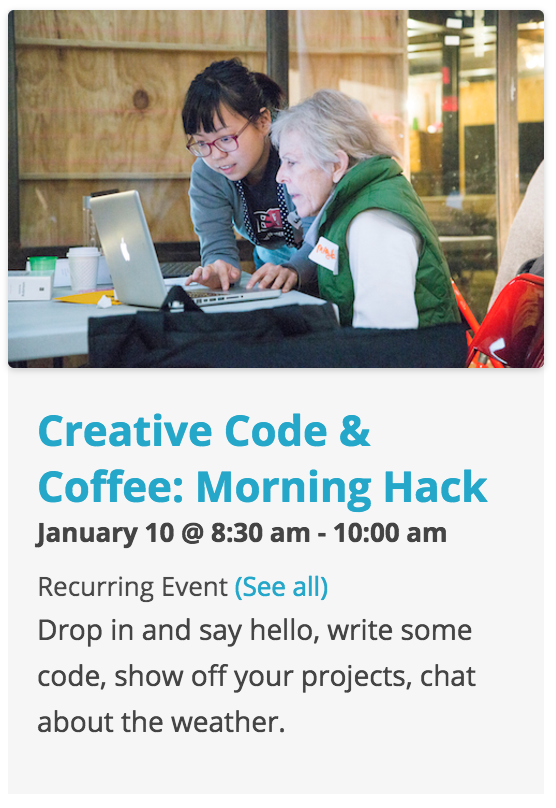
As previously mentioned, it’s best to set up a test site where you can add/remove code from templates to help identify which files you need to alter to get the changes you seek. This is how I familiarized myself with our plugins and it’s worked wonders for me.
Good luck and if you didn’t watch the videos recommended in my previous post, I highly recommend doing so. Have a great rest of your week!
ModeratorHello,
I hope your week is off to a great start! We’re fairly limited in providing support for plugins by other authors, but a good place to begin is the ACF’s Getting Started page. You’ll need to first create the custom fields you want to use, then make sure the location rule is set so the custom fields show on tribe_events. See screenshot below for example.
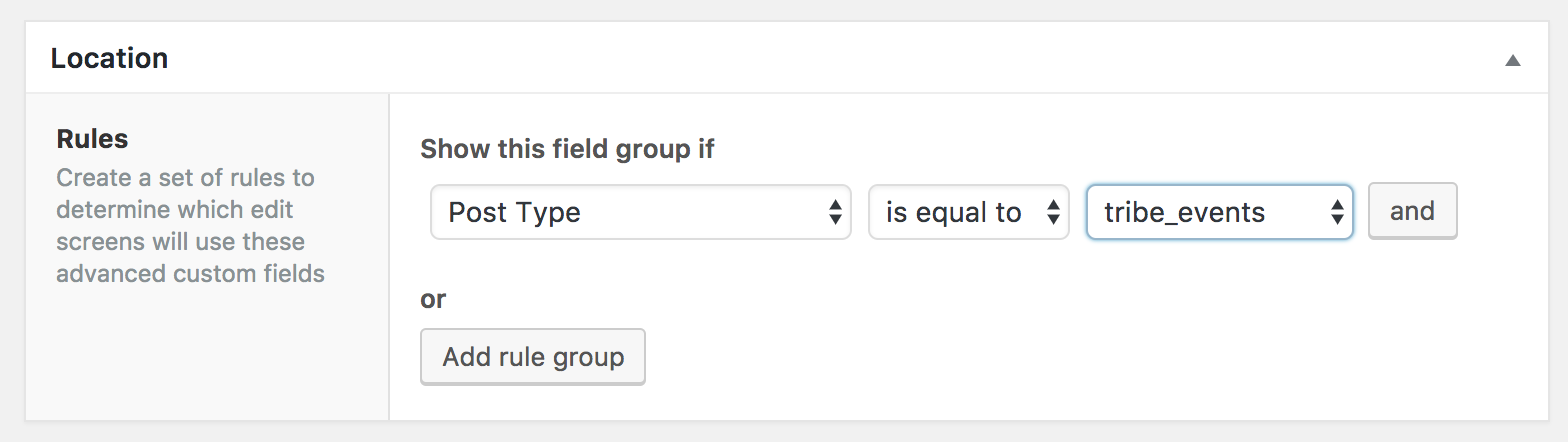
Once you’ve done that, check out the Displaying values in your theme article for further instructions.
If you want to use the custom fields included with PRO, check out our PRO Additional Fields Knowledgebase article. Lastly, please review our What support is provided for license holders? Knowledgebase article. Please let me know how things work out and good luck. Cheers!
ModeratorWelcome back,
Can you confirm if this behavior is occurring on your test site? We first need to eliminate the potential for a theme and/or plugin conflict before proceeding. I believe you might be experiencing the behavior of a known bug, but need the results from the Testing for conflicts guide before I can know for certain.
Please let me know what you find out and have a good rest of the day 🙂
January 8, 2017 at 9:36 pm in reply to: Automatically to the top when clicking 'Next events' #1214959ModeratorWelcome back 🙂
Happy Birthday to the little one! I hope he had a great day! Please review our Using One License for Live and Dev Sites Knowledgebase article for further instructions.
Please keep me updated and have a great week ahead!
January 8, 2017 at 8:34 pm in reply to: You have entered a license key for The Events Calendar PRO but the key is out of #1214957ModeratorHey Jim,
If you visit your License Keys page, you can see which URL your PRO license is activated on. More information on the matter can be found on our Finding and inputting your license key Knowledgebase article.
It’s always best to review our Testing for conflicts guide to ensure a theme/plugin conflict isn’t somehow causing the issue. Please let me know if you’re able to solve the riddle and if not, I’d be happy to further investigate. Thanks and have a great upcoming week!
ModeratorHi and welcome back 🙂
I hope your New Year is off to a great start! At this time, there’s not any way to disable featured images from being imported using Event Aggregator from Facebook. I see the validity in giving users the option of selecting what does and doesn’t get imported. The best place to submit requests of this nature is our UserVoice Feature Ideas page.
Sorry I don’t have a better answer for you at this time and please let me know if you have any more questions or comments. Thank you and have a great evening. Cheers!
ModeratorHi Yohanan,
Welcome back and thank you for posting to our premium plugin forums! Forgive me if I’m on the wrong path here, but are you asking if Advanced Custom Fields works with The Events Calendar? If so, the answer is yes! If I’ve mistaken your question, please try rephrasing it and I’ll do the best I can to provide accurate information.
Thanks again and take care!
ModeratorHi Emanuele,
Welcome back and sorry to see you’re having issues with the customizations. I like to share this Customizing WordPress #1 – How To Create A Child Theme by LevelUpTuts YouTube video with users learning how to make template overrides. Hopefully it helps!
Another helpful video is this Customizing WordPress #2 – Using Chrome Developers Tools by LevelUpTuts. This one is great for learning the basics of CSS using your browser’s ‘Inspect‘ tool.
In response to the map issue, does is still occur when deactivating all plugins other than ours and reverting back to the default WordPress theme? Before creating new threads, it’s required you review our Testing for conflicts guide to see if you can reproduce each issue.
Based on what you’ve shared with me, you also might need to Set Up Your Google Maps API Key. Have a look at that article and let me know if the map displays properly once you have the API key set up.
To edit the single event template, you’ll need to copy the contents from /the-events-calendar/src/views/single-event.php and save your customizations as [your-theme]/tribe-events/single-event.php to avoid losing your custom code when updating The Events Calendar. Please review our Themer’s Guide once again if you get caught up.
To edit the photo view template, do the same process I explained above. The file(s) you’ll need to overwrite are /events-calendar-pro/src/views/pro/photo.php and in the photo folder inside the /events-calendar-pro/src/views/pro/ folder. If you look at the top of each template, it provides instructions on how to properly name and save customizations. (see screenshot below for example)
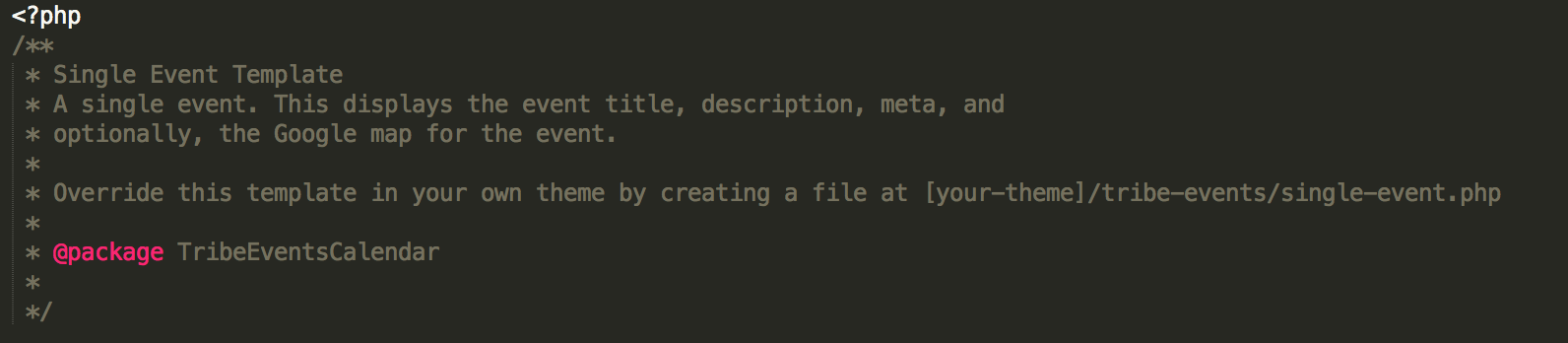
I recommend setting up a test site where you can fully test without the risk of losing important data. The best way to learn this process is to practice. Best of luck with the customizations and let me know how things go. Cheers!
-
AuthorPosts