

Forum Replies Created
-
AuthorPosts
-
Hunter
ModeratorHey Diane,
My sincerest apologies for the delayed response. For some reason, this thread wasn’t appearing in the queue of threads needing attention. Have you done any research on the error you’re seeing on the WP Crontrol admin screen? Wp_cron needs to run in order for the scheduled imports to work, so it’s worth investigating to make sure wp_cron is working correctly on your site.
Furthermore, the scheduled imports run when wp_cron fires. What triggers wp_cron is a visit to your site, so there’s the possibility the failed imports did fail at one point, but the plugin is designed to reschedule any failed imports automatically.
It might be best you set up a custom cron to ensure it gets ran. More information and instructions can be found here and here.
We have a bug report which at first appeared to be an influx of failed imports, but after more investigating it turned out that most “failed” imports were simply imports that didn’t get ran and were rescheduled. We are updating the information provided by the plugin when an import does fail.
I’ve made it a point to include more information in our Knowledgebase on how Event Aggregator uses wp_cron, potential issues users might come across, and easy solutions for aforementioned issues.
In regards to the duplicate events when importing – are you still experiencing this issue? If so, let me know and I’d be happy to help further assist. Thanks and take care!
January 10, 2017 at 2:25 pm in reply to: Google Cal export not correctly exporting event on Event View #1216162ModeratorThanks again! We typically update threads marked as ‘Pending Fix‘ notifying users we’ve patched the faulty code, though it’s always best to review the Release Notes regularly.
Have a great rest of your week. Cheers 🙂
ModeratorHello,
Thank you for posting to our premium plugin forums 🙂
Caching is one of those finicky features/functionalities that can produce a wide variety of results, so I unfortunately can’t give you an exact answer to your question. I can however provide the resources available on the matter. Sorry again I can’t do more in this instance and best of luck. Cheers!
- https://codex.wordpress.org/High_Traffic_Tips_For_WordPress
- https://codex.wordpress.org/WordPress_Optimization
- https://theeventscalendar.com/knowledgebase/caching-basics/
- https://theeventscalendar.com/knowledgebase/caching-month-view-transients/
- https://theeventscalendar.com/knowledgebase/caching-basics/
- https://theeventscalendar.com/the-events-calendar-performance-considerations/
- https://theeventscalendar.com/favorite-developer-plugins/
- https://theeventscalendar.com/knowledgebase/problems-with-minification/
ModeratorHey Scott,
Spam is more related to WordPress and websites in general rather than our plugins. You might want to install Askimet to help combat spam. There are many other plugins that can help available in the WordPress plugin repository.
Sorry I can’t do more here and best of luck resolving the increased spam. Cheers!
ModeratorHey David,
Welcome back! You can actually do this yourself! I’ll share any relevant information I have below. Let me know if you have any more questions. Cheers!
ModeratorHey William 🙂
What a small world it is! I grew up visiting Southern California and we’d stay at Newport Dunes in our R.V. for a week or two! What a great part of the country it is. Now down to business.
1. If I have that event on the home page setup as a recurring event it will post more than one of that event depending on the dates.
I imagine you’re using a shortcode to display the list of events on your homepage. It also appears you’ve chosen the Photo view. We have included an option under Events > Settings to display the first recurrence only, but it only works on list view.

Please try adding the following snippet to the bottom of your theme’s functions.php. This should display the first recurrence in Photo view. Please let me know how it works out. To submit feature requests, visit our UserVoice Feature Ideas.
/* Tribe, remove child recurring events from photo view */

function tribe_set_default_date ( $query ) {

	if (  tribe_is_photo() ) {

		$query->set( 'post_parent', '0' );

	}

}

add_action( 'pre_get_posts', 'tribe_set_default_date', 15 );
2. Less of an issue, it creates multiple events in the events page (backend) and calendar list on the website. Only an issue because their might be so many that the other events get lost in the crowd. Mostly an issue with the weekly specials, Since there are four of them that happen every week so it gets to be a lot.
We are aware of some improvements that can be made in the WordPress Admin Events dashboard, so I added this forum thread to the feature report for the developers to review while preparing to make improvements. I don’t have a temporary workaround for you in the mean time, but please stay tuned to our Release Notes and the plugin changelogs for more information.
If you have any more recommendations, the best venue to submit requests is our UserVoice Feature Ideas page. Thanks again and let me know if you’ve got any additional questions or comments. Cheers!
ModeratorHello again, Yohanan 🙂
It’s a little difficult to decipher which template you’re requesting information on based on the information and screenshots provided. As I’ve mentioned in the other thread I’m assisting you on, these sort of customizations need to be handled on your end. If you haven’t already set up a test site where you can fully troubleshoot to figure out which templates you need to edit, it’s a good idea to do so. From there, you can add/remove code and refresh your site to see where the changes take place.
Furthermore, our Themer’s Guide gives plenty of examples on how to properly locate files, create, and save customizations. With the examples given and enough practice, you should be able to quickly learn the process.
If things get beyond your level of expertise, our list of customizers can help further assist.
Sorry we can’t do more in this instance and for what we are able to cover, please review our What support is provided for license holders? Knowledgebase article. Thanks and have a good evening.
ModeratorHi Richard,
Welcome to our Pre-Sales Questions Channel and I hope your New Year is off to a great start! To answer your question simply, yes, Community Events and Community Tickets would allow event organizers to check in attendees from the front end of your site.
Each organizer’s events will be located at: [your-site]/events/community/list. From there, they can view the Attendee reports for each event and check in attendees from that same screen.
We have a 30-day money back Refunds policy which allows ample time to test things out to make sure they’re going to work for your project.
Please let me know if you have any additional questions and have a great rest of the week. Cheers!
January 9, 2017 at 3:04 pm in reply to: Paid for Facebook Events, now I have to purchase Aggregator? #1215378ModeratorHey Kim,
Welcome to our premium plugin support forums and I hope your New Year is off to a great start! We are in the process of retiring the Facebook Events plugin and replacing it with our newest plugin, Event Aggregator.
You have been granted a license for Event Aggregator and it is set to expire on the same date your Facebook Events license expires. For information, please review our Moving to Event Aggregator Knowledgebase article and if you run into any issues along the way, please create a separate thread.
Let me know if this helps answer your question and have a great evening. Cheers!
ModeratorHey Jesper,
Welcome back! Can you send over your System Information as a private reply?
Once I’ve got that, I’ll have a better idea on how to proceed. Thanks and have a great evening. Cheers!
January 9, 2017 at 2:54 pm in reply to: Events can't be updated "import records have to be finalized" #1215370ModeratorHi Gabriele,
Welcome to our premium plugin forums! Before we proceed, can you please review our Testing for conflicts guide and reply back with your findings?
I also see you have 4.3.3 of PRO installed. The most recent version is 4.3.4, so it’s recommended you update to avoid potential conflicts. Please keep me posted and have a good afternoon. Cheers!
ModeratorHi Bec 🙂
Welcome and thank you for your purchase! I set up a test event from 8pm-9pm and it’s displaying on the Month view as expected. See screenshot below.
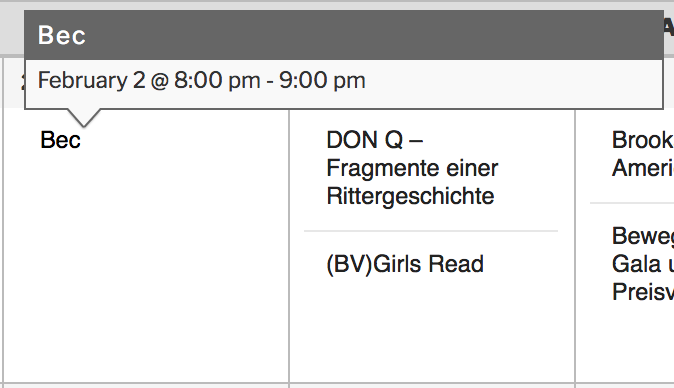
I see you checked ‘Yes’ to reverting back to the default WordPress theme and deactivating all plugins other than ours as instructed in the Testing for conflicts guide, but can you please confirm this?
If you have, it might be best you set up a fresh WordPress installation where you can fully troubleshoot the issue. Make sure you have only the default WordPress theme and The Events Calendar installed and activated on the test site. Please review our Using One License for Live and Dev Sites for more information.
Please make sure WP_DEBUG and WP_DEBUG_LOG are enabled on your site’s wp-config.php file. Any errors will display at the top of your page as you try to reproduce the conflict. Note what you find and please include it in your reply.
I notice in your System Information you are running outdated versions of our plugins. It’s recommended you update to the latest versions to avoid any potential conflicts. I also you have the Facebook Events plugin installed on your site. If you’re not aware, we are in the process of retiring the Facebook Events plugin and replacing it with our newest plugin, Event Aggregator.
You have been granted a license for Event Aggregator and it is set to expire on the same date your Facebook Events license expires. For information, please review our Moving to Event Aggregator Knowledgebase article and if you run into any issues along the way, please create a separate thread.
I also checked our logged bug reports but am not finding anything resembling your issue. Please keep me updated with what you learn and have a great evening. Cheers!
January 9, 2017 at 2:43 pm in reply to: Event Aggregator Renewal still shows "Buy Event Aggrega" #1215361ModeratorWelcome back, Gustavo 🙂
When you visit Events > Settings > Licenses on your WordPress site, do you see a “Valid Key! Expires on 2018-01-08” message beneath the Event Aggregator license field?
A recommended article in this instance is our Finding and inputting your license key Knowledgebase article. You’ll also need to review our Testing for conflicts guide to ensure a theme and/or plugin conflict is the cause. This is a required step to continue receiving support.
Lastly, please include your System Information as a private reply. Thanks and have a great evening!
January 9, 2017 at 2:37 pm in reply to: How to change 'WooCommerce' text to 'Paid Ticket' (or whatever) for ticket type #1215356ModeratorHi and welcome back 🙂
You could either create a custom template override as explained in our Themer’s Guide or use the technique outlined in our Change the wording of any bit of text or string Knowledgebase article.
Let me know how it works out for you and have a great afternoon. Cheers!
ModeratorHey Bryan,
Thank you for posting to our premium plugin forums and sorry to see you’re experiencing issues. Do you have a test site where you can fully test any issues you come across? If not, it’s recommended doing so. Before we proceed, you’ll need to review the Testing for conflicts guide and reply back with what you find out.
If you would like to backdate to prior versions, you can find them on your Downloads page. Doing so shouldn’t cause you to lose any data though it’s absolutely recommend that you back up your database prior to doing so just in case.
Keep me updated with what you learn from testing and have a good afternoon. Cheers!
-
AuthorPosts