

Forum Replies Created
-
AuthorPosts
-
Hunter
ModeratorHey Andy,
I hope your week went well! Before I’m permitted to troubleshoot any further, I’ll need you to review the Testing for conflicts guide in it’s entirety and let me know what you learn.
Once we identify the conflict, we’ll have a better idea on how to proceed. Thanks and have a great weekend ahead. Cheers!
ModeratorHello and welcome back,
I hope your Friday went well! The issues you’re experiencing are most likely related to your theme, whether it be an issue with the layout or possibly CSS.
I right-clicked my mouse and opened the ‘Inspect’ tool to see if I could identify any issues. It appears the reason your first event is set lower than the others is due to this line of CSS code, most likely coming from your theme:
.tribe-events-list .type-tribe_events:first-of-type {

    margin-top: 32px;

    margin-top: 2rem;

}
You could try adding the following line of CSS to your theme options CSS panel or directly into the theme’s style.css file:
.tribe-events-list .type-tribe_events:first-of-type {

    margin-top: 0;

}
You might need to set it to margin-top: 0!important;.
Please review this Customizing WordPress #2 – Using Chrome Developers Tools YouTube video and let me know if you’re able to use what you learn to resolve the display issues using CSS.
We are unfortunately not permitted to troubleshoot theme conflicts in depth, so you’ll need to resolve the issue yourself. For what we are able to support, please review our What support is provided for license holders? Knowledgebase article.
You also might want to try contacting your theme author to see if a) this is a known issue and b) if there is a readily-available solution they can provide. Sorry I can’t do more and let me know if you’ve got any additional questions or concerns. Have a great weekend!
ModeratorHello,
I’ve been working with the Community Events today and haven’t experienced the behavior described. Before we proceed, can you please review our Testing for conflicts guide and reply back with your findings?
Thanks and have a great Friday evening!
January 20, 2017 at 4:17 pm in reply to: Google maps position/size change on single event view #1221788ModeratorHello, again 🙂
I visited the link provided but the map isn’t showing. I tried a few other events, but wasn’t able to find one with the map displaying. When working with CSS, I like to use the ‘Inspect’ tool. This Customizing WordPress #2 – Using Chrome Developers Tools YouTube video is a great example.
If you still want me to take a look, please send a link to an event displaying a Google Map and I’d be happy to help further assist. Thanks and have a great weekend ahead!
ModeratorHello 🙂
Our Required Fields for Events Submission Form tutorial provides the information you’ll need to make the Google Maps options mandatory. Please let me know how it works out!
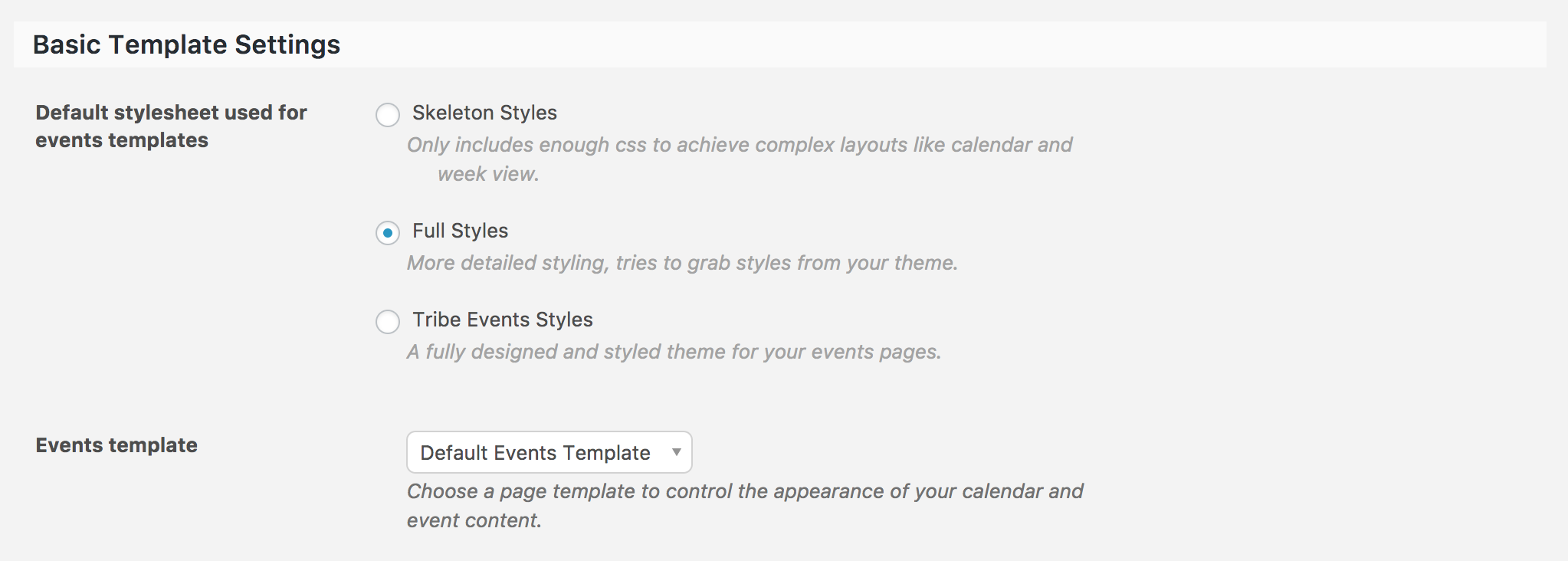
ModeratorThank you for further clarifying. The best route in this case is to review the Stylesheets and Page Templates KB resource, then refer to the Themer’s Guide for information on how to create and save custom templates; which is exactly what you’ll be doing to achieve the look and feel you’re going for if you aren’t able to get sidebars to display using the Basic Template Settings in the Events > Settings > Display tab.
Let me know how things go and if you get caught up along the way, feel free to respond with specific questions. Again, theme customizations are beyond the scope as stated in our What support is provided for license holders? Knowledgebase article, but I’ll do my best to accommodate.
Thanks again and have a great weekend ahead!
ModeratorHello,
I was not able to reproduce the issue you’re having. Please see this short screencast: https://drive.google.com/file/d/0B32mV0cGGJlhUkY5QWU0YXZFNGs/view
If I’m missing a step to reproducing the behavior, let me know and I’d be happy to try again. Without the ability to reproduce the bug and seeing no logged bugs resemble your issue, this is most likely an isolated incident which the What support is provided for license holders? Knowledgebase article states we’re unable to support.
Thanks for understanding have a great rest of your day!
ModeratorHello,
It doesn’t look like any images came through. Go ahead and try resending them. Did any of the documentation provided in my last response help answer questions on a) how the plugin handles featured images and b) how to edit images so they compliment the look and feel of your theme?
Other than providing some basic CSS, there’s not much I can do in this instance, but I’ll look for those images from you and do my best to help out. Thanks and have a great Friday!
ModeratorAwesome!
Can you explain to me (or point to a document) where the page template or even blank page can be used?
Sure! Our Stylesheets and Page Templates and Settings Overview: The Events Calendar and Events Calendar PRO are the most relative resources I can think of at the moment. Let me know if they help clear up how those settings work and if you have any additional questions, feel free to respond. Have a great weekend 🙂
ModeratorMy pleasure! Please feel free to create a new thread if you have any more questions or comments. Take care!
January 20, 2017 at 1:44 pm in reply to: Installing Events Calendar Pro caused .php Fatal Error #1221707ModeratorTo clarify, is everything working properly on the latest versions? If so, I’ll go ahead and close this thread out. Let me know and have a good afternoon!
January 20, 2017 at 1:40 pm in reply to: Events in the past are ordering on publication date #1221704ModeratorYou are correct, my apologies for providing incorrect information! I just checked to see if my test site behaves as you’ve described, but my past events are displaying in the correct order. I notice you’re on version 4.3.4 of PRO while the latest version is 4.4. Can you update and see if it makes a difference?
I see you checked ‘Yes’ to reverting back to the default WordPress theme and deactivating all plugins other than ours as instructed in the Testing for conflicts guide, but can you please confirm this?
If so, it might be best you set up a fresh WordPress installation where you can fully troubleshoot the issue. Make sure you have only the default WordPress theme and The Events Calendar installed and activated on the test site. Please review our Using One License for Live and Dev Sites for more information.
Please make sure WP_DEBUG and WP_DEBUG_LOG are enabled on your site’s wp-config.php file. Any errors will display at the top of your page as you try to reproduce the conflict. Note what you find and please include it in your reply.
January 20, 2017 at 1:32 pm in reply to: Can't Submit Event Error: Start / End Time is required #1221701ModeratorHello,
I created a short screencast which shows I don’t run into any issues when adding an event via the Community Events Submit Event form: https://drive.google.com/file/d/0B32mV0cGGJlhbjFPUV9GbG92eUE/view
My plugin versions are:
TEC 4.4.0.1
PRO 4.4
Community Events 4.4
Filter Bar 4.4I tested with every combination in hopes of identifying the conflict, but I was still able to submit an event without issues. Please take a look and let me know if I’m missing a step to reproduce the behavior. Thanks and have a great weekend ahead!
ModeratorHello,
The ICS file you linked to has over 300 events. Can you clarify why you are expecting this to import only 105 events? If you are using specific date or category filters on the import, what filters are those specifically? Reply back and I will try to replicate. Do you have another file and URL you can test this issue out on?
Thanks for your patience while we continue investigating. Cheers!
January 19, 2017 at 6:21 pm in reply to: The Events Calendar creates duplicate locals and organizers #1221253ModeratorWelcome back!
We have a bug logged resembling what you’ve described, so I’ve gone ahead and added this forum thread to the ticket which helps expedite the process of getting a fix included in an upcoming release. I don’t have a precise date when it will be available, but please stay tuned to our Release Notes and the plugin changelogs for more information. Thanks again and let me know if you’ve got any additional questions or comments. Cheers!
-
AuthorPosts