

Forum Replies Created
-
AuthorPosts
-
Hunter
ModeratorHello and welcome back,
Once you save the changes on your functions.php file file, visit Settings > Permalinks in your WordPress dashboard and hit the “Save Changes” button. This is known as flushing your permalinks. Once you’ve done so, you shouldn’t get the 404 page not found error. Let me know how it goes!
ModeratorHi and welcome 🙂
I hope your week is off to a great start! To identify the source of conflict, please review our Testing for conflicts guide and let me know what you learn. Please include your entire System Information as a private reply.
Thanks and have a good evening!
ModeratorThank you for letting me know the issue is resolved for the time being. I highly recommend reviewing my first response if you run into this issue again as it contains essentially all the information you’ll need to address the oversized featured image.
Thanks again and have a great week. Cheers!
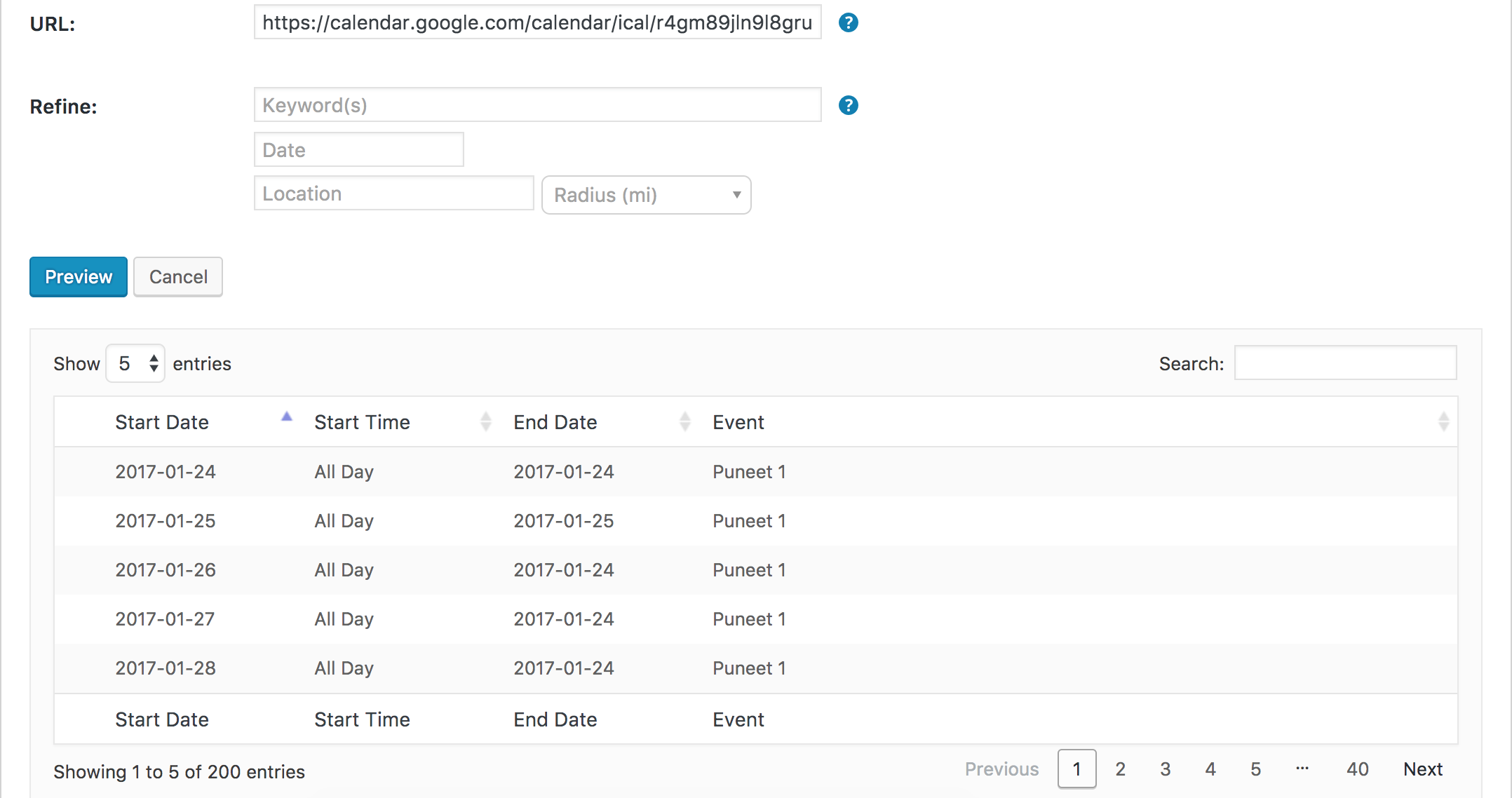
ModeratorI’m definitely a little baffled here. I created a test calendar with 200 events and I’m not experiencing any discrepancy between importing the URL:
or uploading the ICS file:
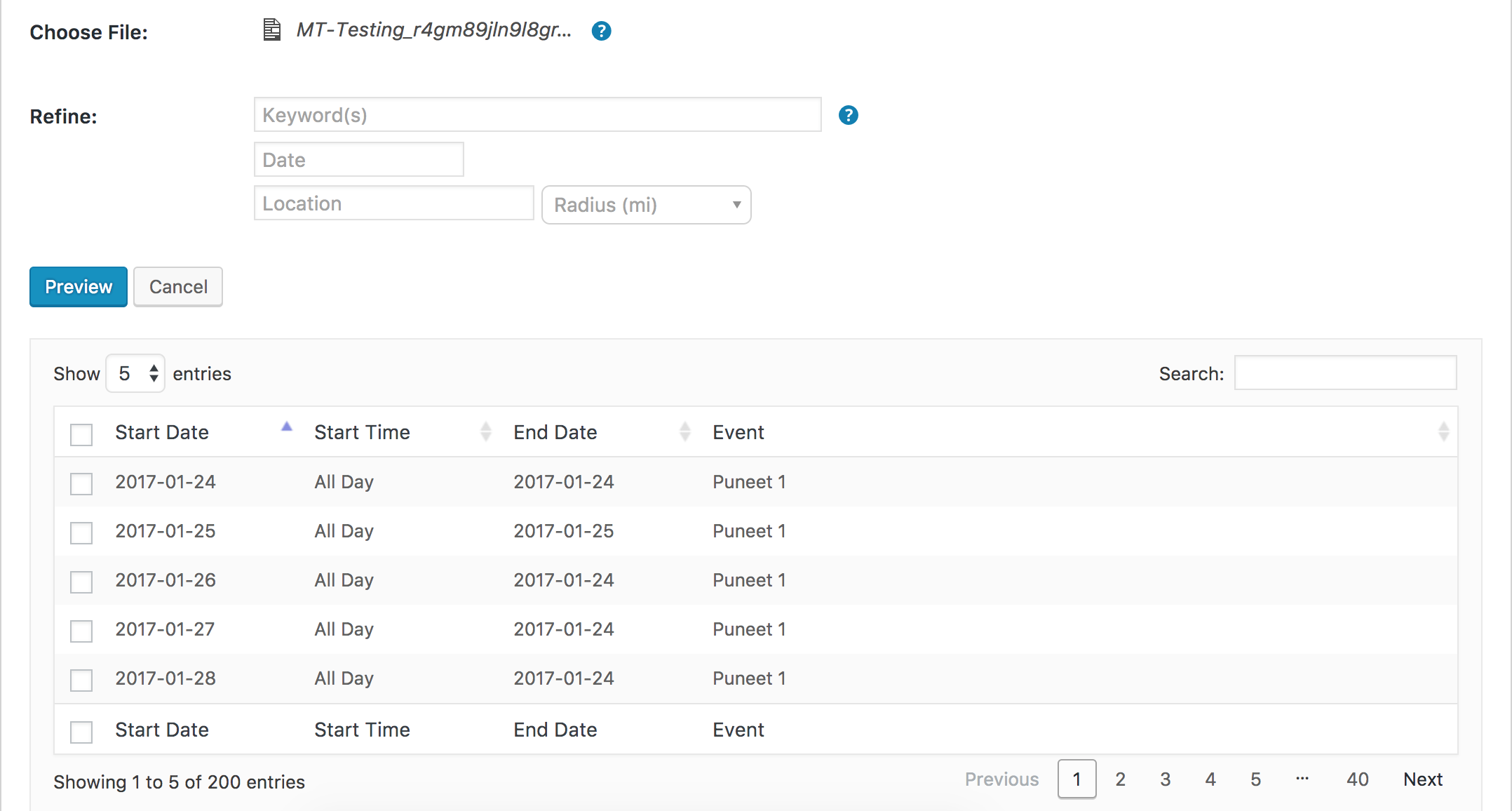
As previously stated, I’m not convinced a bug is present here. The likely culprit most likely has something to do with the calendars you’re attempting to import events from. I’ve thoroughly tested and haven’t been able to reproduce the issues you’re having other than seeing the discrepancy in numbers between the URL and the ICS files you’ve shared with me.
Please let me know your final thoughts on the matter and have a great evening. Cheers 🙂
January 23, 2017 at 6:08 pm in reply to: Installing Events Calendar Pro caused .php Fatal Error #1222667ModeratorHey Andrew,
My apologies, I was admittedly a little confused by your last responses but am all caught up. I’ve added this forum thread to the logged bug report. It’s marked at Priority Level 1 which is a good sign, but I don’t know exactly when it will be released. I imagine within the next few days, but I can’t promise you that.
We typically update threads linked to logged bug reports once a fix is released, but just in case we don’t, read over the plugin changelogs and Release Notes when you see any updates available.
Sorry I don’t have a temporary workaround other than backdating and let me know if you’ve got any more questions. I’ll mark this thread as ‘Pending Fix’ for the mean time. Cheers 🙂
January 23, 2017 at 5:55 pm in reply to: Google maps position/size change on single event view #1222659ModeratorHello,
Thank you for sharing the link. You should be able to achieve the look you’re going for using CSS, but that will ultimately be up to you. I opened the Chrome Developer tools by right-clicking my mouse and selecting ‘Inspect’. I then located the Google Maps CSS class and began adjusting the width:
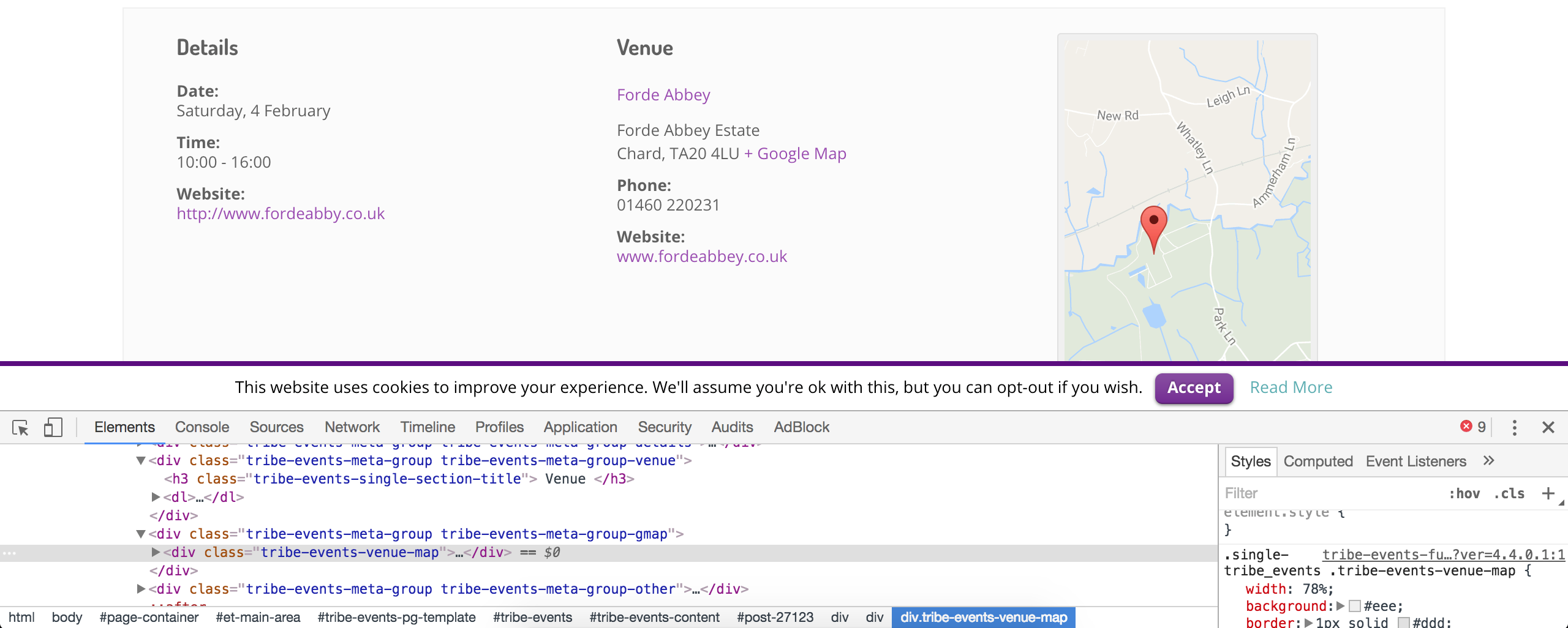
Our What support is provided for license holders? Knowledgebase article states I’m unable to assist with these type of support requests, so you’ll need you spend some time familiarizing yourself with the process until you get the look you’re aiming for.
Again, the Customizing WordPress #2 – Using Chrome Developers Tools YouTube video takes just a few minutes to watch and I’ve found to be extremely helpful.
Sorry again I can’t do more in this instance and if you need any more help finding a specific CSS class or something along those lines, reply back with as much detail as possible and I’ll do my best to help out. Cheers!
ModeratorWelcome back,
I hope you had a pleasant weekend! I understand the issues have started since the 4.3.2 release. As previously mentioned, theme conflicts are beyond what we are able to cover in the forums, so any issues which do not persist once you deactivate back to the default WordPress theme will need to be handled by you. Did you follow any of my instructions above aimed to help further identify the source of conflict? For example, setting WP_DEBUG to true. I also recommend using your browser’s ‘Inspect’ tool by right-clicking your mouse. Any errors will display in the console. I would be happy to look more in depth into your issue, but saying the date-pickers and drop-downs don’t work doesn’t give me much to work with.
Between the Testing for conflicts guide and Themer’s Guide, you should be able to a) identify the exact source of conflict for any issues you have and b) update any customizations you currently have saved as template overrides. You might also want to read over the Release Notes to see if you can get an idea what exactly is causing the issues with the drop-downs.
I wish I had a better answer for you but my hands are essentially tied. If things get beyond your level of expertise, we have a list of non-affiliated customizers that can help further assist. Good luck and have a good evening 🙂
ModeratorThank you for the update,
You can use one license on a live and test site. For more info, please review our Using One License for Live and Dev Sites and Moving Your License Keys Knowledgebase articles.
Once you’re able to update all plugins to the latest version on your test site, please review the Testing for conflicts guide once more and reply back with the errors displayed.
I’ll compare our known issues to what you share with me and update you with what I learn.
ModeratorWelcome back,
I hope you had a great weekend! If you choose ‘Default Events Template‘, event-related content will use the templates included in the plugin. If you choose ‘Default Page Template‘, the plugin will attempt to display all event-related content using the active theme’s page.php template.
I encourage you (if you haven’t already) to take a few minutes and try different options so you get an idea what effects they have on your site. Please let me know if you’ve got any more questions… that’s what we’re here for! Have a good night 🙂
ModeratorHello,
I hope you had a great weekend! There are a few different options for adding a button. The easiest way is to add HTML or a shortcode in the Add HTML before/after content boxes found on the Events > Settings > Display tab. More info can be found here.
Another idea is to use a template override as explained in our Themer’s Guide. This route would allow for greater control on where you want the button(s) placed, but is a little tricker. This Customizing WordPress #1 – How To Create A Child Theme by LevelUpTuts YouTube video is similar to the process explained in the Themer’s Guide.
I’m sure a professional developer could manage these additions in an hour or two, so there is another option. We have a list of customizers that can help, but there are tons of developers out there ready to help in exchange for compensation. Be sure and do your due diligence on the potential candidates and get some kind of written agreement signed by both parties before starting work.
If you’d rather go a different direction, visit our Refunds page and we’d be happy to get that going for you.
Please let me know which way you’re leaning and if you’ve got any more questions. Have a great evening!
January 23, 2017 at 4:53 pm in reply to: Imports from Facebook dont import automatically and Load wrong images manually #1222625ModeratorThank you for further clarifying.
I’d be happy to test and see if I experience the same behavior, but before doing so, I’ll need you to confirm you’ve reviewed our Testing for conflicts guide to eliminate the potential of a theme and/or plugin conflict.
As previously mentioned, our next maintenance release will include a fix for the scheduled import issues, but I’m not seeing anything resembling the image issue.
It might be best you set up a fresh WordPress installation where you can fully troubleshoot the issue. Make sure you have only the default WordPress theme and The Events Calendar installed and activated on the test site. Please review our Using One License for Live and Dev Sites for more information.
Please let me know what you learn and rest assured we’ll get to the bottom of this. Take care!
January 23, 2017 at 12:29 pm in reply to: Automatically to the top when clicking 'Next events' #1222541ModeratorHello 🙂
I hope you had a pleasant weekend. Can you share the error message you got when trying to update?
We found out there is a problem with this version of the plugin.
Can you also elaborate on the problem in greater detail? I’d be happy to help further investigate, so let me know what you find out when you’re able to set up the local test environment. Cheers!
ModeratorThank you for letting me know the issue has been resolved and please feel free to create a new thread if you have any more questions or comments. Take care!
ModeratorHello 🙂
Happy Friday! You can “hide” the errors by setting WP_DEBUG to ‘false’ on your site’s wp-config.php file. Which errors still appear when reverting back to the default WordPress theme and deactivating all plugins other than ours?
I see you checked ‘Yes’ to reverting back to the default WordPress theme and deactivating all plugins other than ours as instructed in the Testing for conflicts guide, but can you please confirm this? If so, which appears still appear?
Have a great weekend ahead. Cheers!
ModeratorHey Sally,
Welcome back! Sorry to see you’re experiencing issues.
I use Genesis with a Dynamik child theme.
The Community event form has no date picker when you click ‘event series’. I swapped to the twenty fifteen default wp theme and the date picker appeared. Screenshot coming.
How do I resolve this issue?Since the issue didn’t persist when you reverted back to the default WordPress theme, this means there’s not much I can do. Theme conflicts extend beyond what we’re able to cover. Please review our What support is provided for license holders? Knowledgebase article for more information.
We do have a bug logged relating to an issue with datepickers, so there is the potential the fix we’re including in an upcoming maintenance release could resolve the issue your currently dealing with, but I cannot guarantee this.
To troubleshoot, please make sure WP_DEBUG and WP_DEBUG_LOG are enabled on your site’s wp-config.php file when doing further testing. Any errors will display at the top of your page as you try to reproduce the conflict. Note what you find and please include it in your reply.
Secondly
The community events form is not displaying full width.What I’d first do is visit your Events > Settings > Display tab and try all the different options to see if you get the desired results on your Add Event page. More info can be found here.
If none of the available options work, you can either use CSS or a template override to address the width issue. Please review this Customizing WordPress #2 – Using Chrome Developers Tools YouTube video as it’s a great example on how to easily identify CSS classes/IDs and make changes. If your theme author has included a CSS options panel, try adding your CSS code there first. If that doesn’t work, try the theme’s style.css file.
Is it correct that there is no drop down for venues? I need to include the option to select an existing venue otherwise there are going to be duplications of venues.
The Add Event form includes a dropdown so users can select from a list of existing venues. See the screenshot below from my test site. Please let me know if this helps answer your question.
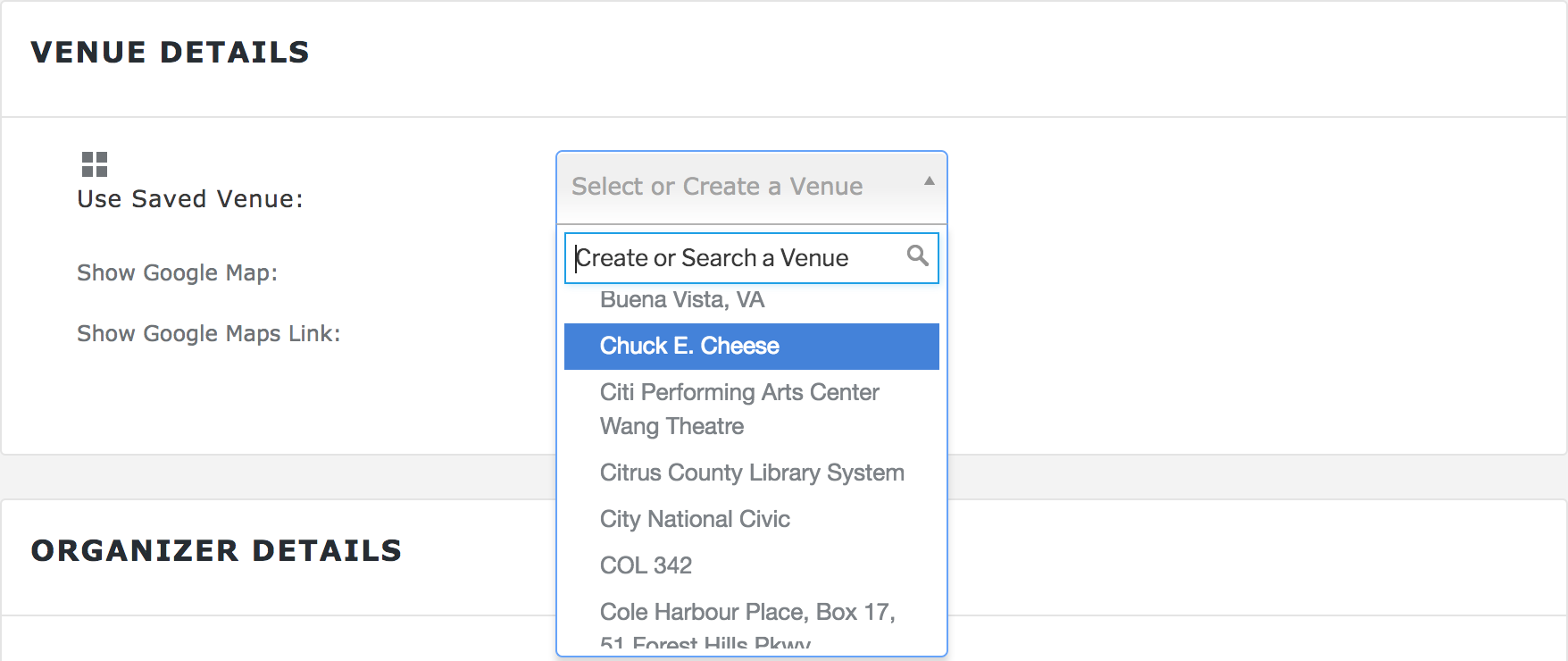
I hope this helps clarify any confusion you might have had and please let me know if you have any additional questions or concerns. Have a great weekend ahead!
-
AuthorPosts