
Home › Forums › Calendar Products › Events Calendar PRO › Google maps position/size change on single event view
- This topic has 6 replies, 3 voices, and was last updated 9 years, 9 months ago by
Hunter.
-
AuthorPosts
-
January 20, 2017 at 7:25 am #1221493
Riza
ParticipantHi
I find the Google Maps on an event with no organizer to be too narrow. How can I force it to display below the venue always and as there will then be more space, make it full width?
This is what I see:
http://www.yourvalleynews.co.uk/valley-event/far-fetched-presents-jonas-blue/
If you give me the CSS and the responsive points you use I’m happy to play around.
Many thanks for your help.
-
This topic was modified 9 years, 9 months ago by
January 20, 2017 at 4:17 pm #1221788ModeratorHello, again 🙂
I visited the link provided but the map isn’t showing. I tried a few other events, but wasn’t able to find one with the map displaying. When working with CSS, I like to use the ‘Inspect’ tool. This Customizing WordPress #2 – Using Chrome Developers Tools YouTube video is a great example.
If you still want me to take a look, please send a link to an event displaying a Google Map and I’d be happy to help further assist. Thanks and have a great weekend ahead!
January 21, 2017 at 3:26 am #1221851ParticipantHere is one:
http://www.yourvalleynews.co.uk/valley-event/snowdrop-weekends-throughout-february/2017-02-04/
The map is very narrow and tall, it looks odd. However, when the viewport is narrow then the map goes down and becomes wider. I want move the map down and make it wider at all viewports. Preferably do that with CSS alone.
January 23, 2017 at 5:55 pm #1222659ModeratorHello,
Thank you for sharing the link. You should be able to achieve the look you’re going for using CSS, but that will ultimately be up to you. I opened the Chrome Developer tools by right-clicking my mouse and selecting ‘Inspect’. I then located the Google Maps CSS class and began adjusting the width:
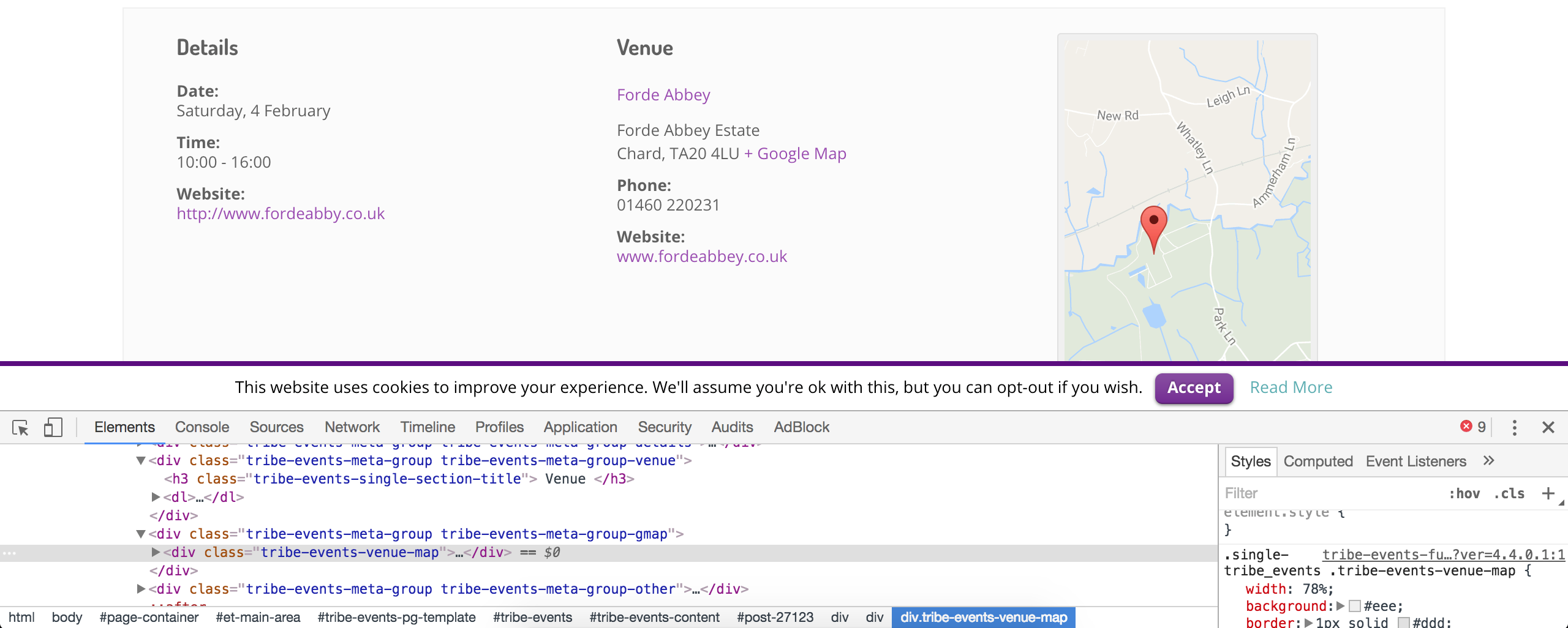
Our What support is provided for license holders? Knowledgebase article states I’m unable to assist with these type of support requests, so you’ll need you spend some time familiarizing yourself with the process until you get the look you’re aiming for.
Again, the Customizing WordPress #2 – Using Chrome Developers Tools YouTube video takes just a few minutes to watch and I’ve found to be extremely helpful.
Sorry again I can’t do more in this instance and if you need any more help finding a specific CSS class or something along those lines, reply back with as much detail as possible and I’ll do my best to help out. Cheers!
January 25, 2017 at 3:07 am #1223479ParticipantOK. I was lazy 🙂
Here is the CSS I’ve added and the result is in the same link above. In case anyone in the forum needs it.
.tribe-events-event-meta .column, .tribe-events-event-meta .tribe-events-meta-group {
  float: none!important;
  width: 100%!important;
  margin: 0 4%;
}
.single-tribe_events .tribe-events-venue-map { width: 100%;}
January 25, 2017 at 12:02 pm #1223896ModeratorThank you for letting me know you’ve got things figured out and also for sharing your solution for others to learn from. Feel free to create a new thread if you have any more questions or comments and have a pleasant evening. Cheers!
-
This topic was modified 9 years, 9 months ago by
-
AuthorPosts

- The topic ‘Google maps position/size change on single event view’ is closed to new replies.