

Forum Replies Created
-
AuthorPosts
-
Hunter
ModeratorHi and welcome,
I’m happy to see you’re making progress. I highly recommend installing Easy WP SMTP to help ensure emails get delivered. You should have a test site set up with the default WordPress theme and our plugins only where you can fully troubleshoot issues. Please review our Using One License for Live and Dev Sites and Moving Your License Keys tutorials for more information.
Whenever you believe you might be affected by a bug, you need to review the Testing for conflicts guide and provide your findings to the support team member handling your thread. With that said, please review the Testing for conflicts guide and let me know what you find out. This is a required step to continue receiving support and I cannot proceed until I have the results from your testing.
When testing, make sure WP_DEBUG and WP_DEBUG_LOG are enabled on your site’s wp-config.php file. Any errors will display at the top of your page as you try to reproduce the conflict. I also recommend right-clicking your mouse and opening the ‘Inspect’ tool to see if any errors display in the console. Note what you find and please include it in your reply.
Lastly, visit WooCommerce > Settings > Emails and review the WooCommerce-Specific Ticket Settings tutorial to ensure the settings are ideal for your needs.
Please keep me updated and have a pleasant weekend ahead. Cheers!
March 10, 2017 at 6:11 pm in reply to: Adding a file upload field to the community event submission form #1252756ModeratorHello!
First off, thank you for your purchase and welcome to our premium plugin support forums! Unfortunately, there hasn’t been much progress since that thread you referred to, but as Brian pointed out, setting something up with Advanced Custom Fields wouldn’t be too difficult a task to take one. If it gets beyond your level of expertise, you might look into hiring a professional to help further assist.
Advanced Custom Fields is one of the most popular plugins available for WordPress, so try searching our forums in addition to general web searches to see if you can find any working examples. Last idea is to visit our UserVoice Feature Ideas and submit your request there.
Please let me know if this helps and have a great weekend ahead. Cheers!
ModeratorWelcome back,
Thank you for sharing your System Information with me. Which option do you have selected for Events > Settings > Display > Default stylesheet used for events templates? (see screenshot below)
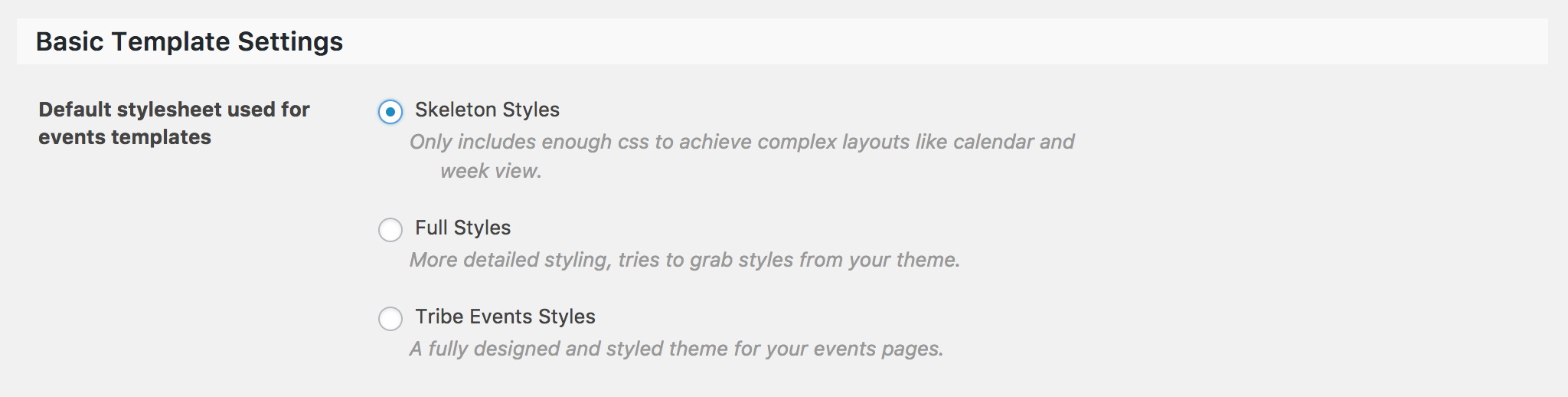
Can you try all three options (Skeleton Styles, Full Styles, and Tribe Events Styles) and note the behavior of each option? Please make sure you have the default WordPress theme active and only our plugins active as outlined in the Testing for conflicts guide.
Lastly, so I understand your issue correctly, can you explain in detail exactly what the issue is? So far, you’ve stated there is a problem with Photo view but have yet to elaborate on what the problematic behavior is.
Thanks and have an enjoyable weekend ahead. Cheers!
ModeratorWelcome back!
We are aware of Photo view not working when using “Skeleton Styles” – so I’ll include this thread to the bug report. I don’t have a precise date when a fix will be available nor a workaround in the meantime other than using a different option or downgrading to the version which works best for you, but please stay tuned to our Release Notes and the plugin changelogs for more information.
I do want to bring to your attention that we are unable to provide support for conflicts with custom themes. The only scenario where we provide support for theme conflicts are when any of our plugins conflict with the default WordPress themes (Twenty Seventeen, Twenty Sixteen, etc). Please review our What support is provided for license holders? Knowledgebase article for more information on the matter.
Thanks again and let me know if you’ve got any additional questions or comments. Cheers!
ModeratorAwesome! I appreciate the update and glad to hear the issue has been resolved. Please open a new thread if you have any more questions. Cheers!
ModeratorThat information should be manageable with the SEO plugin you’re using, though I’ve never used it myself so I’m unsure of it’s features/capabilities. I know with Yoast’s SEO plugin, you can manage essentially every aspect including the meta data you’re having troubles with.
I’d keep exploring the options in your SEO plugin. It might be worth researching their forums (if they have them available) and possibly contacting them for more information. Lastly, try searching our forums in addition to general web searches to see if you can find any answers and possible solutions.
Please review our What support is provided for license holders? Knowledgebase article for more information on what we’re able to cover in the forums. Thanks and best of luck! Cheers 🙂
March 10, 2017 at 3:44 pm in reply to: aditional fields info shows in dashboard but not on frontend #1252695ModeratorHi and welcome back,
It is always best practice to have a test site set up where you can fully troubleshoot issues without risk of interrupting your live site. There are plenty of resources available that can help get you started in the right direction. Refer to our Using One License for Live and Dev Sites and Moving Your License Keys to ensure all features are available when and where you need them.
On the test site, please make sure WP_DEBUG and WP_DEBUG_LOG are enabled on your site’s wp-config.php file. Any errors will display at the top of your page and on your server’s error logs as you try to reproduce the conflict. I also recommend right-clicking your mouse and opening the ‘Inspect’ tool to see if any errors display in the console. Note what you find and please include it in your reply.
1) the additional field not showing up
For information not showing up, it’s most likely because the overrides in [your-theme]/tribe-events are missing code and/or using outdated code. We’ve included Recent Template Changes under Events > Help to inform users of any changes in our code, so get in the habit of checking there after updating any of our plugins. It’s also recommended reviewing the plugin changelogs and our Release Notes for each release.
We’re unfortunately unable to help with theme conflicts and customizations, but our Themer’s Guide does a great job of explaining the process of creating and saving custom template overrides. If you’re a visual learner, this Customizing WordPress #1 – How To Create A Child Theme by LevelUpTuts YouTube video essentially goes over the same process explained in the Themer’s Guide.
2) in the filter bar, organisers still show even after the event has passed and they have no more future events
I did some testing and I found the only time an Organizer can/does appear in the Filter Bar’s Organizer field is if an Organizer is attached to an event, either past or future. This is the default behavior. If you would like the plugin to behave otherwise, you would need to either make those customizations yourself or hire a professional to assist. It’s always a good idea to submit your thoughts to our UserVoice Feature Ideas page.
3) if I have a recurring series, on the dashboard every instance shows up, even though I have ticked to just show the first instance ( I am assuming this is in reference to the dashboard, and not to the front end display)
If you’re referring to the “Recurring event instances” option (Events > Settings > General, screenshot below for reference), that applies to the front end only, not the WordPress dashboard’s list of events.

Please try out this code if you would like to Hide recurring event instances in the admin dashboard.
Let me know how things go and have a pleasant weekend ahead. Cheers!
ModeratorHey Matt,
It appears the screenshot did not come through. Can you try resending it over so I can take a look? Does the message display after reviewing our Testing for conflicts guide? We just dropped a few maintenance releases, so make sure all of our plugins are updated to their latest versions. Thanks and have a pleasant weekend ahead!
ModeratorHello again!
Please review Configuring Automatic Background Updates for information on disabling automatic updates.
I had typed up a response stating I was unable to reproduce the behavior, but upon further inspection it looks like the attendee information is not saving properly, so I deleted that response to avoid creating confusion. Only after I visited the “My Tickets for This Event” page, filled in the ticket’s test fields and hit the “Update Tickets” button did the information display on the event’s Orders page.
With that said, I’m going to add this forum thread to the report we have open relating to your issue. Once I have a response from them I’d be happy to update you with that information. In the meantime, try downgrading until you reach the version that works again. Thanks and have a pleasant weekend ahead! Cheers 🙂
ModeratorWelcome back,
Thank you for providing the System Information. I still need you to confirm you’ve reviewed the Testing for conflicts guide before I’m able to provide any support.
It might be best you set up a fresh WordPress installation where you can fully troubleshoot the issue. Make sure you have only the default WordPress theme and The Events Calendar installed and activated on the test site. Please review our Using One License for Live and Dev Sites and Moving Your License Keys tutorials for more information.
I also notice you have a few outdated versions of our plugins installed. It’s always best to stay up-to-date unless you’re backdating for any specific reason(s). Thanks again and please let me know what you find out after further testing. Enjoy the upcoming weekend! Cheers 🙂
ModeratorHey Lisa,
Thank you for the detailed response. It might be best you set up a fresh WordPress installation where you can fully troubleshoot the issue. Make sure you have only the default WordPress Twenty Seventeen theme, The Events Calendar, ET/ET+, and WooCommerce installed and activated on the test site. Please review our Using One License for Live and Dev Sites and Moving Your License Keys tutorials for more information.
Always make sure WP_DEBUG and WP_DEBUG_LOG are enabled on your site’s wp-config.php file. Any errors will display at the top of your page and in your server’s error logs as you try to reproduce the conflict. I also recommend right-clicking your mouse and opening the ‘Inspect’ tool to see if any errors display in the console. Note what you find and please include it in your reply.
I don’t have the Mollie extension you’re referring to, so I’m unable to fully troubleshoot the issue. We aren’t permitted to dedicate too much time on conflicts with plugins by other authors barring extreme circumstances, but if you send a .zip of the latest version of Mollie, I’ll see what I can come up with.
I also created a functions.php file on Pastebin (click to view) which includes the code from WooCommerce which autocompletes orders automatically, so if you wouldn’t mind, replace the contents of your Twenty Seventeen theme’s functions.php file with the contents of the Pastebin code I shared with you. Once you’ve done that, go through the process of purchasing a ticket and let me know if it has any effect on the behavior.
I see in your System Information you have Easy WP SMTP installed. That plugin should ensure emails get delivered properly, so I’m not sure why you’re having email delivery issues. Have you reviewed the WooCommerce > Settings > Emails tab to ensure the options are set to your liking?
Please keep me updated and have a pleasant weekend ahead. Cheers!
ModeratorHi Pamela,
Thank you for the update. I still need you to send your System Information as a private reply, so please send that over so I can continue providing support. Are any sites you’re currently working with related to this issue (live and/or dev) using https?
I also requested you test the issue again with WP_DEBUG set to “true” on your site’s wp-config.php file in addition to using your browser’s ‘Inspect’ tool. Doing so will help identify any warnings/errors which might help point us in the right direction. Please refer to my previous response which includes detailed instructions and let me know what you learn.
Please keep me updated and have a great weekend ahead. Cheers!
ModeratorHey John 🙂
Welcome back! Unfortunately what you’re asking would require custom modifications – which we’re unable to provide. I will however provide all relative documentation, so hopefully you can come up with a solution in no time! I’d also visit our UserVoice Feature Ideas page and submit your suggestion there. Please review our What support is provided for license holders? Knowledgebase article for detailed info on what we’re able to cover in the forums. Have a great weekend ahead. Cheers!
ModeratorHey Phil,
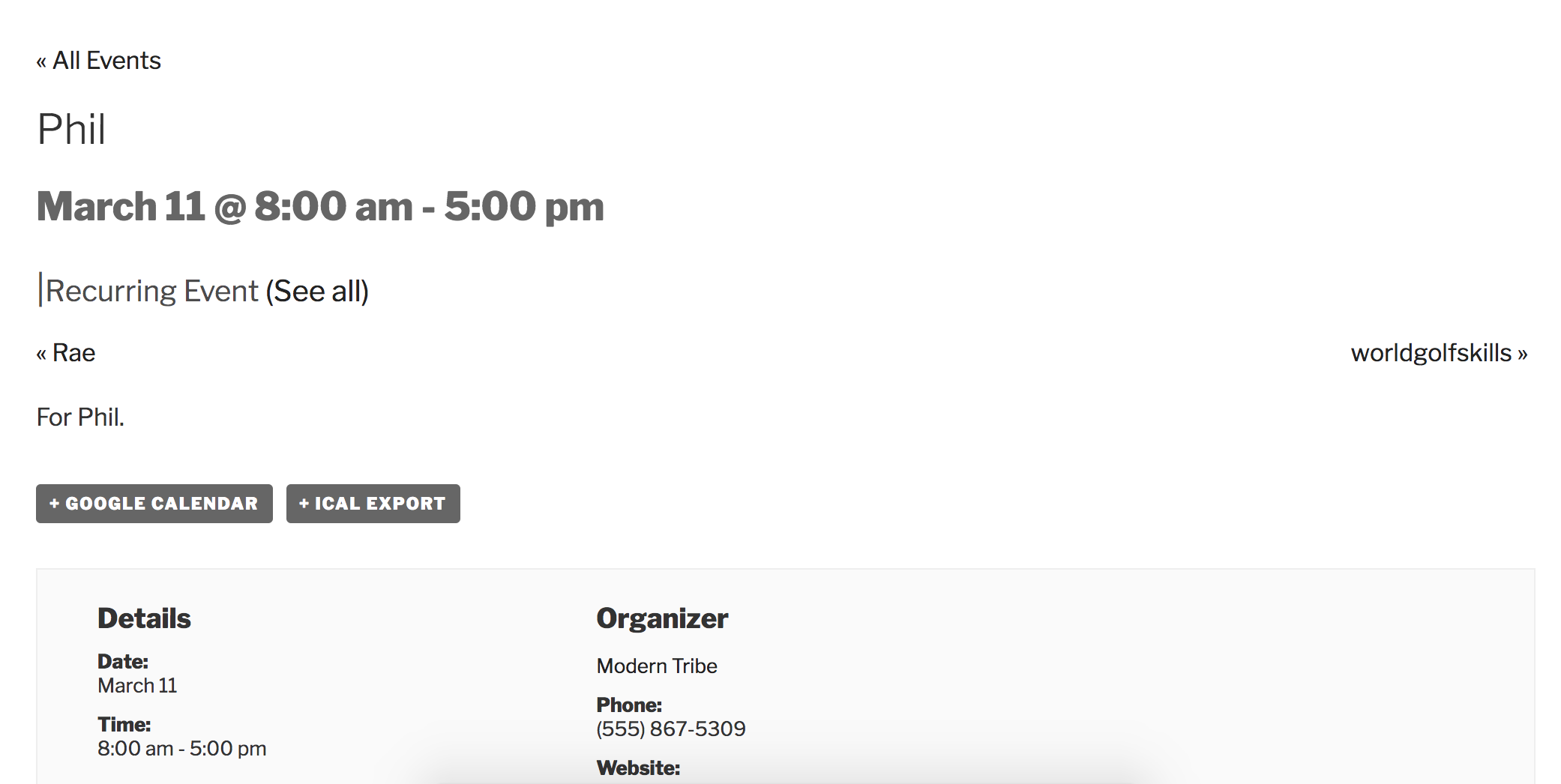
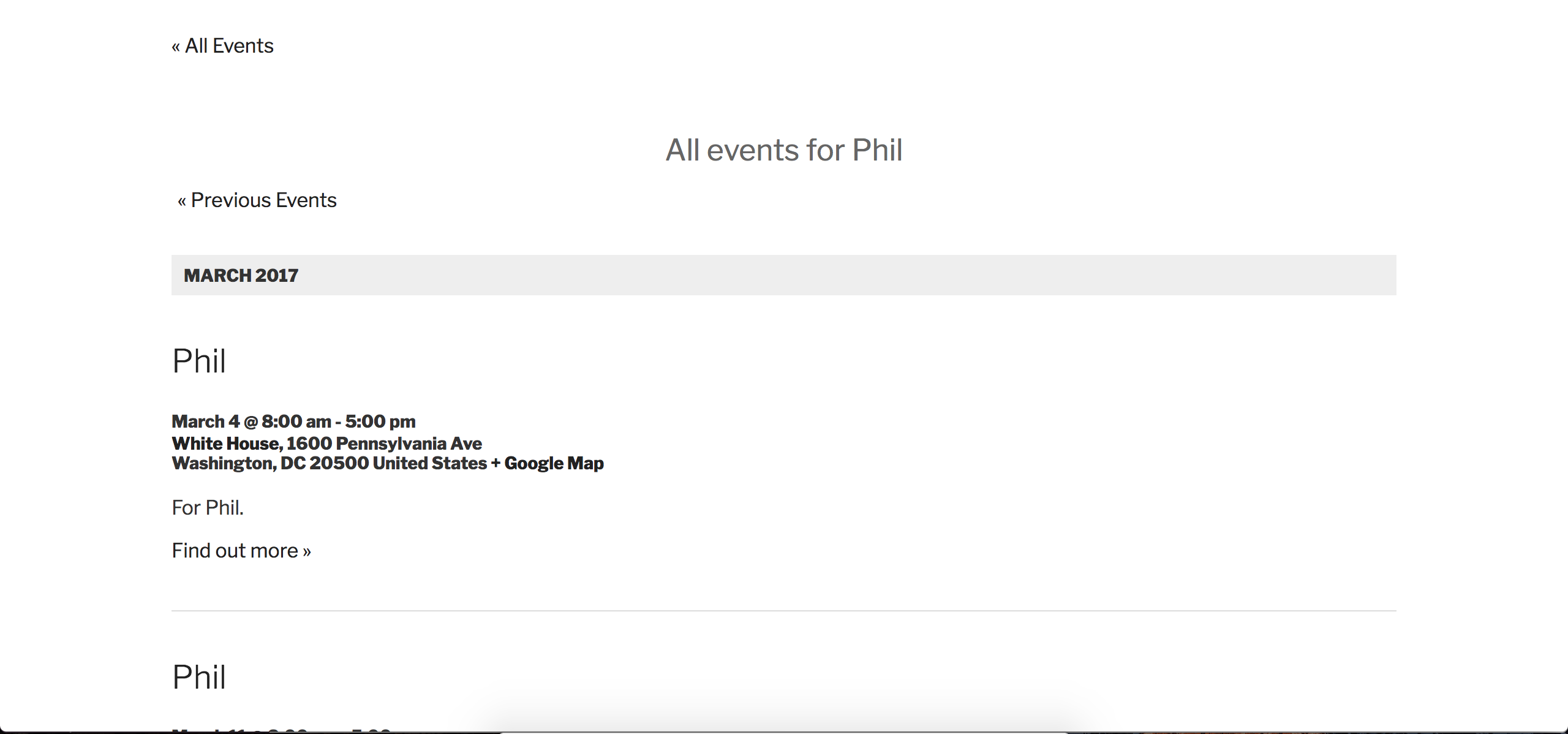
If you’re referring to the page that lists events after clicking “See all” from an event page which is part of a recurring series (see screenshot below), then we’re aware of the issue you’re referring to. We have a bug logged, so I’ve added this forum thread to the ticket which helps expedite the process of getting a fix included in an upcoming release. I don’t have a precise date when it will be available, but please stay tuned to our Release Notes and the plugin changelogs for more information. I also don’t have any workaround other than downgrading to TEC 4.3.5 and PRO 4.3.4. Thanks again and let me know if you’ve got any additional questions or comments. Cheers!
 March 10, 2017 at 11:23 am in reply to: Attendee information not being saved in the backend #1252542Moderator
Hey Blane,
Thank you for your purchase and welcome to the premium plugin forums! Sorry to see you here under the circumstances. I’d be more than happy to look into the issue, but before doing so I’ll need you to update all of our plugins to their latest versions, then review the Testing for conflicts guide and let me know what you find out. Please include your System Information as a private reply.
When testing, please make sure WP_DEBUG and WP_DEBUG_LOG are enabled on your site’s wp-config.php file. Any errors will display at the top of your page as you try to reproduce the conflict. I also recommend right-clicking your mouse and opening the ‘Inspect’ tool to see if any errors display in the console. Note what you find and please include it in your reply.
Once I have all that information, I’ll have a better idea on how to proceed. Thanks again and have a pleasant rest of your day. Cheers!
-
AuthorPosts