

Forum Replies Created
-
AuthorPosts
-
March 10, 2017 at 11:17 am in reply to: Categories and Event Options get reset when import runs #1252539
Hunter
ModeratorAwesome! I appreciate the update and glad to hear the issue has been resolved. Please open a new thread if you have any more questions. Cheers!
ModeratorHi Elizabeth,
Thanks for creating a separate thread for your issue and sorry to see you’re here under the circumstances. Are you using “Skeleton Styles” under Events > Settings > Display? If so, the issue you’re referring to is a known bug which we have plans to address in an upcoming maintenance release.
I tested to see if I had issues with either “Full Styles” and “Tribe Events Styles” options but everything appeared to work correctly for me. If you are experiencing a conflict when using either of these options, please review the Testing for conflicts guide and let me know what you find out.
Thanks again and have a great afternoon. Cheers!
ModeratorMy pleasure! I’ll close this thread out but feel free to create a new one if you have any more questions or concerns. Enjoy the rest of your day!
ModeratorHi to all of you 🙂
@Elizabeth, I noticed you created a separate thread on the issue. Thank you for that. Please continue any conversation in your thread as to avoid confusion. @Paul, would you mind creating a separate thread? It’s a requirement and helps expedite the process all around. Feel free to refer back to this thread.
@jskk123, if you set the “Default stylesheet used for events templates” setting under Events > Settings > Display to either “Full Styles” and/or “Tribe Events Styles“, does the issue occur? Or does the problem only occur when you have it set to “Skeleton Styles“?
I see you checked ‘Yes’ to reverting back to the default WordPress theme and deactivating all plugins other than ours as instructed in the Testing for conflicts guide, but can you please confirm this?
Would you mind testing again, but this time please make sure WP_DEBUG and WP_DEBUG_LOG are enabled on your site’s wp-config.php file? Any errors will display at the top of your page as you try to reproduce the conflict. I also recommend right-clicking your mouse and opening the ‘Inspect’ tool to see if any errors display in the console. Note what you find and please include it in your reply.
Between the information you’ve already shared with me and the results of the tests I’ve requested, we should be able to move pretty quickly through the process. Thanks to all of you for taking the time to open threads and have a pleasant rest of your day. Cheers!
ModeratorHey Bryce,
Welcome back. Have you reviewed our Using Recurring Events in Events Calendar PRO tutorial to learn everything there is to know about recurring events? I’d also read over the Settings Overview: The Events Calendar and Events Calendar PRO tutorial to ensure your settings are optimized for ideal results.
If no options and/or settings achieve what you’re after, the next step is to review the Themer’s Guide so you can overwrite any template you’d like with whatever information you want/need!
The last ideas I have is to do some searches on our forums in addition to general web searches to see if you can find other users doing the same thing as you. Our UserVoice Feature Ideas is a great place to submit suggestions for future feature releases.
If things get beyond your level of expertise, we’ve got a list of non-affiliated customizers that can help further assist. Sorry I don’t have a solid answer for you at this time and let me know if my response has helped. Cheers!
ModeratorCheck out our Moving Your License Keys tutorial and let me know if it helps answer your question. Cheers!
ModeratorHey Vanessa,
First off, thank you for your purchase and welcome to the premium plugin support forums! Sorry to see you’re having troubles importing events from Eventbrite. I’d be happy to look further into the issue, but before doing so I’ll need you to review our Testing for conflicts guide and let me know what you find out. This is a required step to continue receiving troubleshooting support.
And just to confirm, have you reviewed our Configuring Eventbrite Tickets tutorial to ensure things are set up properly? If not, please do so and let me know if that has an effect on the behavior.
ModeratorHi and welcome 🙂
Thank you for considering our plugins for your project! I’d be happy to answer your questions.
1. Can this be set as the default view for displaying events to visitors?
Yes! We’ve included the option to set whichever view you prefer as the default. Please see the screenshot below for reference:
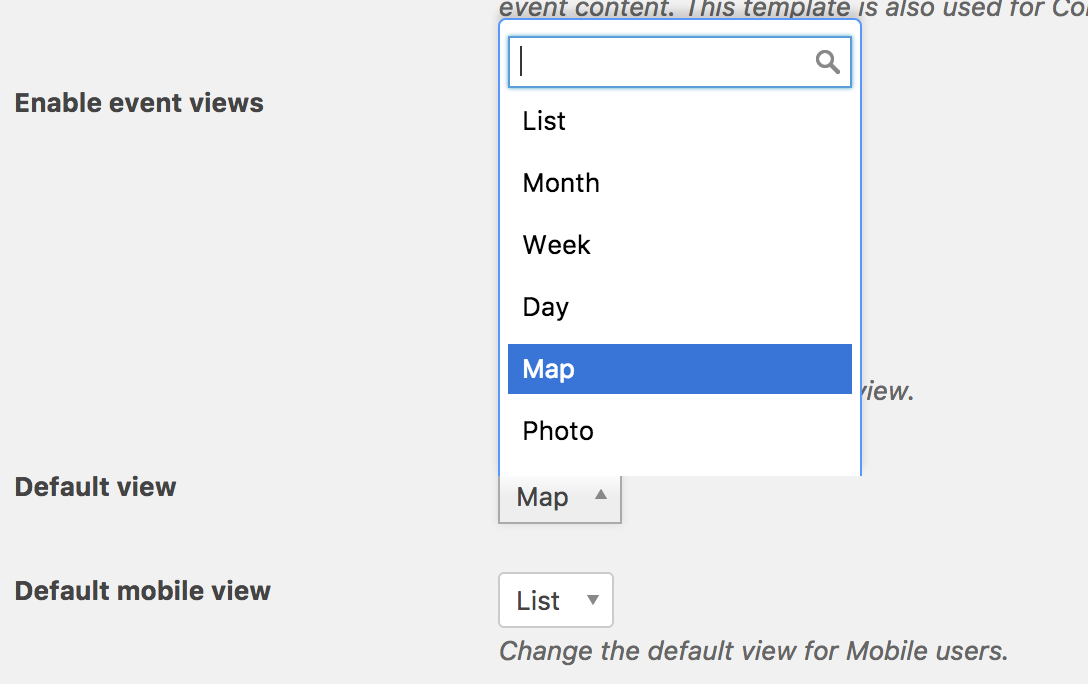
2. What addons/plug ins are required to achieve this?
In order to gain the Map view, you would need to purchase Events Calendar PRO.
3. Does the filter bar work with this map view?
Yes! If you visit our demo site’s Map view, select the “Show Filters” text to see the Filter Bar in action.
Please let me know if I’ve sufficiently answered your questions and feel free to include any more you might have in a reply. Thanks again and have a pleasant rest of your day. Cheers!
ModeratorHey Justin,
Do you have a Google Webmaster account? If so, have you submitted an updated sitemap? Once you do that, changes should reflect in your Google results 24-48 hours after doing so. Most SEO plugins have a section dedicated to sitemaps, so simply grab the sitemap URL and submit it to Google Webmaster and things should work themselves out.
To confirm I’m not missing anything, I did a quick check of our logged bug reports but am not finding anything relative to your situation. Please keep me updated and have a pleasant rest of your day. Cheers!
March 9, 2017 at 6:57 pm in reply to: Issue importing EVENTS csv – data appearing in wrong columns #1252163ModeratorHey and welcome back!
Before we go much further it’s recommended you review our CSV file examples for importing and Importing Data from a CSV File tutorials to ensure you’re using proper procedures for importing data via CSV.
I checked to see if there were any logged bugs that might be affecting CSV imports but came up empty-handed. It might be best you set up a fresh WordPress installation where you can fully troubleshoot the issue. Make sure you have only the default WordPress theme and The Events Calendar installed and activated on the test site. Please review our Using One License for Live and Dev Sites and Moving Your License Keys tutorials for more information.
Please make sure WP_DEBUG and WP_DEBUG_LOG are enabled on your site’s wp-config.php file. Any errors will display at the top of your page as you try to reproduce the conflict. I also recommend right-clicking your mouse and opening the ‘Inspect’ tool to see if any errors display in the console. Note what you find and please include it in your reply.
Please keep me updated and have a pleasant rest of your day. Cheers!
ModeratorHello,
We are unfortunately unable to provide support through our Pre-Sales forum channel, but you can head over to The Events Calendar WordPress.org support forums for assistance and answers.
If you have a PRO license, you can log into your account and get assistance through the PRO forums.
Thanks for understanding and good luck resolving your issue. Have a good day!
March 9, 2017 at 6:34 pm in reply to: Can I buy the plug in while still using the developers site/ authentication ? #1252146ModeratorHello and welcome 🙂
Thank you for considering our plugins for your project! I would be more than happy to help answer your questions.
Our site is still under the developers’ name. If I get the Pro plugins will they transfer over when we move the site to our server?
Depending on how many sites you need licenses for and which licenses you currently own will determine what you’ll need to do when transferring the site to your server.

I’ll provide all license-related documentation below, so please take a moment to review each source:
• Using One License for Live and Dev Sites
• Finding and Inputting Your License Key
• Moving Your License Keys
• Who should buy the license, the client or the developer?
• Knowledgebase Index for Installation & License KeysAlso, we are a 501 c3 non-profit so can we even request the discounted plug-ins while under his name?
This is a question you would need to submit via the Contact page. We’d be happy to help look into any options available.
If we get the Events tickets Plus plugin is there any way to do an authentication that we tie into our library users library card number so only our patrons can print the tickets or passes?
This is a feature I’ve personally never developed, so I unfortunately wouldn’t know the best approach without looking into the matter. Our What support is provided for license holders? Knowledgebase article states what we’re able ta assist with, so you’ll need to either develop the customizations yourself or hire a professional. We have a list of non-affiliated customizers that can help get things rolling should that be the route you take.
Please let me know if you’ve got any addditional questions and have a great rest of your day. Cheers!
ModeratorHi and welcome back,
Before we proceed, can you send your System Information as a private reply? Did you try the solution provided by Cliff in the thread you believe to be related? If so, what were the results?
Thanks and please keep me posted. Cheers!
ModeratorHey Ben,
Welcome back. You are correct this will most likely require some custom development. I’ve personally never done anything similar to what you’re attempting, but I’d start by reviewing the Themer’s Guide to start testing different files you believe to contain the code you’ll need to be working with.
It might be best you set up a fresh WordPress installation where you can fully troubleshoot the issue. Make sure you have only the default WordPress theme and The Events Calendar installed and activated on the test site. Please review our Using One License for Live and Dev Sites and Moving Your License Keys tutorials for more information.
I’d also check out the Using tribe_get_events tutorial to see if any information leads you to the right files. Lastly, try searching around our forums in addition to general web searches to see if you can find examples of other users attempting similar requests. Sorry again I can’t do more in this instance! Please review our What support is provided for license holders? Knowledgebase article for more info on the matter.
Best of luck! Cheers 🙂
ModeratorWelcome back,
You can review our Release Notes for all update and maintenance release records. I’m unsure on which version the feature you’re referring to was incorporated, so your best bet would be to start at the version notes you’re currently on and go from there.
For TEC, you can download the latest version for free on WordPress.org. You’ll need to be running the latest version of TEC for sure, but depending on the features you need will determine which plugins you’ll need to renew license(s) for. If you plan on offering RSVP capabilities, you can also download the latest version of Event Tickets from WordPress.org.
If you want to allow for users to purchase tickets, you’d need to renew your Event Tickets Plus license. If you’d like for users to create their own tickets, you would need to purchase Community Tickets. Before making any purchases, I recommended reviewing our Bundles page to see if that’s the most cost-effective route.
Please let me know if this helps answer your questions and have a great afternoon. Cheers!
-
AuthorPosts