

Forum Replies Created
-
AuthorPosts
-
March 9, 2017 at 11:21 am in reply to: aditional fields info shows in dashboard but not on frontend #1251939
Hunter
ModeratorHi and thanks for the compliments! We’re always aiming to please our users, so the kind words go a long way. I’d be happy to help look into the issue. Before doing so, can you please review our Testing for conflicts guide and reply back with your findings?
Thanks and have a pleasant rest of your day. Cheers!
ModeratorHey Kam,
After a quick look, it appears you might be using multiple Google Maps API keys. We have included a section under Events > Settings > APIs where your Maps API key needs to be entered in order for the maps to work for our plugins.
I’d also look around in your theme options and other plugins for any Google Maps API-related options/settings as having multiple API keys entered in different settings will most likely have a negative effect.
In order for me to continue providing support, I’ll need you to review our Testing for conflicts guide and reply back with what you find. Running through this test should help identify the source of conflict and start us off in the right direction for a solution.
Lastly, a few resources worth checking out that can really help in these situations include: Customizing WordPress #2 – Using Chrome Developers Tools YouTube video and Using Google Chrome Developer Tools tutorial. You claim you’re not a developer, but if you’re going to be running/maintaining websites, it would be in your best interest to learn how to at the least identify conflicts so you can make better-informed decisions on how to resolve them. The video and tutorial shared above will help tons in the long run.
Keep me posted and have a good evening. Cheers!
ModeratorHi and welcome 🙂
Do you have a Google Webmaster account set up and tied to your site? Do you have an SEO-focused plugin such as Yoast WordPress SEO? Our recurring events include structured data so that Google can tell it is a series of events tied together. Due to the dates being different and the structured data indicating to Google it is an event part of a series appears to appease Google’s bot preferences/requirements. I was unable find any documentation stating our approach is bad practice. Additionally, we do not a large amount of users saying Google is penalizing their site for recurring events.
Please let me know what you find after spending some time in your Google Webmaster account and include your System Information as a private reply. Thanks and take care!
ModeratorHey Matt,
Those are fairly old versions! It’s always recommended staying up-to-date with the most recent versions to avoid conflict and get the most out of newer release features. With that said, I checked to see if I was able to edit past events on the front end and as you can see in the screenshot below, there is a link which allows me to edit past events:
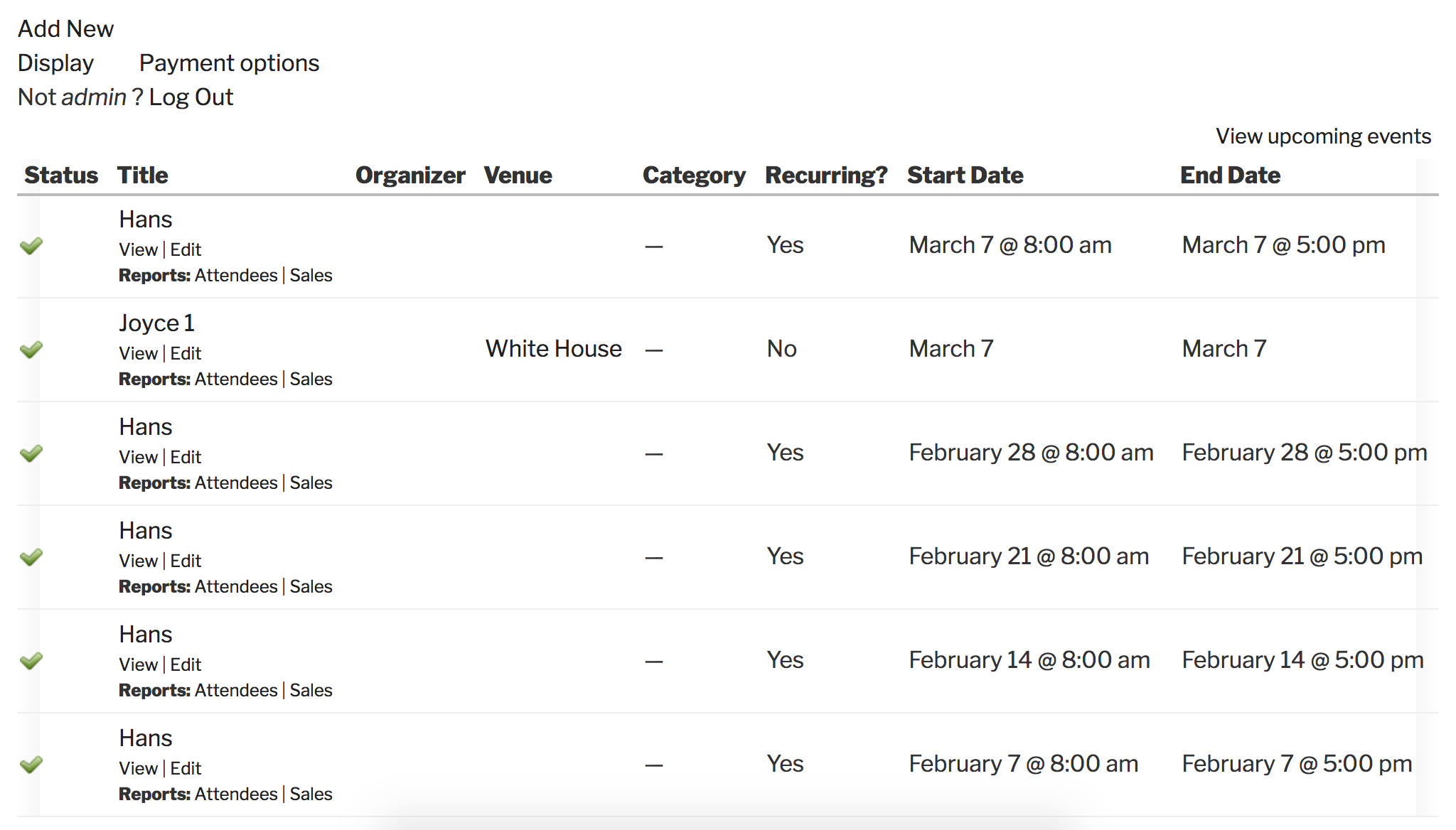
I’m currently running Community Events 4.4.2. Please let me know if this helps answer your question and have a pleasant remainder of your day. Cheers!
ModeratorHi and welcome back 🙂
We appreciate the kind words! Unfortunately, the functionality you’re seeking is not currently possible with the use of shortcodes. I see the validity in your request, so the options available to you at this time include submitting a request to our UserVoice Feature Ideas, exploring tribe_get_events to see if you can come up with a viable solution, or you hiring a reputable developer to build the customizations you’re after. We have a list of non-affiliated customizers who can help further assist.
Sorry I don’t have a better answer for you at this time and best of luck with the customizations! For what we are able to cover, please review our What support is provided for license holders? Knowledgebase article. Should you come up with a solution and you’d like to share it for others to benefit from, go ahead and reply back with your methods as I’m sure they’ll come in handy for other users in search of a similar feature.
Have a pleasant rest of your week. Cheers!
March 8, 2017 at 10:01 pm in reply to: Added shortcode full calendar view to a page but the "Show Filter" option doesn’ #1251567ModeratorHello and welcome!
Unfortunately, the Filter Bar is not currently incorporated into the [tribe_events] shortcodes, but we have a feature report logged aimed to include this feature in an upcoming release.
I don’t have any precise info on when this feature will be available, but I’ll include this thread to the report which typically will get updated once the feature has been released. It’s always a good idea to keep an eye on our Release Notes and the plugin changelogs for more information. Thanks again and let me know if you’ve got any additional questions or comments. Cheers!
ModeratorHi and welcome 🙂
I tested all the plugins & it doesn’t seem to be a conflict there.
I’ll need you to review the Testing for conflicts guide to rule out both theme and plugin conflicts before I’m able to provide any assistance. Once I’ve got that information I’ll have a better idea on how to proceed.
Thank you for understanding our position on the matter and if you haven’t already, please review our What support is provided for license holders? Knowledgebase article for more information on our license policy.
Cheers!
ModeratorHi and welcome back,
I tested to see if I was able to reproduce your issue, but I get the calendar/month view on desktop and list view on mobile – which is what I have my settings set to in Events > Settings > Display.
I see you checked ‘Yes’ to reverting back to the default WordPress theme and deactivating all plugins other than ours as instructed in the Testing for conflicts guide, but can you please confirm this?
It would be best if you could test again, but this time ensure WP_DEBUG and WP_DEBUG_LOG are enabled on your site’s wp-config.php file. Any errors will display at the top of your page as you try to reproduce the conflict. I also recommend right-clicking your mouse and opening the ‘Inspect’ tool to see if any errors display in the console. Note what you find and please include it in your reply.
I’d also review Events > Help > Recent Template Changes to see if there’s the possibility any overrides you have in [your-theme]/tribe-events might contain incorrect/outdated code. Let me know what you find and have a pleasant rest of your day. Cheers!
ModeratorHey Mike!
You actually have a valid license for Event Aggregator. We are in the process of retiring the Facebook Events and iCal Importer plugins and replacing them with our newest plugin, Event Aggregator.
You have been granted a license for Event Aggregator and it is set to expire on the same date your Facebook Events license expires (2017-05-07). For information, please review our Moving to Event Aggregator Knowledgebase article and if you run into any issues along the way, please create a separate thread and our support team would be happy to further investigate.
Let me know how things work out and have a pleasant rest of your day. Cheers!
ModeratorHi and welcome back,
We’re a little limited with these types of support requests, but my first hunch would be to use the post_id when using tribe_get_events. I’d also explore the Technical Docs related to recurring data, more specifically tribe_get_recurrence_start_dates. Straight from that source:
array tribe_get_recurrence_start_dates ( int $post_id = null )
Sorry again I can’t do more in this instance but please let me know if you’re able to get things squared away. Cheers!
ModeratorHi and welcome 🙂
Sorry to see you’re having troubles with scheduled imports. The current situation appears that scheduled imports are being marked as “Failed” though they are actually being performed. We use wp_cron to trigger the scheduled imports, so if an import is set to occur at a specific time but no one visits either the back or front end of your site, it will be marked as “Failed” but should run at some point shortly after it initially “failed”.
This has been discussed in-depth by the support team and developers, so hang tight while we nail down the most effective ways to educate users on the results of scheduled imports. We have a ticket logged where we are working to compile as much data as possible to help make the most efficient improvements.
Have you done any basic tests where you create a test event on Google Calendar, create and set an import to run every 30 minutes, import it, then add another test event to see if the second event gets imported when the import runs next?
Ideally, you could do all this on a test site so you can fully troubleshoot the matter without having to worry about interrupting your live site. Please review our Using One License for Live and Dev Sites tutorial. Please make sure WP_DEBUG and WP_DEBUG_LOG are enabled on your site’s wp-config.php file. Any errors will display at the top of your page as you try to reproduce the conflict. I also recommend right-clicking your mouse and opening the ‘Inspect’ tool to see if any errors display in the console. Note what you find and please include it in your reply.
Thanks and have a pleasant rest of your day. Cheers!
ModeratorJust so I can make sure we’re on the same page, can you please provide a screenshot of the “edit in WooCommerce” text you’re referring to? Once I have that information I’ll have a better idea on how to proceed.
Thanks 🙂
ModeratorHi Pamela,
Welcome back. Can you please send your System Information as a private reply? I’ll also need you to confirm you’ve reverted back to the default WP theme and deactivated all plugins other than ours simultaneously as required in the Testing for conflicts guide. This is a required step to continue receiving support.
I also recommend visiting Events > Help > Recent Template Changes to ensure any custom template overrides (review the Themer’s Guide for more info) are not using old/outdated code.
Other worthy resources in this case is to re-read the New User Primer: The Events Calendar and Events Calendar PRO, Settings Overview: The Events Calendar and Events Calendar PRO, and Stylesheets and Page Templates.
One last idea I had: you might need to review the Using One License for Live and Dev Sites tutorial. The features you’re mentioning having issues with are all PRO-related, so it might be as simple as ensuring your license key is active on the site you’re working on at that particular moment.
Please let me know what you find out! Cheers 🙂
March 8, 2017 at 7:51 pm in reply to: Categories and Event Options get reset when import runs #1251476ModeratorHey Colin,
Unfortunately it is the nature of the business to withhold this type of information, simply because we just don’t know. With the amount of vetting done on each bug/feature before we even “break ground”, in addition to testing, testing, and retesting for good measure, there are just too many variables that can affect release dates.
Sorry I don’t have a better answer for you at this time and let me know if you’ve got any additional questions or comments on the topic. Thanks and have a great remainder of the week.
ModeratorHey John,
Welcome back. Did you review any of the resources I provided above? I attempted to locate the issue to see if I could get you started in the right direction, but I’m not seeing any white on white problem area. Can you please send a link where the problem is showing and I’d be happy to take another look.
As previously requested, the YouTube video and Knowledgebase article I linked to above should provide enough information on how to identify CSS classes/IDs if you’re not already familiar with the process. We are unable to assist with theme customizations and conflicts which I believe is the case we’re currently facing. Please review our What support is provided for license holders? Knowledgebase article for more information on the matter. I’ll gladly provide other relative resources below, too:
• TEC Settings Overview (To check out the available options in the plugin)
• Stylesheets and Page Templates
• Themer’s Guide (Help for making the changes yourself)
• Customization Guide (Help finding help with making custom changes)Thanks and take care. Cheers 🙂
-
AuthorPosts