

Forum Replies Created
-
AuthorPosts
-
Hunter
ModeratorThank you for the update. I believe I understand your issue clearly, but it would be extremely helpful if you could essentially create an exact step-by-step list of instructions I can follow to reproduce the behavior.
It would also be helpful if you could spin up a fresh WP test site with the default WP theme and our plugins only (see Testing for conflicts guide) and create a few test events as you’ve been doing, then check to see what happens when trying to reproduce the problem. If you have the ability to screencast on how to reproduce the issue, that would be the most efficient method. Check out the Screencastify Chrome Browser Extension. If you’re using a different browser, I’m sure there are similar options available for Firefox, Safari, etc.
Please make sure WP_DEBUG and WP_DEBUG_LOG are enabled on your site’s wp-config.php file. Any errors will display at the top of your page as you try to reproduce the conflict. I also recommend right-clicking your mouse and opening the ‘Inspect’ tool to see if any errors display in the console. Note what you find and please include it in your reply. It is imperative you share any errors you find with me so I can compare your findings to any logged bugs we’re aware of.
One other thing you could do on the test site is downgrade in reverse chronological order to see if you can find the exact version where the behavior begins. You may need to review our Using One License for Live and Dev Sites for instructions on using one license for both sites.
It is always best practice to have a test site where you can fully troubleshoot any issues you’re having, so once it’s set up, you’ll be able to test in a much timelier fashion. I have a premium license for WP DB Migrate Pro which has helped the process all around, so you might want to check it out.
Thanks again and have a great evening. Cheers 🙂
ModeratorHey Lisa,
Thanks for the update. Can you send over exact step-by-step instructions on how to reproduce the behavior on my test site? We’ve got a few bugs which might be related, but I’ll need that information before I’m able to make an informed decision.
Thanks again and enjoy the rest of your day. Cheers!
ModeratorThank you for letting me know the issue has been resolved and please feel free to create a new thread if you have any more questions or comments. Take care!
ModeratorAwesome! I appreciate the update and glad to hear the issue has been resolved. Please open a new thread if you have any more questions. Cheers!
ModeratorHey Sherman,
It appears the screenshot didn’t come through, so please try resending it at your earliest convenience. I’ll also need you to review our Testing for conflicts guide to ensure we’re not dealing with a theme and/or plugin conflict. I’ll also need you to locate your System Information and send it over as a private reply.
ModeratorHey Vicki!
Sorry to see you here under the circumstances. Before we can confirm the behavior you’re experiencing is in fact coming from a plugin or plugins by Modern Tribe, I’ll need you to please review our Testing for conflicts guide and reply back with your findings.
I see in your System Information you have WP Super Cache and WP-Optimize. I can almost guarantee the issue is coming from either your custom theme and/or one or both of the aforementioned plugins. I highly suggest looking into purchasing a license for WP Rocket. I’ve spent more hours than I’d like to admit on caching/performance, and WP Rocket will save you many hours and is one of the most valuable plugins I’ve used in 5+ years.
I also checked out your site using my ‘Inspect’ tool and see a plethora of errors which are most likely related to the issues you’re experiencing:
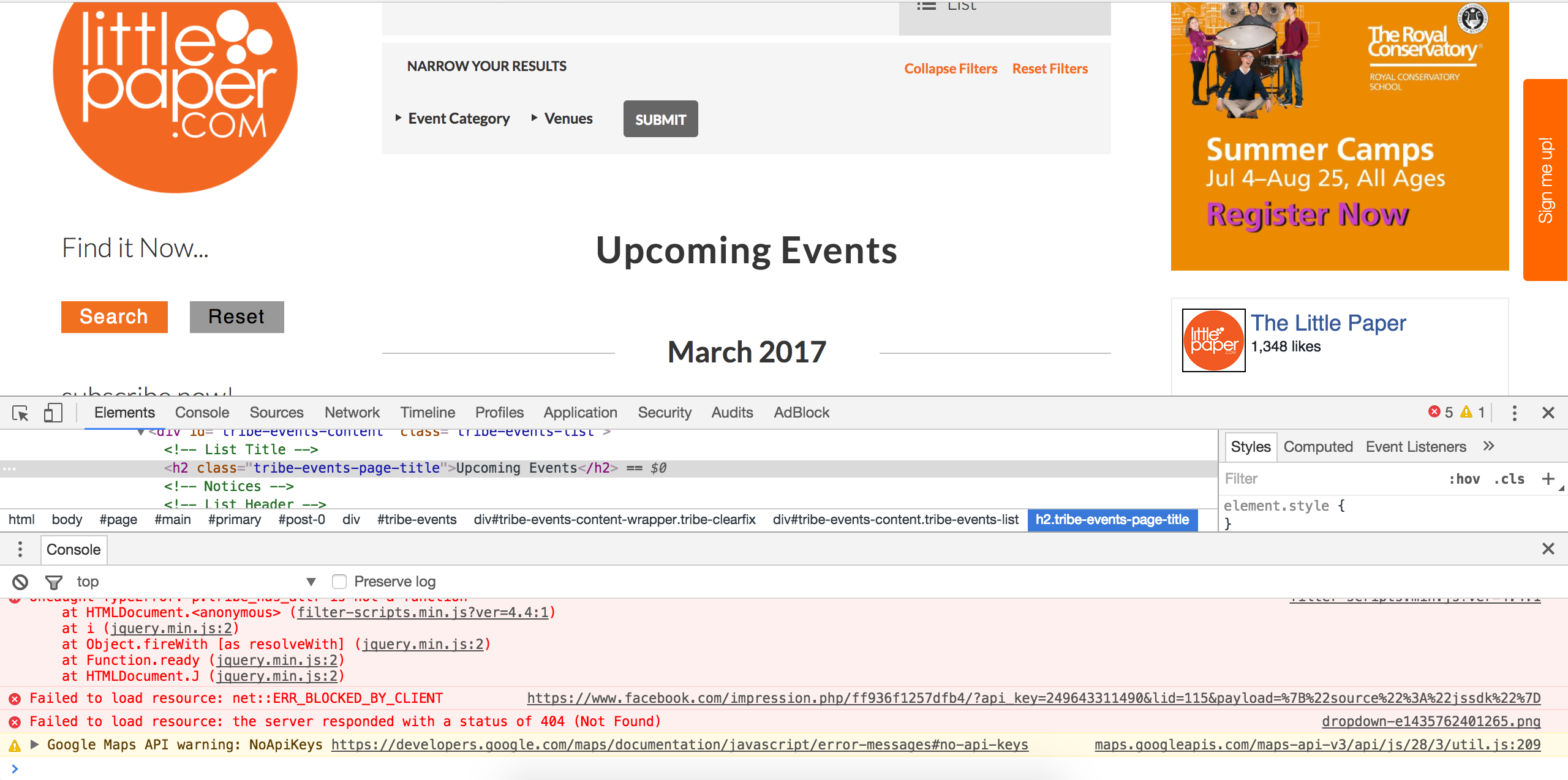
Lastly, I’ll provide all caching/performance-related information I have, so please take some time to review them:
- https://codex.wordpress.org/High_Traffic_Tips_For_WordPress
- https://codex.wordpress.org/WordPress_Optimization
- https://theeventscalendar.com/knowledgebase/caching-basics/
- https://theeventscalendar.com/knowledgebase/caching-month-view-transients/
- https://theeventscalendar.com/knowledgebase/caching-basics/
- https://theeventscalendar.com/the-events-calendar-performance-considerations/
- https://theeventscalendar.com/favorite-developer-plugins/
- https://theeventscalendar.com/knowledgebase/problems-with-minification/
Let me know what you find and have a pleasant rest of your day. Cheers!
ModeratorHi and welcome back!
At this time, there is no “easy” way to accomplish what you’ve described. I located a feature report aimed to include a “Featured Events” section when importing events using Event Aggregator. I’ll include this forum thread to the report which helps increase attention on the matter. We’re unable to provide information related to expected release dates.
You could run an SQL query (always make a backup prior to doing so). I checked the database relating to Featured Events and included a screenshot below:

I wish I could provide more instance in this scenario, but our What support is provided for license holders? Knowledgebase article state we’re limited providing support in these situations.
Please let me know how things work out and feel free to share your solution in the case another user has a similar goal in mind. Have a pleasant rest of your day and thanks again. Cheers!
ModeratorHi Pamela,
Before we go too deep into the issue, can you visit your WordPress Admin Settings > Permalinks and simply hit the “Save Changes” button to see if it has any effect on the behavior? I’ll also need you to review our Testing for conflicts guide and let me know what you find out.
When testing, please make sure WP_DEBUG and WP_DEBUG_LOG are enabled on your site’s wp-config.php file. Any errors will display at the top of your page as you try to reproduce the conflict. I also recommend right-clicking your mouse and opening the ‘Inspect’ tool to see if any errors display in the console. Note what you find and please include it in your reply.
If you’d rather not go through the troubleshooting process on your live site, it’s recommended doing it on a test site. Please review our Using One License for Live and Dev Sites tutorial.
Please let me know the results and we’ll continue the troubleshooting process. Take care 🙂
ModeratorHi and welcome,
If I’m understanding correctly, when you visit WordPress Appearance > Widgets and add The Events Calendar mini calendar widget, the links to individual events displaying in the widget on the front end are not working?
I’ve I’ve misunderstood your issue, please include exact step-by-step instructions on how to reproduce the behavior and I’d be happy to test.
I see you checked ‘Yes’ to reverting back to the default WordPress theme and deactivating all plugins other than ours as instructed in the Testing for conflicts guide, but can you please confirm this?
Regardless, do you mind testing again ensuring WP_DEBUG and WP_DEBUG_LOG are enabled on your site’s wp-config.php file. Any errors will display at the top of your page as you try to reproduce the conflict. I also recommend right-clicking your mouse and opening the ‘Inspect’ tool to see if any errors display in the console. Note what you find and please include it in your reply.
Thanks and I look forward to getting this issue resolved. Have a pleasant rest of your day! Cheers 🙂
March 7, 2017 at 11:31 pm in reply to: Event Tickets Plus is not working or ticket is not showing on configuring page #1250913ModeratorHello!
First off, thank you for your purchase and welcome to our premium plugin support forums! The first step in this instance is to review the Testing for conflicts guide in it’s entirety so we can locate the source(s) of conflict.
I’d also look to see if you have any existing template overrides. Look inside your theme folder for a folder named tribe-events. Whatever files you have in that folder will override the files in our plugin folders. Chances are there is missing or outdated code needing attention so the ticket section displays on the front end.
Keep me updated on your findings and we’ll continue investigating. Thanks again and have a pleasant remainder of your day. Cheers!
ModeratorHi and welcome 🙂
I see you checked ‘Yes’ to deactivating all plugins other than ours, but I’ll need you to also revert back to the default WP theme as outlined in our Testing for conflicts guide before I’m able to proceed. Please gather your System Information and include it as a private reply.
A few other resources worth reviewing include Stylesheets and Page Templates and Settings Overview: The Events Calendar and Events Calendar PRO.
Once I have the results from your testing, I’ll have a better idea on how to proceed. Thanks and have a pleasant rest of your day. Cheers!
ModeratorHi and welcome 🙂
Have you checked our Event Tickets? It’s a plugin which allows users to RSVP for upcoming events. I encourage you to review our New User Primer: Event Tickets & Event Tickets Plus tutorial for insight on how the plugin works, available features, etc.
Other than that, I’m not 100% certain of any plugins that fit your exact criteria, but I’m sure you can find something in the WordPress plugin repository. I’d also try some searches within our forums in addition to general web searches on the topic. Please let me know if we’re on the right track and have a pleasant rest of your day. Cheers!
ModeratorHi and welcome 🙂
I reviewed the thread you believe to be related to your issue. Can you please send over exact step-by-step instructions I need to follow in order to reproduce the behavior you’re currently experiencing? Screenshots and screencasts are always helpful in these situations.
I’m not sure if you’re aware of our WooCommerce-Specific Ticket Settings tutorial, but have you reviewed that and tried different options to see if there is any positive effect on the issue?
Lastly, I see you checked ‘Yes’ to reverting back to the default WordPress theme and deactivating all plugins other than ours as instructed in the Testing for conflicts guide, but can you please confirm this? If not, please do so as it’s a required step to continue receiving support.
It would be super helpful if you could test the issue once again, ideally on a test site where you can fully troubleshoot without risk of interrupting your live site. See our Using One License for Live and Dev Sites tutorial for more info.
When testing, please make sure WP_DEBUG and WP_DEBUG_LOG are enabled on your site’s wp-config.php file. Any errors will display at the top of your page as you try to reproduce the conflict. I also recommend right-clicking your mouse and opening the ‘Inspect’ tool to see if any errors display in the console. Note what you find and please include it in your reply.
ModeratorHi and welcome back,
Unfortunately, event categories aren’t included in the Tribe Events Bar search results without the use of another plugin such as SearchWP (haven’t tested so I cannot vouch) or developing some custom code to include categories in the results.
I took a quick look at our UserVoice Feature Ideas and came across this request which resembles what you’re after: https://tribe.uservoice.com/forums/195723-feature-ideas/suggestions/15170253-tribe-bar-keyword-search-to-include-category.
I’ll also paste below an answer made by another support team member on a relative question:
Easy way: Add the name of your category somewhere in the content of the event. You could even just have a “Tags: Exhibitions” or something like that at the bottom beneath the rest of your verbiage.
Hard but better way: If you are familiar with WP API and search terms, then you could hook into the Tribe Bar search and add the logic to search category names as well.
Sorry I don’t have a better answer for you at this time and please feel free to share the route you end up going. Cheers!
ModeratorHi and welcome back!
Before I’m able to investigate much further, can you please review our Testing for conflicts guide and reply back with your findings?
Please make sure WP_DEBUG and WP_DEBUG_LOG are enabled on your site’s wp-config.php file. Any errors will display at the top of your page as you try to reproduce the conflict. I also recommend right-clicking your mouse and opening the ‘Inspect’ tool to see if any errors display in the console. Note what you find and please include it in your reply.
Thanks and I look forward to your response! Cheers 🙂
-
AuthorPosts