

Forum Replies Created
-
AuthorPosts
-
March 13, 2017 at 8:01 pm in reply to: Edit Event: O/V dropdowns not matching based on second, third, etc. word #1253649
Hunter
ModeratorThank you for doing your homework! I checked our logged bug reports and found what I believe a bug to be related, though the case may be they are indeed different. Should the latter occur, I’ll create a new bug based on the information you’ve shared with me in addition to testing on my end.
I did open up the add/edit event screen and tried searching for “Beach” in my venue dropdown, but the “Pebble Beach” venue did not appear as it should, so the fact I’m able to reproduce the behavior is a good sign a bug is present.
Other than downgrading as you’ve already done, it’s up to you whether or not you’d like to stay updated to the latest versions until we can get a fix addressed in an upcoming maintenance release. I’ve added this forum thread to the ticket which helps expedite the process of getting a fix included in an upcoming release. I don’t have a precise date when it will be available, but please stay tuned to our Release Notes and the plugin changelogs for more information. Thanks again and let me know if you’ve got any additional questions or comments. Cheers!
ModeratorHi Tyler,
Thanks for your patience. We typically aim to respond within 24 hours of user replies, so if I’ve fallen short I truly apologize. During the weekends, things tend to slow down a little. Regardless, I really appreciate you testing so in-depth to rule out any theme and plugin conflicts.
With that said, I compared your latest findings with our list of logged bugs and I’m confident in saying the issue you’re experiencing is due to a bug in our latest versions. As you’ve already done, downgrading is a temporary solution until we can get things patched up in a future maintenance release. Once we do have an update available, we’ll update this thread with more information. It’s also best to keep an eye our our Release Notes and the plugin changelogs.
Again, thank you for your patience and willingness to troubleshoot in order to be sure the behavior you’re experiencing is in fact due to the known issue. If you don’t have a test site set up, it’s recommended you do so where you can fully troubleshoot any potential issues of new releases before introducing them into your live environment.
Hang tight and have a great week ahead. Cheers!
ModeratorMy pleasure! I’ll close this thread out but feel free to create a new one if you have any more questions or concerns. Enjoy the rest of your day!
ModeratorHi and thanks for the detailed response. I have a license for the Avada theme, so I downloaded the latest version (5.1.1) and used your notes in hopes of recreating the behavior, but I never experienced the same behavior. I tested as many different possible combinations of options under the Events > Settings > General/Display tabs.
I notice a Google Maps API key warning/issue in the notes you shared. Can you visit your Avada Theme Options > Advanced > Theme Features and switch on and off the Google Maps Script setting to see if it has any effect on the behavior?

We’ll start there, so please let me know what you find out. While we can’t guarantee with certainty our plugins will be compatible with all themes, we understand many users are on the Avada theme, so if I can somehow reproduce the issue you’re having I’d be happy to log a bug for the developers to review on a deeper level.
Thanks and have a wonderful rest of your day. Cheers!
ModeratorHello,
Thank you for the detailed response. We have a bug logged resembling what you’ve described, so I’ve added this forum thread to the ticket which helps expedite the process of getting a fix included in an upcoming release. I don’t have a precise date when it will be available nor a workaround in the meantime other than downgrading until we can get things patched up, but please stay tuned to our Release Notes and the plugin changelogs for more information. Thanks again and let me know if you’ve got any additional questions or comments. Cheers!
March 13, 2017 at 3:11 pm in reply to: Adding a file upload field to the community event submission form #1253550ModeratorThank you for further clarifying your needs. It’s admittedly been awhile since I developed anything resembling what you’re looking to do, but I believe ACF is still a relevant option in this instance, though I could be way off. I’m unfortunately unable to look into the matter at this time, but I recommend doing some general web searches in addition to searching our forums for relevant requests to see if you can come up with a viable solution. I truly wish I could spend more time investing the matter, though I did find this thread where a user shares another plugin. I cannot confirm whether or not it will work.
As you mentioned, our UserVoice Feature Ideas is another good route though the turnaround time is less than ideal. You also might want to take a quick peek at our list of customizers to see if any candidates meet your requirements.
Thanks for understanding I can’t provide much more support in this instance and please feel free to share a solution should you come up with one for others to benefit from. Take care and let me know if you’ve got any more questions or comments on the matter. Cheers 🙂
ModeratorHello 🙂
I’m not 100% certain, but check to see if your CDN has a plugin (similar to WP Offload S3 Lite) that includes options allowing you to adjust the URL structure accordingly. You might need to look into doing a template override as explained in our Themer’s Guide.
I wish I was able to do more in this instance, but this type of support request extends beyond what we’re able to cover in the support forums. Please review our What support is provided for license holders? Knowledgebase article for more information.
One last idea I have is to review our Using Chrome Developer Tools tutorial for more information on how to go about resolving the issue. Best of luck and enjoy the rest of your weekend. Cheers!
March 10, 2017 at 8:37 pm in reply to: Import to or from Event calendar to Eventbrite tickets #1252784ModeratorHi Marc,
Welcome back! I went ahead and set up a new Eventbrite Application Key based on the instructions from this tutorial. I created a screencast of me creating an Eventbrite Application Key from start to finish and did not run into any issues, so you can follow along in hopes of successfully connecting your site to Eventbrite.com.
Make sure you revert back to the default WordPress theme and deactivate all plugins other than ours when attempting to set up the key and get authorization. Detailed instructions are in the Testing for conflicts guide. I cannot provide support if you’re unable or unwilling to test as outlined in the Testing for conflicts guide.
It might be best you set up a fresh WordPress installation where you can fully troubleshoot the issue. Make sure you have only the default WordPress theme and our plugins only installed and activated on the test site. Please review our Using One License for Live and Dev Sites and Moving Your License Keys tutorials for more information.
Lastly, sometimes a refresher is all you need, so take a moment and review our New User Primer: Eventbrite Tickets to see if it’s a simple setting that can fix this quickly. Keep me posted and have a great weekend ahead. Cheers!
ModeratorHi and welcome back,
I checked the status of the bug related to the thread you linked to, but it’s still “Open” which means we’re still working on a solution. I’ll provide what the bug description says in our Central reporting system:
Recurring events created prior to PRO version 4.4 are somehow “corrupted” and are producing errors. The test event’s ‘Time & Date’ rules we’re basing this information off is: recur every week on Tuesday, 8-10am, for 12 weeks (starting January 11, 2017)
As always, you need to review the Testing for conflicts guide to eliminate the potential of a theme and/or plugin conflict. This is a required step to continue receiving support.
You mention you do not have a test site. I cannot recommend enough the benefits of having a test site where you can fully troubleshoot issues without risk of interrupting your live site. If you have XAMPP or MAMP or any other software allowing you to run WordPress on your local machine, it takes just a few minutes to “clone” your live site to your local machine. There are many easy-to-follow tutorials available around the internet, so I encourage you to take the little time it takes to set up a test site. My favorite plugin is WP Migrate DB Pro.
I’m unable to provide a concrete “yes” or “no” on whether or not the known bug will have an impact on the many events on your calendar, so I would either delay the updates until our Release Notes indicate this issue has been resolved or set up a test site and test until you have a definitive answer.
Have you looked for/seen any errors on your server’s error log? I’d review the Testing for conflicts guide, but make sure WP_DEBUG and WP_DEBUG_LOG are enabled on your site’s wp-config.php file. Any errors will display at the top of your page as you try to reproduce the conflict. I also recommend right-clicking your mouse and opening the ‘Inspect’ tool to see if any errors display in the console. Note what you find and please include it in your reply.
Keep me posted and have a pleasant rest of your weekend. Cheers!
March 10, 2017 at 7:44 pm in reply to: Slow loading time (15 seconds) after clicking on "Order" button #1252779ModeratorHi and welcome 🙂
I see you have done the following:
• Deactivated all other plugins? Yes
• Switched to a default theme? No (or unknown)Before I’m able to proceed, I’ll need you to review the Testing for conflicts guide and let me know what you find.
I also notice W3 Total Cache in your System Information. This plugin has been known to cause many different issues, so I’ll provide all relative information I have on performance below. If you’re on shared hosting, there will always be the potential for slow load times. I recommend looking into either Pantheon or DigitalOcean for your hosting provider and WP Rocket for caching.
- https://codex.wordpress.org/High_Traffic_Tips_For_WordPress
- https://codex.wordpress.org/WordPress_Optimization
- https://theeventscalendar.com/knowledgebase/caching-basics/
- https://theeventscalendar.com/knowledgebase/caching-month-view-transients/
- https://theeventscalendar.com/knowledgebase/caching-basics/
- https://theeventscalendar.com/the-events-calendar-performance-considerations/
- https://theeventscalendar.com/favorite-developer-plugins/
- https://theeventscalendar.com/knowledgebase/problems-with-minification/
Let me know what you find and have an enjoyable weekend ahead. Cheers!
ModeratorHi and welcome 🙂
We have a bug logged resembling what you’ve described, so I’ve added this forum thread to the ticket which helps expedite the process of getting a fix included in an upcoming release. I don’t have a precise date when it will be available, but please stay tuned to our Release Notes and the plugin changelogs for more information. Thanks again and let me know if you’ve got any additional questions or comments. Cheers!
March 10, 2017 at 7:37 pm in reply to: Event Imports from Facebook not populating with the right location data. #1252775ModeratorThis reply is private.
ModeratorHey Stephen,
What you’ve described could definitely be done, but might require the use of additional plugins/extensions and possibly some custom code. Check out the following extensions and see if you’re able to figure things out. I wish I was able to dedicate the time to come up with a working snippet, but our What support is provided for license holders? Knowledgebase article states we’re unable to assist in this situation.
The files you’ll need to check out are located in the /the-events-calendar/src/views/month/ folder. Say you make a template override for /the-events-calendar/src/views/month/tooltip.php. You would save it with the following structure so the changes take effect and you don’t lose customizations when updating the plugins: [your-theme]/tribe-events/month/tooltip.php. Detailed instructions can be found in our Themer’s Guide.
I understand it may seem complicated or more technical than you believe you’re capable of, but it’s honestly not that difficult. If you can copy/paste, that’s about all you’ll be doing. Watch this Customizing WordPress #1 – How To Create A Child Theme by LevelUpTuts YouTube video for a visual explanation of the process.
If you want to see this feature incorporated into an upcoming release, visit our UserVoice Feature Ideas and submit any requests you’ve got. If things get beyond your level of expertise, you might want to look into hiring a reputable developer. We have a list of non-affiliated customizers that can help assist, but there are more affordable options if you look hard enough.
ModeratorHi and welcome!
Thank you for your purchase! We hope you’re loving things so far. CSS is probably the most efficient route for adjusting colors. I’ll provide all relative documentation on the subject, so please take a few moments to review them and let me know if you’re able to manage. Thanks again and have a great weekend ahead. Cheers!
- https://wordpress.org/plugins/the-events-calendar-category-colors/ (plugin is by other author)
- https://theeventscalendar.com/knowledgebase/pro-color-customizer
- https://theeventscalendar.com/knowledgebase/themers-guide
- https://theeventscalendar.com/knowledgebase/stylesheets-and-page-templates
- https://theeventscalendar.com/knowledgebase/wp-admin-settings-overview
- https://theeventscalendar.com/knowledgebase/changing-fonts-and-colours
- https://css-tricks.com/methods-overriding-styles-wordpress
ModeratorHi and welcome 🙂
Thank you for your purchase! I’m not 100% certain I understand your issue, but I’ll do my best to accommodate. The first step is to revert back to the default WordPress theme and deactivate all plugins other than ours. This is a required step to continue receiving assistance. Detailed instructions can be found in our Testing for conflicts guide. Once that’s done, try checking/unchecking the “Recurring event instances” option in the Events > Settings > General tab to see if that addresses your concern.
Next, it would be helpful if you can take a screenshot of the ‘Time & Date’ section on the back end of an event giving you troubles (see screenshot below for reference).
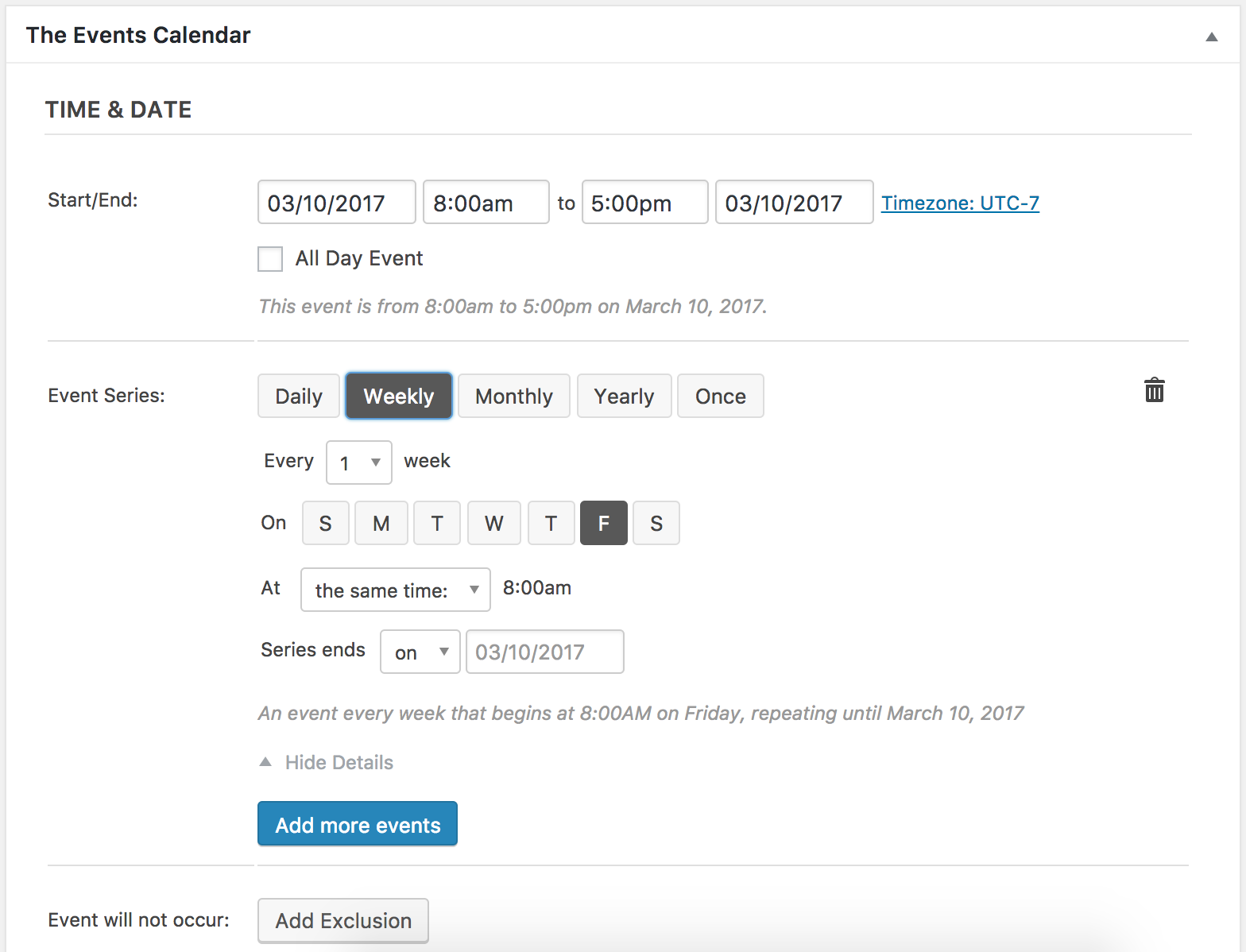
The next step is to provide exact step-by-step instructions on how to reproduce the conflict. The more specific you can get, the better off we’ll be. Lastly, can you show any examples (URLS and/or screenshots) of the effects from the conflict?
-
AuthorPosts