

Forum Replies Created
-
AuthorPosts
-
Hunter
ModeratorHello, Uwe!
Thank you for reaching out and welcome back 🙂
According to the PRO Widget Shortcodes Knowledgebase article, it is possible to accomplish what you’ve described with essentially no caveats. I set up a test event titled “Uwe” and created a new tag also named “Uwe”. I located the tag term_id for the “Uwe” tag which is 20. With that information, the following shortcode succesfully displayed events tagged with “Uwe” exactly as you’ve requested!
[tribe_events_list tags=”#20″]
If you’re unaware of the easiest process to identify the tag term_id, visit Events > Tags in your WordPress dashboard. Hover over the Delete button for the tag you want to acquire the term_id for. Once you’ve done that, if you look at the very bottom of your browser window, look for a link and there will be a section in that link which says, “tag_id=some-number“. The number immediately following the = symbol is your term_id. I’ve shared a screenshot showing which if you look at the very bottom, you’ll see “tag_id=20“.
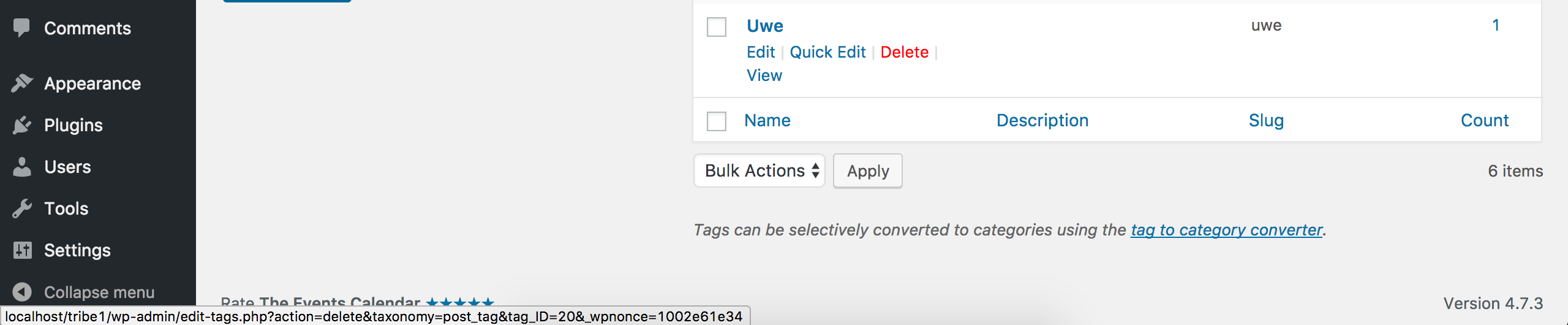
Let me know how things work out and please review all documentation relative to shortcodes to learn even more shortcodes available to use around your site. Cheers!
March 14, 2017 at 6:41 pm in reply to: Adding Product to Order doesn't add person to Attendee List #1254172ModeratorHi and welcome back,
Sorry to see you’re having a bit of struggles with the transition. If you create a new ticketed event and go through the process, does this same behavior occur or do things act as they should?
When transitioning content from A to B, often times it’s a matter of the order you import things. An example would be our own plugins. In order for locations and organizers to attach to the correct event, we recommend importing locations and organizers before events, that way the organizer and venue information “exists” and the imported events can properly refer to them in the database based on it’s relative data. More info on the matter can be found here: https://theeventscalendar.com/knowledgebase/using-the-events-calendars-csv-importer/
Obviously, there’s the potential a bug is present in our code, but if you could provide the results from adding a fresh event and possibly reexamine your transition approach just to make sure things were done in the proper order, it will give me a much better idea on how to proceed.
Thanks and have a great evening!
ModeratorHey Peter,
Hope you’ve been well! The bug related to the issue you linked to has been “Completed” – meaning we patched up the faulty code and shipped it out in a recent maintenance release.
I went ahead and attempted to reproduce the behavior to cut down on communication time and was able to reproduce the exact issue you’ve brought to our attention. I logged a bug for the developers to review and would be happy to update this thread once I have more to report.
In the meantime, downgrading to the version(s) that work best for you is a workaround worth exploring if you’d rather not wait for the maintenance release. I cannot provide any sort of timeline when this issue will be addressed and available, so as previously mentioned, stay tuned for a response to this thread in addition to paying attention to the Release Notes and plugin changelogs.
Thank you for your patience while we further investigated the matter and let me know if you have any additional questions or comments. Cheers!
March 14, 2017 at 6:14 pm in reply to: Error during schedule import: Import failed: Import records must be finalized be #1254164ModeratorHi Piotr,
My sincerest apologies for the delayed response. I apparently did not send through what I had typed up and am now just realizing my mistake. Would you mind sending over the Google Calendar URL and a screenshot of your Events > Imports > New Import screen as you’ve been doing thus far so I can attempt to reproduce the behavior? I will also need a screenshot of your Events > Settings > Imports screen.
I’ll then compare my findings to all relative resources in hopes of making a more educated decision as to what exactly is going on. Thanks again for your patience and have a great rest of your day. Cheers!
March 14, 2017 at 6:02 pm in reply to: Slow loading time (15 seconds) after clicking on "Order" button #1254161ModeratorThanks for the helpful response. I’m sure it will come in handy as the devs review each relative ticket for insight on how to better improve our code. Thanks again and enjoy the rest of your week!
March 14, 2017 at 5:57 pm in reply to: Event Imports from Facebook not populating with the right location data. #1254159ModeratorThis reply is private.
ModeratorI wish we were able to log into customer sites, but it’s not a typical route we take barring extreme circumstances to be determined by us. With that said, you mentioned in a previous response that the issue did not occur when you reverted back to the default WordPress theme.
Could you possibly check to see if any errors display when the default WP theme is active? If any do appear, please share those so I can further assess them. Also, which version of the Avada theme are you using? If you are not up to the latest version, please make the upgrade and let me know if that has an effect on the behavior.
I’m also bringing this thread to the attention of a few support team members who might be able to give us a fresh take on the matter, so let me know the questions to answers I’ve posed above and we’ll go from there.
Thank you so much for going through the troubleshooting process with me. It is difficult, cumbersome, and straight up frustrating, so your kindness and patience allows me to focus on the problem and hopefully get things identified and squared away in no time. Cheers!
ModeratorHello,
Thank you so much for your patience while I’ve further investigated the matter. I too had similar issues while attempting to create the recurrence rules you provided in your previous response. For the mean time, is it possible for you to create separate events for the time being until I can either a) come up with a solution with the current version or b) identify there is in fact a bug, which I would then log and would get addressed by the devs in an upcoming maintenance release.
Another option is to downgrade to the version that works best for you until we can patch things up in a maintenance release. I wouldn’t jump to any other action besides the first recommendation I made (create separate events) until you hear back from me with more information.
Thanks again for your patience while I do a little more testing and converse with my fellow support team members on the matter and have a good rest of your day!
ModeratorSo… I got confirmation the issue you’re experiencing is due to the bug I suspected in my previous response. I’m going to include this forum thread to the report which helps increase attention on the matter.
If I get an update on the ticket in a reasonable time, I’d be happy to update you here with more information. Should things take longer than expected, feel free to create a new thread and please refer to this thread to cut down on the time it takes to communicate the situation.
I unfortunately do not have any sort of timeline when this will get fixed, but we’ll update this thread with that information. It’s always best to keep an eye on our Release Notes and the plugin changelogs for detailed information.
Thank you again for providing the details you have. As previously mentioned, they were extremely helpful in leading me to the report which relates to your particular issue. I’ll let you know if you we need any more information to help us get things going. Cheers!
ModeratorStephen,
I finally got you some working code 🙂
Try creating a file with the following structure: [your-theme]/tribe-events/month/tooltip.php (refer to Themer’s Guide if you get caught up) and use the entire contents of this snippet. I tested on my local site and the tooltip featured event links to the corresponding event as you’re looking to do. Let me know if you run into any troubles. Cheers!
ModeratorThanks for updating me on your situation! Please hang tight while we get this squared away 🙂
March 13, 2017 at 8:39 pm in reply to: Slow loading time (15 seconds) after clicking on "Order" button #1253659ModeratorHello,
After 5+ years developing/managing sites, I’ve grown away from assuming and focused on the actual data I can get my hands on, which typically includes WP_DEBUG and reviewing my error logs regularly.
With that said, I’m not 100% confident your issue is in fact related to any of our plugins. Reason being is I’ve reviewed our logged bug reports and am not finding anything resembling your issue. Additionally, I did some quick testing but am not experiencing painfully slow load times as you are. Obviously, as I mentioned above I’m not convinced either way until I have more information on the matter.
While reviewing our logged reports, I see something which might have an impact on the performance relating to checkout. We have a UserVoice Feature Ideas suggestion we’ve decided to incorporate into an upcoming feature release, so please take a moment and review the submission: https://tribe.uservoice.com/forums/195723-feature-ideas/suggestions/10115976-add-to-cart-via-ajax
I don’t have an exact date when this feature will be available, but I’ll include this forum thread to the report so you get a notification when this particular feature has been released. I also recommend keeping an eye on our Release Notes and the plugin changelogs.
I’ll be sure and pay extra attention to the amount of incoming topics relative to performance during checkout and should I learn more details which lead me to believe there is in fact a bug in our code, I’ll gladly update you with that information.
Please let me know if this helps shed any light on the matter and have a great evening. Cheers!
ModeratorHey Stephen,
I went ahead and attempted to come up with some working code in a limited amount of time but am coming up empty-handed. I’ve shared this request with my fellow support team members in hopes of getting a working solution for you, so hang tight while I pull some strings.
In the mean time, please visit our UserVoice Feature Ideas and suggest this as a feature so our devs can incorporate it into a feature release. I see the validity in it and logic says the featured image should be linked to the event.
Thanks and feel free to ping me if you don’t hear back within 24 hours. Cheers!
ModeratorThanks for the response and details. They helped lead to me a fairly old bug with little to no activity, but before I’m comfortable guaranteeing the issues you’re experiencing are related to this report, I’m having some more seasoned team members look over things.
Hang tight while we investigate a little further and I’d be happy to update you once I’ve got more information. As always, we’ll aim for 24 hours but if it exceeds that amount of time, feel free to ping me here in the forums.
Thanks again and have a good evening!
March 13, 2017 at 8:09 pm in reply to: Events list "See All" view not showing correct events on load #1253652ModeratorHi and welcome back,
We do have a bug related to the initial issue you were having relating to the “See all” page displaying the entire list of events in the series rather than the next upcoming event in the series.
I’ve added this forum thread to the ticket which helps expedite the process of getting a fix included in an upcoming release. Other than downgrading to the versions that work best for you, I unfortunately don’t have a workaround in the meantime no a precise date when a fix will be available. Please stay tuned to our Release Notes and the plugin changelogs for more information.
I checked to see if there were any logged bugs relating to your most recent issue, but am unable to find anything. Does downgrading to a previous version enable you to edit the event?
@Hans, as always, your input is useful and appreciated. Thanks for taking the time to chime in here! Thanks to the both of you and let me know if you’ve got any additional questions or comments. Cheers!
-
AuthorPosts