

Forum Replies Created
-
AuthorPosts
-
George
ParticipantHey @charles,
Unfortunately it’s not quite possible because of the way the Events Calendar “calendar” features work.
The core of that problem is because /events/ is not really a “page”. It’s just an endpoint, much like a feed would be, which is much more dynamic and allows the basic calendar functionality of paginating forward or backward into new or past months, weeks, years, days, et cetera.
Trying to manipulate calendar URLs from the base URL of a site, or as a child URL off of a “real” page or post or something, would nullify much of this functionality due to the way The Events Calendar is currently built. I highlight this last sentence because we may be able to change this in the future, the near future even like sometime in the next year or two; but for now this is unfortunately not possible in the way you describe 🙁
I’m sorry to disappoint @Charles, honestly. Please let me know what other thoughts you have on all of this, and/or if I can help with anything else!
Sincerely,
GeorgeParticipantThank you @Pinder.
There is clearly some sort of JavaScript error happening here – I admit that I’m not entirely sure what the error is, but for now, I would recommend pasting the following CSS into the bottom of your theme’s style.css file:
.new-organizer:last-of-type .organizer {

    display: inline-block !important;

}
This should temporarily fix the problem for now, and buy us some time for further investigation.
Let me know if this helps!
Sincerely,
GeorgeParticipantHey @Mad Dog,
Thanks for the update here, and yes, you are right about not being the only person with the Photo View issue; there are actually some bugs at play there and we are working on fixes for that. Very sorry for the trouble with that!
In regards to your customizations, I’m glad progress has been made. You asked about the other bit of code there, and to be honest it’s really your call whether to leave it alone or not. The code you pasted shows an event start time, and end time.
• Do you need that functionality where this displays?
• Does everything work fine if you copy this code?If so, then go ahead and copy the code over! 😀
If you don’t need the functionality, or if you copy it over but then problems arise, then you do not need to copy this over – or can do so later when you have time to carefully implement it without issues.
Customizations are indeed tricky for these sorts of reasons, so ultimately this is your decision and I hope the information I’ve provided here helps – even a little bit.
Best of luck with your customizations!
— George
ParticipantHey @David,
Alright, thank you for the extra information here. To be 100% clear, you mention a “fatal error”, so is there ever any text that displays on a blank white screen before you get to “Server Error – 500”? If so, let us know – sorry to harp on this point, I’m just curious about what’s happening here…
What I would recommend to resolve this is to do a “Clean install” process – I laid out these steps in clear, simple detail over my first reply to this other recent thread → https://theeventscalendar.com/support/forums/topic/an-error/#dl_post-1035652
I would recommend doing those steps until you are sure that the only files on your site for The Events Calendar, Events Calendar Pro, and Community Events are the 4.0 version files.
Once those are all installed, but still not activated, start by activating The Events Calendar; see what happens. If all clear, proceed with Events Calendar Pro; see what happens. Then finally activate Community Events and see what you find.
Thank you so much for your patience with this process!
Sincerely,
GeorgeParticipantThat’s fine Wendy, thank you for clarifying and for double-checking about this.
Proceed with the licenses and use them as you describe here – if there’s an issue where, for example, you post support requests for each separate project site that comes up, then we may need to require a higher-tier license. But that is very unlikely, and as long as this doesn’t happen you can use the Personal License for this just fine 🙂
I’ll close up this thread for now and wish you the best of luck with our software and your projects; cheers!
– George
ParticipantHi Daniel,
I’m sorry about this, and this is a bug we are working on. For now you can remove that snippet if it does not help; I would recommend then just using “0” (without quotes of course) as the price for free events.
Stay tuned to our maintenance release coming soon, and update to it – see if things are improved!
Thank you,
GeorgeParticipantHey @Lifebear,
Okay, thank you for clarifying that. Unfortunately we cannot log into customer sites for any reason. I have not logged into your site, and have removed the login information you posted here for security purposes.
As for your issues, I’m wondering if you can please share your “System Information” with us? Here’s how to do that → https://theeventscalendar.com/knowledgebase/sharing-sys-info/
Thank you!
GeorgeParticipantThank you!
This system information shows that both Filter Bar and Events Calendar Pro are at version 3.12.
Please update these plugins to version 4.0
You can access the latest files for any plugin you own here → http://theeventscalendar.com/my-account/downloads
Update those plugins to 4.0, make sure your license keys for them are entered and valid, and let us know if your issues persist! 😀
Cheers,
GeorgeParticipantThank you for your patience with this – I will investigate why this message displays and possibly make a development ticket so that we can improve the handling of this with Unlimited Licenses.
In the meantime, I would recommend NOT “network activating” this plugin and instead just activating it on each sub-site that it is needed on.
If you do this, does that help with the notice at all? I would recommend making sure that neither The Events Calendar nor any of its add-ons are “Network Activated”.
Sincerely,
GeorgeDecember 10, 2015 at 12:23 pm in reply to: No "add new location" function in community form #1039079ParticipantHey @Mediaversa, thank you for clarifying that this is NOT an admin page. If it’s just a front-end thing like this, then yes it is fine to log in. Apologies for not clarifying that.
However, I went to the link you provided →
Here is what I see there:
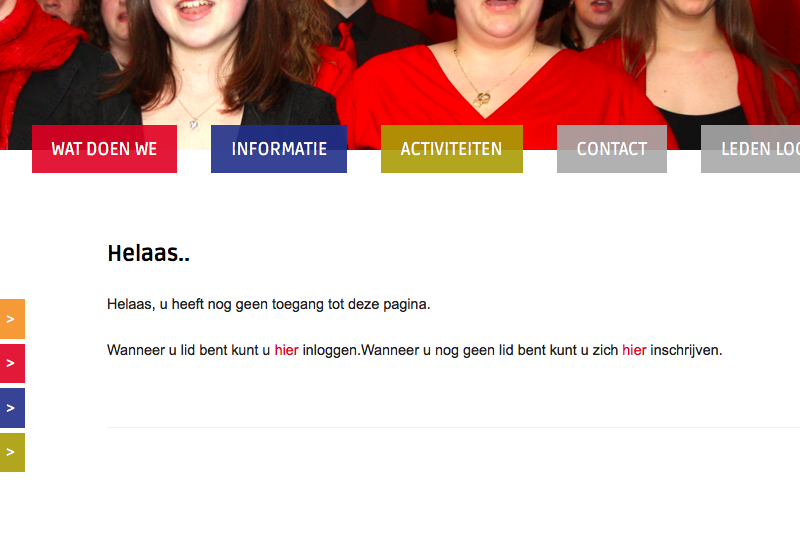
So, there are only two links there that I can click. One is a “contact” page. The other one links to /wp-admin, which is the back-end admin that we cannot access, so I cannot log in via that link.
If I click the “Leden Login” link on the left-hand sidebar, it leads me to /wp-login.php, which is still again the back-end admin that we cannot access.
We cannot log into /wp-admin for any customer sites 🙁
Thank you,
GeorgeParticipantThank you for testing this! And for your continued patience – I’m really sorry that this isn’t resolved yet.
I’m wondering – did you happen to create a new set of recurring events during that testing process on your live site? If so, are any of these events still up on your site and visible with a link to them? And finally, if this is so, can you link to one of these events?
—
Regardless of whether you have a link above or not, I’m wondering – do you have the same web host for both sites?
I would recommend contacting your web hosting provider at this time to report these issues – and also your testing thus far into this.
If you can do this, let us know what they say. I will continue to try to recreate this and otherwise investigate this in the meantime.
Thank you for your patience – this is an issue not reported by anyone else and one that we are not able to recreate yet, so thank you for being patient with us while we work through the possibilities here!
Sincerely,
GeorgeParticipantHey Carolyn,
Thank you for your updates here!
First and foremost, do not apologize for any “lack of technical skill” or anything! 😀 I totally understand your predicament and it’s honestly not a problem at all to help folks of all variety of skill level. No worries. I appreciate your patience, politeness, and cooperation very much and no need to apologize for anything!
Now, with all of the above being said, there is a bit of a roadblock here 🙁
The issue here is that I cannot reproduce your problems on my local site. That fact then leads to the conclusion that your theme or another plugin on your site is causing a code conflict.
So with that in mind I have looked at your site for an error, and found one.
Even with the specific error, though, I was unable to recreate it on my site 🙁
And so I looked through what plugins I could find on your site, but found that the version of jQuery being loaded on your site is very outdated.
This is almost certainly a result of bad code from within your theme – this is a very common issue with themes specifically.
—
So working with the theme code is the only solution here. But if you’re not familiar with the steps required for helping that process along, the only other option would be for me to log into your site directly, but we have a very strict policy that prevents us from logging into customer sites for any reason.
I am very sorry about this predicament, @Carolyn!
—
A Last Resort
There is one idea I have.
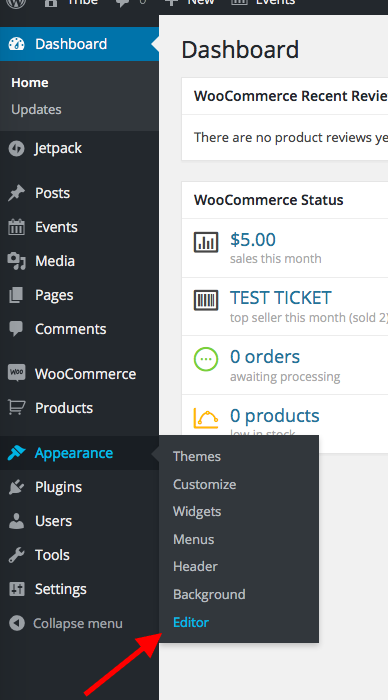
I would recommend going into your site’s wp-admin first. Then, navigate to Appearance > Editor in your wp-admin. Here’s a screenshot of what I mean:
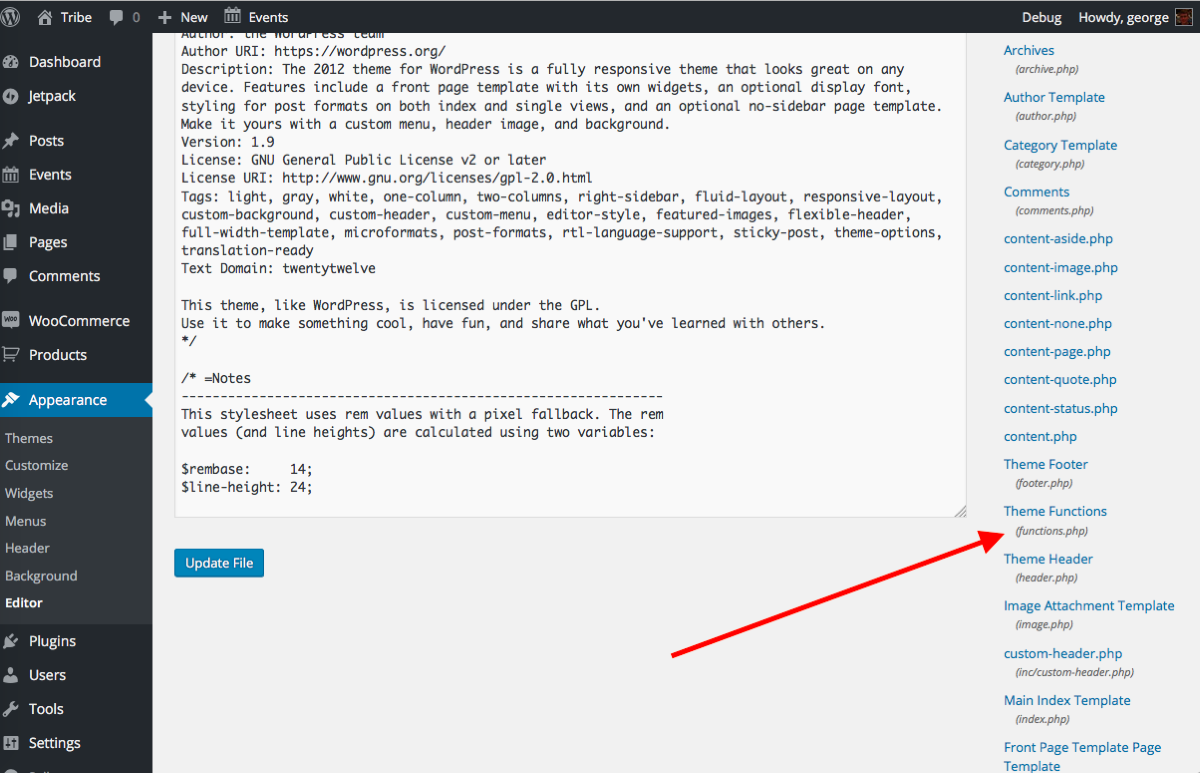
Once here, look for a file called Functions.php – it may be rather small on the right-hand side of the screen, but should be there! Here’s a screenshot of this, click on the image to open this screenshot in its own window so you can view it larger:
—
Once you click this file, its contents will populate that main “editor” window.
Copy and paste the entire contents of this file into a Gist at http://gist.github.com – and then save that Gist and share a link to it here.
I hope this is all clear and makes sense – let me know what you think and if you can make that Gist!
Thank you,
GeorgeParticipantHey @annette,
I’m sorry that that CSS did not help.
Can you link to the specific place where the recurrence information tool tip is showing, but where you do not want it to be showing?
I will try to recommend something better.
I tried going to the originally-linked http://74.220.219.130/ but was met with the following notice → https://cloudup.com/cWqnIOBWuqi
Thank you,
GeorgeParticipantHey @Allison,
Thanks for reaching out – to just display one field, I’d recommend doing a var_dump() on that $fields variable directly.
This will display all of the actual variable data for the fields.
And so if you see that the key for the field you want is, for example ‘allison_example’, then you could replace that foreach loop with this:
if ( isset( $fields['allison_example'] ) ) :

// display name and value however you want

endif;
We unfortunately cannot help much with custom code, but I hope there’s enough here regardless to make some sort of contribution to your project 🙂
Cheers!
GeorgeParticipantHey @yogaservicecouncil,
Thanks for reaching out!
The licenses are not required for any functionality of the plugin whatsoever.
So in other words, if you have the software installed on your test site and do not enter your license key there, it will work fine and behave exactly the same as if the license key was entered.
The license keys only sign up a domain name for support and for auto-update notices.
Does this help at all? The central point is that licenses are not required for functionality at all, and so simply getting the latest version of the software from http://theeventscalendar.com/my-account/downloads and testing it on the development site will be an accurate simulacrum of how it’d behave on the Live site.
Cheers!
George -
AuthorPosts