

Forum Replies Created
-
AuthorPosts
-
George
ParticipantHey @tommy,
These styles are unfortunately dictated by your theme, so there is not a whole lot of support we can provide here. Changing the width is fairly simple, despite this – you should be able to get something more like what you want by heading to the bottom of your theme’s style.css file and adding this bit of code:
#tribe-events-pg-template {

    max-width: 80% !important;

}
You can obviously try any percentage you’d like; play around with this a bit and you should find a good width.
As for the menu styles, these are unfortunately the sort of styles that your theme is dictating heavily and so you should contact your theme developer for help with those. You should also definitely check out a [free!] tool like Firebug if you use FireFox, or the Developer Tools for either Safari or Chrome. They have “Inspector” tools that let you zoom right over the element whose styles you’re wondering about, or would like to customize. It’s super helpful! 🙂
Cheers,
GeorgeParticipantHey @Padrao,
I’m really sorry to hear about this!
I have made a development ticket for us to investigate this problem and, hopefully, fix it.
If we can fix this, the fix will be included in an upcoming maintenance release or even as late as the next “regular” release. This will unfortunately likely not be for several weeks, but I will ensure that we investigate and fix this.
Please let me know if you have any other questions at this time!
Thank you,
GeorgeDecember 10, 2015 at 2:15 pm in reply to: Currency Symbol continuously defaults to the pound #1039176ParticipantHey @James,
I’m sorry to hear this! When you say “edit the currency symbol”, can you clarify exactly which currency symbol option you are referring to? Share a screenshot if possible – you can do so by uploading the screenshot to Imgur.com, Flickr.com, CloudUp.com, or any similar image-hosting site; then just share the links to those images here and I’ll take a look.
There are a few different things you could be referring to, so I just want to be sure I know which one you mean; I will then try to recreate the problem.
—
Also, can you share your “system information”? Here’s how → https://theeventscalendar.com/knowledgebase/sharing-sys-info/
Thank you!
GeorgeDecember 10, 2015 at 2:13 pm in reply to: PLEASE HELP! Event links in upcoming events main page not linking to properly #1039174ParticipantHey Conor,
I’m really sorry to hear about this!
I’m curious about this issue though – can you elaborate exactly on what is happening here, and perhaps share screenshots of phases of your issue to illustrate the problem? (You can do so by uploading the screenshot to Imgur.com, Flickr.com, CloudUp.com, or any similar image-hosting site; then just share the links to those images here and I’ll take a look. No need to try and embed the links or anything, just paste them right in 🙂 ).
The reason I ask for such things is because I checked out the link you provided but could not find this problem there.
For example, look at this event:

• Title: Level 2 Award in Wines & Spirits | Mastroberadino Campania | 20 January 2016
• Date: January 20, 2016 @ 9:30 am – January 22, 2016 @ 5:30 pm—
When I click the title, I am brought here: http://www.wineacademyitalia.com/event/level-2-award-in-wines-spirits-mastroberadino-campania-20-22-january-2016/

• Title: Level 2 Award in Wines & Spirits | Mastroberadino Campania | 20 January 2016
• Date: January 20, 2016 @ 9:30 am – January 22, 2016 @ 5:30 pm
So, it seems to be the same event for me.
This works for every event I clicked on that page.
I’m very sorry if I’m missing something obvious here! Just a bit confused – let me know what you think 🙂
Sincerely,
GeorgeParticipantHey @Koro,
Thank you for reaching out. Unfortunately we cannot help with customizations 🙁
Your best bet would be to read through our themer’s guide to learn how to customize views of The Events Calendar in a safe way → https://theeventscalendar.com/knowledgebase/themers-guide/
Why the calendar is not listed in the categories list so i can add it to a page?
↑ Can you clarify exactly what you mean by this question? Thank you! :]
Sincerely,
GeorgeParticipantHi @Jessica,
It looks like you’ve currently got his configured just fine – if you click the “Start Date” column header there, does it not accurately sort by time for you?
Or is your main question here about adding the start time as actual text next to the title or something?
If so, this would unfortunately require some custom coding, which we can only provide extremely limited support for.
Let me know! 🙂
Thank you,
GeorgeParticipantHey @Michelle,
I’m sorry to hear about this!
This is definitely not the norm, and I cannot recreate this sort of behavior, so I would recommend opening a dialog with your web host to try and see if they can spot anything more specific about what The Events Calendar is doing that is causing this sort of massive memory leak…
I’m sorry that that’s the best I can recommend at this moment, but unfortunately it’s hard to say why your server would be acting this way because we don’t have (and cannot have) any access to the server itself for more hands-on investigation.
Let me know if you can open such a conversation with your web host and, if so, what they say about all of this.
Sincerely,
GeorgeDecember 10, 2015 at 1:52 pm in reply to: Can't deactivate Woocommerce tickets to upgrade to Events Tickets Pro #1039152ParticipantHey @Anthony,
I’m sorry to hear this!
You should be able to install and activate Event Tickets and Event Tickets Plus first without deactivating WooCommerce Tickets. (Event Tickets Plus requires Event Tickets to be installed too – grab there: wordpress.org/plugins/event-tickets/)
Once Event Tickets and Event Tickets Plus are both installed, try activating both of them.
In either case, try deactivating WooCommerce Tickets again once these other plugins are installed.
If the site crashes again after deactivating WooCommerce Tickets, then please let us know if there is a specific error message that appears on the screen at any point during the crash – if so, copy and paste this message in full, and share it here.
Let us know what you find by doing this!
Thank you,
GeorgeParticipantHey @David,
This is unfortunately a known bug that we have just fixed. Stay tuned to the official release of version 4.0.1, coming very soon – you should see an update notice for it, and then updating should fix the problem.
—
If you would not like to wait, then you can get the files now and manually update them on your site. Do not do this unless you know exactly what to do!
But if you want to do that and can perform the manual installation fine, you can get files for the 4.0.1 Release Candidate here → http://theeventscalendar.com/my-account/downloads.
Cheers,
GeorgeDecember 10, 2015 at 1:46 pm in reply to: Long content on event description, but still allow HTML #1039147ParticipantHey @Nickolas,
Thank you for reaching out.
The solution that Josh shared in that thread you linked to simply shortens the word count of the excerpt; this should not affect the HTML display and such.
So I’m curious:
1. Can you please clarify what exact method you have been using to add the HTML to your excerpt as you describe?
2. Can you confirm that what you mean is that, by heading to line 1320 in src/functions/template-tags/general.php as directed by Josh in that other thread, and adding the 55 to the function as he directs, your excerpt HTML no longer works?
In other words, that doing nothing else but adding the 55 breaks your custom HTML, and then that doing nothing else but removing the 55 restores your custom HTML functionality?
3. Finally, on the link you provided in your second and private reply, I see the sort of custom HTML that you are describing:
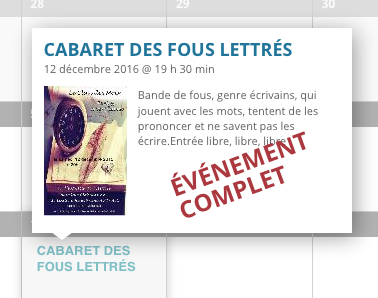
Is that big red text the text that doesn’t show if you make the change Josh recommended? If not, what text are you referring to?
— George
ParticipantHey @Charles / Nick,
I’m sorry to hear about this – can you share a link to a specific page on your site where you’ve tried adding a shortcode but have these display issues?
Also, can you then copy and paste which exact shortcode you use in your reply here? Just curious 🙂
Thank you!
GeorgeParticipantHey Laurie!
Thank you for reaching out. I unfortunately have two pieces of bad news here:
First, we do not offer any phone support 🙁
Secondly, unfortunately our software does indeed require WordPress. It is exclusively a WordPress plugin and cannot function without it at this time.
Sorry to disappoint!
Sincerely,
GeorgeParticipantThank you!
Everything looks fine here, so I’m not sure what’s going on. Can you share a screenshot of the issue? You can do so by uploading the screenshot to Imgur.com, Flickr.com, CloudUp.com, or any similar image-hosting site; then just share the links to those images here and I’ll take a look.
Thank you for your patience here! This is taking a bit of time because we do not have any other reports of this behavior at this time; and I cannot reproduce this on my own site. So this investigation is unfortunately necessary 🙁
Thank you for being patient with it and cooperating!
Sincerely,
GeorgeParticipantThanks @Mad Dog,
And to comment further on that code, the code from the new files is indeed more recent, and you will / should copy over this new code at some point.
I would personally recommend it; use as much of the latest code in your own customized version as possible.
Best of luck with your customizations,
GeorgeParticipantHey Daniel,
I cannot promise that our cost field will fully support something like the cost “range” as you exemplified here; this may require both a new maintenance update and the code snippet I shared above.
Stay tuned to updates!
Thank you,
George -
AuthorPosts