
Home › Forums › Calendar Products › Events Calendar PRO › Long content on event description, but still allow HTML
- This topic has 8 replies, 2 voices, and was last updated 10 years, 10 months ago by
George.
-
AuthorPosts
-
December 10, 2015 at 8:12 am #1038901
Nickolas
ParticipantGreetings
I’m aware of the issue where content is taken instead of the excerpt when showing the event description (such as on the Month view’s overlay). The fix https://theeventscalendar.com/support/forums/topic/4-0-hoverpreview-in-month-view-shows-full-event-description-not-excerpt/#post-1034775 was good for that.
But, in my case, I really appreciated the HTML that was coming through with that new way of getting the event’s “excerpt”, since it enabled me to display a “Cancelled event” of “Event full” stamp above the description when needed…
I’m looking for a way to still be able to have that custom HTML at the very beginning of my event’s post content, yet not having to display the full length of the description.
I tried using str_word_count and play around with the general.php (src/functions/template-tags/general.php) but I couldn’t quite figure out the best way to keep HTML div insert (at the begining of my post) and a few words/exceprt from the description.
Furthermore, I fear that if I modify that specific file, future updates will patch my own code (I don’t think this files can be “themed”)…
Any suggestions?
December 10, 2015 at 8:15 am #1038904ParticipantThis reply is private.
December 10, 2015 at 1:46 pm #1039147ParticipantHey @Nickolas,
Thank you for reaching out.
The solution that Josh shared in that thread you linked to simply shortens the word count of the excerpt; this should not affect the HTML display and such.
So I’m curious:
1. Can you please clarify what exact method you have been using to add the HTML to your excerpt as you describe?
2. Can you confirm that what you mean is that, by heading to line 1320 in src/functions/template-tags/general.php as directed by Josh in that other thread, and adding the 55 to the function as he directs, your excerpt HTML no longer works?
In other words, that doing nothing else but adding the 55 breaks your custom HTML, and then that doing nothing else but removing the 55 restores your custom HTML functionality?
3. Finally, on the link you provided in your second and private reply, I see the sort of custom HTML that you are describing:
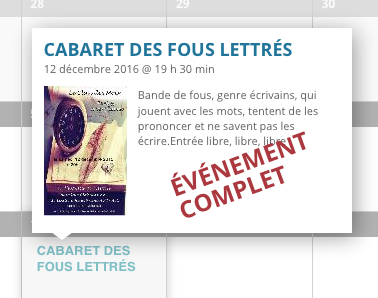
Is that big red text the text that doesn’t show if you make the change Josh recommended? If not, what text are you referring to?
— George
December 10, 2015 at 2:47 pm #1039218ParticipantGreetings
The solution josh provided does changes a few things when the “hover” description is displayed: it doesn’t let the allowed HTML tags through. That in itself, is what “breaks” my custom functionality.
1. The “customized” HTML is added during the importing process (done via a WP All Import job using all Event Calendar Meta tags available). I have a PHP file that generates the XML for the import, based on what info it queries back from the “main” event database. It also checks for events with multiple showings, spiting a single event into all of its showings. So an event with 5 different showings (be it at the same venues or not) would generate 5 different events on my event calendar. This is what you see on the Demo page I gave you.
It also does additional checking on each showing of an event, marking it “full” or “cancelled” if needed (along with other stuff, such as boxoffice links for purchasing of ticket, etc). It does that by adding the following code at the beginning of the description HTML (a canceled event in this case) :
<strong class="stamp">Événement annulé</strong>
My CSS does the rest as far as displaying it goes.The Description is then imported as HTML directly into “the content” of the event.
2. I confirm.
Using “wp_trim_words” (with 55 as a limit) removes the HTML around the words which affects the display later down the road.
Using the default “wp_trim_excerpt” let all the allowed HTML tags through, but it also makes for some very long description! 🙂3. Yes, that “ÉVÉNEMENT COMPLET” is displayed when a showing is “complete”. That is the custom HTML I’m referring to. The case you show in the screenshot (december 12th) simply has this as its full content:
<strong class="stamp">Événement complet</strong><img class="event-img" src="http://media.lavitrinesaguenay.com/image/1449666249573.jpg" alt="" align="left" /> Bande de fous, genre écrivains, qui jouent avec les mots, tentent de les prononcer et ne savent pas les écrire.
Entrée libre, libre, libre
You see the first “strong” bits at the begining is what I use to display the stamp-ish look in red. At the very end, if there is a boxoffice link (it would be parsed in during the XML generation process), it would be shown as such:
<br /><strong>Admission :</strong> <a href="dummydomain.com/to/tickets" target="_blank" class="tribe-events-button">boxoffice link</a>
Funny thing is that “a” HTML tag would display the standard button right in the hover, enabling people to purchase tickets via that url right away.Hopefully I clarified everything!
Let me know if you need further information or direct file access.Best regards
-
This reply was modified 10 years, 10 months ago by
December 11, 2015 at 11:13 am #1039752ParticipantYou’ve indeed clarified things and I appreciate you taking the time to do so!
The good news here is that I think our latest update, 4.0.1, will help resolve this issue. In other words it should keep the excerpts should and preserve that HTML.
So here’s what I would recommend:
• Remove the temporary fix that Josh recommended in the original thread you linked to.
• Upgrade to The Events Calendar 4.0.1
• See if anything is improved here.If there are still some issues with the excerpt HTML, we can continue to work on that, but these steps above should at least bring the code up to do date and ensure that wp_trim_words() is not used or required.
Cheers!
GeorgeDecember 11, 2015 at 11:29 am #1039768ParticipantGreetings
Sadly, the update didn’t fix much. Now, long description are truncated, which is intended, but no HTML is displayed. The image that was in the description also disappeared.
You can see for yourself on the demo link provided earlier.
Regards
December 12, 2015 at 10:53 am #1040241ParticipantHey @Nickolas,
I’m sorry that even the update hasn’t helped much – since it’s the most up-to-date code though, it’s still best to be using that anyways.
Unfortunately some custom code is needed again, but this should meet your needs and keep excerpts short but also preserve the HTML. Simply copy the code in the Gist below into your theme’s functions.php file like you did with Josh’s fix previously – I’ve tested this and it worked well for me, I hope it does for you too!
Here is the Gist where you can find the code:
• https://gist.github.com/ggwicz/ba85b0f9aa4dadbda538
Be sure to copy the entire function over – let me know if this helps!
– George
December 17, 2015 at 11:52 am #1043115ParticipantGreetings
Thanks for the short code, it did the trick of letting HTML through while still cutting short some of the longer description.
Regards
December 21, 2015 at 8:56 am #1044774ParticipantNice! 🙂 Glad to hear this @Nickolas. I will submit a fix for this to be included in some future update of the plugin.
Cheers!
George -
This reply was modified 10 years, 10 months ago by
-
AuthorPosts
- The topic ‘Long content on event description, but still allow HTML’ is closed to new replies.