

Forum Replies Created
-
AuthorPosts
-
George
ParticipantThanks for sharing! 😀 Sorry my original code didn’t help, I’m not sure why it didn’t but am glad you have a solution now regardless.
Cheers!
GeorgeDecember 11, 2015 at 11:13 am in reply to: Long content on event description, but still allow HTML #1039752ParticipantYou’ve indeed clarified things and I appreciate you taking the time to do so!
The good news here is that I think our latest update, 4.0.1, will help resolve this issue. In other words it should keep the excerpts should and preserve that HTML.
So here’s what I would recommend:
• Remove the temporary fix that Josh recommended in the original thread you linked to.
• Upgrade to The Events Calendar 4.0.1
• See if anything is improved here.If there are still some issues with the excerpt HTML, we can continue to work on that, but these steps above should at least bring the code up to do date and ensure that wp_trim_words() is not used or required.
Cheers!
GeorgeParticipantHey @Koro,
Event Categories are a separate taxonomy and will not show up next to “normal” Categories unless you were to do some extensive code customization.
I’m sorry if I’m misunderstanding your question at all! If you think I am, you can share screenshots of the issue to help clarify things. You can do so by uploading the screenshots to Imgur.com, Flickr.com, CloudUp.com, or any similar image-hosting site; then just share the links to those images here and I’ll take a look.
Thank you!
GeorgeParticipantNo problem! Sorry to bear the news that our software won’t be useful for this project 🙁
Thanks for considering it all to begin with, though. Cheers!
— George
ParticipantHey Steffen,
Thank you for this!
“Premium” is not a a menu item generated by The Events Calendar or Events Calendar Pro – it sounds like you are referring to a menu item from another plugin 🙁
Sorry to disappoint! And sorry if I’m misunderstanding something here.
Thank you for your patience with this,
GeorgeParticipantI understand Daniel, and apologize for the inconveniences here! Stay tuned 🙂
ParticipantThank you Carolyn! Sounds good – take your time with this and just keep me posted if/when you’re able to do the steps I shared above.
As for your question here:
Am wondering if there is a way to upgrade to a newer version of jQuery or is this something that has to be corrected in the theme itself?????
This is indeed something that requires a code change within the theme. I suspect, anyways, based on my support experience over the years.
The steps I recommended above will reveal the makeup of the theme’s functions.php file to us, which is usually where themes load jQuery.
And so I’ll read through the file, try to spot this error, and then hopefully will help you fix it (which will be easy – if this is indeed the culprit here!).
Thank you for your patience with all of this! 😀
George
ParticipantThank you for elaborating on this Gary; we unfortunately cannot help with implementing this customization 🙁 I’m sorry to disappoint – but custom coding projects are outside the scope of support here (check out “Product Support” on this page to learn more).
Your best option would be to contact the extension developer if this relates to a specific extension; otherwise, you could hire a professional to implement any customization you need. If it’s any help, we have a list of highly-rated customizers here for reference → http://m.tri.be/18k1
Sincerely,
GeorgeParticipantThank you for this!
If you deactivate WPML completely, and try creating a recurring event like this, does anything improve?
— George
December 11, 2015 at 10:38 am in reply to: Warning: strtotime() expects parameter 1 to be string, object given in #1039730ParticipantI really appreciate your patience Matt!
Can you share your ‘system information’ one more time here, now that some things are updated and what not? I will try again to recreate this problem; once I can do that, we should at least be able to try and work backwards and figure out the problem…
I’m really sorry for all of this Matt! Thank you for the continued patience and cooperation.
Sincerely,
GeorgeParticipantHi,
I’m seeing some issues now unfortunately, and they arising from your theme:
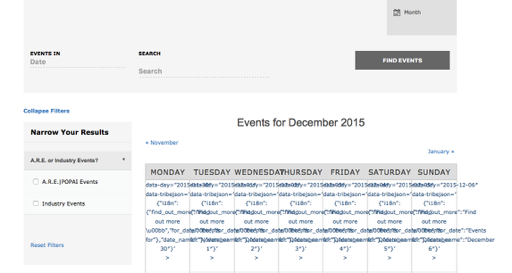
We unfortunately cannot help much with theme styling issues, but just to test this hypothesis to confirm that your theme is to blame anyways, can you please try activating a default theme like Twenty Twelve, Twenty Fourteen, etc. on your site?
Once activated, see if you can recreate these exact problems.
1. Can you recreate these problems when a default theme is active?
2. If not, how about if you leave this default theme active and then try proceeding with deactivating every other plugin on your site one at a time; other than The Events Calendar of course! Check on the issues after each plugin deactivation and see if anything is improved; let us know what you find.
3. What are the Permalinks Settings for your site? These are literally in the “Settings > Permalinks” page of your wp-admin. For example, are they /%postname%/? Or something else…
Please address each of these three pointed questions in order – it’s simple but will provide a lot more information about the nature of this problem than you might expect! 😀
Thank you!
GeorgeParticipantHey @nadine,
I’m sorry to hear that the problem has resurfaced!
I would recommend removing the license keys from your site.
Then, go to http://theeventscalendar.com/my-account/license-keys and click the “Disconnect Now” link next to all of your product licenses.
Then, go back to your wp-admin and try entering the license keys again. Let me know if anything improves when you do this!
Thank you 🙂
GeorgeParticipantHey @adis,
I’m sorry to hear about this problem. To keep things organized and to ensure that your specific problems get the right attention (as these problems may be different, and seem like they are at their source) then can you please open a new thread? A support tech will get to it as soon as possible.
Please include your system information in that new thread; here’s how to do that → https://theeventscalendar.com/knowledgebase/sharing-sys-info/
Thanks!
GeorgeParticipantAwesome! Thanks for the update @David, glad to hear progress has been made 🙂
Cheers,
GeorgeParticipantI’m sorry about that @Mad Dog! If you go through all of the steps listed here, does that help at all? → https://theeventscalendar.com/knowledgebase/fixing-http-404-errors/
-
AuthorPosts