
Home › Forums › Calendar Products › Community Events › Version 4.0 conflict
- This topic has 13 replies, 3 voices, and was last updated 10 years, 8 months ago by
Support Droid.
-
AuthorPosts
-
December 7, 2015 at 12:54 am #1036588
Carolyn
ParticipantI installed the latest updates (new versions) to both The Events Calendar as well as to my PRO plugins this morning. After installing the new versions of the plugins, my drop down menus would no longer display. When I deactivated The Events Calendar PRO plugin, my drop down menus started working again. I worked with the folks at GoDaddy to figure out which new plugin caused the conflict to keep the drop down menus from being displayed. The technical person that I was working with at GoDaddy suggested that I report this issue to you.
As a bit of background, I am not a technical person but was given our Homeowners Association website to manage without having a technical support person. Our website is using the Word Press Magnificent theme
Thank you.
Carol Short
[email protected]
512-396-2488December 7, 2015 at 12:16 pm #1037086George
ParticipantI’m sorry to hear about this Carolyn!
Can you share a link directly to a page on your site where we can see the broken drop-down menus? I’ll take a look and try to spot the problem.
Sorry for the trouble; there could be a JavaScript conflict of some kind here, and I will do what I can to help resolve that if that’s the case 🙂
Sincerely,
GeorgeDecember 7, 2015 at 10:47 pm #1037309ParticipantGeorge, thanks for the quick response back to me.
I will have to re-activate the PRO plugin in order for the problem to show up. At what time would you like to work on the problem? If I re-activate the PRO plugin and leave it activated, then our residents will be unable to access many of our services which are accessed via the drop down menus……so I don’t want them to be inconvenienced for a long period of time.
Carolyn (aka Carol)
December 8, 2015 at 11:25 am #1037776ParticipantHey Carolyn,
I’m very sorry about the issues with activating Events Calendar Pro, and what that would mean for your site 🙁
If you activate the PRO plugin as soon as you see this post of mine here, and then let me know, then I will work as fast as possible to check in on this thread and investigate the problem.
Hopefully the issue will only be “live” for a few short hours – I’m sorry about this! Would there be any sort of notice you could add on your site temporarily to alert people that the site is going through maintenance? (Note: I do not mean something that blocks access to the site with an “under construction” wall in front of it, I just mean a simple text notice somewhere on the homepage or something…)
Thank you so much for your cooperation and patience – I’m really sorry about the trouble caused by all of this but will work as quickly as possible!
Sincerely,
GeorgeDecember 8, 2015 at 12:40 pm #1037804ParticipantGeorge, I have activated the PRO plugin on our website. On the home page when you hover over several of the pages (HOA Info, Request/Submit Info, and Membership), you should get a drop down menu and this does not happen with the PRO plugin is activated.
Also just found another issue that I have not yet researched. I created a new post about the system maintenance, but it is not displaying on the home page. It is not displaying regardless of whether or not the PRO plugin is activated, so this additional problem may not be related to PRO. However, I did add a calendar entry saying “System Maintenance” for today so it shows up in the widget for the events calendar which displays at the top of the left sidebar.
I will be gone for about an hour, but will check back in to see if I have any additional information from you.
Thank you for working with me on this issue.
Carolyn
December 9, 2015 at 12:16 pm #1038412ParticipantThank you Carolyn – can you please provide a link to the home page? One has never been shared thus far.
Thank you,
GeorgeDecember 9, 2015 at 12:20 pm #1038417ParticipantGeorge, here is the link.
BTW, I figured out the problem with getting the post to show up on the home page – I hadn’t added a category, duh, user error.
So it is just the drop down menus not displaying that is still a problem.
Carol
December 9, 2015 at 12:40 pm #1038434ParticipantThank you for this @Carolyn, and for leaving your site like this while we investigate!
I just took a look at things; there’s indeed a JavaScript error but it’s not one I can recreate on my own site.
So for now I think that perhaps your site’s version of jQuery is part of the problem here.
This may be because of your theme. Can you share a .zip of your theme with us? You can do that by uploading a .zip of your theme to http://ge.tt and then sharing the download link there with us here on this thread.
I’ll try to take a look there and see what I can find.
Thank you!
GeorgeDecember 9, 2015 at 1:04 pm #1038444ParticipantHi George,
I’m just a user who inherited our HOA website and I have no technical background and no clue on how to find the theme file and how to create a zip. Basically all I know how to do is create posts, pages, contact forms, and set up the menus to display the pages, plus I was shown how to install updates to the plugins. I will be happy to provide the requested file if you can give me specific instructions on where to find it and how to zip it. Or if you just need to go into my dashboard and take a look, I do know how to create a temporary admin login for you and then I can delete it as soon as you finish.Am certain that it must be nightmare to have to deal with us old retired “non-technical” folks.
I’ll be leaving in about 20 minutes to go workout with my trainer, so I may be slow in responding.
Carol
December 9, 2015 at 10:51 pm #1038590ParticipantHey George,
For your information, I deactivated the PRO plugin earlier this evening so my residents could access the menu items that don’t display with the new version of PRO. I will be happy to activate it activate it again when you need to work on it again. We had just posted our winter newsletter on the website and there is a lot of traffic on the site this week, so I took the liberty of making the menus available at least for this evening. So please let me know when you want to be working so I can try and be available to work with you if you need my assistance. I certainly appreciate you helping me with this problem.Carolyn
December 10, 2015 at 12:03 pm #1039066ParticipantHey Carolyn,
Thank you for your updates here!
First and foremost, do not apologize for any “lack of technical skill” or anything! 😀 I totally understand your predicament and it’s honestly not a problem at all to help folks of all variety of skill level. No worries. I appreciate your patience, politeness, and cooperation very much and no need to apologize for anything!
Now, with all of the above being said, there is a bit of a roadblock here 🙁
The issue here is that I cannot reproduce your problems on my local site. That fact then leads to the conclusion that your theme or another plugin on your site is causing a code conflict.
So with that in mind I have looked at your site for an error, and found one.
Even with the specific error, though, I was unable to recreate it on my site 🙁
And so I looked through what plugins I could find on your site, but found that the version of jQuery being loaded on your site is very outdated.
This is almost certainly a result of bad code from within your theme – this is a very common issue with themes specifically.
—
So working with the theme code is the only solution here. But if you’re not familiar with the steps required for helping that process along, the only other option would be for me to log into your site directly, but we have a very strict policy that prevents us from logging into customer sites for any reason.
I am very sorry about this predicament, @Carolyn!
—
A Last Resort
There is one idea I have.
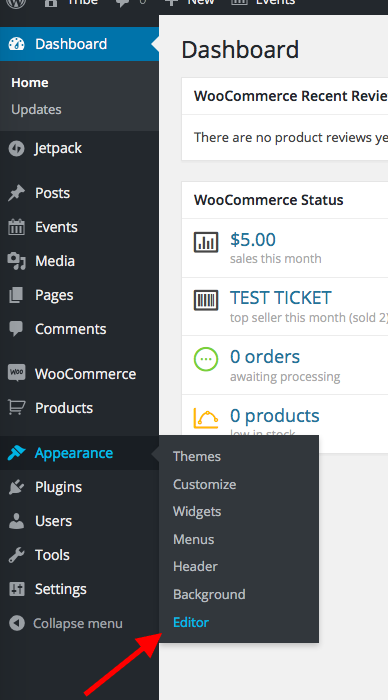
I would recommend going into your site’s wp-admin first. Then, navigate to Appearance > Editor in your wp-admin. Here’s a screenshot of what I mean:
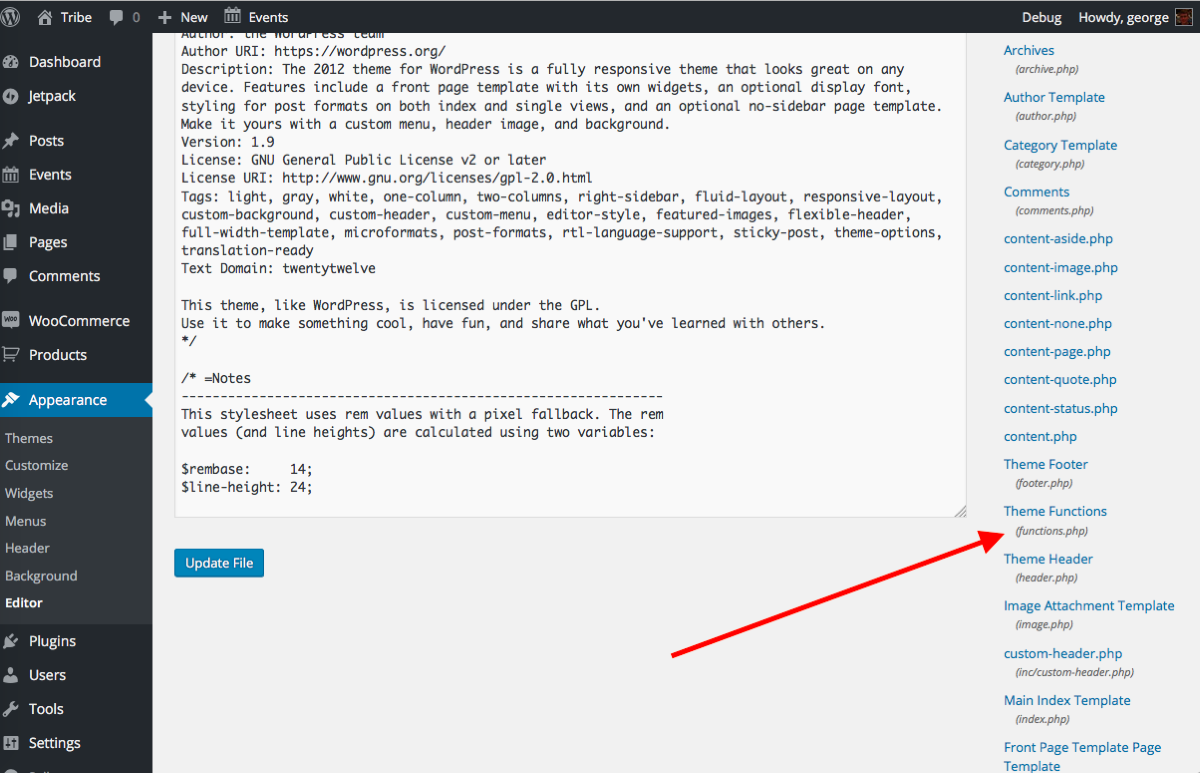
Once here, look for a file called Functions.php – it may be rather small on the right-hand side of the screen, but should be there! Here’s a screenshot of this, click on the image to open this screenshot in its own window so you can view it larger:
—
Once you click this file, its contents will populate that main “editor” window.
Copy and paste the entire contents of this file into a Gist at http://gist.github.com – and then save that Gist and share a link to it here.
I hope this is all clear and makes sense – let me know what you think and if you can make that Gist!
Thank you,
GeorgeDecember 10, 2015 at 1:35 pm #1039139ParticipantThanks, George. Will give it a try soon. I just received approval from my HOA board to upgrade to the “Managed hosting” which also includes daily backups. Once I get this change made so I could easily restore my current system if I screw something up, then I will give it a try. I have already printed out your email and will study it before I begin making any changes.
You have no idea how much your help means to me. And, if I can’t get it to work, then maybe I can put out an SOS call to our residents to see if there is anyone there that can help A. Am wondering if there is a way to upgrade to a newer version of jQuery or is this something that has to be corrected in the theme itself?????
Again thank you and I’ll let you know what happens when I try to do the fix.
Carolyn
December 11, 2015 at 10:53 am #1039736ParticipantThank you Carolyn! Sounds good – take your time with this and just keep me posted if/when you’re able to do the steps I shared above.
As for your question here:
Am wondering if there is a way to upgrade to a newer version of jQuery or is this something that has to be corrected in the theme itself?????
This is indeed something that requires a code change within the theme. I suspect, anyways, based on my support experience over the years.
The steps I recommended above will reveal the makeup of the theme’s functions.php file to us, which is usually where themes load jQuery.
And so I’ll read through the file, try to spot this error, and then hopefully will help you fix it (which will be easy – if this is indeed the culprit here!).
Thank you for your patience with all of this! 😀
George
February 18, 2016 at 8:32 am #1076128KeymasterThis topic has not been active for quite some time and will now be closed.
If you still need assistance please simply open a new topic (linking to this one if necessary)
and one of the team will be only too happy to help. -
AuthorPosts
- The topic ‘Version 4.0 conflict’ is closed to new replies.