
Home › Forums › Calendar Products › Events Calendar PRO › Default View – Month Not Working
- This topic has 12 replies, 3 voices, and was last updated 10 years, 8 months ago by
Support Droid.
-
AuthorPosts
-
November 16, 2015 at 2:38 pm #1026621
Janaur McCormick
ParticipantI’ve toggled the default view to Month under the Display tab in Settings, but my events still show as tabs. How do I fix it?
November 17, 2015 at 6:36 am #1026978George
ParticipantHey @areadmin,
I went to what I presume is your events URL here → http://www.retailenvironments.org/events/
The month view was indeed loaded by default and I didn’t see any “tabs” at all on the page – here’s a screenshot showing what I saw:
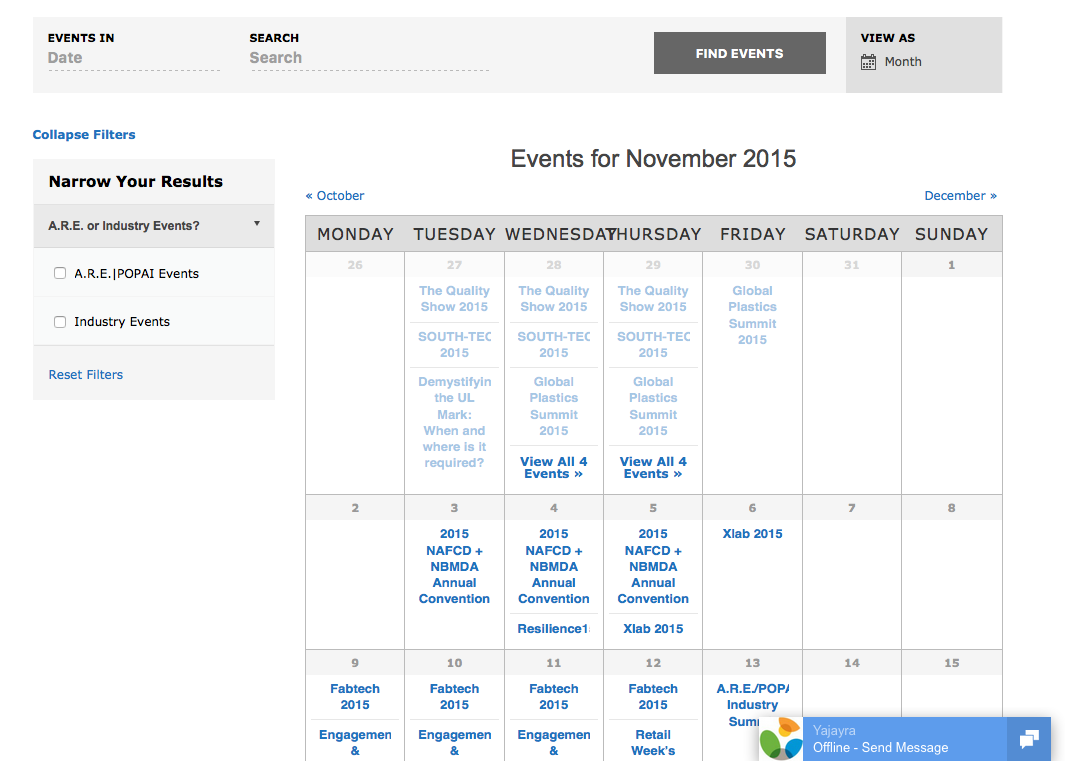
Can you confirm whether issues remain here? If so, can you elaborate on what those issues are specifically, and possibly include screenshots or something? Sorry for my misunderstanding here! Just want to be 100% sure I know what you’re talking about so I can best help out with the problems.
And one last note on screenshots, you can do so by uploading the screenshot to Imgur.com, Flickr.com, CloudUp.com, or any similar image-hosting site; then just share the links to those images here and I’ll take a look.
Thank you!
GeorgeNovember 17, 2015 at 9:54 am #1027100ParticipantI’m still seeing a list view when I go here – this is link direct from the main nav on my website –
November 18, 2015 at 10:28 am #1027628ParticipantHello,
How have you constructed the navigation menu there? The solution here seems to be simply deleting the existing “Events” element there and just adding a new link to “Events” that goes JUST to this URL:
http://www.retailenvironments.org/events/
I hope that helps,
GeorgeDecember 10, 2015 at 4:37 pm #1039286ParticipantThe latest update messed up the display of the calendar. Take a look at the calendar view here:
http://www.retailenvironments.org/events/
And the list view has all of this extra white space everywhere. How do I fix?
December 10, 2015 at 4:40 pm #1039290ParticipantNote, I added the Community Events, so not sure if that had an adverse affect.
December 10, 2015 at 4:46 pm #1039295ParticipantSYSTEM INFO
url
http://www.retailenvironments.org
install keystribe-filterbar = d8361272c3344ceccf615291dac8c5aa5701205e
WordPress version
3.9.1
PHP version
5.3.28
pluginsLayerSlider WP version 5.1.1 by Kreatura Media(http://kreaturamedia.com/)
Akismet version 3.1.5 by Automattic(http://automattic.com/wordpress-plugins/)
WordPress Auth0 Integration version 1.3.6 by Auth0(https://auth0.com)
Contact Form 7 version 4.0.3 by Takayuki Miyoshi(http://ideasilo.wordpress.com/)
Duplicate Post version 2.6 by Enrico Battocchi(http://lopo.it)
FEEDZY RSS Feeds by b*web version 2.7 by Brice CAPOBIANCO(http://b-website.com/)
Goodlayers Portflio Post Type version 1.0.1 by Goodlayers(http://www.goodlayers.com)
Goodlayers Shortcode version 1.0 by Goodlayers(http://www.goodlayers.com)
Goodlayers Importer version 1.0.0 by Goodlayers(http://goodlayers.com/)
Jetpack by WordPress.com version 3.3.2 by Automattic(http://jetpack.me)
LeadPages connector version 1.2.0.3 by LeadPages(http://www.leadpages.net/)
Remove Protected In Title version 1.0 by Dejan Blazeski(http://www.dejanblazeski.com)
Super RSS Reader version 2.5 by Aakash Chakravarthy(http://www.aakashweb.com/)
The Events Calendar: Community Events version 4.0.1 by Modern Tribe, Inc.(http://m.tri.be/21)
The Events Calendar: Filter Bar version 4.0.1 by Modern Tribe, Inc.(http://m.tri.be/25)
The Events Calendar version 4.0.1 by Modern Tribe, Inc.(http://m.tri.be/1x)
Tidio Chat version 3.0.1 by Tidio Ltd.(http://www.tidiochat.com)
UpdraftPlus – Backup/Restore version 2.11.18.22 by UpdraftPlus.Com, DavidAnderson(https://updraftplus.com)
WordPress Importer version 0.6.1 by wordpressdotorg(http://wordpress.org/)
Yoast SEO version 2.3.4 by Team Yoast(https://yoast.com/)
WordPress-d3.js version 2.2 by Ruben Afonso(http://www.figurebelow.com)
WP Edit version 3.5 by Josh Lobe(https://wpeditpro.com)
WPMU DEV Dashboard version 3.5.3 by WPMU DEV(http://premium.wpmudev.org/)network plugins
–
mu plugins
–
theme
Flawless
multisite
–
settingsrecurring_events_are_hidden = hidden
tribeEventsTemplate = default
tribeEventsBeforeHTML =
tribeEventsAfterHTML =
previous_ecp_versions = Array
(
[0] => 0
[1] => 3.4.1
[2] => 3.5
[3] => 3.5.1
[4] => 3.6
[5] => 3.6.1
[6] => 3.7
[7] => 3.8
[8] => 3.8.1
[9] => 3.9
[10] => 3.9.1
[11] => 3.9.3
[12] => 3.10
[13] => 3.10.1
[14] => 3.11.2
[15] => 3.12.1
[16] => 3.12.2
[17] => 3.12.3
[18] => 3.12.6
[19] => 4.0
)
latest_ecp_version = 4.0.1
welcome_notice = 1
viewOption = month
donate-link =
postsPerPage = 10
liveFiltersUpdate = 1
showComments =
showEventsInMainLoop = 1
eventsSlug = events
singleEventSlug = event
multiDayCutoff = 00:00
defaultCurrencySymbol = $
reverseCurrencyPosition =
embedGoogleMaps = 1
embedGoogleMapsZoom = 10
debugEvents =
stylesheetOption = full
tribeEnableViews = Array
(
[0] => list
[1] => month
)
tribeDisableTribeBar =
monthEventAmount = 3
events_filters_layout = vertical
events_filters_default_state = open
dateWithYearFormat = F j, Y
dateWithoutYearFormat = F j
monthAndYearFormat = F Y
dateTimeSeparator = @
timeRangeSeparator = –
datepickerFormat = 0
earliest_date = 2014-02-24 00:00:00
latest_date = 2017-03-09 17:00:00
last-update-message = 3.12.3
schema-version = 4.0.1
enable_month_view_cache =
pue_install_key_tribe_filterbar = d8361272c3344ceccf615291dac8c5aa5701205e
pue_install_key_events_community = 1fbe124f19783e5617d11a9930bd48b0faca88f8WordPress timezone
–
server timezone
UTC
common library dir
C:\inetpub\www-RetailEnvironments\html\wp-content\plugins\the-events-calendar/common/src/Tribe
common library version
4.0.1December 11, 2015 at 10:35 am #1039729ParticipantHi,
I’m seeing some issues now unfortunately, and they arising from your theme:
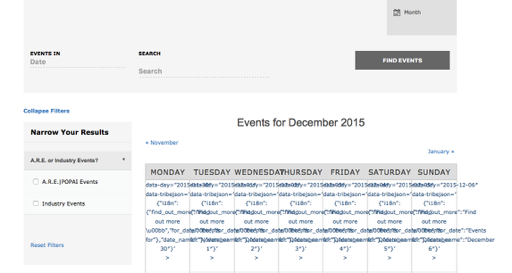
We unfortunately cannot help much with theme styling issues, but just to test this hypothesis to confirm that your theme is to blame anyways, can you please try activating a default theme like Twenty Twelve, Twenty Fourteen, etc. on your site?
Once activated, see if you can recreate these exact problems.
1. Can you recreate these problems when a default theme is active?
2. If not, how about if you leave this default theme active and then try proceeding with deactivating every other plugin on your site one at a time; other than The Events Calendar of course! Check on the issues after each plugin deactivation and see if anything is improved; let us know what you find.
3. What are the Permalinks Settings for your site? These are literally in the “Settings > Permalinks” page of your wp-admin. For example, are they /%postname%/? Or something else…
Please address each of these three pointed questions in order – it’s simple but will provide a lot more information about the nature of this problem than you might expect! 😀
Thank you!
GeorgeDecember 11, 2015 at 10:57 am #1039740ParticipantUnfortunately, I can’t change the theme as this is a heavily trafficked site for a business. So you’re assuming it’s the theme? But the monthly view worked just fine before, so how can the theme be the issue?
December 11, 2015 at 11:00 am #1039746ParticipantHere’s the permalink setting.
December 11, 2015 at 11:16 am #1039754ParticipantI deactivated some plugins, refreshed, reactivated the critical ones and it seems to be working.
December 12, 2015 at 10:11 am #1040231ParticipantThank you for sharing that information about deactivating plugins and such – this might actually reveal the source of the conflict. I assumed it was the theme because 9 times out of 10, with the issues I saw on your page, the theme is the culprit – a plugin definitely could be, though.
I would recommend trying to activate each of those other “non-critical” plugins one at a time. After each activation, check on your Month View and see if any issues arise.
You don’t have to do these steps if you don’t want to, of course – but they might help reveal which specific plugin is causing the problems on your site.
Cheers,
GeorgeFebruary 18, 2016 at 8:32 am #1076160KeymasterThis topic has not been active for quite some time and will now be closed.
If you still need assistance please simply open a new topic (linking to this one if necessary)
and one of the team will be only too happy to help. -
AuthorPosts
- The topic ‘Default View – Month Not Working’ is closed to new replies.