

Forum Replies Created
-
AuthorPosts
-
George
ParticipantHi Pro! 🙂
Thanks for reaching out – I’ll address each of your questions as follows:
Does the plugin support frontend submissions?
The Events Calendar alone does not; but if you buy the premium add-on “Community Events”, then yes, it will enable front-end submissions.
Is there an opportunity to create premium packages with extended input fields? After the consumption of premium messages only the based listings without the additional fields should be possible. If a premium listing is deleted, this entry should be available again with extended fields. Is this possible?
Hm – I admit that I’m not quite sure what you mean here. Can you clarify what you mean by “premium packages”?
In general, though, what you mention about extended input fields makes me think that what you’re describing here is something that would not be possible “out-of-the-box” with our plugins. Custom development may be required; but let me know more details and examples here and I’ll give a more thorough answer!
can you please explain how your product supports overlapping events? let’s say i have 5 events with different start and end times on the same day between 9am and 5 pm. Do you have an example of how this would be displayed? thanks
Absolutely! The events should not overlap and are sorted by their start dates. So for some visual examples, here’s a screenshot of a day that has 5 events all at different start times and with different end times, in the Month View (the day I’m referring to is today, December 10th, highlighted in blue):
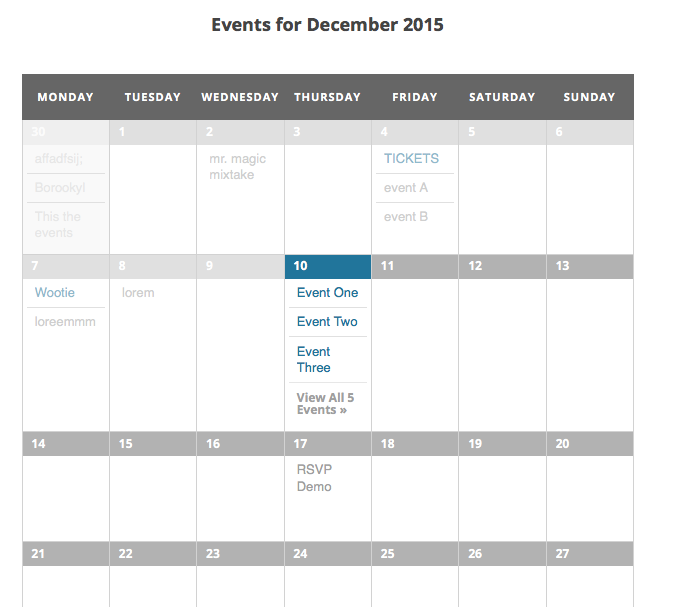
Here is another image that is a bit too large to embed here, but this is what you would see if clicked “See all events” on that above screenshot; in other words, this image is how things look in the List View and in the Day View for a day which has events like you described → https://cloudup.com/cDR9nSEhyCD/f
I hope this all helps!
Cheers,
GeorgeParticipantHey Wendy,
Thanks for reaching out!
In regards to your first question about subdomains, this depends – is each one a separate site? Or a sub-site on a Multisite WordPress installation? If so, and each subdomain is really its own freestanding site, then a Multisite License would be the ideal/recommended license option.
As for your second question, yes, this is fine 🙂 You can disconnect a license by going to http://theeventscalendar.com/my-account/license-keys – once you disconnect the license from one domain, you could then activate that license on another domain successfully.
I hope this helps!
Cheers,
GeorgeParticipantParticipantHey @bigbyrd65,
I’m sorry to hear about this! I have tried to recreate the problem in my own wp-admin but cannot produce this problem.
I’m wondering – does this issue only affect events in your admin, or is the text invisible on any other content like posts or pages?
Thanks,
GeorgeParticipantHey @Barbara,
This is unfortunately a consequence of the cost field requiring integers for values, not strings. You can only change this, at this time, by adding the following code snippet to your theme’s functions.php file:
add_filter( 'tribe_get_cost', 'cost_show_full_meta_field', 10, 2 );function cost_show_full_meta_field( $cost, $post_id ) {
$full_cost = tribe_get_event_meta( $post_id, '_EventCost', false );if ( isset( $full_cost[0] ) ) {
return sanitize_text_field( $full_cost[0] );
}return $cost;
}
I hope that helps! I’m sorry that this is required at this time 🙁
Sincerely,
GeorgeParticipantHey @Abigail,
I’m really sorry about this bug, it’s one we’ve found and have just fixed in our forthcoming Maintenance Release.
This update will be officially released as early as the end of the day today, or tomorrow perhaps – you can wait for this official update, or you can even manually download some Release Candidates right now by heading to the “My Account” Page here on http://theeventscalendar.com:
http://theeventscalendar.com/my-account/downloads
You can manually download the 4.0.1 release there and install it on your site. If you want to wait for the official release, then that release will be available for a one-click automatic update right in your admin 🙂
Thank you!
GeorgeParticipantHey Gaurav,
Unfortunately the slugs you gave as examples are not valid and cannot be used 🙁
So the errors that show are very literally – you can only use numbers, letters, dashes, and underscores. Slashes are not allowed at this time.
I’m sorry if this is a disappointment but hope the information is clear and helps you move forward with your project.
Sincerely,
GeorgeParticipantHey @Charles,
You unfortunately cannot put the calendar on the home page at this time 🙁
The closest you could get is to set up a redirect so that if folks go to electricgap.com it immediately redirects them to electricgap.com/events
I’m sorry to disappoint – please let me know if there’s anything more I can help with here!
Cheers,
GeorgeParticipantHey @Mad dog,
First of all I’m sorry to hear about the Photo View issue – I will investigate this and see if there’s a bug I can recreate here.
—
As for the second issue, my “My Events” page works fine and so I’m wondering if your customizations are at all a factor here. I would recommend first backing up all customizations on your site; then, temporarily remove them and see if anything is improved on your site.
If not, then can you include your “system information” in your reply? Here’s how to do that → https://theeventscalendar.com/knowledgebase/sharing-sys-info/
Cheers,
GeorgeParticipantHey @Graphic,
Sorry to re-open this issue – I was wondering if you happen to still have these issues now with The Events Calendar’s set of 4.0 updates. Community Events is now at 4.0, too – and I can no longer recreate this error with Jetpack Sharing enabled.
Hoping you see my new reply here via email or something – no worries if that doesn’t happen. Just curious about the status of this issue on your site.
Cheers,
GeorgeDecember 10, 2015 at 5:30 am in reply to: De-activating Woo Commerce Tickets crashed my site #1038644ParticipantHey @restoreoregon,
I’m sorry for the trouble here 🙁 It looks like there are two things at play:
1. You were using outdated versions of The Events Calendar’s add-ons, and perhaps The Events Calendar itself.
2. You have customizations in your child theme that reference old code which is no longer around, hence that error there…
So the first order of business, it seems, would be to temporarily deactivate your custom child theme, just so that you can use the site normally. Once this is the case, update The Events Calendar to 4.0 and then install and activate these plugins too:
• Event Tickets 4.0
• Event Tickets Plus 4.0If you have Events Calendar Pro installed on your site, then update that to 4.0 too.
Now try activating the child theme. That fatal error should show up.
I understand how much work you must have put into your child theme, but the good news here is that all of this work does NOT have to be tossed. What likely needs to be done here is simply an updating of class names. So let’s look at that original error:
PHP Fatal error: Class ‘TribeWooTickets’ not found in /home3/restorp4/public_html/wp-content/themes/canvas-child/functions.phpFor this error, head into your child theme’s functions.php file as directed by that error. Find where the class name TrbeWooTickets is being used, and replace it with Tribe__Tickets__Tickets
Save the changes and replace the old functions.php file with this new functions.php
See if the error persists.
If the error still shows in some form, or the functionality of the theme is broken, you can try replacing
Tribe__Tickets__Tickets with Tribe__Tickets_Plus__Main—
The general principle here can then be repeated for each subsequent error that arises, until things are error-free.
I hope this information helps!
Sincerely,
GeorgeParticipantHey @pinder,
I’m sorry for all of the trouble here and will address each of your questions.
Why don’t you answer my question
What question are you referring to? Did you make another post on the forums or something? If so, please link to where you asked a question that we did not answer; I will investigate this 🙂
1. I want to know about upgrading to premium and the benefits.
You mention in your post that you just renewed your license – so it sounds like you already have a premium license. Can you clarify what you mean here? For the most part, getting a license higher up than your current one would just enable you to install the software on a larger number of sites.
2. People who input on my calendar events currently cannot change the venue or organizer so cannot post.
3. Why does events/settings/display/Add HTML before event content it duplicates the comment before the events info?These indeed sound like technical issues and I’m sorry to hear about these – can you please share a link to your Community Events submission page? I will look at it firsthand and see what I can learn.
4. Brittney Dullin is listed as contact and is no longer the contact. I own this website and am the contact.
5. Why can’t someone call me and tell me why I am buying a product that isn’t working and I have no answer on when it will be fixed????
I don’t see the name “Brittney Dullin” in any of the contact information for your license, is that what you mean? If not, can you clarify what you mean here?
Next, we do not provide phone support at this time. This is a universal rule that applies to all customers.
Thank you,
GeorgeParticipantHey @kim!
I’m really sorry about this behavior…there could unfortunately be a bug here, which I will investigate, but just for the time being, you can fix this if you add the following CSS to the bottom of your theme’s style.cs file:
#tribe-community-events.form .tribe-events-before-html {

    display: none !important;

}
—
Now, to help with investigating the existence of a bug here, could you help with the following two things?
1. First can you share your “System Information” with us? Here’s how → https://theeventscalendar.com/knowledgebase/sharing-sys-info/
2. Next, can you confirm whether or not you have any customizations whatsoever on your site? I’m talking only about customizations to either The Events Calendar, or to Community Events.
Thank you!
GeorgeDecember 9, 2015 at 12:45 pm in reply to: Convert additional field (URL) into a button on the single event template #1038438ParticipantHi @webmaster,
This is possible but would unfortunately require some custom coding – I would recommend getting familiar with the custom templating system within The Events Calendar by reading this guide: https://theeventscalendar.com/knowledgebase/themers-guide/
You could then use those principles to achieve this:
I’d like this additional field to display on the single event page as a button with the title ‘Photo gallery’ if a URL has been entered in the field.
I unfortunately cannot find the article or page you’re referring to that explains this in more detail 🙁
Sorry to disappoint about this last point – but best of luck with your customizations!
Sincerely,
GeorgeParticipantSorry to hear about this – can you share the “System Information” for the site where this is happening? Here’s how to do that: https://theeventscalendar.com/knowledgebase/sharing-sys-info/
Thank you!
George -
AuthorPosts