
Home › Forums › Welcome! › Pre-Sales Questions › Front-end submissions, and overlapping events
- This topic has 5 replies, 2 voices, and was last updated 10 years, 8 months ago by
Support Droid.
-
AuthorPosts
-
December 10, 2015 at 8:16 am #1038907
Pro
GuestPresales Questions: Does the plugin support frontend submissions?
Is there an opportunity to create premium packages with extended input fields? After the consumption of premium messages only the based listings without the additional fields should be possible. If a premium listing is deleted, this entry should be available again with extended fields. Is this possible?can you please explain how your product supports overlapping events? let’s say i have 5 events with different start and end times on the same day between 9am and 5 pm. Do you have an example of how this would be displayed? thanks
December 10, 2015 at 9:36 am #1038975George
ParticipantHi Pro! 🙂
Thanks for reaching out – I’ll address each of your questions as follows:
Does the plugin support frontend submissions?
The Events Calendar alone does not; but if you buy the premium add-on “Community Events”, then yes, it will enable front-end submissions.
Is there an opportunity to create premium packages with extended input fields? After the consumption of premium messages only the based listings without the additional fields should be possible. If a premium listing is deleted, this entry should be available again with extended fields. Is this possible?
Hm – I admit that I’m not quite sure what you mean here. Can you clarify what you mean by “premium packages”?
In general, though, what you mention about extended input fields makes me think that what you’re describing here is something that would not be possible “out-of-the-box” with our plugins. Custom development may be required; but let me know more details and examples here and I’ll give a more thorough answer!
can you please explain how your product supports overlapping events? let’s say i have 5 events with different start and end times on the same day between 9am and 5 pm. Do you have an example of how this would be displayed? thanks
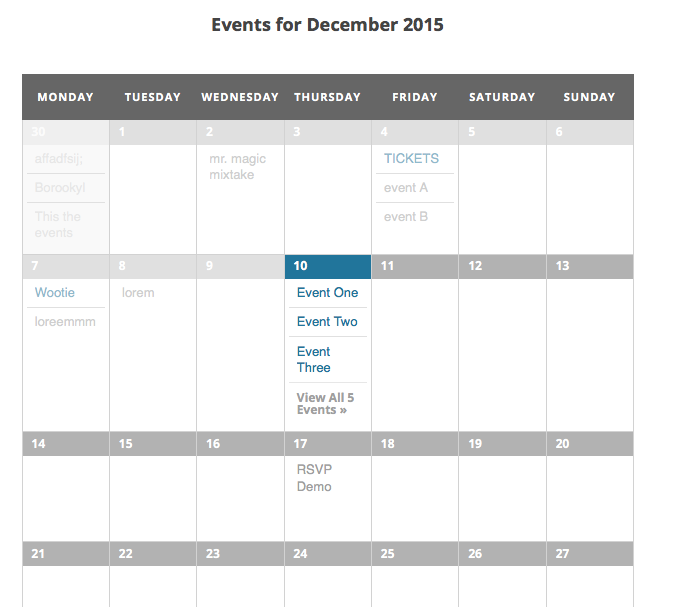
Absolutely! The events should not overlap and are sorted by their start dates. So for some visual examples, here’s a screenshot of a day that has 5 events all at different start times and with different end times, in the Month View (the day I’m referring to is today, December 10th, highlighted in blue):
Here is another image that is a bit too large to embed here, but this is what you would see if clicked “See all events” on that above screenshot; in other words, this image is how things look in the List View and in the Day View for a day which has events like you described → https://cloudup.com/cDR9nSEhyCD/f
I hope this all helps!
Cheers,
GeorgeDecember 10, 2015 at 3:02 pm #1039233Guest1. when you say add-on you mean to buy several to achieve it? Events Calendar + add-on “Community Events” How much is that?
2. Do you have Booking cut-off date, this is the definite date after which bookings will be closed (ex: before the events starts)?
3. Why does it show the names of other Organizers?
4. Does it have
Total Spaces: Individual tickets with remaining spaces will not be available if total booking spaces reach this limit?5. Maximum Spaces Per Booking?
December 11, 2015 at 8:02 am #1039652GuestDo I need to post the last question on the other page?
December 11, 2015 at 11:25 am #1039762ParticipantHi Pro,
No need to post elsewhere for these questions 🙂
1. when you say add-on you mean to buy several to achieve it? Events Calendar + add-on “Community Events” How much is that?
Yes, you would need to buy a license for these premium add-ons. The lowest license cost is $89USD per license.
2. Do you have Booking cut-off date, this is the definite date after which bookings will be closed (ex: before the events starts)?
Yes – you can set each each ticket to have a “Start sale” date and “End sale” date. If before the start sale date, or after the end sale date, tickets/bookings cannot be bought.
3. Why does it show the names of other Organizers?
I don’t know what you mean here, unfortunately – if you mean the “mr. magic mixtake” text in the first screenshot, this is just the title of another event, not of an organizer.
4. Does it have
Total Spaces: Individual tickets with remaining spaces will not be available if total booking spaces reach this limit?
5. Maximum Spaces Per Booking?I’m not sure what this means either, unfortunately, but it sounds like you’re asking if you can set quantities on different ticket types. The answer to this is YES – you can say ticket type A (which maybe is Free and for bookings) only has 50 spots, but then ticket type B (which maybe is $10.00 per ticket for some other thing) only has 25 spots, and once these limits are reached independently of each other they will not be able to sell more spots.
—
I hope this helps!
GeorgeFebruary 18, 2016 at 8:32 am #1076132KeymasterThis topic has not been active for quite some time and will now be closed.
If you still need assistance please simply open a new topic (linking to this one if necessary)
and one of the team will be only too happy to help. -
AuthorPosts
- The topic ‘Front-end submissions, and overlapping events’ is closed to new replies.