

Forum Replies Created
-
AuthorPosts
-
George
ParticipantThank you for sharing this, @xwenieeeorg – I will investigate this output.
In the meantime, I’m wondering if you had any thoughts about what I wrote above? Namely this:
Hm – this sounds like normal behavior here. Because in both URLs you listed, they are the same domain name. /icx-dev and /icx are being read as different pages on ewh.ieee.org
I think a big part of this problem is that you are trying to treat these two domain names separately with license activation and such:
ewh.ieee.org/icx-dev
ewh.ieee.org/icxHowever, they are the same and singular domain name: ewh.ieee.org
At this time our license system will not recognize /icx-dev and /icx as different domain names. These are subdirectories on the same domain, so the system will recognize them as directories or pages of ewh.ieee.org. This means that they cannot be handled as if they were separate domains.
I will update this thread soon with more information regarding your error log output once I can read through it and see what I learn from it.
Thank you!
GeorgeParticipantThank you so much for your testing this!
Yes, if things work in a default theme then it is your custom theme to blame, and as you mentioned it could be a JavaScript-related bug.
I wasn’t able to spot any JavaScript errors on my initial exploration of your site, though, so unfortunately there could be a PHP-level conflict too here.
I would recommend the following two courses of action from here:
• First, send a .zip of your theme to us if possible. You can do this by uploading a .zip of the theme to a site like http://ge.tt or http://cloudup.com – then, just share a link to this download here. We cannot support bugs in other software, including themes, but regardless I will set aside a few minutes to at least see if there’s anything that stands out as obviously the culprit. You never know, there could be a quick fix here.
• Next, since a “quick fix” is unlikely, your best bet is to contact your theme developer directly for some support attention on this.
I’m sorry about the nature of this problem; thank you for your patience and for deactivating everything on your site in the name of testing this. (By the way, you can restore your site to normalcy now!)
Sincerely,
GeorgeJanuary 20, 2016 at 4:48 pm in reply to: Error message on our site regarding the Events Calendar #1059534ParticipantGlad to hear it! 😀
Thanks for your patience with this issue. I will close up this thread for now but please open a new thread any time if other questions, comments, or concerns ever arise.
Sincerely,
GeorgeJanuary 20, 2016 at 4:25 pm in reply to: Calendar PRO hangs/buffers infinitely forward from current month #1059522ParticipantHi Susanna,
I am glad you’re up to date, that’s the first step here and good for security, stability, etc.
I checked out your calendar page anew and see this JavaScript error show up on the page when trying to paginate months:

I’m not 100% certain if my suggestion here will help, but I would recommend you try out a custom support plugin I have written for you to try and resolve this.
To get the plugin, first download here → https://cloudup.com/cwcfeKGvwNp
Then just install and activate that like any other plugin.
Let me know if it helps!
George
P.S. – More information about the plugin
Hey Susanna,
I just wanted to elaborate a bit on the above plugin I shared with you. Basically, the error seen on your site seems to be related to the fact that scripts like jQuery are being loaded over HTTPS, but not correctly. I’m not sure why it’s happening incorrectly, but a potential solution here is to simply remove the https:// section of the script URL.
That’s what the plugin I shared with you does 🙂
I hope it helps!
January 20, 2016 at 3:55 pm in reply to: jquery error stopping me from editing tickets… or post, please help! #1059496ParticipantHey @Aaron
Thanks so much for this information.
I know you mention having already tried deactivating your theme and plugins and such, so I don’t want to recommend doing this again, but unfortunately I cannot recreate this bug at all on my site.
You mention the error being related to this JavaScript:
jQuery(‘#ihc_drip_start_certain_date’).datepickerWhen this error popped up in your console, are you able to see which file it comes from?
Thank you,
GeorgeJanuary 20, 2016 at 12:39 pm in reply to: Event Ticket Plus – getting location to appear on an order #1059432ParticipantHi Amanda,
Our support time response is a reply every 24 hours on business days – thank you for your patience.
In regards to the customization you would like to make, you are correct about the “functionality being there”. The steps required to get all of that functionality to work together for this specific, not-included-by-default functionality is a bit trickier. But possible nonetheless – here are the general things to do:
• Get the Event ID for the event whose tickets are in the order.
• Use the Event ID to get the event’s Venue ID.
• Use the Venue ID to display whichever venue information you’d like.
• Modify the WooCommerce “order” table view to include this information.We cannot help with customizations, Amanda. Please see the “product support” section of this page for more information → http://theeventscalendar.com/terms
However, despite that I have actually put together a small bit of code for you! 🙂
It’s just a starting place – we cannot support this code or help make further tweaks with it, but you are more than welcome to. Here’s a screenshot of the column it adds to the Orders page [right before the last ‘actions’ column]:
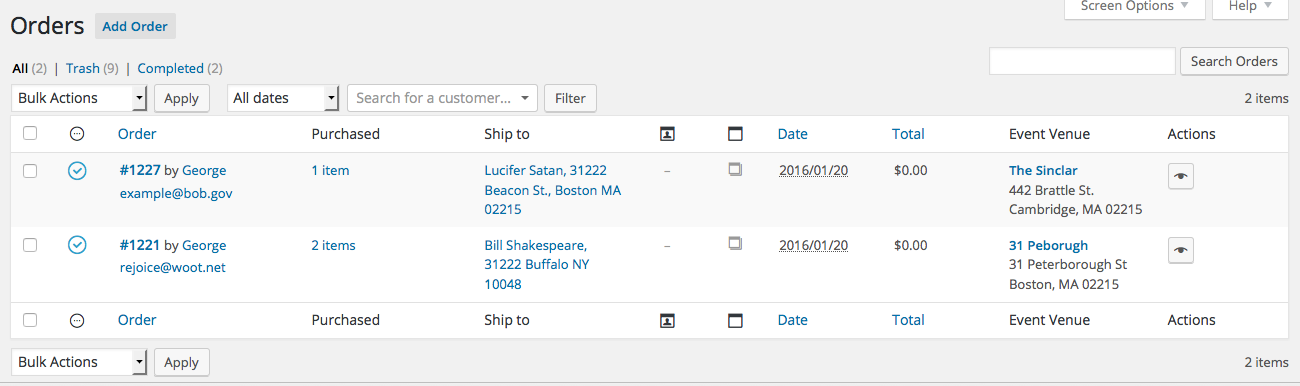
To add this to your site, download the code I wrote for you here: http://m.tri.be/add-venue-to-orders
Then just install it on your site like any other plugin, and then activate the plugin once it is listed in your “Plugins” page.
Cheers!
GeorgeJanuary 20, 2016 at 11:45 am in reply to: mobile events not showing – free version limitatio #1059410ParticipantThank you Amin!
See you over on wordpress.org 🙂
— George
ParticipantSounds good, Francis. Be sure to request a refund within the first 30 days from purchase – if it’s longer than that we may not be able to issue a refund through our payment processors 🙁
To get a refund, follow the steps here → https://theeventscalendar.com/knowledgebase/refund-policy/
I wish you the best of luck with our products, Francis! I’ll close up this issue for now, but reach out over email for a refund or post another thread here if you have other questions, comments, or concerns.
Cheers,
GeorgeJanuary 20, 2016 at 11:39 am in reply to: All recurrences URL shows events earlier than current month by default #1059407ParticipantHey there @sitecrafting,
The bad news is that there is unfortunately not a fix at this time, but there is some [relatively] good news – which is that we’ve finally indeed found a reproducible bug here. I checked our development ticket system and about 5 days ago, a developer was able to reproduce this and so now we can work towards a fix.
I do not have an ETA on when this fix will arrive, but now that we have at least clearly identified the bug we can work on a fix to arrive in one of the next few releases.
I’m sorry that there’s not more progress at this time. Let me know if you have any other questions, comments, or concerns.
— George
ParticipantHey Simon,
Thanks for the update here. I think you are referring to the options as shown in this screenshot:
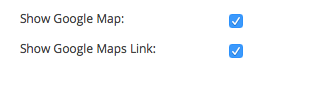
Is that correct?
If so, then yes, these options are available in The Events Calendar core, free plugin. You do not need Events Calendar Pro for these options.
—If these options are not what you are referring to, I’m really sorry for my misunderstanding! In this case, can you share a screenshot of which options you do mean?
You can do so by uploading the screenshot to Imgur.com, Flickr.com, CloudUp.com, or any similar image-hosting site; then just share the links to those images here and I’ll take a look.
—
I really appreciate your patience here, Simon. Thank you!
— George
ParticipantAwesome! 😀
Best of luck with your project,
GeorgeJanuary 20, 2016 at 11:21 am in reply to: Fix for Next Events / More Events no longer working #1059394ParticipantNice! Best of luck with your site 🙂
George
January 20, 2016 at 11:09 am in reply to: Threads that are not resolved should no be closed. #1059386ParticipantThank you Douglas – one last thing: what is the timezone you have chosen in your site’s Settings > General page in the wp-admin?
And what is the timezone that these events are mostly taking place in? (The ones in your screenshots, for a specific example).
Thank you,
GeorgeJanuary 20, 2016 at 11:04 am in reply to: Resend Tickets Option and Tickets not Being Emailed #1059383ParticipantHey @Josearistud,
Thanks for this extra information. I have three specific questions about the bug and your site, and hopefully I can use the information you provide in response to them to figure out what’s going on here.
Here are those three questions:
1. Can you share the specific snippet that you are using to auto-complete orders?
2. Can you clarify which one of these best summarizes your problem:
- The auto-complete snippet does work and marks orders as “complete”; but the issue is that “completed” orders now to not seem to be triggering the emails.
- OR
- The auto-complete snippet itself does not work any more. The orders are not marked “complete” and so the emails never send. (if this option is the case, then can you also clarify whether or not the emails do send once you manually mark them as “Complete”? or even then, do the emails STILL fail?
3. Can you share your system information with us? Here’s how → https://theeventscalendar.com/knowledgebase/sharing-sys-info/
Thank you for your patience here! 🙂
— George
Participant🙂
-
AuthorPosts