

Forum Replies Created
-
AuthorPosts
-
George
ParticipantThank you Allison!
If you haven’t already, definitely reach out to your theme developer directly in the meantime. I am not seeing anything as the obvious culprit yet, but will devote some more time to reading through the theme later today to see if I find the issue.
Thanks,
GeorgeJanuary 21, 2016 at 11:20 am in reply to: jquery error stopping me from editing tickets… or post, please help! #1060035ParticipantHey Aaron,
I appreciate your offer to log into your site! We unfortunately cannot log into user sites for any reason, so please do not post any login information here for the sake of security and such.
One of the things that I’m wondering about is “Safari”, specifically – Safari, like Chrome, can cache things very aggressively, and so perhaps that’s part of the problem here.
What I would recommend is using a browser like Firefox, or just a browser you do not use as your default browser.
1. In this browser, with Indeed Ultimate Membership Pro, does the JavaScript issue persist? You can still check the console in any modern browser like Firefox or Chrome – see if the issue is there.
2. In this browser, deactivate Indeed Ultimate Membership Pro. Then, clear the browser’s cache completely. Then check for the error again on the front-end – is it still there?
I’m really sorry about the persistence of this issue, Aaron. I have to bear the news that, since all of our troubleshooting steps so far have not revealed the culprit, there is little else we can do 🙁 The JavaScript causing the issue is not from any of our plugins, and so if the steps I recommend in this reply to not help at all, the best course of action from here would be to contact the support team of Indeed Ultimate Membership Pro (or whichever plugin/theme on your site you think this JavaScript is coming from!).
Thank you so much for your patience Aaron! I really want to be able to resolve this here on our forums, but am afraid that we might not be able to 🙁
Apologies for that. Thanks for your cooperation and patience with all of this thus far.
Sincerely,
GeorgeJanuary 21, 2016 at 9:33 am in reply to: Calendar PRO hangs/buffers infinitely forward from current month #1059998ParticipantI’m really sorry to hear this Susanna!
I would recommend deactivating my plugin now since it is not helping here.
I appreciate your patience a lot here and am sorry about the persistence of this issue. To recap, the cause seems to be that some of your assets (like JavaScripts and CSS) are coming over HTTPS, while others (like the admin-ajax.php file seen in my above reply’s screenshotted error message) are coming over HTTP.
Since my plugin did not help, there are three things left on the table that I can think of going through that are valuable troubleshooting steps. Here they are in the order I would recommend trying them out:
- 1. Update your version of WordPress Core. You may have done this already; sorry if so! But in your first post, your site’s “System Information” shows your site is running version 4.3.2 of WordPress. WordPress is now at version 4.4.1, and so just to rule this out as a variable, I would recommend updating to 4.4.1. This is also good for security purposes.
- 2. Go to Settings > General in your WordPress site. Look for the WordPress Address and Site Address options as shown here: https://cloudup.com/ck2sApSnurx. Do your URLs start with http:// here, or https:// ? If they start with http://, try changing it to https:// and then save your changes. Have a look at the month view hanging issue, and see if anything improves.
- 3. If nothing changes after steps 1 and 2, then I would recommend you check out the steps in this article → https://theeventscalendar.com/knowledgebase/testing-for-conflicts/
I know you have already done a substantial amount of testing here; these steps, however, are specifically focused on ruling out (or revealing) a plugin or theme code conflict. So I would recommend doing these steps. After EACH STEP in the process, check out your site’s month view and see if the issue persists.
The results of the above three tests will reveal a lot of information about this issue – though unfortunately they won’t necessarily resolve it 🙁 So, just to be clear, this may indeed be an issue stemming from something deeper on your site, like the SSL Certificate’s configuration or some server settings.
So while you get started on the steps above, I would recommend also opening a support ticket with your webhost describing the problem.
I’m sorry this issue is still persisting; it’s an odd one and I reall appreciate your patience with this!
Keep me posted on your findings with the above steps and what your webhost says if you reach out to them.
Thank you,
GeorgeParticipant🙂
ParticipantNo problem!
Be sure to keep backups of all custom code you make 🙂
Best of luck with your site,
GeorgeParticipantGlad to hear it, @joe – thank you for your patience with this issue and our mistake there!
Cheers,
GeorgeParticipantI’m really sorry about this Joe!
The issue here is a bit of weird one, so let me explain:
- We had an urgent security issue arise last Thursday, and so we worked hard to get an update out the door in under 48 hours from the original bug report.
- In that rush, the version of 4.0.5 that first went live on wordpress.org, for updates, had this fatal error in it. Terrible mistake!
- As soon as we noticed this, we pulled the original 4.0.5 update files.
- Then we fixed them and reuploaded them.
So basically, the first time we posted 4.0.5 it had this error. But it has now been fixed. When you updated on your site, you got the version with the error in it.
I’m really sorry about this Joe – it was a terrible mistake but from here, you should be able to basically delete the existing version of The Events Calendar off of your site, and then re-install the version 4.0.5 from here → https://wordpress.org/plugins/the-events-calendar/
Deleting the plugin will not erase event content, although backing up your site before doing this replacement is recommended if possible.
Let me know if you do this re-installation of the plugin and, if so, if it helps at all.
Thank you for your patience with this!
GeorgeParticipantHey @graham,
Thanks for reaching out.
What you describe is currently the default functionality of this widget (and its corresponding shortcode) – this is a conscious design choice in the context of the widget because widgets are usually used in small areas of the website with limited space.
Your current list might look something like this:
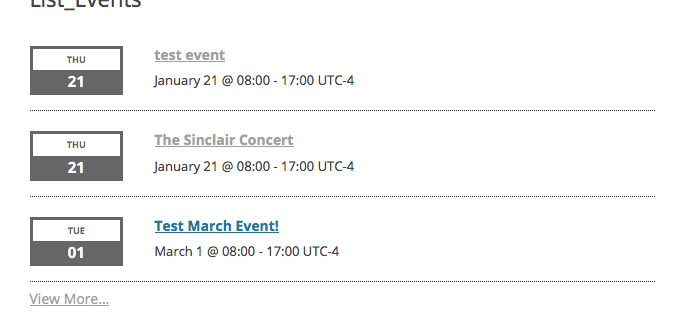
To add the location information, you will have to modify code.
Now, we cannot help with custom code, so if you would like to change the appearance of the event address and such, you will have to take the reins on that yourself.
However, just to get the actual information to show up in that location div, what you can do is create the following file inside your theme:
[your-theme]/tribe-events/pro/widgets/modules/single-event.phpThen, use the content of this Gist I made for you as the content of that file → https://git.io/vz06c
Here’s that code in effect; you can see the location info now on events that have venues:
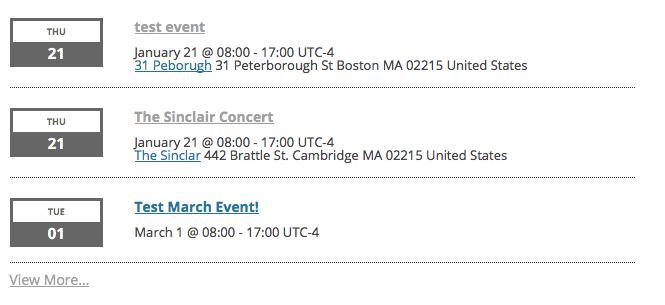
You will have to take the reins from here to further get this how you would like, but I hope this all helps you get started. For more information on customizing event templates (which is what the process I laid out above, with the custom single-event.php file), check out this guide on our site → https://theeventscalendar.com/knowledgebase/themers-guide/
Best of luck with your customizations,
GeorgeParticipantHey Tisha,
Thanks for reaching out and for your interest in our plugins!
At this time we unfortunately do not have a bundle discount like you mention, but this is a feature we are actively working on for the site.
If all goes to plan, then Bundles should be a feature on our site roughly by early summer – though this is subject to change and not definitive at all 🙁
I’m sorry about this! For now, our full price plugins are the only option.
Please email me at [email protected] with a link back to this forum thread for reference, though – I would like to share something with you that might help for now 🙂
Sincerely,
GeorgeParticipantAbsolutely, @Timothy! Follow the steps on this page and we’ll process your refund once we’ve matched your information to our records → https://theeventscalendar.com/knowledgebase/refund-policy/
Thank you,
GeorgeJanuary 20, 2016 at 5:15 pm in reply to: jquery error stopping me from editing tickets… or post, please help! #1059561ParticipantHey @Aaron,
Thanks for this extra information – just to be 100% certain, what happens when you deactivate Indeed Ultimate Membership Pro?
1. When you go edit an event again, are the issues still there?
2. If there are more errors in the Safari console, what are they?
Thanks so much for your patience with this. I’m not sure where that JavaScript is coming from, but it seems to be the culprit.
— George
ParticipantReal sorry to hear about this Terry! To get refunds for your purchases, follow the steps on this page and we’ll issue the refund immediately once we match your information to our records → https://theeventscalendar.com/knowledgebase/refund-policy/
Thank you!
GeorgeJanuary 20, 2016 at 5:10 pm in reply to: Using Event Tickets Plus with Events Calendar Non-Pro Version #1059553ParticipantHey Phil!
Thanks for your interest in our plugins.
You do NOT need Events Calendar Pro to use Event Tickets Plus.
These are the only requirements for Events Tickets Plus:
• Event Tickets [free]
• WooCommerce [free]
• The Events Calendar [free]
• Event Tickets Plus [$89+]Let me know if this helps and/or if there’s anything else I can help with!
— George
January 20, 2016 at 5:08 pm in reply to: Looking at buying the events calendar and replacing our current vendor #1059551ParticipantHey Sam,
Thanks for reaching out!
We don’t provide email or phone support at this time but are happy to address any and all questions here in this thread. Let me know what questions you have and I’m happy to help!
Thanks,
GeorgeJanuary 20, 2016 at 5:05 pm in reply to: Threads that are not resolved should no be closed. #1059545ParticipantThank you Douglas. I’m using this information to adjust my site and test this specific problem and will update this thread based on what I find.
Thanks,
George -
AuthorPosts