

Forum Replies Created
-
AuthorPosts
-
George
ParticipantHey Robert, no need for a screenshot indeed, I believe you! 😀
I’m curious, have you been continuing to work on your site and change things over the duration of this thread? I ask because before writing this current reply, I was scanning your site’s source code and DID see the tribe-events.css files, or at least one of them, loaded in the <head> of your site.
However, here now when I view your site’s source, the file is no longer there. Weird.
‘
—To be completely candid, there could be a very specific and hard-to-locate bug or code conflict causing the failure of those scripts’ loading. It could also be something simple! But I just don’t know at this point.
With that in mind, then, I would like to clarify that there isn’t much of a benefit to using these custom Tribe-Events CSS files for your custom CSS. The thing is, these files will be lost if you update your theme anyways, so that after each theme update you would have to find a backup of this custom CSS and re-add it to your theme.
You would have to do the same thing if you just put the CSS at the bottom of your theme’s own “style.css” file, where you seem to already be putting some Events-related CSS.
So, I am not saying that we have to stop investigating this issue.
All I’m saying is that for the purposes of your project and deadlines and such, what I would personally recommend is to use the child theme’s style.css file for now.
In the meantime, I will continue a more thorough investigation of the loading of these files – for example, to test if they load differently when used in a child theme instead of a parent theme.
Just some thoughts, Robert – let me know what you think! I’d love for you to be able to continue development and such on your site without waiting on this issue; I will test thoroughly to look for bugs here in the meantime.
For the record, I have not found a bug yet.
Thank you!
GeorgeParticipantNice 🙂
I’ll close up this thread for now, but open a new thread any time if any other questions ever arise.
Cheers!
GeorgeParticipantHey Allison,
We don’t personally provide support for software that is not our own, so the theme-specific issues are indeed not ones that we can dive much into 🙁
I tried to identify something very obvious in your theme code despite our policy, because there are a few specific theme issues that account for a vast majority of bugs (like improper loading of jQuery, or the absence of a few specific WordPress functions, etc).
I couldn’t identify something like this, though that does not mean the issue is necessarily complex. I just couldn’t spot it in the amount of time I could reasonably spend on this.
I’m sorry for the disappointing news, @Allison. Please let me know what you think about all of this and what other questions you might have from here.
Sincerely,
GeorgeParticipantHey Matthew (and Chris), thanks for the update here. Glad to hear the /events slug issue is resolved.
—
In regards to your other issues, can you link directly to the URL on your site where you see this issue:
Those links as well as the links appearing directly on calendar days show up as columnsofknowledge.com/#
I was not able to see this specifically on your site anywhere.
—
I took another closer look at your site and noticed a JavaScript error on your main /events page, the error is this:
TypeError: jQuery(...).prettyPhoto is not a functionIt is coming from your theme, this file specifically:
http://columnsofknowledge.com/wp-content/themes/stereoclub-wpl/js/base.jsThat is not something that is caused by The Events Calendar, but it is something that could break The Events Calendar’s own JavaScript which does seem to be the case.
—
So, from here I would recommend doing:
1. Sharing a URL to where the calendar URLs just show up as columnsofknowledge.com/#.
2. Fixing the JavaScript error in your theme; you can do this on your own or reach out to your theme developer for assistance here.
Thank you!
GeorgeParticipantThanks for your feedback Cody, I’m sorry if the news here was disappointing but wish you the best of luck with your site!
Cheers,
GeorgeParticipantHey Cody,
Thanks for reaching out.
To clarify how our plugin system works, The Events Calendar is the “core” plugin. This happens to be free, too, but it is the basic functionality of events, organizers, and venues.
Every thing else that we sell here is separate, optional, not required, and does not overlap in features with any of the other add-ons.
So, for your specific needs you would need:
• The Events Calendar [free]
• The Events Calendar Pro add-on to provide the map view [$89/year+]
• Community Events for the event submission features [$89/year+]There are unfortunately no discounts at this time for buying both products together 🙁
I hope this information helps!
— George
ParticipantThanks for this information! I checked out your site; it seems that Events Calendar Pro is activated, but The Events Calendar itself does not appear activated. Can you head to the “Plugins” listing page in your wp-admin and confirm that The Events Calendar is activated?
Thanks for your patience here 🙂
ParticipantHey Randal!
Thanks for your interest in our plugins.
I want to keep that field private for existing users until we can get opt-in from them. I would also like the opportunity to publish / not publish contact numbers for each event going forward.
Is this possible?YES – If you are collecting phone numbers in our “Organizers” taxonomy for events, then yes you can remove those phone numbers from the front-end of your site completely. This will unfortunately require some code customization, but this would be on the simpler end of the customization spectrum. To get a sense of what this would entail, check out our “themer’s guide” here → https://theeventscalendar.com/knowledgebase/themers-guide/
Can additional fields be set up to display / not display online so we can attach notes to events (say, how to set up the room) without the public seeing them?
NO/SOMEWHAT – they cannot be set up to be visible or not, but using the same principles above and other code customization methods, you could selectively hide certain fields from being displayed wherever you choose.
I hope this information helps!
– George
ParticipantHey Benjamin,
Thanks for reaching out. This sounds like WooCommerce’s own emails and so to disable these, I would recommend first adjusting your WooCommerce email settings.
You can learn the specifics of doing that here → https://docs.woothemes.com/document/configuring-woocommerce-settings/
If these settings don’t seem to help, then can you share a screenshot of the specific sort of email you are receiving? You can do so by uploading the screenshot to Imgur.com, Flickr.com, CloudUp.com, or any similar image-hosting site; then just share the links to those images here and I’ll take a look.
Thank you!
GeorgeParticipantHey Robert,
Thanks for reaching out.
I went to the URL you provided – http://173.254.111.227 – but unfortunately it does not seem like The Events Calendar is active there.
1. Can you share a link to where the custom CSS is failing to load? I will take a look and view the source code of the page to try and learn what specific thing is failing.
2. Also, can you include your system information for the URL you link to? Here’s how to do that → https://theeventscalendar.com/knowledgebase/sharing-sys-info/
Thanks!
GeorgeJanuary 21, 2016 at 12:12 pm in reply to: All recurrences URL shows events earlier than current month by default #1060069ParticipantAbsolutely, @sitecrafting – not “ideal” news perhaps, but definitely a relief to have finally found out that there is bug here. I was stumped, too! 🙂
I’ll close this thread for now, but stay tuned to the plugin updates as they arrive in your wp-admin dashboard. If there’s a specific fix for this bug included in a given release, it will be noted in the changelog.
It will also be noted here → http://theeventscalendar.com/blog
Stay tuned to those updates – thank you so much for your patience with this!
– George
ParticipantHey there,
Did you author the theme yourself from scratch? Did you buy it from a theme shop somewhere online, or perhaps do a bit of both (where you maybe, for example, bought a basic theme and then customized it extensively etc.).
If you did buy this theme somewhere, can you share where you bought it? There are CSS comments inside the theme that point to http://mndl.com as the source, but it’s not clear if this is the theme author specifically.
Thank you!
GeorgeJanuary 21, 2016 at 12:06 pm in reply to: Calendar PRO hangs/buffers infinitely forward from current month #1060064ParticipantNice! I checked out the /events page on your site and indeed no longer see the same mixed-content error as before. Glad to see this 🙂
Thank you for your patience here, Susanna. I’ll close up this thread for now but please open a new thread any time if other issues arise.
Sincerely,
GeorgeJanuary 21, 2016 at 12:04 pm in reply to: Event Ticket Plus – getting location to appear on an order #1060062ParticipantI’ve updated the plugin to include venue information on the screen you mention – this has not been thoroughly tested, and I admit that it does not look super slick:
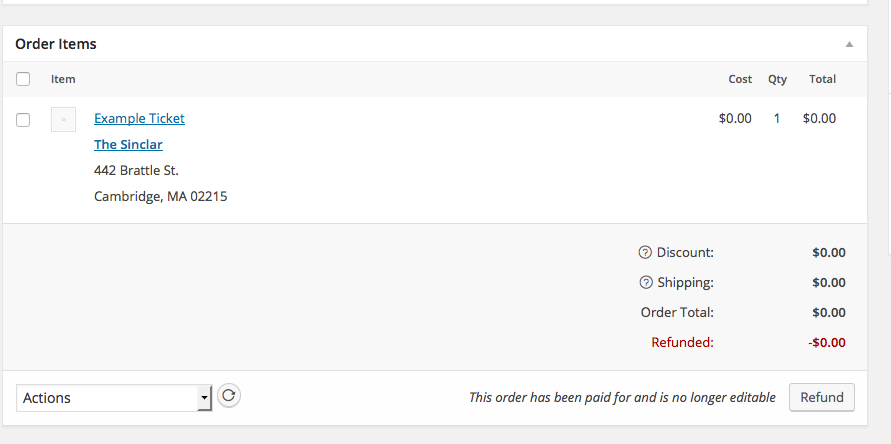
However, it should hopefully help. You can download this updated version of the plugin here → https://cloudup.com/iXNMprtLcfp
I won’t be able to make further tweaks from here, but I hope all of this code helps you get started if you’re interested in further customizations.
Best of luck with your site!
GeorgeJanuary 21, 2016 at 11:47 am in reply to: Calendar PRO hangs/buffers infinitely forward from current month #1060051ParticipantThanks for reporting this Susanna. I’m very sorry about the new issue where your site is down, however this sort of thing does seem to be at the root of the problem and I hope it leads to a correction of the mismatched HTTP protocols being used! Your database, .htaccess, and site settings should all be on the same page with regards to what URLs on your site are using HTTPS…this is hopefully the first step in that direction.
I’m sorry for the trouble Susanna, please keep us posted on things!
Thanks,
George -
AuthorPosts