
Home › Forums › Ticket Products › Event Tickets Plus › Event Ticket Plus – getting location to appear on an order
- This topic has 7 replies, 3 voices, and was last updated 10 years, 8 months ago by
Support Droid.
-
AuthorPosts
-
January 19, 2016 at 7:54 am #1058694
Amanda
ParticipantDoes anyone know how I can get location to appear on an order using Event Ticket Plus please?
January 19, 2016 at 8:21 am #1058709George
ParticipantHey @Amanda,
Thanks for reaching out.
Adding information to an order is a customization, and we unfortunately cannot help with customizations here on the forums 🙁
That being said, I’m wondering – it looks like you have WooCommerce installed, is this correct? If so, can you clarify exactly what you are trying to show, and where?
For example, are you trying to just show the Venue name on the last page of the checkout process? Or are you trying to show latitude and longitude on the “order confirmation” receipt email? Or are you trying to add the information to something in the wp-admin?
Just wondering for some more detail here; while we cannot help with custom coding, I will use the added details to at least try and point you in the right direction! 😀
Thanks,
GeorgeJanuary 19, 2016 at 10:01 am #1058758ParticipantThis reply is private.
January 20, 2016 at 7:36 am #1059270ParticipantHi Support
Would it be possible for someone to reply to my question please. This is a paid for plugin.
Many thanksJanuary 20, 2016 at 12:39 pm #1059432ParticipantHi Amanda,
Our support time response is a reply every 24 hours on business days – thank you for your patience.
In regards to the customization you would like to make, you are correct about the “functionality being there”. The steps required to get all of that functionality to work together for this specific, not-included-by-default functionality is a bit trickier. But possible nonetheless – here are the general things to do:
• Get the Event ID for the event whose tickets are in the order.
• Use the Event ID to get the event’s Venue ID.
• Use the Venue ID to display whichever venue information you’d like.
• Modify the WooCommerce “order” table view to include this information.We cannot help with customizations, Amanda. Please see the “product support” section of this page for more information → http://theeventscalendar.com/terms
However, despite that I have actually put together a small bit of code for you! 🙂
It’s just a starting place – we cannot support this code or help make further tweaks with it, but you are more than welcome to. Here’s a screenshot of the column it adds to the Orders page [right before the last ‘actions’ column]:
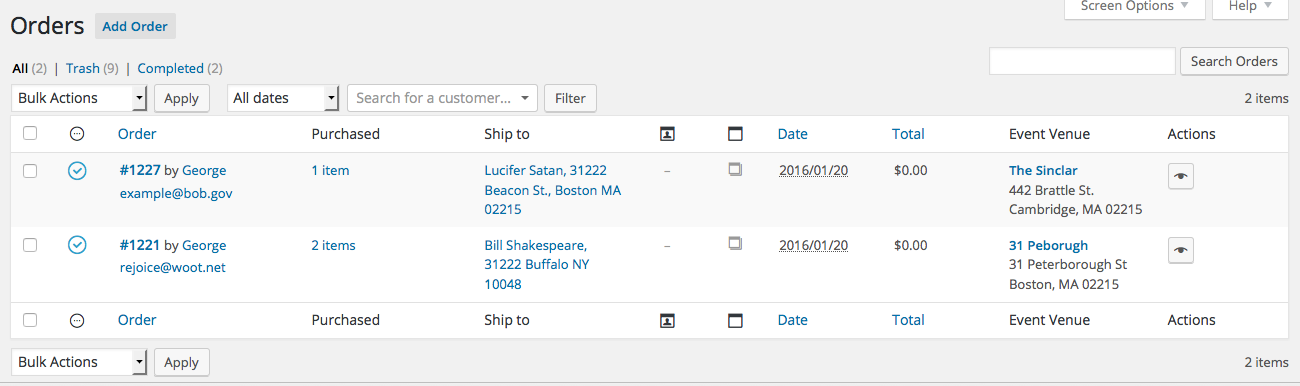
To add this to your site, download the code I wrote for you here: http://m.tri.be/add-venue-to-orders
Then just install it on your site like any other plugin, and then activate the plugin once it is listed in your “Plugins” page.
Cheers!
GeorgeJanuary 20, 2016 at 1:25 pm #1059458ParticipantThis reply is private.
January 21, 2016 at 12:04 pm #1060062ParticipantI’ve updated the plugin to include venue information on the screen you mention – this has not been thoroughly tested, and I admit that it does not look super slick:
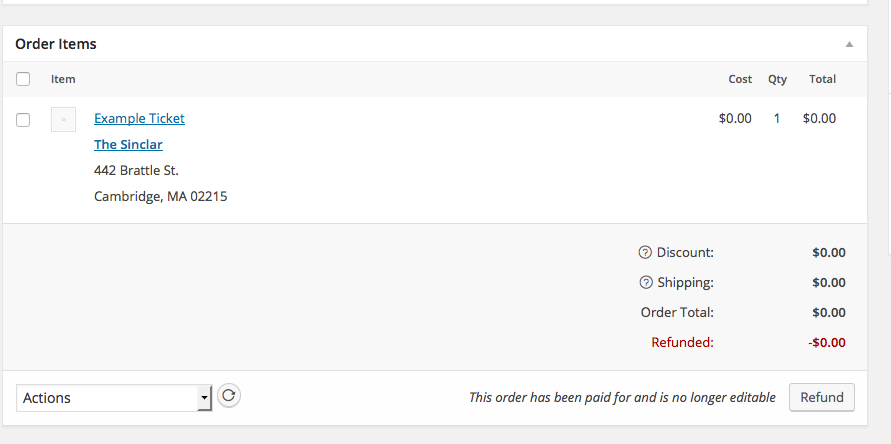
However, it should hopefully help. You can download this updated version of the plugin here → https://cloudup.com/iXNMprtLcfp
I won’t be able to make further tweaks from here, but I hope all of this code helps you get started if you’re interested in further customizations.
Best of luck with your site!
GeorgeFebruary 19, 2016 at 8:35 am #1078155KeymasterThis topic has not been active for quite some time and will now be closed.
If you still need assistance please simply open a new topic (linking to this one if necessary)
and one of the team will be only too happy to help. -
AuthorPosts
- The topic ‘Event Ticket Plus – getting location to appear on an order’ is closed to new replies.