

Forum Replies Created
-
AuthorPosts
-
George
ParticipantHey everyone,
This thread was originally started by Helgi Petersen to ask about where QR codes are. Since that original query has been answered, for any further discussion about QR Codes, or to report issues like Chris above, please open up new threads on the forums here and include your “system information” if appropriate. (as per this guide: https://theeventscalendar.com/knowledgebase/sharing-sys-info/)
We will get to those threads promptly and will be able to address your specific issues more efficiently that way instead of keeping things in this thread.
Cheers,
GeorgeParticipantSorry to hear this Chris! Can you open a new thread on these forums that describe the issue? Describe exactly what happens when you try to scan a QR Code for check-in…
Also, can you include your system information in that thread? Here’s how to do that → https://theeventscalendar.com/knowledgebase/sharing-sys-info/
Thank you!
GeorgeJanuary 20, 2016 at 7:38 am in reply to: Threads that are not resolved should no be closed. #1059271ParticipantHi Douglas,
Just to confirm, when you say ‘date display issue’ do you mean this issue from your last thread: https://cloudup.com/cph66Kctevr
If so, can you let us know what versions of these are running on your site:
• The Events Calendar
• The Events Calendar: Facebook ImporterAnd also, what version of WordPress are you using?
Thank you,
GeorgeParticipantHey Michelle,
Really sorry to hear about this!
Can you elaborate a bit on what you mean about the updates failing? Were you met with error messages when trying to update or something like that? Just curious here – this is not normal and I’m really sorry to hear about this.
—
As for getting files for Events Calendar Pro, you should be able to find these in http://theeventscalendar.com/my-account/downloads
Now, I only see a license for Eventbrite Importer and for Community Events in your account – I do not see a license for Events Calendar Pro in your account, so you will not see files for that if you are logged in as the account you used to post this thread.
Do you happen to have a separate account with an Events Calendar Pro license? If so, log into that account and you will be able to access the files at the above link.
I hope this information helps!
— George
ParticipantHey Matt,
Sorry to hear about these issues!
Unfortunately it doesn’t seem like you have any premium licenses here. This forum is our “Pre-Sales Questions” forum, so we cannot field technical support requests here like troubleshooting your current errors.
If you do have premium licenses, then apologies for the extra step here! Please log into the account that has those licenses and then post this question in the premium support forums where appropriate.
If you do not have a premium license, please post these and other technical support questions in our Free support forums here → http://wordpress.org/plugins/the-events-calendar.
Thanks,
GeorgeParticipantHi @Barback,
This is default WordPress functionality and not anything that our plugins change or set up – the reason is because our plugins simply use the “wp_mail()” function that is included within WordPress Core. The default “address” for your site’s mailing function is wordpress@[your-site].com
If you’re interested in this function, check out this Codex page about it → https://codex.wordpress.org/Function_Reference/wp_mail
To change things like the “from” address and such, you would have to use custom code on this function or use other plugins to change settings.
I hope this information helps shed some light on this; let me know if that’s the case and/or if you have any other questions!
Cheers,
GeorgeParticipantHey @Isadora,
Thanks for reaching out.
To move the license from your staging site to your production site, the steps in that article you linked to are exactly right.
In regards to site functionality, no, the migration of licenses will not affect functionality in any way.
In fact, licenses never affect functionality to begin with! 🙂 You can leave your “staging” site unlicensed, for example, and the plugin will work entirely fine.
A license only signs up a domain name for support and updates, so it does not have any impact on actual plugin functionality.
Lots of folks who have a staging-site and then a separate production site will often leave the license on the production site, where they can update automatically and everything, and then on the staging site, they just manually do updates themselves by installing the latest versions of plugin files.
If you are interested in this, you can access the latest versions of plugin files any time by heading to this page → http://theeventscalendar.com/my-account/downloads
I hope this information helps!
Cheers,
GeorgeParticipantHi Allison,
Thanks for this!
I couldn’t spot any errors right away, so I’m wondering – you mention having tried deactivating your theme and plugin, but I’m wondering if you can leave your site in this state temporarily just so I can test it in this state directly:
• with the Twenty Sixteen theme active
• with EVERY SINGLE plugin deactivated, except for The Events Calendar and Events Calendar ProI know that it is not ideal to have a site in this state especially when it is live; however, I cannot recreate this problem on my own testing site. By seeing your site in this state, I can investigate the JavaScript and such more closely and see if there are issues coming from our own plugin code.
Let me know if you can do this, and when the site is in that state! I will work quickly to minimize the amount of time your site is like this…
Thank you!
GeorgeParticipantHey Simon,
Can you specify what page on your site you are referring to, which has the introductory video you mention? I will look just to be certain I know exactly what you are referring to.
The reason why I’m curious is because it depends on what you mean by your question – if you are asking if events on the front-end can be shown based on the venue they are taking place at, then yes, and individual venues even have their own pages with an “upcoming events” section.
If you mean the Map View, then yes this is available as a default feature of Events Calendar Pro, and a demo of it is here → http://wpshindig.com/events/map
If you mean something other than either of these things, then let me know in a bit more detail…sorry to ask for more information, Simon! Just want to make sure I understand your query in full so I can best address it 🙂
Cheers,
GeorgeJanuary 19, 2016 at 8:26 am in reply to: Calendar PRO hangs/buffers infinitely forward from current month #1058712ParticipantHey @Susanna,
Sorry to hear about these issues!
If Events Calendar Pro is listing as version 3.5.2, that is a very out-of-date version of that plugin and so the first order of business is updating that to the current version, which at present is version 4.0.4.
However, I noticed that in your “system information”, Events Calendar Pro is not listed at all. Why is this?
The only Modern Tribe plugins are The Events Calendar and Image Widget – I don’t see Events Calendar Pro. Did you remove Events Calendar Pro from your site?
Thank you!
GeorgeP.S.
To get the files for version 4.0.4 of Events Calendar Pro so that you can update to this version, you can find the files here: https://theeventscalendar.com/my-account/downloads/January 19, 2016 at 8:21 am in reply to: Event Ticket Plus – getting location to appear on an order #1058709ParticipantHey @Amanda,
Thanks for reaching out.
Adding information to an order is a customization, and we unfortunately cannot help with customizations here on the forums 🙁
That being said, I’m wondering – it looks like you have WooCommerce installed, is this correct? If so, can you clarify exactly what you are trying to show, and where?
For example, are you trying to just show the Venue name on the last page of the checkout process? Or are you trying to show latitude and longitude on the “order confirmation” receipt email? Or are you trying to add the information to something in the wp-admin?
Just wondering for some more detail here; while we cannot help with custom coding, I will use the added details to at least try and point you in the right direction! 😀
Thanks,
GeorgeParticipantHey Christine,
Thanks for reaching out.
You mention having an Events Calendar Pro plugin, but are not posting this thread from a user account on our site. So it does not appear you have a license. I’m sorry if you do have a license! Just curious though – are you a licensed Events Calendar Pro user, and if so, what is your account username that has the license?
—
As for your main question, we don’t have any official recommendations for WordPress table plugins. The best thing I can think of, in terms of a recommendation, is to sort results by rating when you search in the wordpress.org/plugins site – choose plugins that have a large amount of five- and four-star ratings with low amounts of 2- and 1-start ratings.
If specific issues arise with a given plugin, let us know! We can help point you in the right direction for resolving the issue.
Thanks,
GeorgeParticipantHey Andy,
You could indeed sell memberships separately and use them alongside Events, but you cannot integrate memberships and tickets and such – not with where our plugins are currently at, anyways. I’m sorry about this 🙁
—
As for where the support for recurring tickets currently stands, the best option would be to create a recurrence series, and then for an event that you would like to sell tickets for, simply “break it out” of the series so that it becomes its own standalone event. Here’s a screenshot of this “Break from series” button for reference:
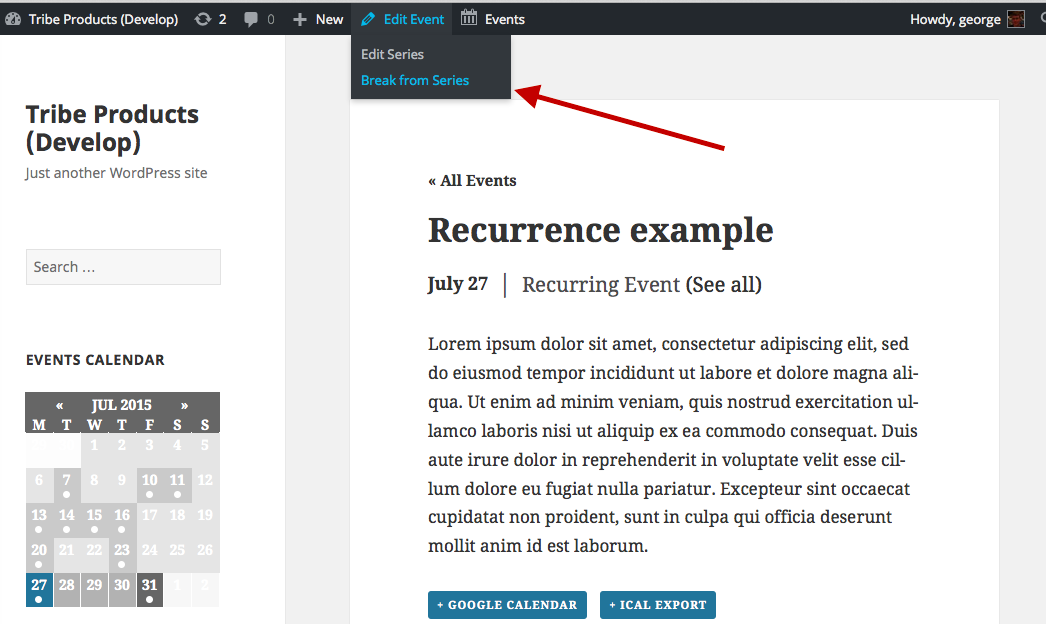
You ask about potential workarounds for the time being; unfortunately, aside from the above “trick” there are no workarounds at this time.
I hate bearing all this bad news, Andy, but I hope the information is clear and helps you move forward with your project. Please let me know if I can help with anything else! 😀
— George
January 19, 2016 at 7:57 am in reply to: Issues When Increasing the Responsive Breakpoint via Filter #1058697ParticipantHey Karly,
Thank you for your patience and understanding with the bugs; real sorry about their existence to begin with.
I unfortunately cannot set a thread to be notified when a fix is released, but we do publish the changelog for each release in two locations:
• Inside the plugin itself, which is readable when an update arrives in your wp-admin directly.
• On http://theeventscalendar.com/blog, in the “release notes” for a given update.These sources are updated and you can even subscribe to the blog with RSS or something if you’d like.
If this fix comes soon enough, then I can just update this thread directly 🙂
But if the fix doesn’t come before this thread is auto-closed by our Support Droid bot, then the above two sources are the best places to keep tabs on updates.
I have also elevated the ‘priority’ of these bugs, so hopefully this will help us get developer attention on them sooner.
Thank you for your patience! Please let me know if I can help with anything else.
– George
January 19, 2016 at 7:41 am in reply to: Issues When Increasing the Responsive Breakpoint via Filter #1058682ParticipantHey Karly,
Sorry about not being clear on this – what you describe is actually part of the same bug in number 2, where the breakpoint’s changes are not being reflected by the JavaScript of the plugin. The JavaScript is what powers both the mobile day view, and the text-switching between “Full” day names and abbreviations.
So yes, the abbreviations change should be reflecting the mobile breakpoint too. It’s part of the same bug, unfortunately 🙁
I’m sorry about this bug, Karly, we have a ticket for it and are hoping to fix this in as soon a release as possible!
— George
-
AuthorPosts