
Home › Forums › Calendar Products › Events Calendar PRO › Fix for Next Events / More Events no longer working
- This topic has 9 replies, 2 voices, and was last updated 10 years, 9 months ago by
George.
-
AuthorPosts
-
January 14, 2016 at 2:16 pm #1056222
Benjamin
ParticipantI had followed the fix recommended in this post:
To change the “next events” pagination link to “more classes,” but this approach which adds an argument to the functions file no longer works with the most recent update of The Events Calendar.
Please advise.
Thanks!
January 14, 2016 at 3:57 pm #1056252ParticipantHey @Benjamin!
Thanks for reaching out.
That thread is indeed quite outdated, and its code is not valid. Our plugins are coded much differently these days, and so the first thing you’d need to is use the code from this article to change the word “Events” to “Classes” → https://theeventscalendar.com/knowledgebase/changing-the-word-events-to-something-else/
Once that’s done, you can change the word that precedes “Event/s” by adding this code snippet to your theme’s functions.php file below the code from the above article:
function tribe_custom_theme_text( $translations, $text, $domain ) {$custom_text = array(
'Previous %s' => 'Older %s',
'Next %s' => 'More %s',
);if ( array_key_exists( $text, $custom_text ) ) {
$text = $custom_text[ $text ];
}return $text;
}add_filter( 'gettext', 'tribe_custom_theme_text', 20, 3 );
If you use both principles together, instead of “Previous Events” and “Next Events” you will have “Older Classes” and “More Classes”, respectively.
Now, you do not have to use “Older Classes”, of course, that’s just an example of how you could change the “Previous” text to something else.
If you only to change the “Next” text to “more”, then you can just make that $custom_text variable above look like this instead of what you see in the above snippet:
$custom_text = array(

    'Next %s' => 'More %s',

);
I hope this all helps!
— George
January 14, 2016 at 4:11 pm #1056253ParticipantGeorge, thank you for your quick response!
The first step (changing Events to Classes) works for me, but when I added the snippet of code you’ve included below that I get a syntax error.
Here’s everything as I currently have it:
add_filter( ‘tribe_event_label_singular’, ‘event_display_name’ );
function event_display_name() {
return ‘Class’;
}add_filter( ‘tribe_event_label_plural’, ‘event_display_name_plural’ );
function event_display_name_plural() {
return ‘Classes’;
}// Change next classes to more classes
function tribe_custom_theme_text( $translations, $text, $domain ) {
$custom_text = array(
‘Previous %s’ => ‘Older %s’,
‘Next %s’ => ‘More %s’,
);if ( array_key_exists( $text, $custom_text ) ) {
$text = $custom_text[ $text ];
}return $text;
}add_filter( ‘gettext’, ‘tribe_custom_theme_text’, 20, 3 );
January 14, 2016 at 5:05 pm #1056264ParticipantI’m sorry to hear this! I do not have a syntax error and cannot spot a specific error in your code as you’ve copied-and-pasted it; can you copy-and-paste the actual error itself?
Apologies for the added step here; not sure what’s happening with this error but once I see the full text of the error I might be able to spot the issue.
Thanks for your patience,
GeorgeJanuary 14, 2016 at 6:06 pm #1056288ParticipantGeorge,
It has something to do with these lines:
‘Previous %s’ => ‘Older %s’,
‘Next %s’ => ‘More %s’,Because when I remove it, it works.
When I leave that line in the code, my browser throws this error:
Parse error: syntax error, unexpected ‘=’, expecting ‘)’ in /home3/ab58849/public_html/wp-content/themes/fropo/functions.php on line 29
January 15, 2016 at 9:55 am #1056722ParticipantHm, I again do not have this error so I am wondering – can you copy and paste your entire functions.php file into a Gist at http://gist.github.com and then share a link here to that Gist?
I’ll take a look and see what I can learn.
Thank you,
GeorgeJanuary 15, 2016 at 9:17 pm #1056912ParticipantHere’s a link to the code from my functions file:
https://gist.github.com/anonymous/b58649144f442dde6c03
Thanks for taking a look!
January 18, 2016 at 4:17 pm #1058162ParticipantThanks Benjamin!
The problem is this:
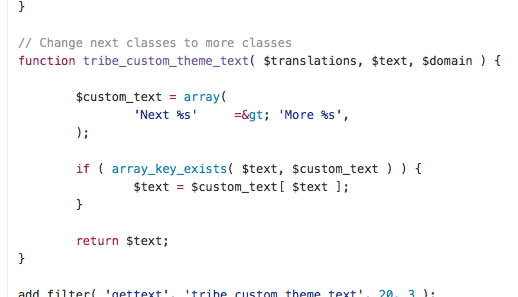
You cannot have this in the file there:
=& gt;You need to have this:
=>I hope this clears things up with that snippet; it should work well!
Thanks for your patience here,
GeorgeJanuary 19, 2016 at 4:28 pm #1058915ParticipantThanks George, that did the trick!
January 20, 2016 at 11:21 am #1059394ParticipantNice! Best of luck with your site 🙂
George
-
AuthorPosts
- The topic ‘Fix for Next Events / More Events no longer working’ is closed to new replies.