

Forum Replies Created
-
AuthorPosts
-
George
ParticipantGlad to have helped, Mike—I’ll close up this thread for now, but open a new one any time if there’s anything else we can help with. 🙂
Cheers!
GeorgeParticipantHey Cheryl,
Thanks for clarifying!
That behavior is odd and could be indicative of a plugin or theme code conflict—before jumping to that conclusion, can you share your “System Information” with us?
Here’s how to do that → https://theeventscalendar.com/knowledgebase/sharing-sys-info/
I’ll look through that information and see what I can learn about your site.
Thank you!
GeorgeParticipantHey Harrison,
I unfortunately cannot help with that information because we do not make that software. 🙁 If you are interested in exploring the database on your site, you can definitely do this—though this is not something our plugins facilitate. You’d have to use MySQL tools to explore the database—Google around and such for queries like “how to explore a mysql database” and you should find useful information.
I will close this thread given the nature of these questions, because they’re outside the scope of what our support includes, but I wish you the best of luck with your tinkering and customizing.
Cheers,
GeorgeParticipantSounds good @Rob—I’m sorry that some things here aren’t quite ideal yet, but appreciate your feedback and hope the information here is useful enough to keep things going sufficiently for a bit, until eventual improvement….
Best of luck with your project!
GeorgeMarch 26, 2016 at 11:20 am in reply to: ECP causes URL issues / Invalid post type error when using tag filter view #1094450ParticipantThanks for all of this information, @Steve. I was wondering if your Events Calendar plugin versions were all up-to-date, and they sure are, so from here I unfortunately can only think of one troubleshooting step worth doing: testing for conflicts.
I say “unfortunately” because for conflicts requires deactivating other plugins, and possibly even switching your theme. The process can sound altogether tedious….
However, in general it goes by much faster than it sounds! For your specific purposes, I would recommend these following steps:
• Head to the Plugins page in your admin. Deactivate all of the plugins on your site—ALL of them—other than just The Events Calendar and its add-ons.
Then check on the issue on the post tags page—does it persist?
• If so, then leave your site in this state and activate a default theme, too—Twenty Sixteen, for example. Then check on the tag issue.
Does the issue persist?
Let me know what you find if you can do these two steps!
Cheers,
GeorgeParticipantHey @rob,
Thanks for your follow-up!
Folks are not emailed upon being checked-in at an event.
As for your feedback about managing your annual events, I’m sorry to hear the current UI is so tricky to work with. We’re constantly tinkering and improving the UI, so your feedback means a lot—a simple way to “duplicate” events or have “event templates” to simplify the generation and management of similar and oft-occurring events is something we’ve long wanted to implement, and sounds like it could be useful in a situation like this one.
While we don’t have anything on the immediate horizon that will impact the UI much in terms of the things you mention here, I just wanted to acknowledge that this feedback doesn’t fall on deaf ears. One last thing I’ll mention here is that you should consider posting any further feedback or specific ideas on our UserVoice page, where ideas can be “voted up” by other users if they, too, want the same thing. We put ideas from here into our plugins all the time, so feel free to submit ideas there! http://tribe.uservoice.com
Thank you,
GeorgeParticipantHi Sylvain,
Thank you for sharing all of this.
I cannot recreate this behavior on my own site, and so I’m wondering if you could try doing all of the steps listed in this article → https://theeventscalendar.com/knowledgebase/testing-for-conflicts/
After EACH STEP in that article, take a look at both of your test pages again.
Does anything change along the way? Does the list view widget by itself improve in its display at all?
Thank you!
GeorgeParticipantHey there,
That warning is likely from a typo I fixed on the thread, but if you are seeing this over email or saw it before I updated the thread then the correction might not have been made yet. Instead of what I originally recommended, try this:
add_filter( 'tribe_events_this_week_date_format', 'tribe_remove_suffix_from_this_week_date' );function tribe_remove_suffix_from_this_week_date( $date ) {
return 'j';
}I hope this helps!
Sincerely,
GeorgeMarch 26, 2016 at 10:41 am in reply to: can't upload media, can't edit widgets, can't edit menus #1094442ParticipantHey @Barrybradford,
Thank you for sharing all of this information!
Your Events Calendar plugins are all up-to-date, so at this point in time the most likely reason for the issues you are experiencing is a theme or plugin code conflict. The reason for this being so likely is that I cannot recreate any of the same issues you describe here, and we have no other reports of similar behavior.
I would thus recommend doing the complete set of troubleshooting steps outlined in this article → https://theeventscalendar.com/knowledgebase/testing-for-conflicts/
After EACH STEP in that article, look at EACH ISSUE you listed in your first post of this thread.
Do you see changes in behavior anywhere along the way?
Let us know what you find!
Thank you,
GeorgeParticipantHey Mike,
Thanks for your updates. I cannot speak to the quality or utility of that third-party widget you linked to, but I can confirm that this is not possible with our plugins at this time:
Each venue page can display a calendar of just their own events?
A single-venue page will have a list of events at that venue coming up, but not a mini calendar outright, and building that require extensive code customization.
There are many small details and possibilities with our plugins, and so to best determine if it’s a good fit for your project, I would recommend trying out the plugin firsthand. The plugin is FREE, so spending a half hour or so alone with the plugin should be quite informative. You can find The Events Calendar here → http://wordpress.org/plugins/the-events-calendar
If you are interested in trying out a premium add-on, too, then while these things are not free, we have a thirty-day no-questions-asked refund policy. So, you basically get a thirty-day “safety” period where you can just play around with things, and then if you don’t like them, request a refund within those thirty days and we’ll issue a full refund immediately. Learn more here → https://theeventscalendar.com/knowledgebase/refund-policy/
I just wanted to share this information because it might be useful.
Best of luck with your project,
GeorgeParticipantThanks for this information, Lance!
I took a look at both your site and your “system information.” Your site’s “events page slug” is /calendar, obviously, but I’m wondering: do you also have a page called “Calendar” in your wp-admin?
If you do have a page with this title, try deleting the page; it will cause problems because it’s trying to use the same /calendar URL endpoint as your events slug, but only one of these things can exist at /calendar on your site.
— George
ParticipantIn regards to the theme issue, I’m sorry to hear you lost that CSS—this is not normal and sounds like a bug with the theme, because if that CSS is in a file then it would only be lost if the file is deleted. That doesn’t happen on theme-change; and if it’s stored in a database option, then this, too, shouldn’t be deleted on a theme-change or anything.
Very weird! Definitely contact your theme developer about that, it could be a major bug in their system.
As for the plugin conflict, I’m glad to hear that you found the culprit! Thank you for your patience and for testing all of that.
Best of luck with your site!
GeorgeParticipantHey Juan,
When I went to https://afineagenda.com/events/, I was met with a blank white screen—can you ensure that the site and page are both up and visible publicly?
I will take a closer look when the site is visible and see what I can find.
Thank you!
GeorgeMarch 25, 2016 at 8:25 pm in reply to: PIN is not showing and the event on Map view don't stop loading #1094348ParticipantHi there,
Thanks for reaching out!
I’m wondering about three things here:
1. What do you mean by “PIN”?
2. Can you share your system information with us? Here’s how → https://theeventscalendar.com/knowledgebase/sharing-sys-info/
3. Our calendar does not support subdomains as slugs for the events page—so while /events/ would work, /testing/events will generally not. 🙁 I’m sorry to bear this news! But if you use something like just /events, does anything improve with your issues?
Thank you!
GeorgeParticipantHey @Rallygoddess,
I’m sorry to hear about these issues! I took a look at your events pages and am just wondering—when you describe your issues with erroneous logos being pulled in and such, is what I’ve pointed out in this screenshot the thing you’re referring to? (See below.)
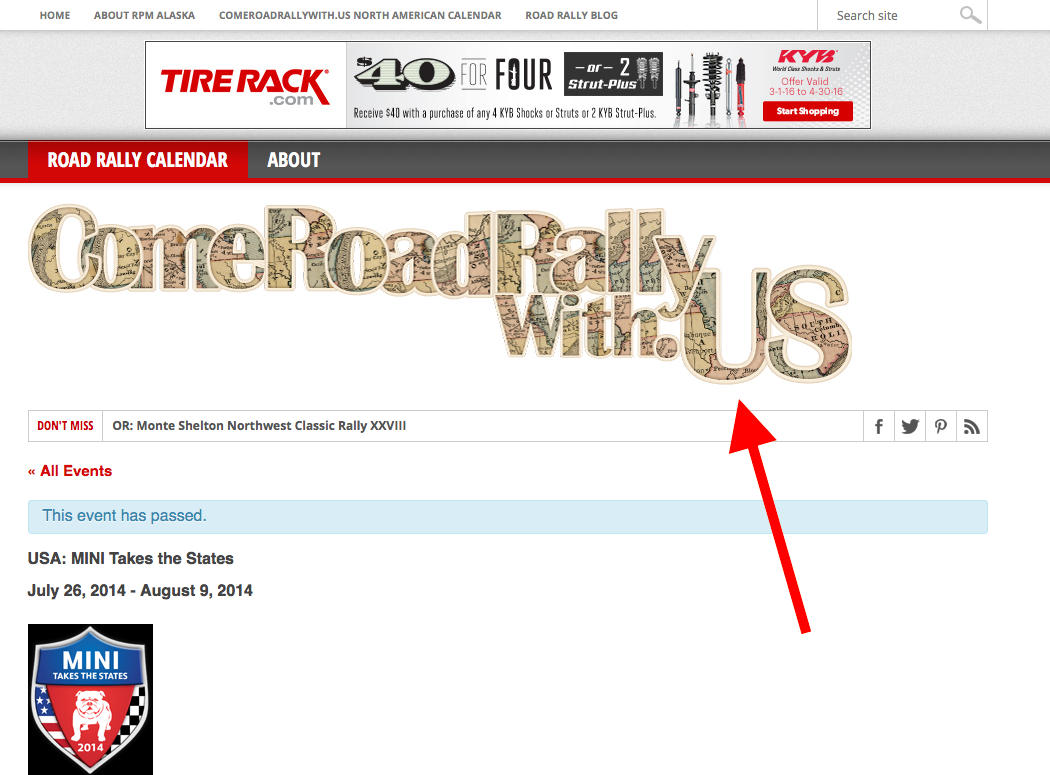
As for importing with the CSV importer, there aren’t many “Be sure you…” sort of reminders; it’s about as straightforward a process as we can make it. I would recommend reading this whole article for a complete understanding of the import process → https://theeventscalendar.com/knowledgebase/using-the-events-calendars-csv-importer/
That covers pretty much anything—let me know if you have any other questions!
Thanks,
George -
AuthorPosts