

Forum Replies Created
-
AuthorPosts
-
George
ParticipantHey Paul,
I’m really sorry to hear about this!
I cannot recreate this behavior, so to help investigate, I’m wondering if you can do a few steps here:
1. First, share your system information with us. Here’s how → https://theeventscalendar.com/knowledgebase/sharing-sys-info/
2. Next, open a support ticket with your web hosting company. This issue may be arising from a limitation at the level of the server—they can help look into that and possibly recommend a fix.
3. Finally, for now, can you confirm what your permalinks settings are? These are literally located in Settings → Permalinks in your site’s wp-admin. Are they /%postname%/, for example?
Thank you!
GeorgeParticipantHey Matt,
I also wanted to request something to help me fix this—I went to the submission page proper, http://localgetaways.com/events/california/add, but was met with a login form prompt.
⚠️ We cannot log into customer sites for any reason, so please do not post any login information.
However, I cannot recommend a solution unless I can see the actual form live.
Would you be at all able to temporarily make your submission form publicly-visible? I will work quickly to minimize the amount of time your site is in this state.
Sorry for this extra bit of trouble!
GeorgeParticipantHey Matt,
This appears to be a theme or plugin CSS conflict from some other CSS on your site.
I cannot guarantee a CSS solution here, but am happy to try! Can you share your system information with us, first, though? Here’s how to do that → https://theeventscalendar.com/knowledgebase/sharing-sys-info/
I will look through this to see if anything else stands out as a possible culprit.
Thank you!
GeorgeMarch 27, 2016 at 3:10 pm in reply to: EVENT TICKET PUS – Ticket sale email and admin access #1094621ParticipantHey Simon,
Thanks for reaching out!
I’m sorry to bear the news that neither thing you listed here is possible with our plugins out-of-the-box. You could write custom code to facilitate both features, or hire a professional developer to write such custom code for you, but the plugins themselves will not provide these features. 🙁
I’m sorry about this! Let me know what other questions you might have here and if I can help with anything else.
Sincerely,
GeorgeParticipantHey Jeff,
Thanks for reaching out!
There is unfortunately no “minimal build” option that I am aware of with WooCommerce. WooCommerce—the full, official version—is required for Event Tickets Plus to work.
Sorry to disappoint—let me know if you have any further questions here!
Sincerely,
GeorgeParticipantHey Robert,
Thanks for reaching out. Upgrading to PRO will not provide you with options to pull of the customizations you are trying to achieve, and even with a premium license, we cannot assist with any custom coding projects.
Check out this article to learn more about the support policy and what comes with license support → https://theeventscalendar.com/knowledgebase/what-support-is-provided-for-license-holders/
So the best way to pull off the customizations you describe is to start tinkering with custom theme files. You do NOT have to modify core plugin files for this—you instead basically make duplicate versions of plugin files and put them in your theme, and then you can customize THESE duplicate files.
As noted, we cannot help with this process in terms of support, but we’ve written quite a bit about how to customize in this way.
The first thing to read is our Themer’s Guide here → https://theeventscalendar.com/knowledgebase/themers-guide/
Check that out, check out any of the other articles linked from it, and research online anything PHP or WordPress-related that you’re not familiar with. With these tools and some tinkering you’ll can pull off pretty much anything.
I hope this information helps!
GeorgeParticipantHey Ciel,
Thank you for reaching out. These forums here are our “Pre-sales Questions” forums, so we unfortunately cannot field technical support questions here.
It doesn’t currently appear that you have a premium license with us. If this is wrong, and you do have a premium license with us, then apologies for my misunderstanding!
However, in that case please log into the account on this site that has your premium license, and then post this question in a premium support forum.
If you indeed do not have a premium license, then please post your question in our free support forums here → http://wordpress.org/plugins/the-events-calendar
We check those forums a bit more than once per week, so hopefully we will be able to get to your question there.
Thank you,
GeorgeParticipantThanks for the kind words about the new site, Chris! And thanks for reaching out, too. I’m sorry to bear this news, but unfortunately what you describe is not possible. 🙁
A month-view stack like you describe is not anything that our plugins do out-of-the-box. So it would unfortunately require many code customizations to implement.
To build out any custom view like that, you would have to write that custom code yourself or hire a professional developer to write the code for you. We have a list of great developers here → http://m.tri.be/18k1 (and have no affiliation with any of these folks—they’re simply some well-respected names in the community that we’ve compiled to share in situations like this one).
Sorry to disappoint!
GeorgeParticipantHey Jeff,
Thanks for reaching out!
While some sort of custom “masonry-style” layout like on the page you linked to is possible, technically, it unfortunately is not anything that our plugins do out-of-the-box. So it would unfortunately require many code customizations to implement 🙁
To build out any custom view like that, you would have to write that custom code yourself or hire a professional developer to write the code for you. We have a list of great developers here → http://m.tri.be/18k1 (and have no affiliation with any of these folks—they’re simply some well-respected names in the community that we’ve compiled to share in situations like this one).
Sorry to disappoint!
— George
ParticipantHey Lance,
Can you clarify your question here? If you are asking if I can personally log into your site and do that, no, I cannot.
⚠️ We cannot log into customer sites for any reason so please do not post any login information anywhere on this site.
If this is not what you’re asking, can you clarify what you are asking? If you’re wondering if deleting that page will erase calendar data, no, you will not lose event data when you delete that page.
Thank you,
GeorgeParticipantHey Juan,
I’m sorry, but every time I try viewing the page I am met with a “white screen of death” and the error being output as shown in this screenshot:
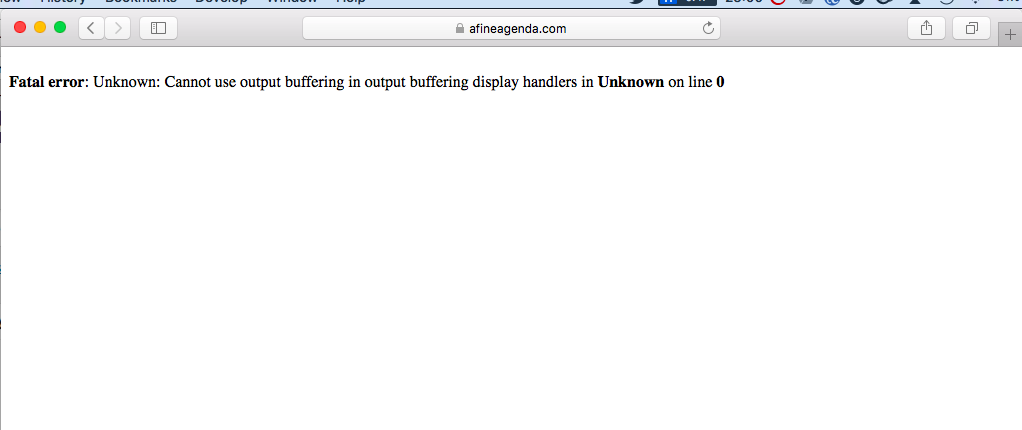
🙁
ParticipantHey Mary Anne,
So it does indeed seem that your own theme and child theme stylesheets are just not loading onto the site correctly—we unfortunately cannot help with theme issues because we only make plugins, and our plugins will not prevent the stylesheets being loaded or anything like that.
I would recommend reaching out to your theme developer’s support team or otherwise Googling/researching your way out of that particular issue if what I’m about to recommend does not help, BUT, even though this is out of scope of our support forums, I do have one recommendation that I am going to make as follows:
Try REPLACING all of the code you posted above with this simpler code:
function mary_anne_theme_styles() {

	wp_enqueue_style( 'parent-theme-style', get_template_directory_uri() . '/style.css', array() );

	wp_enqueue_style( 'child-theme-style', get_stylesheet_directory_uri() . '/child-style.css', array( 'parent-theme-style' ) );

}
add_action( 'wp_enqueue_scripts', 'mary_anne_theme_styles' );
If this doesn’t help or if you have any further child-theme things to sort out, we unfortunately cannot assist with that, but I hope this simpler code does a better job of loading your parent theme’s style.css file and your child theme’s child-style.css file.
— George
ParticipantThanks for elaborating on this a bit, @Mathew. The behavior you describe is part of a bug that we recognized and have fixed for the next release—this release should be coming this week or next week, if all goes to plan.
I would recommend staying tuned for version 4.1.1 of our plugins to come out; when those are available, update to that version and see if these issues persist.
Thank you!
GeorgeParticipantAwesome! 🙂
I’ll close up this thread for now, but open a new thread any time if there’s anything else we can help with.
— George
ParticipantAwesome! 🙂
Best of luck with your project,
George -
AuthorPosts