

Forum Replies Created
-
AuthorPosts
-
George
ParticipantHey @Stefan,
I’m sorry that the CSS didn’t seem to improve anything.
In Chrome, I see this happening to that link:
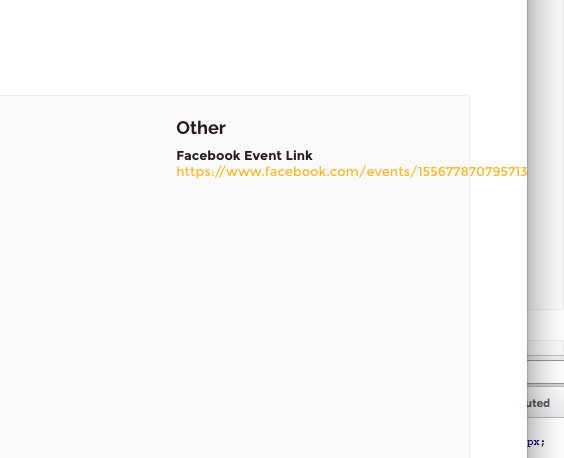
☝️ Is that what you want to happen in all browsers?
Thank you!
GeorgeParticipantHey @Wilco,
Thanks for sharing this link!
Until we publish a proper fix for this issue, you can hide those category links by adding the following CSS to the bottom of your theme’s style.css file:
  .tribe-events-meta-group.tribe-events-meta-group-details dt:nth-of-type(3),

  .tribe-events-meta-group.tribe-events-meta-group-details .tribe-events-event-categories {

      display: none !important;
}
.tribe-events-meta-group.tribe-events-meta-group-details dd:nth-of-type(2) {
border-bottom: 0 none;
}
Try that out—I hope it helps!
Cheers,
GeorgeParticipantHey Pau,
This file will only alter the display of events in the List View:
the-events-calendar/src/views/list/single-event.phpTo highlight the specific place in that file where you can modify the details you are referring to, I have put the contents of that file into a Gist here ? https://git.io/vo6HV
☝️ Please see lines 42 through 61 in that Gist. That’s where those details are generated; tinker and customize, and let me know if this helps!
Sincerely,
GeorgeParticipantHey @Olivier,
I’m sorry for the trouble here! Your feedback is appreciated and, in a quick look at this stuff in my own account, I agree that we could improve the clarity of some of these details.
We are constantly rolling out improvements to this site, so stay tuned in the coming weeks and months—improvements on these issues may roll out.
For now, I’m glad you were able to find what you needed—I will close up this thread, but please open a new thread any time if other issues arise.
Thank you!
GeorgeParticipantThis reply is private.
ParticipantHey @Eduardo,
Thank you for your update.
1. You say, “I have read before that it’s a bug.” Can you please link to where you read this? I just want to confirm your finding and see if there is, indeed, a bug.
2. The problem here, to me, seems to be that you are using localhost. To test this, I would recommend manually editing your CSV file and replacing some of the localhost image URLs with this URL:
• http://dummyimage.com/300/09f.png☝️ Then try re-importing, and see if the events on which you made this change import THAT testing image URL any differently than the localhost ones.
Thank you!
GeorgeJune 21, 2016 at 2:33 pm in reply to: https://tiga.org/events/the-tiga-games-industry-awards-2016 #1130087ParticipantThank you for testing, and for your patience here!
Can you please link to an event with tickets so I can see the issue live again?
I should note that, if the issue only arises in your current theme, you should contact that theme author for support too. It is not clear why at this time, but based on your findings, this theme is breaking the plugin functionality:
On swapping out my theme this works, but this did work on my theme originally. I am not sure what the issue could be?
☝️ I’m not sure why things worked before and not now, but the “On swapping out my theme this works” part of your comment above is very important and reveals the nature of the problem.
Let me know about a link to a ticketed event and if you contact your theme author.
Thank you so much for your patience here,
GeorgeParticipantThank you for the update.
— George
ParticipantHey @Norman,
Thank you for confirming that detail—I’m glad to hear this, as if it only happens in the error log, then what should follow is that it therefore does NOT cause any issues on the front end of your site.
Is this correct? Are there any visible, user-facing issues arising on your site with The Events Calendar etc.?
I am still struggling to reproduce the error, even in error logs, but we are investigating this.
Thank you for your patience here,
GeorgeParticipantGlad to hear it! Thank you for the update and for your patience with this thread.
If other issues arise, please open a new thread any time. 😀
Sincerely,
GeorgeParticipantHey Ben and Karlos,
Thank you for your patience here. While this bug is hard to reproduce, and I, for example, do not produce it, other members on our team have and we have a fix for this bug coming very soon.
Stay tuned! I will update this thread with more information on the fix and will post when it is released.
Sincerely,
GeorgeParticipantHey Jeremy,
Thanks for your update here. I’m glad to hear that you found a workaround. While I have not confirmed if there is a bug with Sensei again here, for the time being I will write you a code snippet to add that ticket information to the [tribe_events_list] shortcode.
This will take me a bit of time, so sit tight—I’ll post the snippet soon! Just wanted to give you an update here given the long wait since my last reply over the weekend and such.
Stay tuned!
GeorgeParticipantThank you for this information, @Craig!
#1 The Mini Calendar Widgets
I am glad the CSS I shared was helpful. As for why the limit=”0″ worked previously, but doesn’t any longer, I have to admit the unsatisfying answer of, “I am not sure” at this time. I will investigate this and see if there is a bug or a conscientious change on our end regarding this; but in the meantime will respond to the license issues to try and keep things moving quickly. See below.
#2 The License Issues
Thank you for these screenshots and for clarifying the nature of things.
1. Does omcar1.staging.yournewsites.com still exist? It seems to, when I go to that domain name.
2. Does omcar1.staging.yournewsites.com have the same IP address as omcar.com? It seems that they do, 97.74.234.241
3. If you log into the wp-admin of omcar1.staging.yournewsites.com, and navigate to the “Licenses” settings tab, is there a license key entered in the settings there?
4. If the answer to #3 is “Yes”, then what happens if you try removing the license key from the settings in omcar1.staging.yournewsites.com/wp-admin? After doing this, use the Disconnect Now link back on http://theeventscalendar.com/license-keys, and then try adding the key on omcar.com again.
Thank you!
GeorgeJune 20, 2016 at 9:28 pm in reply to: Edit order and re-send ticket still sends the new tickets #1129637ParticipantHey @Shane,
Thank you for your update, and for your patience over the weekend!
When it comes to that feature—letting attendees edit their orders—have you configured things exactly as described in the “Letting Attendees Edit Their Information” section of this page? ? https://theeventscalendar.com/knowledgebase/managing-your-orders-and-attendees/#editing-attendee-info
If not, please read through those details carefully and configure things as described. That section links to another knowledgebase article or two, so be sure to follow those as described, too. This may sound like a lot of tutorial-reading and jumping-through-hoops, but I can assure you that it’s a much easier process to set up than it sounds.
Let me know if that information helps!
Sincerely,
GeorgeJune 20, 2016 at 9:24 pm in reply to: Event tickets all became free, and now there are two price fields #1129636Participant😀
-
AuthorPosts