
Home › Forums › Ticket Products › Event Tickets Plus › https://tiga.org/events/the-tiga-games-industry-awards-2016
- This topic has 31 replies, 6 voices, and was last updated 10 years, 3 months ago by
Richard.
-
AuthorPosts
-
June 9, 2016 at 12:58 pm #1124741
Richard
ParticipantDo you want the login to my site to look?
June 10, 2016 at 2:01 pm #1125386George
ParticipantHey Richard,
We unfortunately cannot log into customer sites for any reason. 🙁
Please don’t post any login credentials to this site (or anywhere online, really).
Are the steps Geoff posted the same steps you’ve been following when testing? We just want to confirm we’re both looking at the same thing since we’ve been unable to recreate the issue ourselves.
Thank you!
GeorgeJune 13, 2016 at 5:57 am #1126040ParticipantYes same process, have you been on the URLs I have sent to see the issue?
Thanks
June 13, 2016 at 9:44 am #1126186ParticipantHey Richard,
Thanks for your patience and persistence with us here! If you have done those steps and still have issues, then there is a code conflict going on of some kind. So let’s do a few more things here to try and reveal the culprit.
Yes, we have looked at your links on the front end. This event, for example: http://tiga.org/events/how-to-grow-a-successful-games-business
We notice that when you select a ticket quantity, no options for adding ticket fields show up at all.
Can you confirm that you’ve added additional ticket fields to this event? To help confirm this, please do the following steps on that event I linked to above (http://tiga.org/events/how-to-grow-a-successful-games-business):
• Go into the “Edit” screen for that event (this one: http://tiga.org/events/how-to-grow-a-successful-games-business).
• Scroll down to the “tickets” metabox
• For the tickets you have, click the “edit” link that pops up upon hovering over the ticket. Here is a screenshot of what I mean for reference: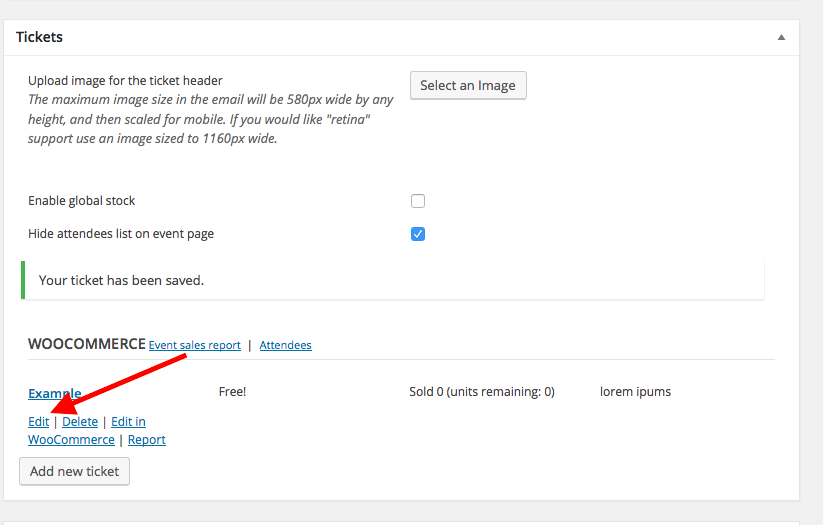
• Clicking that link will expand the ticket settings for the ticket. Here is a screenshot of that, for example:
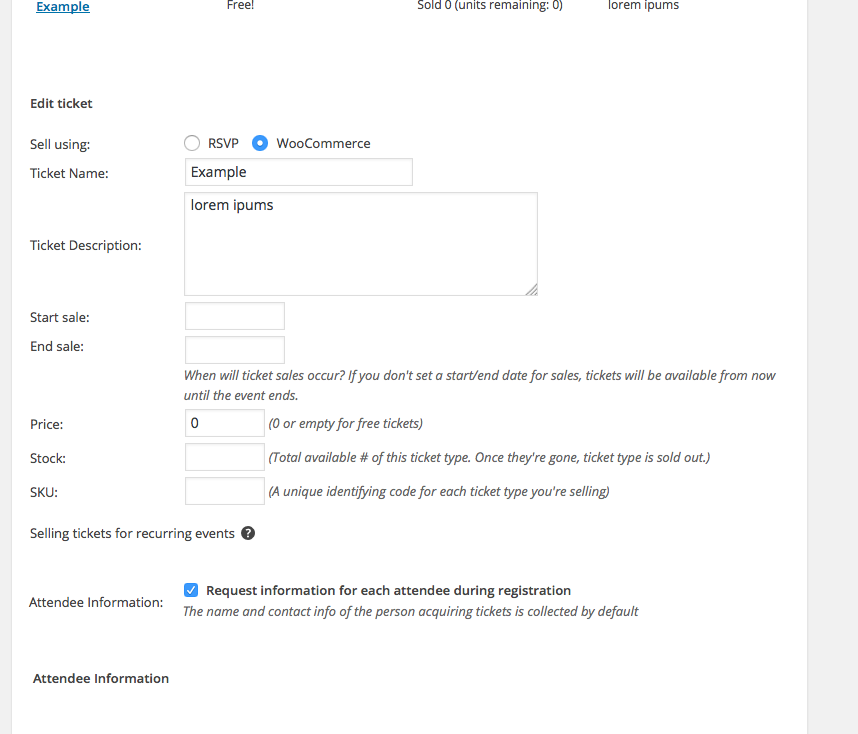
• ☝️ Please do these steps and share a screenshot of your ticket settings in the same way as the screenshot above. (You can do so by uploading the screenshots to this thread. If you have issues with that, you can upload to Imgur.com, Flickr.com, CloudUp.com, or any similar image-hosting site; then just share the links to those images here and I’ll take a look.)
We will take a closer look and go from there.
Thanks!
GeorgeJune 14, 2016 at 11:43 am #1126912ParticipantHere it is thanks
June 14, 2016 at 11:43 am #1126913ParticipantAlso, I don’t understand what is meant by the quantity statement you mentioned in the last reply? I can book many tickets at once.
June 14, 2016 at 1:00 pm #1126944ParticipantHey Richard,
Thank you for the information. All I meant in my mentioning of ticket qualities is, essentially, that the fields never show up.
Your screenshot confirms that you have these fields show up, so if they never show up, then this suggests a theme or plugin code conflict.
1. First, please update your site’s version of WordPress to the most recent version. You’re currently running WordPress 4.4.3; the most recent version is 4.5.2.
2. If updating WordPress does not change the behavior of the issue, then can you put your site back in this state temporarily, and then let me know when the site is in this site? This is the specific state:
• Running The Events Calendar, Event Tickets and Event Tickets Plus — no other plugins at the moment
• Running the default WordPress Twenty Sixteen theme☝️ Once your site is in this state, please let me know—I will take another look at that same event with my debugging tools open and see if I can spot the issue.
Thank you for your patience here!
GeorgeJune 16, 2016 at 6:29 am #1127842ParticipantThis requires changes to our live site so we would need to organise a 15 minute slot to do this at a mutually convenient time. Could we do this live on skype or the telephone? Replies in the forum are very slow.
June 16, 2016 at 11:57 am #1128076ParticipantHey Richard,
I am sorry about the pace of support, but we unfortunately do not offer Skype or phone support. The specific steps above are, fortunately, not anything that our presence is required to fulfill:
• Upgrading WordPress
• Deactivating plugins and themes to test(See my post before this one for the complete details)
These are steps you can do whenever most convenient for you; while doing them, observe the behavior of the issues; and then report back in the forums.
Let us know if you can do these steps and, if so, what you find.
Thank you!
GeorgeJune 20, 2016 at 10:51 am #1129394ParticipantHi
On swapping out my theme this works, but this did work on my theme originally. I am not sure what the issue could be?
-
This reply was modified 10 years, 4 months ago by
June 20, 2016 at 8:36 pm #1129617ParticipantHey Richard,
Thank you for testing this out!
It sounds like there is a theme conflict here, and I appreciate your testing to help reveal this. Why did things work before, but not now? Well, there are numerous possibilities for explaining this. The best way to try and find out the specific cause of the problem is to head to your site’s wp-config.php file and change this line of code:
define('WP_DEBUG', false);to this:
define('WP_DEBUG', true);That will display PHP errors if any exist, which might be quite useful here.
So, once you’ve made this change, reactivate the theme in which things break. See if any PHP errors display as you try navigating through the site—if you see errors, copy and paste them in their entirety into a reply on this thread and I’ll take a look.
Thank you!
GeorgeJune 20, 2016 at 10:50 pm #1129662ParticipantI’ve done this but inserted the define(‘WP_DEBUG’, true); as the define(‘WP_DEBUG’, false); didn’t exist.
There appears to be no change to my live page at all or this similar page (also setup the same way!)
June 21, 2016 at 2:33 pm #1130087ParticipantThank you for testing, and for your patience here!
Can you please link to an event with tickets so I can see the issue live again?
I should note that, if the issue only arises in your current theme, you should contact that theme author for support too. It is not clear why at this time, but based on your findings, this theme is breaking the plugin functionality:
On swapping out my theme this works, but this did work on my theme originally. I am not sure what the issue could be?
☝️ I’m not sure why things worked before and not now, but the “On swapping out my theme this works” part of your comment above is very important and reveals the nature of the problem.
Let me know about a link to a ticketed event and if you contact your theme author.
Thank you so much for your patience here,
GeorgeJune 25, 2016 at 8:54 am #1131884ParticipantJune 27, 2016 at 4:15 pm #1132660ParticipantThank you for this, @richard! And for your patience here over the duration of this thread.
When I investigate your site on the front end, I do not find a specific thing that helps identify the culprit. It looks like you’ll have to turn to your theme developer from here for further assistance; if simply activating a default theme makes things work, then the current non-default theme is definitively the source of the problem.
I’m sorry to bear this news after all of this back-and-forth, but the steps here confirm that the problem is your current theme. Please share this thread with the author of the theme to provide context for the issues—I wish you the best of luck with them!
Sincerely,
George -
This reply was modified 10 years, 4 months ago by
-
AuthorPosts
- The topic ‘https://tiga.org/events/the-tiga-games-industry-awards-2016’ is closed to new replies.