
Home › Forums › Ticket Products › Event Tickets Plus › https://tiga.org/events/the-tiga-games-industry-awards-2016
- This topic has 31 replies, 6 voices, and was last updated 10 years, 3 months ago by
Richard.
-
AuthorPosts
-
May 24, 2016 at 10:09 am #1118307
Richard
ParticipantDespite collect data for every attendee being ticked, it isn’t collecitng the data, please help.
May 24, 2016 at 2:28 pm #1118422Andras
KeymasterHi Richard and welcome to the forums,
I’m sorry you are having a problem. Let me try to help you with this.
To be able to help you more effectively, could you please do the following:
- Share your system information with me, according to this guide.
- Run a test for conflicting plugins with the help of this article.
Also, could you tell me or share a screenshot of the settings of the event that is causing this, plus explain further where you don’t see the data?
Thanks and cheers,
AndrasMay 25, 2016 at 11:39 am #1118826ParticipantThere’s no data to report as if you follow my link above you can see it doesn’t request the data for each attendee at point of purchase.
Thanks
May 25, 2016 at 2:04 pm #1118865KeymasterHello Richard,
I apologize, I’m a little confused here. Did you manage to figure out what the problem was?
If not, and you are still in need of help, then please follow the steps outlined above and I will try to help you solve this issue.
Thanks,
AndrasMay 31, 2016 at 7:48 am #1120635ParticipantSorry, this still isn’t working.
If you visit:
and try to purchase tickets you are not requested info for each attendee. Yet that check box is setup on the event setup page.
Please help.
May 31, 2016 at 3:39 pm #1120942KeymasterHi Richard,
Looking at your site the option might be hidden with CSS in the fronted. Look for something like this in your style.css:
.tribe-tickets-attendees-list-optout {

display: none;

}
If you remove that, then the checkboxes should be visible.In case this doesn’t solve it, then:
Please share with me your system information. Here’s our handy guide for that.
And please confirm that having a default theme (like twentysixteen) active and only the Modern Tribe plugins + WooCommerce activated, then you are still having this problem.
Thanks and cheers,
AndrasJune 2, 2016 at 3:05 am #1121518ParticipantSorry all thats in our style is:
.tribe-tickets-attendees-list-optout {
display: none;
}
.tribe-events-tickets .tribe-tickets-remaining {
display: none;
}Thanks
June 2, 2016 at 3:08 am #1121520ParticipantSorry I think we are confused, I am talking about it isn’t asking attendees to enter their names so we know who they are, nothing to do with a public attendee list!
Thanks
June 2, 2016 at 2:03 pm #1121865KeymasterThanks for clarifying, Richard. Indeed we thought of something else. 🙂
If you tick the box “Request information for each attendee during registration / The name and contact info of the person acquiring tickets is collected by default”, then the purchaser information is collected automatically through the WooCommerce checkout form. However that only collects info from one person.
If you want to have a name / data per ticket, then you need to create a custom attendee meta field to collect the required data per ticket. See the screenshot for the looks:
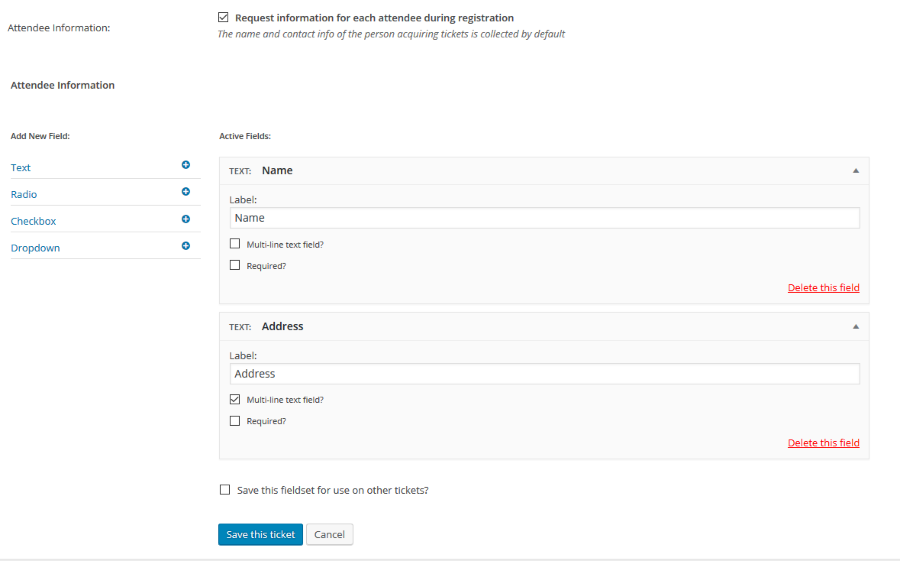
If you want to use the same fields for different tickets, then you can save the fieldset and you can reuse it with one click for a different ticket.
Does this help you with your question?
Cheers,
AndrasJune 2, 2016 at 3:04 pm #1121899ParticipantNo, as already stated I have this checkbox “Request information for each attendee during registration / The name and contact info of the person acquiring tickets is collected by default” ticked in my config and as you can see from my URL it isn’t collecting data for each attendee!
I also have my custom fields setup and it still doesn’t collect data!
June 3, 2016 at 12:34 pm #1122380KeymasterHello Richard,
I’m sorry we still couldn’t nail this frustrating problem.
Could you please share with me your system information as per this article? Knowing that can eliminate some future questions.
Also, can you confirm that you are still experiencing the issue when using a default theme (like twentyfourteen or twentysixteen) and you have only the Modern Tribe plugins plus WooCommerce activated? This can help determine whether there is a conflicting plugin, or if the theme you are using somehow modifies the output.
Thanks for your cooperation!
AndrasJune 6, 2016 at 12:15 am #1122872ParticipantThis reply is private.
June 7, 2016 at 3:49 pm #1123618Geoff
MemberHey Richard,
Andras is out today, so I wanted to follow-up for him in the meantime. 🙂
Just to clarify one thing about the option to collect attendee information on a ticket:

The attendee name and contact info will be collected by default during the checkout process when the customer completes the purchase. This is different than if you create your own custom fields for Name and Contact Info, which the customer will be promoted to complete before adding the tickets to the cart.
Just to confirm: are you able to click on the “Attendees” link for your event and see the report? Is there any data in that report or is it completely empty? And, if it’s empty, have any tickets been sold for the event that you’re aware of?
You can access the Attendees report by heading to Events from the WordPress dashboard, then hovering over the event title. This will reveal the “Attendees” link (screenshot) which will take you to the report.
Let’s give that a shot and see what we find.
Thanks so much!
GeoffJune 8, 2016 at 1:23 am #1123744ParticipantHi
Yes, the Request information for each attendee is checked.
The fields I have are as follows (see attachment).
Yes I can see the attendees report. The same name appears multiple times when someone purchases multiple tickets, we don’t get multiple names and the bespoke info.
Try and register yourself: http://tiga.org/events/how-to-grow-a-successful-games-business
This is causing us a major issue, I need this fixing asap.
Thanks!
June 9, 2016 at 12:32 pm #1124713MemberHi Richard,
I’ve been doing some extra testing on this and am having a tough time recreating the issue. Let me walk you through the steps I’ve tried so far so we can see where our paths might differ:
- Running The Events Calendar, Event Tickets and Event Tickets Plus — no other plugins at the moment
- Running the default WordPress Twenty Sixteen theme
- Created a test event
- Made a ticket for that event
- Made sure that the “Request information for each attendee during registration” was selected (screenshot)
- Created custom fields for that event (screenshot)
- Saved the event and opened it up on the front end
- Saw the custom fields from the ticket once I selected a ticket from the form (screenshot)
- Completed a purchase
- Went to my attendee report for the event
- Saw the attendee information captured in the report (screenshot)
Are these the same steps you’re following when testing? Just want to confirm we’re both looking at the same thing since I’ve been unable to recreate the issue myself and I really want to get to the bottom of this with you.
Thanks!
Geoff -
AuthorPosts
- The topic ‘https://tiga.org/events/the-tiga-games-industry-awards-2016’ is closed to new replies.