

Forum Replies Created
-
AuthorPosts
-
August 15, 2016 at 11:04 pm in reply to: custom title doesn’t work with mini calendar widget #1151946
Geoff B.
MemberGood evening Carlotta and welcome to the Events Calendar Support forum!
Thank you for reaching out to us.
We are sorry to hear that your custom title does not display correctly.
I would love to help you with this topic.As a first troubleshooting step, could you please provide us with your complete system information in a private reply using the instructions found in the following link?
https://theeventscalendar.com/knowledgebase/sharing-sys-info/
Secondly, could you please provide me with a screenshot of your advanced mini-calendar settings ?
Best regards,
Geoff B.
August 15, 2016 at 11:01 pm in reply to: TEC Pro: no widget events found in Google structured data testing tool #3 #1151944MemberGood evening Bark and welcome back!
Thank you for reaching out to us.
Yikes, this is not good!As far as I can tell, the extra JSON-LD support should have indeed been added in with the release of 4.2.
However some additional research revealed that adding that support in widgets was not included in that release.The good news is that the programming for it has been completed and it’s currently pending smoke testing.
So in short, it should be out pretty soon!I have added a follow-up note to this thread so that you are contacted when it’s out.
Thank you for your patience as we put the final touches on this.
Best regards,
Geoff B.
MemberGood evening Niklas and welcome to the Events Calendar Support forum!o
Thank you for reaching out to us.
I would love to help you with this topic.To answer your question, the simplest way to achieve that is through some template customization.
You might want to read our Themer’s guide to get a sense of how that works.Simply put, you can make your own copy of any view and tweak it to your liking.
Let me know if that helps.
Have a great day!
Geoff B.
August 15, 2016 at 10:50 pm in reply to: Only importing all-day events from Google Calendar (v 4.5.3) #1151939MemberThis reply is private.
MemberGood evening Rika,
Thank you for writing back.
There are 23,455 items in the events calendar. Many of these are recurring. Is there an easy way to re-save every event?
I am unsure if the 23,455 events is a normal figure for your calendar or not ? Without knowing, it does seem like a pretty big amount.
If this is indeed a bigger amount than expected, all you need to do is to re-save (click on “Update) only the parent event from a recurrence series, not every recurring event individually.
To access the parent event of a series, you can simply click on the “Edit all” link of any event of that series (see screenshot).
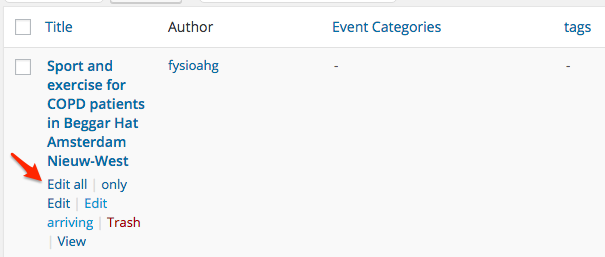
Doing that for each recurring series should reduce the number of events dramatically and most likely remove the error message.
If that is still too involved (or long), there is an alternative way to do this.
- Try running the following SQL query: https://gist.github.com/elimn/a998d7b67f6166dab5e17ec071eb35ee and please share the results with me.
- Update only the event IDs returned from that query with the procedure outlined above.
Let me know if that helps.
Have a great day!
Geoff B.
MemberGood evening Truss,
Thank you for writing back!
1. Is there a future, that marks the event image –> complete (I saw in a example that it could mark an event as featured (featured image).
I would need to see that specific example to tell you how that was accomplished. But it is most likely done:
- Manually (by simply changing the image or using an image watermark plugin. E.g.: https://wordpress.org/plugins/image-watermark/
- Automatically through the use of a template customization and most likely tied to one of our Tickets plugins.
I totally understand that in your case even the tickets plugin might be too big. However, in the case of an automated solution, you still need to have a trigger to “tell” your template that the event is fully booked.
2. I use the list view. Could you specify where to put the shortcode for viewing the list view (past/present/future) events?/ Or where could I find these shortcodes?
This is a great question. Upon further research, it seems like there is no built-in date parameter directly available in the list view shortcode.
I am sorry about that. Hopefully this will get added to the upcoming enhancements of our shortcodes.But, in the meantime, the good news is that you could get exactly what you are looking for (either by extending the shortcodes or doing some template customizations).
To achieve that, you will need to use the tribe_get_events function: https://theeventscalendar.com/knowledgebase/using-tribe_get_events/
As you can see, this would allow you to specify start and end dates to your liking.
Let me know if that helps.
Have a great day!
Geoff B.
MemberHello again Peter,
– How should i deal with Google penalties on seeing event reoccuring post as possible duplicates.
I believe my colleague Geoff (great name) has the perfect answer for you: https://theeventscalendar.com/support/forums/topic/reoccurring-events-i-want-to-improve-seo/#post-1006013
In short, there should be no penalties.
This other post by the same colleague shares some insight on how to use some tools to test your site’s structured data: https://theeventscalendar.com/support/forums/topic/structured-data-on-event-search-results/#post-1149015
– Also if you search in google then a lot of times it shows you one of the reoccuring dates instead of the parent without the reoccuring date added in the link. How to deal with that Also
Would you be able to provide me with a specific example ?
– If site visitors want to go to another week other then the present then in week off… they get a calender to pick a date but they cannot click on another day in that week other then the monday of that week they want to visit. that is not intuitive. Am i missing something?
Here again, a specific example (and perhaps a screenshot) would be awesome!
Have a great day!
Geoff B.
MemberGood evening Peter,
Thank you for writing back.
I would like to help you clear any remaining confusion.
– How can i see if a event post is a parent?
That’s a great question.
Typically, the first event of a recurring series is the parent event. All other recurring events are children of that event.
If you want to find out quickly which event is the parent of a series, you simply hover over any event from a recurring events series and place your mouse on the “Edit all” link (see screenshot).
Clicking on that link brings you to the parent event directly.
– if it is a event post with the possibility to edit all (with the series to bin) then that is clear!!
Yes, this is exactly what it is.
Additionally, if you look at the bottom of your screen in your browser, you can actually see the parent event ID when you hover over the “Edit all” link.

– if it does not have the posibility to bin series but has edit all what kind of post is this then and can i do a new reoccuring range on that one?
When the “edit all” link is gone, it means that this event post was “liberated from the recurring serie” or that it was never part of a recurring series.
This can happen in a few way (deactivating the Events Calendar Pro, Editing a single event instead of “Edit all”, etc..)
The only way to reintegrate that event in the series is to:
- Delete that event permanently
- Go in the parent event and click “Update” (that should regenerate the complete recurring event series)
– the event copy wich that does not have the possibility to edit all and series to bin what kind of single event copy is this and can i use this one also the make a reoccuring series ( is this the real parent !!) ??
The same answer as above applies.
These events are considered “stand alone” once they are “liberated”. Except for the content, they no longer have any relationship to the original parent event.
Depending on what you are looking to do you can:
- Follow the procedure explained in your previous question
- Use that standalone event to create a completely separate recurring series (with it’s own set of rules). That event then becomes a new parent. Once again, except for content, it no longer shares any relationship with the original parent event.
Let me know if that helps.
Have a great day!
Geoff B.
August 15, 2016 at 8:42 pm in reply to: Recurring events with exclusions… Excluded event dates still show. #1151920MemberGood evening Jennifer and welcome back!
Thank you for reaching out to us.
We are sorry to hear about the excluded event showing up on your client’s site.
I would love to help you with this topic.As a first troubleshooting step, could you please provide us with your complete system information in a private reply using the instructions found in the following link?
https://theeventscalendar.com/knowledgebase/sharing-sys-info/
Could you also please send me a copy of your WordPress theme / child theme in a .zip file link (via Dropbox or Google Drive) so that I can run some tests on my end ?
Finally, could you send me screenshots of your WordPress and the Events Calendar timezone settings ?
Best regards,
Geoff B.
August 15, 2016 at 7:50 pm in reply to: Advanced Minicalender Fast Forward Not Working Correctly #1151912MemberGood evening Anne and welcome to the Events Calendar Support forum!
Thank you for reaching out to us.
We are sorry to hear about the calendar widget not working to your liking.
I would love to help you with this topic.With that in mind, although the issue does seem to be very similar, it is possible that the cause is slightly different.
As a first troubleshooting step, could you please provide us with your complete system information in a private reply using the instructions found in the following link?
https://theeventscalendar.com/knowledgebase/sharing-sys-info/
Secondly, could you provide me with a screenshot of your settings for the calendar widget ?
Best regards,
Geoff B.
August 15, 2016 at 7:42 pm in reply to: How to add a space between the currency symbol and value? #1151907MemberGood evening again Rafael!
I have some great news for you.
The best method to do that is exactly the same as for your previous request: a template customization.
This will let you tweak any view to your liking. You can move stuff around, add spaces, remove unwanted information, etc..
If you need a hand after reading the Themer’s guide , I’ll be glad to walk you through it.
Let me know how that goes.
Best regards,
Geoff B.August 15, 2016 at 7:39 pm in reply to: Single event page: how to display city below event title #1151906MemberGood evening Rafael and welcome back!
Thank you for reaching out to us.
I would love to help you with this topic.The best way to achieve that would be by doing a template customization.
You might want to read our Themer’s guide to get a sense of how that works.
Basically, that means:
- Making a copy of the single-event.php and related includes in your WordPress theme
- Tweaking that copy to add the city from the venue info on that line
Let me know if that helps.
Have a great day!
Geoff B.
MemberGood evening Kevin and welcome to the Events Calendar Support forum!
Thank you for reaching out to us.
We are sorry to hear about your photo view not working properly.
I would love to help you with this topic.As a first troubleshooting step, could you please provide us with your complete system information in a private reply using the instructions found in the following link?
https://theeventscalendar.com/knowledgebase/sharing-sys-info/
That should provide me with many clues on why that might be as well as the link to your actual website where I can inspect things.
With that in mind, would you mind sharing a screenshot of that issue (with the related URL), just to make sure I can pinpoint what the issue is.Best regards,
Geoff B.
MemberGood evening Nathaniel,
Thank you for sharing that. Now I understand better what you mean.
With that in mind, could you tell me which OS / Browser you are viewing the site from ?
The reason I am asking is because I have tested the website under Windows and Mac using several browsers and I am not able to reproduce the arrow alignment issue.
So my best guesses for now are:
- A browser cache issue
- A browser/OS specific issue
Have a great day!
Geoff B.
MemberGood evening Kim and welcome to the Events Calendar forum!
Thank you for reaching out to us.
We are sorry to hear about the tickets not showing up on your install.
I would love to help you with this topic.As much as I hate to be the bearer of bad news, I have to inform you that for now our WPML support only extends to the Events Calendar free and the Events Calendar Pro. Unfortunately Event Tickets Plus and Event Tickets are not supported.
That being said, we are absolutely working on providing such support within the next year.
I apologize for any inconvenience this might be causing in the meantime.
The good news is you are fully entitled to a refund for Event Tickets Plus if you want one since you are within 30 days of your purchase. To obtain the refund, you just need to follow the procedure described here.
Best regards,
Geoff B.
-
AuthorPosts