
Home › Forums › Calendar Products › Events Calendar PRO › Reoccuring events problem
- This topic has 29 replies, 4 voices, and was last updated 10 years, 1 month ago by
Peter.
-
AuthorPosts
-
August 9, 2016 at 11:47 pm #1149866
Peter
ParticipantThis reply is private.
August 9, 2016 at 11:49 pm #1149868ParticipantThis reply is private.
August 10, 2016 at 10:50 pm #1150365Geoff B.
MemberThis reply is private.
August 11, 2016 at 10:56 pm #1150822ParticipantHi Geoff,
Thanks a million times for your brilliant help.
What a spectaculair help result indeedA few questions to finish this thread;
– Does it make any difference in speed launch if an event is made reoccurable per month or per 1/2 year?
– If i want to extend a reoccuring event let’s say after a month what is the best way to do this (grab one of the reoccuring posts and and edit the reoccuring settings or edit the whole series at the end)?Gr,
Peter
August 11, 2016 at 11:07 pm #1150827MemberGood evening Peter,
I am glad you like the end result.
Let’s answer your final questions.
– Does it make any difference in speed launch if an event is made reoccurable per month or per 1/2 year?
The answer to that question is the more recurrences for any event, the “longer” it takes to generate initially.
But now that the other issues are fixed, the difference should be minimal.
– If i want to extend a reoccuring event let’s say after a month what is the best way to do this (grab one of the reoccuring posts and and edit the reoccuring settings or edit the whole series at the end)?
The best way to do this is to use the “edit all” link (editing the “parent” event) and re-saving it after either:
- Changing the settings under Events -> Settings -> General
- Changing the end date of a recurrence rule
In other words, every time you re-save a parent recurring event, it should regenerate the series (extend or reduce depending on your changes).
Additionally, because of your awesome cooperation, I have extended your licenses for a full extra year.
Let me know if that helps.
Have a great day!
Geoff B.
August 12, 2016 at 10:38 pm #1151226ParticipantThis reply is private.
August 13, 2016 at 12:49 am #1151239ParticipantThis reply is private.
August 15, 2016 at 9:07 pm #1151926MemberGood evening Peter,
Thank you for writing back.
I would like to help you clear any remaining confusion.
– How can i see if a event post is a parent?
That’s a great question.
Typically, the first event of a recurring series is the parent event. All other recurring events are children of that event.
If you want to find out quickly which event is the parent of a series, you simply hover over any event from a recurring events series and place your mouse on the “Edit all” link (see screenshot).
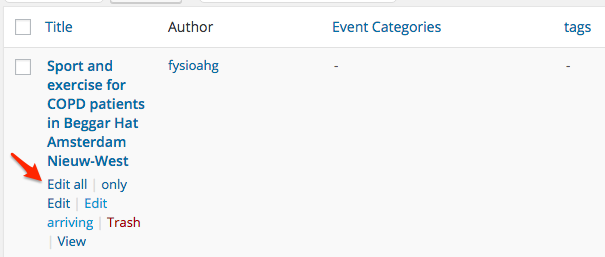
Clicking on that link brings you to the parent event directly.
– if it is a event post with the possibility to edit all (with the series to bin) then that is clear!!
Yes, this is exactly what it is.
Additionally, if you look at the bottom of your screen in your browser, you can actually see the parent event ID when you hover over the “Edit all” link.

– if it does not have the posibility to bin series but has edit all what kind of post is this then and can i do a new reoccuring range on that one?
When the “edit all” link is gone, it means that this event post was “liberated from the recurring serie” or that it was never part of a recurring series.
This can happen in a few way (deactivating the Events Calendar Pro, Editing a single event instead of “Edit all”, etc..)
The only way to reintegrate that event in the series is to:
- Delete that event permanently
- Go in the parent event and click “Update” (that should regenerate the complete recurring event series)
– the event copy wich that does not have the possibility to edit all and series to bin what kind of single event copy is this and can i use this one also the make a reoccuring series ( is this the real parent !!) ??
The same answer as above applies.
These events are considered “stand alone” once they are “liberated”. Except for the content, they no longer have any relationship to the original parent event.
Depending on what you are looking to do you can:
- Follow the procedure explained in your previous question
- Use that standalone event to create a completely separate recurring series (with it’s own set of rules). That event then becomes a new parent. Once again, except for content, it no longer shares any relationship with the original parent event.
Let me know if that helps.
Have a great day!
Geoff B.
August 15, 2016 at 9:17 pm #1151928MemberHello again Peter,
– How should i deal with Google penalties on seeing event reoccuring post as possible duplicates.
I believe my colleague Geoff (great name) has the perfect answer for you: https://theeventscalendar.com/support/forums/topic/reoccurring-events-i-want-to-improve-seo/#post-1006013
In short, there should be no penalties.
This other post by the same colleague shares some insight on how to use some tools to test your site’s structured data: https://theeventscalendar.com/support/forums/topic/structured-data-on-event-search-results/#post-1149015
– Also if you search in google then a lot of times it shows you one of the reoccuring dates instead of the parent without the reoccuring date added in the link. How to deal with that Also
Would you be able to provide me with a specific example ?
– If site visitors want to go to another week other then the present then in week off… they get a calender to pick a date but they cannot click on another day in that week other then the monday of that week they want to visit. that is not intuitive. Am i missing something?
Here again, a specific example (and perhaps a screenshot) would be awesome!
Have a great day!
Geoff B.
August 17, 2016 at 11:35 pm #1152992ParticipantHi Geoff,
As requested attached a screenshot to make clear that in weekly view switching to another week can only be done by picking a monday to switch to the week of choice.
It would be far more intuitive to be able any dat in the week of choice to switch week view
August 18, 2016 at 3:06 pm #1153396MemberGood evening Peter,
I am afraid the attached screenshots got lost in cyberspace on their way to me 🙁
Would you mind trying again (perhaps with a Dropbox, Google Drive or Cloudup link) ?
Best regards,
Geoff B.
August 18, 2016 at 11:02 pm #1153506ParticipantNext try ;-))
August 19, 2016 at 10:43 pm #1153960MemberThank you for the screenshot Peter.
It looks like there is a issue with the date picker in the Tribe search bar on your install.
If you don’t mind, could you please open a separate thread for this ?
There are a couple of reasons for this:
- This is a very different issue than the original recurring event issue (which I believe is no resolved).
- As much as I love to help you out, I will unfortunately not have the appropriate ressources over the next week to investigate this correctly (as I am officially “on vacation” 🙂
Thank you for your understanding and let me know if there is anything remaining on the initial recurring events issue.
Have a great weekend,
Geoff B.
September 10, 2016 at 9:35 am #1162440Support Droid
KeymasterHey there! This thread has been pretty quiet for the last three weeks, so we’re going to go ahead and close it to avoid confusion with other topics. If you’re still looking for help with this, please do open a new thread, reference this one and we’d be more than happy to continue the conversation over there.
Thanks so much!
The Events Calendar Support Team -
AuthorPosts
- The topic ‘Reoccuring events problem’ is closed to new replies.