

Forum Replies Created
-
AuthorPosts
-
Geoff B.
MemberThis reply is private.
MemberHey Oliver,
Thank you for doing such an amazing job with translations.
That is truly impressive!I went ahead and extended the licenses that looked like they needed some love.
Let me know if that works for you 🙂Kudos and thank you once again.
Best regards,
Geoff B.
November 2, 2016 at 11:44 pm in reply to: Login to purchase persistant when using WP Rocket #1186860MemberGood evening Neil,
Thank you for writing back, for the ticket link and for running some tests.
I believe I might have miscommunicated what I was trying to say.
I was not suggesting that you should change themes. I was merely trying to say that I did not have a completely identical setup to yours when I ran my tests. I always try to leave no possible factor out of the equation.As for the server upgrade, I am sorry that did not go smoothly.
As stated earlier, even that requires a bit of time and testing, it is truly something you should consider doing with the help of your webhost.On my end, I am not seeing the issue with the “Require users to log in” popping up. I tried different browsers and going back and forth.
Can you confirm if you are still experiencing this issue on your end ?
Best regards,
Geoff B.
MemberGood evening Sam,
That is a great question.
The short answer is no. None of the existing events and bookings will be impacted by deleting the plugin.
That being said, it is common practice when doing that to:
- Make a Database backup in case anything goes wrong (that way you can revert back to it)
- Use a maintenance page plugin while doing this quick operation so that your users are not seeing this.
Let me know how that goes.
Best regards,
Geoff B.MemberGood evening Mike,
Yes, a .zip file containing the exact same version of NinjaForms you are using is what I would need.
Grabbing the plugin folder off FTP is actually the best way to do that.
With that in hand, we can truly start digging deep in the cause of the conflict.Thank you so much for sticking with us on this one.
Best regards,
Geoff B.
November 2, 2016 at 10:42 pm in reply to: can't embed my calendar and header changes to archives when page asigned #1186844MemberGood evening Blandine,
I believe I might have miscommunicated what I meant.
You mentioned that you tried embedding the calendar using a shortcode, but that this did not work for you.I noticed that you are using The Events Calendar Shortcode version 1.3 to do so. As it turns out, that plugin is made by a third party, not us.
That being said, if you had a the Events Calendar Pro license, you could take advantage of full calendar shortcodes: https://theeventscalendar.com/knowledgebase/embedding-calendar-views-tribe_events-shortcode/
Thank you for the files. Since you are not comfortable with coding, I tweaked the following file for you: /wp-content/themes/screenr/inc/extras.php
Here is a modified copy of it which should fix your “Archives issue”. I simply changed line 615 of that file: extras
You simply need to replace the file found in the correct location on your server and you should be good to go.
You might want to contact the theme author to suggest adding a condition of what title to display when the page has a post-type-archive-tribe_events body class
Let me know how that goes.
Best regards,
Geoff B.MemberGood evening Deb and welcome to the Events Calendar forum!
Thank you for your interest in our products.
We’ll be glad to answer your questions.we would very much like to avoid making people slog through a WooCommerce purchase page. We would, however, like to ask people for a bit more info (such as Member ID, want to be seated with a particular other guest, names of other guests when registering for more than one ‘ticket’, etc.).
The short answer is yes. You can use Event Tickets Plus additional attendee meta information in RSVP tickets.
In other words, getting a license for Event Tickets Plus will absolutely meet your needs.
As for the emails not being sent properly, I would recommend installing, configuring and testing the following plugin: <u>https://wordpress.org/plugins/easy-wp-smtp/</u>
This should fix it.
Let me know how that goes.
Best regards,
Geoff B.November 2, 2016 at 10:04 pm in reply to: Tooltips Not Displaying with [tribe_events] shortcode on page #1186809MemberGood evening Shay and welcome back!
Thank you for reaching out to us.
I have really good news. It turns out this specific bug was corrected by today’s maintenance release of the Events Calendar Pro (4.3.1.2).
I recommend upgrading to get tooltips happening with shortcodes.
Let me know how that goes.
Best regards,
Geoff B.November 2, 2016 at 10:00 pm in reply to: Remove end time, details section, single event page #1186792MemberGood evening Sally and welcome back!
Thank you for reaching out to us.
I would love to help you with this topic.
What code or snippet do I need to remove the end time, but leave the start time.
The most robust way to do this is to simply create a template override:
- Create a /tribe-events/ folder in your WordPress theme
- Create subfolders in that newly created folder. Specifically /modules/meta/
- Place a modified version of details.php were lines 95-98 are commented or deleted in /yourtheme/tribe-events/modules/meta/ (here is such a copy of details.php: details )
You might want to read our Themer’s guide to get a sense of how that works.
And can I remove the end time from the add an event forms both back end and also on the community form?
Hiding it is preferable over removal as the end time does serve a purpose in our code.
You can customize the community add form to your liking using the same method as we did to remove the end time.There is a specific section of the themer’s guide that tells you which file to edit and which directories to use in your /tribe-events/ folder.
The backend is a bit trickier, but not impossible. If you use CSS with relative elements you should be able to hide most of the end time related fields.
Let me know how that goes.
Best regards,
Geoff B.MemberGood evening William and welcome to the Events Calendar Support forum!
Thank you for reaching out to us.
We are sorry to hear about the images being so tiny in your photo view.
I would love to help you with this topic.I did a bit of digging, and I have found the culprit.
There is a CSS rule that is doing this on your site@media and (min-width: 750px) {
.post-type-archive-tribe_events .tribe-events-event-image {
width: 25%;
}
}You could either remove that rule or create a new one to offset its effects:
@media and (min-width: 750px) {

.post-type-archive-tribe_events .tribe-events-event-image {

width: 100% !important;

}

}
Also my events, some may have lots of content and some little, is there a way just to use an excerpt so it doesn’t look out of whack when next to each other.
Absolutely, you will simply need to activate the “excerpt metabox in your events pages
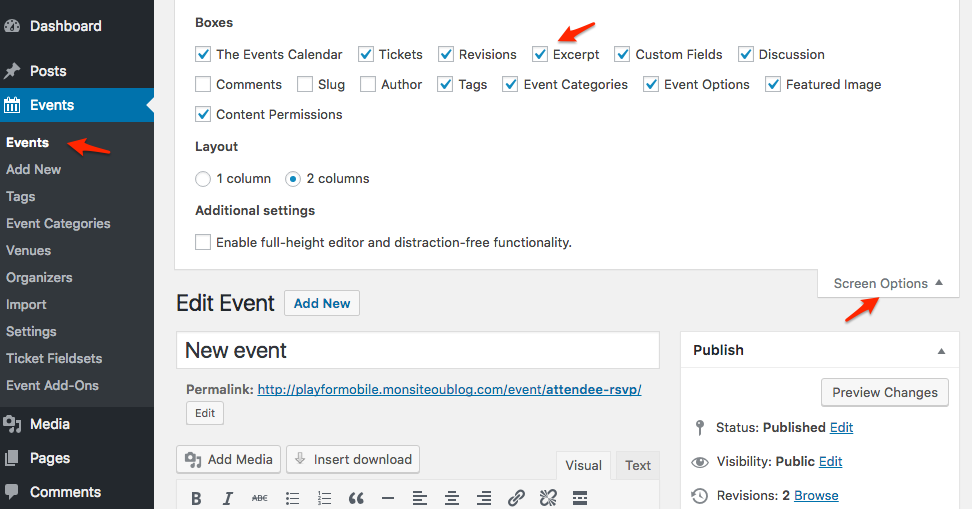
Let me know if that helps.
Have a great day!
Geoff B.
MemberGood evening Lukas and welcome back!
Thank you for reaching out to us.
We are sorry to hear about the missing slash missing in the link to view a day that contains more than 3 events. I would love to help you with this topic.
The first thing I would recommend is re-saving your permalinks, that sometimes helps.
Secondly, I did try to reproduce the issue on my end.
As it turns out, I unfortunately was not able to reproduce the issue.This leads me to believe that there might be a conflict at play.
By the sound of it, it looks like there is some type of conflict at play.
This is usually because of:- A conflict with another plugin
- A conflict with your WordPress theme
- A template customization for the Events Calendar that requires updating
A first quick test is to simply temporarily revert back to a default WordPress theme such as twenty-sixteen to see if the issue persists.
The next step would be to <u>go through our testing for conflicts procedure</u> (preferably in a staging/dev environment or local install of your WordPress website) and let us know what you find out.
Basically the goal here is to revert back to a bare WordPress installation to see if the problem persists. It also allows us to pinpoint what the cause of the issue is.
But, before you do that, there are 2 things I would advise:
- Make a backup of your database
- Consider activating a “Maintenance Page” plugin if you are doing this on your live site (to minimize impact on your visitors)
Let me know how that goes.
Best regards,
Geoff B.November 2, 2016 at 9:21 pm in reply to: Changing the licence from the dev sit to the live site url #1186781MemberGood evening Leya and welcome to the Events Calendar Support forum!
Thank you for reaching out to us.
I would love to help you with this topic.
I believe you will find all of your answers here: https://theeventscalendar.com/knowledgebase/moving-your-license-keys/Let me know if that helps.
Have a great day!
Geoff B.
November 2, 2016 at 9:17 pm in reply to: Permalink Not Editable for Recurring Events After Most Recent Update #1186779MemberHey Hans,
Thank you for sharing your alternate workaround.
I am sure it will help many as we wait for an official bug fix.On my end, I reached to Dev to see if a quick fix could not be put together.
Alas, the mechanisms behind this run too deep for that.I wish I had a better answer for you, but for now it’s the best one I have.
Thank you for your understanding.
Best regards,
Geoff B.
MemberGood evening Simon and welcome back!
Thank you for reaching out to us.
We are sorry to hear that you are dealing with that nasty bug too.
I want to apologize for any inconvenience this might be causing for you.I would love to help you with this topic.
As you know, we are working on a bug fix as fast as we can.
Unfortunately, I cannot commit to a release date at this point. But stay tuned, you will be contacted when the fix is released.
In the meantime, the only other workaround would be to edit things straight in the Database using phpMyAdmin from your webhost’s cPanel.
I wish I had a better answer for you, but for now it’s the best one I have.
Hang in there as we work on fixing this.
Best regards,
Geoff B.
MemberGood evening Bram and welcome back!
Thank you for reaching out to us.
I would love to help you with this topic.
You can simply use the following path /yourtheme/tribe-events/login-to-purchase.php
Let me know if that helps.
Have a great day!
Geoff B.
-
AuthorPosts