

Forum Replies Created
-
AuthorPosts
-
Geoff B.
MemberGood evening Kathleen,
Thank you for taking the time to write back.
Question 1 about recurring events: I wasn’t clear. I meant if you use the events pro with the calendar pro, and you click from the calendar to buy a ticket on a recurring calendar item, once you get to the page where you buy, will you see a select list of dates or just the one you clicked on in the calendar?
When you click on a recurring event. You are taken to that specific event’s single page.
From that page, you will also see that this is a recurring event and a link to see all the other dates from that recurring event series will be available.
However, by default, you do not see a list of dates (although it is possible to add that list in the single event view with a bit of customization).
But, more importantly, at the time of writing, selling tickets while using recurring events is fairly limited in functionality.
Although we are looking at adding complete support for selling tickets while using recurring events hopefully by the end of this year, for the moment, the only possibility is to have one set of tickets for the whole series of events.
In other words, every single event in that series will feature the exact same tickets (and ticket stock, if any).
I guess one way around that would be to have several tickets tied to that event series.
Question 2 was in regards to a problem I now see is because event tickets plus does not work with WC’s product variations.
That is correct. Technically that would not be impossible to do, but there is not built-in compatibility with WooCommerce’s product variations.
With that in mind, you are more than welcome to vote for that feature here: https://tribe.uservoice.com/forums/195723-feature-ideas/suggestions/6388546-support-woo-product-variations-within-wootickets
Question 3 regarding inventory appears to be a problem with event ticket plus not fully integrated with Woocommerce. But that’s because I was in woocommerce to set up variations. I didn’t realize the settings in Woocommerce have no effect in the events plus settings. As long as people don’t be mistaken thinking they can edit products in Woocommerce, I’m guessing it all works fine.
I see your point. I guess it would be safe to call this a very rigid type of integration with WooCommerce.
In other words, there are indeed some things you can do directly in WooCommerce (product visibility comes to mind).
But, to ensure proper functioning of things, those changes are highly limited (as you have found out).
Question 4 is again a problem because I was trying to use WC variations.
You are absolutely right. Other than that, you should indeed be able to modify stock (or to not track it), provided you use a simple virtual product.
I see now that with events plus you simply have to ignore Woocommerce’s product editor because it can overwrite what you’re trying to do in Events. Is that a correct understanding?
I believe the question 3 covers this. It is not so much that we ignore WooCommerce product editor. But rather that we prevent users from things such as modifying the product type.
This is mostly done to prevent compatibility and usability issues.
With that in mind, you could probably remove those restrictions. But, if you did so, usage would be completely at your own risk.
Let me know if that helps.
Have a great day!
Geoff B.
April 10, 2017 at 3:13 pm in reply to: Need solution before I consider on buying the pro version #1267932MemberGood evening Jason,
Awesome to hear that you are on your way to becoming a CSS ninja!
You are right. The Avada theme does include several customizations and even their own the Events Calendar customizer (on top of the one found under Appearance > Customize).
If that can help, even the toughest CSS rules can typically be overridden with the use of the !important element. I recommend googling it up.
You are welcome back in our support forums any time 🙂
For now, I am going to close this thread.
Have a great week!
Geoff B.
MemberGood afternoon Titus,
I am sorry to hear that. Yikes!
Just to be sure we are talking about the same thing, would you mind, providing me with some specific examples (or screenshots) as well as a screenshot of the “Edit Event” screen for these ?
Hang in there!
Have a great day!
Geoff B.
MemberGood afternoon Kathleen,
Thank you for taking the time to write back.
I just went ahead and logged in using your account.
Here is what I am able to see under https://theeventscalendar.com/my-account/downloads/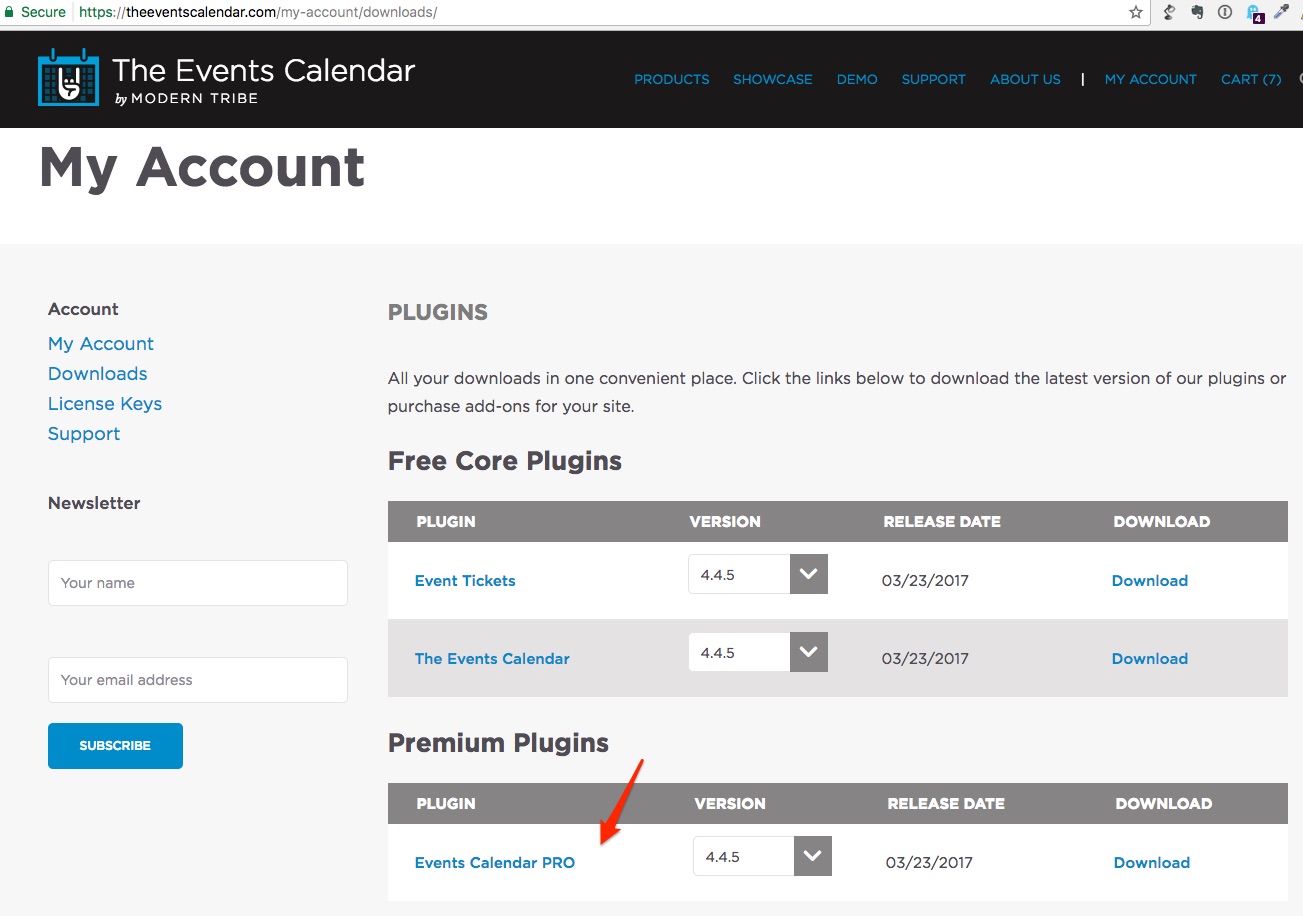
Would you mind giving it another shot ?
Best regards,
Geoff B.
April 10, 2017 at 9:44 am in reply to: Need solution before I consider on buying the pro version #1267730MemberGood afternoon Jason,
I just went and checked the example you provided.
This site looks like it is only running the Free version with a little bit of CSS customization (custom fonts and transparency on the background-color).I totally understand where you are coming from. Just to clarify, the Pro version does not offer a different appearance (that mostly depends on the theme you are using). But it does provide you with additional views and features (e.g.: recurring events).
I cannot promise anything, but you might want to apply for our non profit program (you just never know): https://theeventscalendar.com/knowledgebase/do-you-offer-discounts-for-nonprofit-organizations/
Best of luck with everything!
Have a great day!
Geoff B.
MemberGood afternoon Matthew,
Thank you for taking the time to write back.
I am super stoked that you are good to go!
You are welcome back in our support forums any time 🙂
For now, I am going to close this thread.
Have a great week!
Geoff B.
MemberGood morning Daniel,
Thank you for the theme files.
Kudos on finding the issue!In my experience, the best approach is to use some type of file compare tool (between your files and the most recent versions of theme) and look for deprecated functions.
Please let us know if you have trouble finding out what customizations need updating.
You are welcome back in our support forums any time 🙂
For now, I am going to close this thread.
Have a great week!
Geoff B.
MemberGood evening Tasha and welcome back!
Thank you for reaching out to us.
We are sorry to hear about the 404 errors you are experiencing following the installation of Event Tickets Plus 4.4.5. Yikes!
I would love to help you with this topic.
The first thing I would try would be to go to Events -> Settings -> General and change the slug for Single event URL slug to AND flushing your permalinks.
If that does not work, I would take a look at your WP engine caching to make sure it is not interfering.
Another solution (with a backup) would be to downgrade to WooCommerce 2.6.14.
Let me know how that goes.
Have a good weekend,
Geoff B.
MemberGood evening Michelle and welcome back!
Thank you for reaching out to us.
We are sorry to hear about the overlap in your mobile view.
I would love to help you with this topic.This looks like a CSS / Theme-based issue.
Could you tell me what happens if:
- You try different settings under Events -> Settings -> Display for Default stylesheet used for events templates ?
- You try temporarily reverting back to a default WordPress theme such as twenty-sixteen ?
Could you please send me a copy of the latest version of your WordPress theme / child theme via a link to a .zip file link (stored Dropbox or Google Drive) so that I can run some tests on my end ? I recommend a private reply for that purpose.
Please ensure you are using the latest files as found on your actual website.
This way I will get access to any updates or customizations you might have made.Have a good weekend,
Geoff B.
MemberThis reply is private.
April 7, 2017 at 9:45 pm in reply to: Cannot activate nut field for number of tickets on event page. URGENT! #1266941MemberGood evening Andreas and welcome back!
Thank you for reaching out to us.
We are sorry to hear about the issues you have been dealing with. Yikes!
I would love to help you with this topic.I am glad you found a workaround for now. But that also means that I cannot reproduce the issue on my end.
Could you please send me a copy of the latest version of your WordPress theme / child theme via a link to a .zip file link (stored Dropbox or Google Drive) so that I can run some tests on my end ? I recommend a private reply for that purpose.
Please ensure you are using the latest files as found on your actual website.
This way I will get access to any updates or customizations you might have made.Additionally, when you say simple layout, could you confirm to which setting in Events -> Settings -> Display (skeleton, full, tribe).
Finally, I would strongly encourage you to upgrade your PHP version to at least 5.4.x +
In fact WordPress recommends 5.6+This ensures that all of your site runs smoothly.
Have a good weekend,
Geoff B.
April 7, 2017 at 9:37 pm in reply to: Just purchased license key for PRO version and it's saying not valid #1266940MemberThis reply is private.
MemberGood evening Rachel and welcome back!
Thank you for reaching out to us.
I would love to help you with this topic.Is it possible to change the size of the tribe-event-date-end and tribe-event-date-start in the ecs-event-list when displayed with the short code?
The short answer is yes.
However, The Events Calendar Shortcode, is actually not our plugin, but rather a plugin made by a third-party.
I would recommend reading the following article to understand how to identify and update the CSS rules pertaining to that plugin’s appearance: https://theeventscalendar.com/knowledgebase/using-google-chrome-developer-tools/
As a side note, we also have a plugin that offers complete shortcode capabilities (including full views), when you get a copy of the Events Calendar Pro: https://theeventscalendar.com/product/wordpress-events-calendar-pro/
Have a good weekend,
Geoff B.
MemberThis reply is private.
MemberThis reply is private.
-
AuthorPosts