
Home › Forums › Ticket Products › Event Tickets Plus › How do I get a refund?
- This topic has 13 replies, 3 voices, and was last updated 9 years, 5 months ago by
Kathleen.
-
AuthorPosts
-
April 5, 2017 at 2:54 pm #1265428
Kathleen
ParticipantAfter reading things in the forum here, I can see that the Event Tickets Plus is not going to work for us. It’s integration with the Calendar and Woocommerce just doesn’t work well. Multiple price options in WC don’t work for one and there are other bugs that I addressed in another forum thread, but probably only rear their ugly heads if you’re trying to add prices in WC which I need. So I’d like to get a refund for that plugin and then I’ll apply it to the purchase of Events Calendar Pro. How do I do that? I can’t find anyway to contact you guys other than here.
To answer your questions on troubleshooting, there is no conflict with other plugins. I will not change the theme so that’s a moot question. If it doesn’t work with my theme (Yootheme) then I can’t use it. I don’t believe that has anything to do with it though.
Thanks!
April 5, 2017 at 10:56 pm #1265641Geoff B.
MemberHello again Kathleen,
I am sorry to hear you did not have a good experience with the integration of the Events Calendar, Event Tickets Plus and WooCommerce.
To your point, the tickets products is meant to WooCommerce as a simple virtual product.
Although it is technically possible to extend it’s behaviour, anything beyond that is something that would require a fair amount of customization and testing.As you might know, the scope of our support is mostly to get our customers started on the right track and to help them in case of issues. We unfortunately do not provide complete support for customization.
So I’d like to get a refund for that plugin and then I’ll apply it to the purchase of Events Calendar Pro. How do I do that? I can’t find anyway to contact you guys other than here.
I totally understand where you are coming from.
The good news is you are fully entitled to a refund if you want one since you are within 30 days of your purchase.
I can process that refund for you or simply swap your license to the Events Calendar Pro.
It is really up to you. I will do as you prefer.To answer your questions on troubleshooting, there is no conflict with other plugins. I will not change the theme so that’s a moot question. If it doesn’t work with my theme (Yootheme) then I can’t use it. I don’t believe that has anything to do with it though.
I see your point. That being said, the goal of our testing for conflicts procedure is to pinpoint what the issue is.
In turn, that lets us find workarounds and solutions in a lot of cases. Furthermore, leaving no stone unturned usually leads to a speedier resolution.
With that in mind, I am just going out on a hunch here, but there is one thing that might (or might not) be at play here: we are not fully compatible with WooCommerce 3 at the moment of writing: https://theeventscalendar.com/known-issues/
In any case, let me know how you want me to proceed from here on out.
Best regards,
Geoff B.
April 6, 2017 at 12:37 am #1265671ParticipantThanks Geoff. We would like to exchange it for the Events Calendar Pro. Do you need anything from me, or will I just see it in my downloads?
thanks.
April 6, 2017 at 12:09 pm #1266141MemberGood afternoon Kathleen,
I just made the change for you.
You should be able to see the Events Calendar Pro in your downloads section.
Have a great day!
Geoff B.
April 8, 2017 at 10:42 pm #1267233ParticipantHi Geoff,
There is nothing in my downloads area. Nothing old, nothing new. Please try again and let me know.Thanks.
April 10, 2017 at 9:52 am #1267737MemberGood afternoon Kathleen,
Thank you for taking the time to write back.
I just went ahead and logged in using your account.
Here is what I am able to see under https://theeventscalendar.com/my-account/downloads/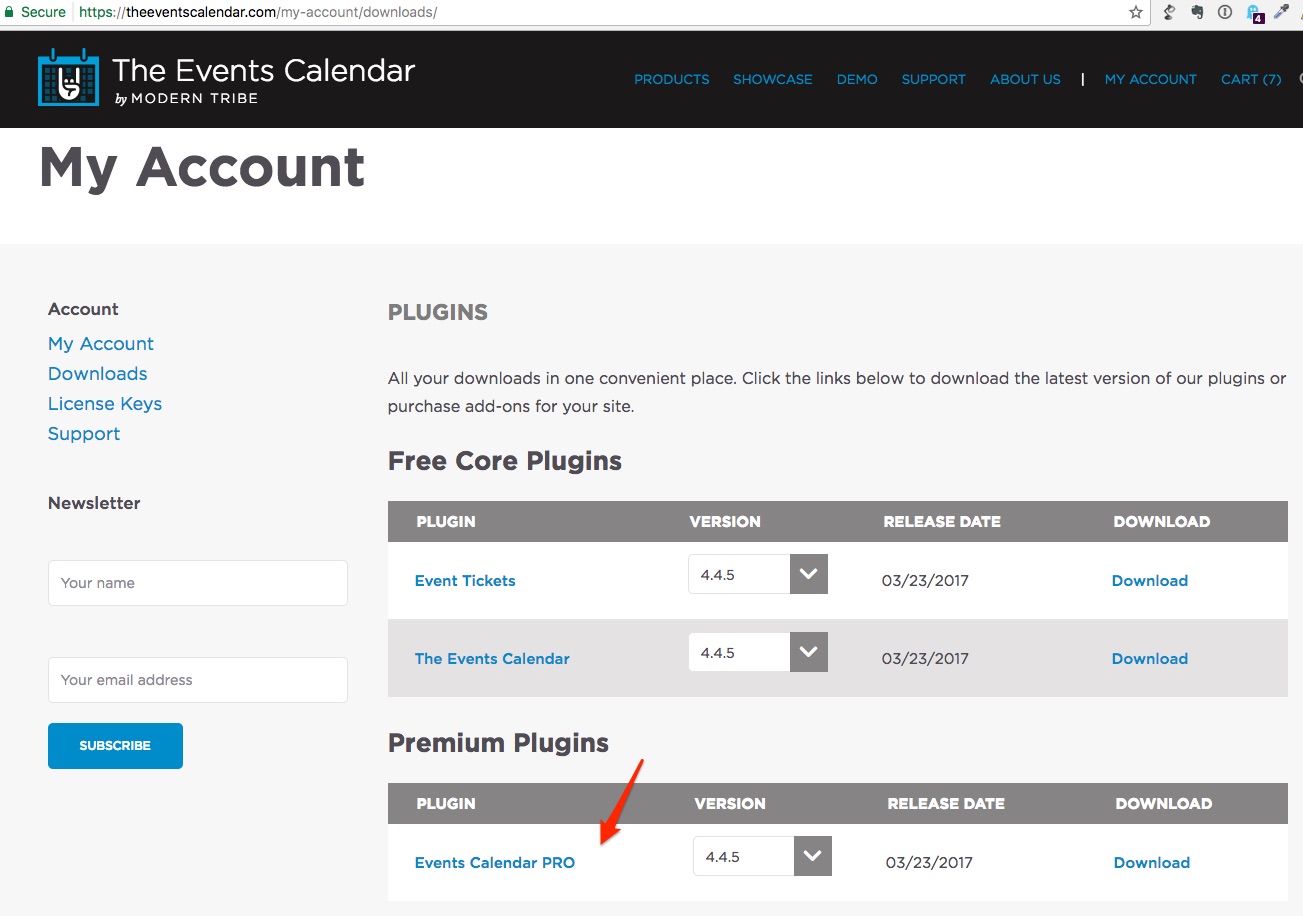
Would you mind giving it another shot ?
Best regards,
Geoff B.
April 10, 2017 at 2:37 pm #1267924ParticipantThanks Geoff. It’s showing up now. Unfortunately this won’t work for us either and here’s why so you can maybe put this in your developers’ to-do list. Keep in mind we purchased this because we thought it would handle our recurring event need.
Here’s an example: http://animalreiki.bizabuzz.com/event/test-events-1/2017-07-24/
That particular class REPEATS itself on different dates throughout the year. We, of course, don’t want to have to enter the same event and descriptions over and over again, so we were hoping your software would do that for us.The problem is this is a 2 day class, but your software does not allow for that, and only repeats ONE DAY. So what you’ve forgotten to include is a START and an END date, and that makes our calendar list view look wrong: http://animalreiki.bizabuzz.com/event/
Seems like an easy fix on your end, but if it’s not in the works, we’d like to ask for a refund on this one as well.
Big disappointment for us because your software really looked promising. I look forward to watching it grow and improve over time.
Thanks,
KathleenApril 10, 2017 at 2:43 pm #1267926ParticipantHi Geoff,
I was just notifying my team that it is not the end of the world because we could just CLONE an existing event and change the date, everything else being the same, only to find out you don’t provide a clone link like WordPress does for pages, posts, and Woocommerce does for products. There’s something else I recommend you add to your to-do (feature) list. We may not be able to use even the basic plugin as is.
Thanks for all your help though. You guys are off to a good start.
Warmly,
KathleenApril 10, 2017 at 2:55 pm #1267929ParticipantYou should know you’re talking to Kathleen Prasad’s web developer, another Kathleen or Kathy or Kat for short. My company is http://www.katandmouse.com. Years ago myself and my partner built dozens of website plugins before anyone even heard of plugins. So I have a bit of history and probably a pickier eye for usability and functionality than most of your users. That said, though, I believe the features we are looking for should be standard in your plugins because what Kathleen Prasad needs isn’t all that different from what other business owners like her need. I really am hoping your team will integrate them in the near future. What you have now is great and it’s clear your team knows what it’s doing. You just need to know a bit better what your customers are doing is all. 🙂
Thanks again. My best to you!
Kat (aka Kathleen)April 10, 2017 at 3:54 pm #1267946ParticipantFinal note. Sorry for taking up so much of your time. I went ahead and removed the recurring items so you won’t be able to see them in my link above. But I think you get the idea. I’ve instructed the team to keep using your plugin as is. It’s easy enough to add a new calendar item instead of using recurring. And I do believe we can trust your team to keep on making it better. For now it’s good enough, but do refund for the pro version. Thanks.
Oh, and here’s a short summary for a feature request. Just imagine this as one of your customers because this is an honest-to-goodness example:
Marketing class, first Thurs and Friday of every month. $150 for the class. OPTIONAL: Add $15 for lunch.
There you can see a need for multiple days to recur, and a variable price option.Have a great day.
April 11, 2017 at 12:06 pm #1268482MemberGood afternoon Kathleen,
I will gladly answer all of your follow-up points.
The problem is this is a 2 day class, but your software does not allow for that, and only repeats ONE DAY. So what you’ve forgotten to include is a START and an END date, and that makes our calendar list view look wrong
This is a good catch and definitely a legit high priority bug. We are actively working on a solution for this.
I cannot guarantee when it will be fixed, as it’s in the development team’s hands now.
They need to assign it, code it, test it, and schedule it for release.The good news is that you will be contacted as soon as a fix is available, regardless of your status as a client.
I was just notifying my team that it is not the end of the world because we could just CLONE an existing event and change the date, everything else being the same, only to find out you don’t provide a clone link like WordPress does for pages, posts, and Woocommerce does for products. There’s something else I recommend you add to your to-do (feature) list. We may not be able to use even the basic plugin as is.
That is a very good point and I believe several good news about this:
- We are definitely working on expanding our features to make it easier for our customers to have reusable event templates and ticket templates. No date is official yet, but it is totally in the works.
- You do not have to wait for that since any custom post type duplication plugin will work immediately. There is even one made just for our products: https://wordpress.org/plugins/duplicate-tec-event/
I really am hoping your team will integrate them in the near future. What you have now is great and it’s clear your team knows what it’s doing. You just need to know a bit better what your customers are doing is all. ?
Thank you for your very valuable and thorough feedback Kat. It is certainly appreciated.
And yes, we do strive to always improve our products. So your input is super helpful.
For now it’s good enough, but do refund for the pro version. Thanks.
I have just done that for you.
Marketing class, first Thurs and Friday of every month. $150 for the class. OPTIONAL: Add $15 for lunch.
There you can see a need for multiple days to recur, and a variable price option.This a very interesting idea.
It sounds like an integration with a WooCommerce plugin such as Extra Products options would do the trick. The other option being to try to upsell the customer as part of their checking out experience (related product).
As a side note, you might want to vote for the WooCommerce products variations feature request.
Best regards,
Geoff B.
April 20, 2017 at 6:26 am #1272095Nico
MemberHi,
Just wanted to share with you that maintenance release 4.4.6 of our plugins is out, including a fix for this issue 🙂
Find out more about the release → https://theeventscalendar.com/maintenance-release-events-calendar-pro-4-4-6-event-tickets-4-4-6-premium-add-ons/
Please update the plugins and let us know if the fix works for your site,
Best,
NicoMay 12, 2017 at 9:35 am #1283067Support Droid
KeymasterHey there! This thread has been pretty quiet for the last three weeks, so we’re going to go ahead and close it to avoid confusion with other topics. If you’re still looking for help with this, please do open a new thread, reference this one and we’d be more than happy to continue the conversation over there.
Thanks so much!
The Events Calendar Support Team -
AuthorPosts
- The topic ‘How do I get a refund?’ is closed to new replies.