

Forum Replies Created
-
AuthorPosts
-
Geoff B.
MemberGood afternoon Mel,
I am glad to see you are making progress.
Q1: The font size worked after adding the important! arg
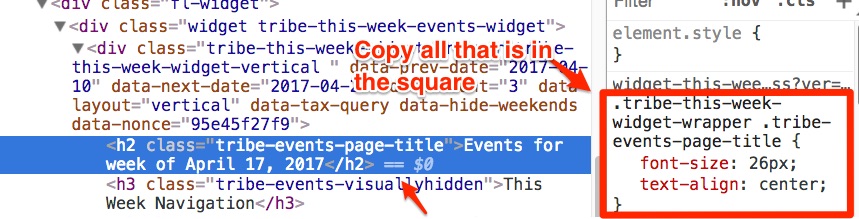
Using inspect I found the CSS for the widget title but am not sure what to include in the
CSS? See attached pic…. I can edit it manually but not sure how to change it in CSS?Once you find the CSS rule and you change it to your liking, you will need to copy-paste all of it over to the style.css file of your theme or in your Custom CSS metabox.
If you can’t find either of these 2 things, the you should install the following plugin: https://wordpress.org/plugins/simple-custom-css/
Q2:
Using the snippets that you suggested see above code, I am not sure what to change to make the weekly event widget show only 30 days of events from current day. So the user can click prev/next to browse the 30 days only.This specific part is alas outside of the scope of our support.
Especially since your needs have now evolved to specifically no more than 30 days in the future.Short term, I would forget about the snippet and apply the suggested CSS rule to hide navigation to the past or simply hide the navigation altogether.
If coding is not really your cup of tea, you could always hire one of our recommended customizers to do the customization for you.
Q3: I did all the steps 1-4 you described above for editing the:
/wp-content/plugins/events-calendar-pro/src/views/pro/widgets/this-week/single-event.phpSimply put, the code on line 17 needs to change from
ID ) ); ?>" rel="bookmark"><?php echo esc_html( $event->post_title ); ?>to
<?php echo esc_html( $event->post_title ); ?>Have a great day!
Geoff B.
April 19, 2017 at 9:35 am in reply to: Events Calendar plugin crashing admin area after web-site transfer #1271740MemberThis reply is private.
MemberGood morning Simon,
I have good news.
I believe the following filter works
add_filter( 'tribe_events_excerpt_allow_shortcode', '__return_true' );Let me know how that goes.
Best regards,
Geoff B.MemberGood evening Ronald and welcome to the Events Calendar forum!
Thank you for your interest in our products.
We’ll be glad to answer your questions.<p style=”text-align: left;”>1) Would like to filter events on several pages before the results get displayed. ie Page 1 is gender choice, page 2 is location choice, page 3 is a category choice, then page 4 displays the results for all 4 choices.
<p style=”text-align: left;”>Technically, we offer all of these filtering possibilities:
-
<li style=”text-align: left;”>Gender choice could be either an event tag or an event category
<li style=”text-align: left;”>Location choice could be based on Country, City or Province/State of the event venue
<li style=”text-align: left;”>Category choice could be handled by an event categoryAll of these are perfectly handled by our Filter Bar plugin: https://theeventscalendar.com/product/wordpress-events-filterbar/
Since the filtering is URL based, you would simply need a multi-page form plugin that directs to a constructed URL based on the choices made in the form.
2) Full ticketing and payment system, including letting organisers manage their own events
You will require the following plugins:
- Event Tickets (free): https://theeventscalendar.com/product/wordpress-event-tickets/
- Event Tickets Plus premium: https://theeventscalendar.com/product/wordpress-event-tickets-plus/
- Community Events: https://theeventscalendar.com/product/wordpress-community-events/
- Community Tickets: https://theeventscalendar.com/product/community-tickets/
This will meet all of these requirements.
You will probably be interested in the following bundles: https://theeventscalendar.com/bundles/3) clean, clear and simple visualisation
Our free the Events Calendar offer a variety of views (list, month, day), but our the Events Calendar Pro premium add-on also adds the photo and the map view to the mix (on top of advanced widgets): https://theeventscalendar.com/product/wordpress-events-calendar-pro/
Let me know if that helps.
Have a great day!
Geoff B.
MemberThis reply is private.
MemberGood evening Greg,
“Include events in main blog loop”
I wonder if this will help us achieve what we were aiming to do (if event isn’t translated, the english version appears in the foreign language site as a ‘fill in’)
Actually, this is not quite the same, but good thinking.
The Reproduce built-in WPML functionality for the Event Custom post type (Blog Posts To Display ticket is still open and has been properly estimated.
It has a fairly high priority and should make the cut once the Dev team works on the WPML centric release.
The logic behind it is not that complicated and it should be pretty fast once we can get Dev involved:
- spot WPML active
- whatever the loop switch to default lang
- pull all posts for the loop in default lang
- parse each for an available translation else return the default one
Of course, you will be contacted as soon as it’s out 🙂
But for now, that is all I have.
Best regards,
Geoff B.
MemberThis reply is private.
MemberGood evening Simon,
I am sorry the suggested filter did not help.
I will ask our code ninjas to see if they have any further suggestions.
But, perhaps, you might want to use custom fields for that purpose instead ?
In other words, if you added a custom field containing the shortcode AND displayed that custom field (do_shorcode) in lieu of the excerpt IF not empty, I believe you will reach your goal.
You might want to read our Themer’s guide to get a sense of how to customize the different views.
Hang in there as I follow up on this for you.
Best regards,
Geoff B.
April 18, 2017 at 8:00 pm in reply to: Images not showing up on first events page http://mattyandamanda.com/events #1271429MemberGood evening Matthew and welcome to the Events Calendar Support forum!
Thank you for reaching out to us.
We are sorry to hear about the images not showing up and the format not being as expected.
I would love to help you with this topic.What is a bit odd is that the https://mattyandamanda.com/events/ URL is not using the Events Calendar at all.
It almost looks like you have set up static pages with that URL (which is incompatible with our plugins).
Short term, could you change the slugs under Events -> Settings -> General for Events URL slug and Single event URL slug to calendar and calendar-page respectively.
Once that is done, please re-save your permalinks and let me know.
Ideally, if there could be a couple of problematic events in place, that would help me troubleshoot better.
Hang in there!
Geoff B.
April 18, 2017 at 7:42 pm in reply to: Can't get shortcode to work on homepage with Events Pro #1271417MemberGood evening Greg and welcome to the Events Calendar forum!
Thank you for reaching out to us.
We are sorry to hear about the shortcode not working properly on your install. Yikes!
I would love to help you with this topic.However in order to do so, could you simply repost this question in the correct forum: https://theeventscalendar.com/support/forums/forum/events/events-calendar-pro/ ?
This, among other things, will allow us to use private replies to share sensitive information (which is not possible in the current forum).
And, while you do that, as a first troubleshooting step, could you please provide us with your complete system information in a private reply using the instructions found in the following link?
https://theeventscalendar.com/knowledgebase/sharing-sys-info/
Finally, still while you are there, could you send us an example of a page that has the shortcode in place (URL) ?
Best regards,
Geoff B.
MemberGood evening Jon and welcome back!
Thank you for reaching out to us.
I would love to help you with this topic.You are correct, the work on recurring event tickets has started, but there is alas no available ETA for now.
To put this into perspective, we are currently redesigning our recurring events module from the ground up to accommodate this (among other things). We are currently in the QA phase of that section of the project.
As you might guess, we can’t wait to release this feature either!
In the meantime, in case you did not know, this feature already partially works, but only in 1 context: the tickets for any given event series are shared by all the events in that series.
In other words, the tickets do not vary from one event to the next (at least not for now).
Some of our customers that require separate tickets for each event in the series have applied the following workarounds for now:
- Create the series and then break the different events from the series. This does remove the “see all” events functionality, but since each event is independent, you can sell different tickets in each.
- Create all the tickets they need in the series and hide some of them using CSS in each event.
I wish I had a better answer for you, but for now it’s the best one I have unfortunately.
Let me know if that helps.
Have a great day!
Geoff B.
April 18, 2017 at 12:15 pm in reply to: Events Pro Customers causes fatal error on Theme Customizer Page #1271274MemberGood afternoon Monica and welcome to the Events Calendar Support forum!
Thank you for reaching out to us.
I would love to help you with this topic.Based on what I am seeing, this is most likely caused by the fact that the Events Calendar Pro on your install is in dire need of an update.
You are currently using 4.0.5 and the current version is 4.4.5
You should see the update from your WordPress admin dashboard. If not, you might have to deactivate and delete the plugin in order to install the latest version manually.
Let me know how that goes.
Best regards,
Geoff B.MemberGood afternoon Jose and welcome back!
Thank you for reaching out to us.
We are sorry to hear about these irregularities showing up on your site. Yikes!
I would love to help you with this topic.Can you tell me which version of Avada you are using ?
Secondly, I see several errors in the Google Chrome developers Console.
By the sound of it, it looks like there is some type of conflict at play.
This is usually because of:- A conflict with another plugin
- A conflict with your WordPress theme
- A template customization for the Events Calendar that requires updating
A first quick test is to simply temporarily revert back to a default WordPress theme such as twenty-sixteen to see if the issue persists.
The next step would be to go through our testing for conflicts procedure (preferably in a staging/dev environment or local install of your WordPress website) and let us know what you find out.
Basically the goal here is to revert back to a bare WordPress installation to see if the problem persists. It also allows us to pinpoint what the cause of the issue is.
But, before you do that, there are 2 things I would advise:
- Make a backup of your database
- Consider activating a “Maintenance Page” plugin if you are doing this on your live site (to minimize impact on your visitors)
Best regards and
Good afternoon Jeff,
Thank you for the additional info.
Based on what I am seeing, only the memory_limit looks a bit odd,
At this point, there are a couple of thing I would like to do:
- Could you please send me a copy of the latest version of your WordPress theme / child theme via a link to a .zip file link (stored Dropbox or Google Drive) so that I can run some tests on my end ? I recommend a private reply for that purpose.
Please ensure you are using the latest files as found on your actual website.
This way I will get access to any updates or customizations you might have made. - Could you send me the system info of your staging site ?
- Would it be possible to login to look (not to touch) on your live site ? I would require temporary admin credentials for that purpose.
Hang in there!
Geoff B.
April 18, 2017 at 12:05 pm in reply to: Events Calendar plugin crashing admin area after web-site transfer #1271271MemberThis reply is private.
MemberGood afternoon Greg,
I am mostly glad we managed to apply the workaround everywhere.
I have assigned the other thread to myself and will see you there.
In the meantime, I will change this thread’s status to “Pending fix”.
Best regards,
Geoff B.
-
AuthorPosts