
Home › Forums › Calendar Products › Events Calendar PRO › Weekly Event Widget
- This topic has 16 replies, 2 voices, and was last updated 9 years, 6 months ago by
Mel.
-
AuthorPosts
-
April 14, 2017 at 11:04 am #1270228
Mel
ParticipantHi,
The TEC and support is wonderful….. I am using the weekly event widget (see attached pic).Q1: How can I change the widget text at the top to read: “Events for April, 10th” in a smaller font!
Q2: I want the widget to display only the current week and future weeks NOT past events!
Q3; I want the events to be read only NOT clickable.
Thank You
Mel FisherApril 17, 2017 at 12:58 pm #1270797Geoff B.
MemberGood morning Mel and welcome back!
Thank you for reaching out to us and for the great words.
We’ll be glad to answer your questions.Q1: How can I change the widget text at the top to read: “Events for April, 10th” in a smaller font!
I would highly recommend giving the following articles a read, as they will make you more autonomous when it comes to styling changes:
- https://theeventscalendar.com/knowledgebase/using-google-chrome-developer-tools/
- https://theeventscalendar.com/knowledgebase/changing-fonts-and-colours/
With that in mind, try adding the following CSS rule to your style.css file or in your Custom CSS metabox:
.tribe-this-week-widget-wrapper .tribe-events-page-title {

font-size: 18px;

}
Q2: I want the widget to display only the current week and future weeks NOT past events!
By default, the week widget will only display this week’s events (including “past days” of the current week).
If you want to modify that behaviour, you will have to do some type of template customization.
You might want to read our Themer’s guide to get a sense of how that works.
Additionally, you will probably want to adapt the following snippet to your needs: https://gist.github.com/BeardedGinger/ea60931dd8dae7818465727f090e784f#file-filter_event_list_query_args-php
Q3; I want the events to be read only NOT clickable.
Here again, a template customization that would remove the links from any view you want to perform that change under would work.
You can read about that here: https://theeventscalendar.com/customizations/
If coding is not really your cup of tea, you could always hire one of our recommended customizers to do the customization for you.
Best regards,
Geoff B.
April 17, 2017 at 4:39 pm #1270864ParticipantHi,
Thank you for the response… Unfortunately none of it worked. I am using the weekly widget as shown in the attached pic.
In my Q1 I want the title of the weekly widget to read “Week of <weeks date>” in a smaller font! I use the plugin Simple Custom CSS and the CSS you provided did not work, nothing changed? Also the widget shows all events prev/next not just the current week as you described.
Q2: I put the following code you suggested into the Code snippets plugin shown below: Should the filter be as I changed below?
<?php
add_filter( ‘tribe_weekly_event_widget ?????_query_args’, ‘jm_filter_list_widget_query_args’ );
/**
* Filter the query used for the Event List Widget to show only events starting
* in the future
*/
function jm_filter_list_widget_query_args( $args ) {$offset = 86400 * 30;
$date = date( ‘U’ ) + $offset;$args[‘eventDisplay’] = ‘list’;
$args[‘meta_query’] = array(
array(
‘key’ => ‘_EventStartDate’,
‘value’ => date( ‘Y-m-d H:i:s’, $date ),
‘compare’ => ‘>=’,
‘type’ => ‘DATETIME’,
),
);return $args;
Q3: I checked the customizations page you suggested and did a search for weekly event widget. Found a few things but nothing showed up about making an event no click in the weekly event widget?
Need more advice please as I am not a designer.
Thanks
MelApril 18, 2017 at 9:21 am #1271148MemberGood afternoon Mel,
Thank you for your answer.
For the CSS rule, I believe the rules works, but is overridden by the one already in place.
You can fix that by adding the !important argument..tribe-this-week-widget-wrapper .tribe-events-page-title {
font-size: 18px !important;
}To remove the navigation to past events specifically in that widget, try
.tribe-this-week-widget-wrapper .tribe-events-sub-nav .tribe-this-week-nav-link.nav-previous {display:none !important}For question 2, perhaps the CSS rules above will suffice ?
Other than that, if you want to use the filter, it really goes in your theme’s functions.php, not elsewhere.It will also require some customization, as it is meant for the list view, not the widget.
Just to set expectations, the scope of our support is mostly to get our customers started on the right track and to help them in case of issues.
We unfortunately do not provide complete support for customization.
Q3: I checked the customizations page you suggested and did a search for weekly event widget. Found a few things but nothing showed up about making an event no click in the weekly event widget?
I totally understand what you are saying and I would like to help you get started.
However, as per the previous point, as much as we are excited about our customers customizing our plugins to their liking, we are only able to get them started on that journey.
With that in mind, here is how customizing the week widget works in a nutshell:
- With the themer’s guide, you find out which file controls the view or the elements of the widget you want to change ( /wp-content/plugins/events-calendar-pro/src/views/pro/widgets/this-week/single-event.php), download it and open it up in a text editor.
- Remove the and tags but leave what is between them on line 17
- Create a /tribe-events/ folder in your WordPress Child theme
- Upload that modified file in /tribe-events/pro/widgets/this-week/ in your child theme (create these additional directories manually)
The event in the widget will now be read-only.
Have a great day!
Geoff B.
April 18, 2017 at 11:33 am #1271263ParticipantHi again,
Slowly making progress…. 🙂
Q1: The font size worked after adding the important! arg
Using inspect I found the CSS for the widget title but am not sure what to include in the
CSS? See attached pic…. I can edit it manually but not sure how to change it in CSS?Q2:
Using the snippets that you suggested see above code, I am not sure what to change to make the weekly event widget show only 30 days of events from current day. So the user
can click prev/next to browse the 30 days only.Q3: still working on that…..
Thanks for the ideas and patience…
MelApril 18, 2017 at 12:25 pm #1271276ParticipantHi,
Q3: I did all the steps 1-4 you described above for editing the:
/wp-content/plugins/events-calendar-pro/src/views/pro/widgets/this-week/single-event.phpAt line 17:
ID ) ); ?>” rel=”bookmark”><?php echo esc_html( $event->post_title ); ?>what are the and tags you mentioned?
Thanks again
MelApril 18, 2017 at 12:39 pm #1271280ParticipantApril 19, 2017 at 10:10 am #1271755MemberGood afternoon Mel,
I am glad to see you are making progress.
Q1: The font size worked after adding the important! arg
Using inspect I found the CSS for the widget title but am not sure what to include in the
CSS? See attached pic…. I can edit it manually but not sure how to change it in CSS?Once you find the CSS rule and you change it to your liking, you will need to copy-paste all of it over to the style.css file of your theme or in your Custom CSS metabox.
If you can’t find either of these 2 things, the you should install the following plugin: https://wordpress.org/plugins/simple-custom-css/
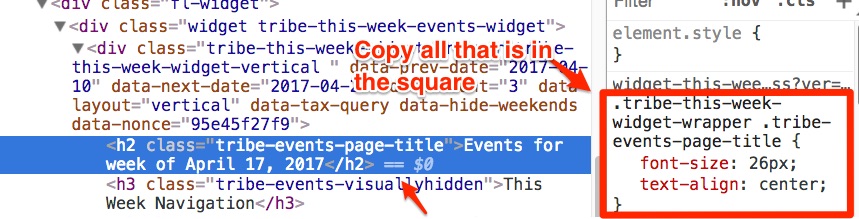
Q2:
Using the snippets that you suggested see above code, I am not sure what to change to make the weekly event widget show only 30 days of events from current day. So the user can click prev/next to browse the 30 days only.This specific part is alas outside of the scope of our support.
Especially since your needs have now evolved to specifically no more than 30 days in the future.Short term, I would forget about the snippet and apply the suggested CSS rule to hide navigation to the past or simply hide the navigation altogether.
If coding is not really your cup of tea, you could always hire one of our recommended customizers to do the customization for you.
Q3: I did all the steps 1-4 you described above for editing the:
/wp-content/plugins/events-calendar-pro/src/views/pro/widgets/this-week/single-event.phpSimply put, the code on line 17 needs to change from
ID ) ); ?>" rel="bookmark"><?php echo esc_html( $event->post_title ); ?>to
<?php echo esc_html( $event->post_title ); ?>Have a great day!
Geoff B.
April 19, 2017 at 1:33 pm #1271861ParticipantHi,
I hope I solve my issue before you retire hehe. Sorry I am so slow on this.
Q1: I have been using the simple custom css plugin for awhile and works fine.
I had previous added the highlighted css when I changed the font size.
What do I do with the other H2 line that you highlighted? That is the place I manually
change the title and it worked, but not sure where to put that line? See attached pic.Q3: I replaced the code in line 17 of the file under my child theme in the path you
suggested. see my notepad++ screen capture attached. But I can still click the events in
the weekly widget….Thanks for your patience..
MelApril 20, 2017 at 9:34 am #1272229MemberGood afternoon Mel,
No worries, we are indeed here to help and empower our customers 🙂
What do I do with the other H2 line that you highlighted? That is the place I manually change the title and it worked, but not sure where to put that line? See attached pic.
I believe there is a bit of confusion here. CSS files or Simple Custom CSS boxes are not meant to handle HTML elements, only the CSS rules.
In other words, the following is great (notice the use of { and } )
.tribe-this-week-widget-wrapper .tribe-events-page-title {

font-size: 18px!important;

text-align: left !important;

}
But the actual HTML element should not be there
Events for week of April 17, 2017
So in short, the process is:
- Click on the page using the inspector
- Find the HTML element and look and it’s CSS rules
- Only paste the rule (not the element in the CSS file or Metabox)
As for the links still working, that is quite odd.
Is it possible that there is some kind of caching at play on your website ?
Can you confirm that you are indeed using the “This week” widget ?In any case, just for fun, after unzipping, could you slide the following file directly in the correct plugin folder ? single-event
The correct path is /wp-content/plugins/events-calendar-pro/src/views/pro/widgets/this-week/
Let me know how that goes.
Best regards,
Geoff B.April 20, 2017 at 10:35 am #1272312ParticipantHi Geoff,
The cloudflare cache plugin was blocking the line 17 issue but it is ok now, weekly events are not clickable now.
The only issue is Q2: to change the title to ” Week of <date> “. In the pic you send me, a red arrow pointed to the:
Events for week of April 17, 2017
== $0
What should I do with this?
Thanks
MelApril 21, 2017 at 9:12 am #1272715MemberGood afternoon Mel,
I am glad that each issue is getting solved 🙂
Regarding that last point, you can simply ignore that arrow and what it is pointing to.
The arrow was only there to show how I found the rule, it was never meant to have the content it is pointing to copied.Let me know if there is anything else on this topic.
Have a good weekend,
Geoff B.
April 21, 2017 at 9:53 am #1272803ParticipantHi Geoff,
Q3: OK I will ignore that red pointer…
Q2: what would I need to change in the snippet (see pic) to make the weekly list only show the current day + 30 days? If possible it would be nice to have this feature….
Thanks
MelApril 24, 2017 at 8:35 pm #1273866MemberGood evening Mel,
Regarding Question 2, as stated before, we are unfortunately limited in the amount of support we can provide for customizations, past pointing people in the right direction.
What I could do is refer you to the following KB article which is our best documentation on the topic: https://theeventscalendar.com/knowledgebase/using-tribe_get_events/
Here is a related usage thread: https://theeventscalendar.com/support/forums/topic/how-to-limit-widget-events-by-date/
In fact, I would recommend using that instead of the snippet that simply offsets the start date by (60 seconds x 60 minutes x 24 hours) * 30 days.
I would highly recommend hiring one of our recommended customizers to do the customization for you if this is too much outside of your comfort zone.
Let me know how that goes.
Best regards,
Geoff B.April 24, 2017 at 9:11 pm #1273877ParticipantThanks for the nice support……
Mel -
AuthorPosts
- The topic ‘Weekly Event Widget’ is closed to new replies.