

Forum Replies Created
-
AuthorPosts
-
April 20, 2017 at 8:37 am in reply to: Events Calendar plugin crashing admin area after web-site transfer #1272191
Geoff B.
MemberThis reply is private.
MemberGood morning Ajax,
I am super stoked that this was helpful to you.
You are welcome back in our support forums any time 🙂
For now, I am going to close this thread.
Have a great week!
Geoff B.
MemberGood evening Pierre and welcome back!
Thank you for reaching out to us and kudos for finding the culprit (the /wp-content/languages/ folder. For the record, files found there will always override any other language file.
Aside from that folder (and its /plugins/ sub-folder), you will typically only need to worry about the /lang/ folder of each plugin.
I would love to help you with this topic.
The filter bar string is translatable directly in Events -> Settings -> Filters (see screenshot)
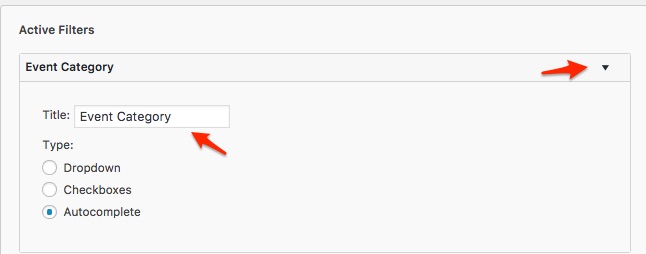
Let me know how that goes.
Best regards,
Geoff B.MemberGood evening Colin and welcome to the Events Calendar forum!
Thank you for your interest in our products.
We’ll be glad to answer your questions.We apologize for the inconvenience caused by this glitch.
We are actively working on a solution for this.I cannot guarantee when it will be fixed, as it’s in the development team’s hands now.
They need to assign it, code it, test it, and schedule it for release.The good news is that you will be contacted as soon as a fix is available.
Thank you for your patience as we see this through.In the meantime, there are 2 workarounds:
- Create a blank page and use one of the Pro shortcodes to create your desired calendar view and set that page up as your Front page
(https://theeventscalendar.com/knowledgebase/embedding-calendar-views-tribe_events-shortcode/) - Downgrade to the Events Calendar 4.3.4.I recommend reading the following: https://theeventscalendar.com/knowledgebase/downgrading-plugin-past-version/
Best regards,
Geoff B.MemberGood evening Josie and welcome to the Events Calendar Support forum!
Thank you for reaching out to us.
We are sorry to hear about the calendar not displaying properly.
I would love to help you with this topic.The first thing I would recommend is trying a different setting under Events -> Settings -> Display for Events Template.
Normally that fixes the issue.
Let me know how that goes.
Best regards,
Geoff B.MemberThis reply is private.
MemberGood afternoon Oscar,
Thank you for reaching out to us.
We are sorry to hear about the issues you are facing while attempting to renew. Yikes!
I would love to help you with this topic.I just checked your orders and they both went through. I believe the issue is that your account is tied to the following email address jesterminute(at)gmail.com. Can you confirm ?
Additionally, for some reason, the net result was that the license did not get renewed in spite of the 2 orders. So I went ahead and refunded the second one.
Hang in there!
Geoff B.
MemberGood afternoon Jason and welcome back!
Thank you for reaching out to us.
I would love to help you with this topic.I’m wanting to have the option for the admins on my site to purchase tickets for a few of our events. We will sometimes have members call in who will request that we purchase the tickets over the phone.
The best way to achieve this would be through the use of a third-party plugin such as https://codecanyon.net/item/shop-as-customer-for-woocommerce/7043722
This would make sure that all tickets are properly ordered without the need to actually log off.
That is still going through the front-end, but for now that is a requirement to make sure that all informations are properly captured (which would not be the case using direct backend manual orders – e.g.: attendee info).
Let me know if that helps.
Have a great day!
Geoff B.
MemberGood afternoon Jeremy,
Alas there is no workaround available for now.
This is mostly because Filter Bar compatibility with WPML never existed.But, the good news is that we are about to schedule a WPML centric release.
Hopefully, that will get us one step closer to being able to do just that.Best regards,
Geoff B.
MemberGood afternoon Titus,
Awesome. Thank you for your understanding and kudos on the temporary fix.
Keep me posted on your findings and I will do the same as soon as the fix is out.
Have a great day!
Geoff B.
MemberGood afternoon James and welcome back!
The short answer is yes. We have started work on this: https://tribe.uservoice.com/forums/195723-feature-ideas/suggestions/3685663-recurring-event-support-for-tickets
I still do not have an ETA for you at this point, but I can tell you that we are almost done completely rebuilding our recurring event code. This was a necessary step to allow recurring events ticket support.
In the meantime, some of our users create recurring events and “break them” from the series (turning them into independent single events – which in turn provides individual capacity).
The obvious downside is that this removes them from the series.
I wish I had a better answer for you, but for now it’s the best one I have unfortunately.
Have a great day!
Geoff B.
MemberGood afternoon Ryan and welcome to the Events Calendar forum!
Thank you for your interest in our products.
We’ll be glad to answer your questions.1. In the calendar view, can we have images in the days. Similar to this site: http://www.nourished.com/class-schedule
The short answer is yes.
However, that will require some customization of the view(s) you want this to appear.
You might want to read our Themer’s guide to get a sense of how that works.If coding is not really your cup of tea, you could always hire one of our recommended customizers to do the customization for you.
2. I assume user can purchase and register multiple people at a time when purchasing tickets?
Yes, absolutely. Especially if you take advantage of the attendee information feature that comes with Event Tickets Plus.
3. Can we connect to Constant Contact?
Yes, however, this will happen at the WooCommerce level (since we hand-off all of the transactional aspect of things to WooCommerce).
Check out this plugin: https://woocommerce.com/products/woocommerce-constant-contact/
4. Is it possible to have waitlist if an event is full?
That is a very popular feature request. In fact, you can vote for it here: https://tribe.uservoice.com/forums/195723-feature-ideas/suggestions/6095921-add-waitlist-capability
As you can see, we do have a workaround to do mimic a waitlist on that page.
Let me know if that helps.
Have a great day!
Geoff B.
April 19, 2017 at 10:25 am in reply to: recurring events all is getting redirected to single event #1271770MemberGood afternoon Merijn and welcome back!
Thank you for reaching out to us.
We are sorry to hear about the all link not working properly on your website.
I would love to help you with this topic.The main thing I am noticing is that your the Events Calendar and the Events Calendar Pro versions are currently not matching (4.4.5 vs 4.2.5).
It is very important that both versions “match” (in time) to ensure proper functioning.
Furthermore, since you are using WPML, the most optimized version we have for that purpose is 4.3.5 ( the Events Calendar ) and 4.3.4 (Pro).
I recommend reading the following: https://theeventscalendar.com/knowledgebase/downgrading-plugin-past-version/
If you do not wish to downgrade, you should upgrade Pro to 4.4.5
Of course, before any upgrade or downgrade, you should always to a database backup to be safe.
Let me know how that goes.
Best regards,
Geoff B.MemberGood afternoon Tasha and welcome back!
Thank you for reaching out to us.
I would love to help you with this topic.Since we hand-off all of the transactional aspect of things to WooCommerce. I am pretty sure this is possible.
It will only be a matter of finding the correct third-party plugin to help you achieve that.
Here are a couple to get you started:- https://wordpress.org/plugins/woocommerce-multiple-free-gift/
- https://wordpress.org/plugins/pricing-deals-for-woocommerce/
Let me know if that helps.
Have a great day!
Geoff B.
MemberGood afternoon Ryan and welcome back!
Thank you for reaching out to us.
Kudos on figuring things out!
For the record, there are also Date Format Settings under Events -> Settings -> Display
You are welcome back in our support forums any time 🙂
For now, I am going to close this thread.
Have a great week!
Geoff B.
- Create a blank page and use one of the Pro shortcodes to create your desired calendar view and set that page up as your Front page
-
AuthorPosts