

Forum Replies Created
-
AuthorPosts
-
Geoff B.
MemberGood evening and welcome back!
Thank you for reaching out to us.
I would love to help you with this topic.To accomplish what you are looking for, you will probably also need a plugin such as Members.
You can read all about it here: https://theeventscalendar.com/knowledgebase/admin-roles-and-permissions/Let me know if that helps.
Have a great day!
Geoff B.
MemberGood evening Joren and welcome to the Events Calendar forum!
Thank you for your interest in our products.
We’ll be glad to answer your questions.I would recommend trying the following template override: https://gist.github.com/niconerd/d2ea62be5375ae3dc088dd29b7350608
You might want to read our Themer’s guide to get a sense of how that works.
Best regards,
Geoff B.
MemberGood evening Adam and welcome to the Events Calendar Support forum!
It looks like you are using the standalone version of Event Tickets Plus (without the calendar).
This is fine and will work perfectly.
Typically, tickets are tied to post or pages.
In fact, depending on your settings under Events -> Settings -> Tickets, you should see an “Add ticket” box in posts and pages.If, on the other hand, you are solely interested in using them as WooCommerce products, the reason you are not seeing them in the shop is because of their default catalog visibility.
By default, this is set to “hidden”.
You could either manually change that in each ticket (directly in WooCommerce) or you could apply the following snippet in the functions.php file of your theme (without the PHP tag at the top): https://gist.github.com/jesseeproductions/5768685acc4cd48cdd81#file-tribe-woo-catalog-visible-php
Let me know how that goes.
Best regards,
Geoff B.June 13, 2017 at 12:11 am in reply to: How to cancel and refund our event tickets plus purchase #1297051MemberGood evening Anandamayi and welcome back!
We are sorry to hear you could not customize our plugin to your liking.
Thank you for taking the time to provide feedback.
The good news is you are fully entitled to a refund if you want one since you are within 30 days of your purchase.
I just went ahead and refund the order. It might take a couple of days to fully process and appear on your account.
Best of luck with your projects.
Geoff B.
June 13, 2017 at 12:10 am in reply to: URGENT! I updated the plugin and ticketing has disappeared from event pages #1297049MemberGood evening Thomas and welcome back!
Thank you for reaching out to us.
We are sorry to hear about the tickets disappearing on you. Yikes!
I would love to help you with this topic.By the looks of it, it seems that your Event Tickets Plus plugin is deactivated.
Would you mind reactivating it and, if need be, completely deleting it and reinstalling it from scratch.
It is always safer to do a database backup beforehand, but this is not a destructive operation.
Let me know how that goes.
Best regards,
Geoff B.MemberGood evening Victoria and welcome back!
Thank you for reaching out to us.
We are sorry to hear about the issues you are experimenting.
I would love to help you with this topic.By the sound of it, it looks like there is some type of conflict at play.
This is usually because of:- A conflict with another plugin
- A conflict with your WordPress theme
- A template customization for the Events Calendar that requires updating
When it comes to that type of issue, it is preferable to troubleshoot in a staging environment if you have one.
A first quick test is to simply temporarily revert back to a default WordPress theme such as twenty-sixteen to see if the issue persists.
The next step would be to go through our testing for conflicts procedure and let us know what you find out.
Basically the goal here is to revert back to a bare WordPress installation to see if the problem persists. It also allows us to pinpoint what the cause of the issue is.
But, before you do that, there are 2 things I would advise:
- Make a backup of your database
- Consider activating a “Maintenance Page” plugin if you are doing this on your live site (to minimize impact on your visitors)
Let me know how that goes.
Geoff B.
June 12, 2017 at 11:55 pm in reply to: Cannot see Pro event calendar widget options just the free ones #1297045MemberGood evening Yuval and welcome back!
Thank you for reaching out to us.
We are sorry to hear about the Pro widget features not being available to you.
I would love to help you with this topic.By the sound of it, it looks like there is some type of conflict at play.
This is usually because of:- A conflict with another plugin
- A conflict with your WordPress theme
- A template customization for the Events Calendar that requires updating
When it comes to that type of issue, it is preferable to troubleshoot in a staging environment if you have one.
A first quick test is to simply temporarily revert back to a default WordPress theme such as twenty-sixteen to see if the issue persists.
The next step would be to go through our testing for conflicts procedure and let us know what you find out.
Basically the goal here is to revert back to a bare WordPress installation to see if the problem persists. It also allows us to pinpoint what the cause of the issue is.
But, before you do that, there are 2 things I would advise:
- Make a backup of your database
- Consider activating a “Maintenance Page” plugin if you are doing this on your live site (to minimize impact on your visitors)
Let me know how that goes.
Geoff B.
June 12, 2017 at 11:53 pm in reply to: 15 minute increments gone for event start/stop times? #1297044MemberGood evening Lisa and welcome to the Events Calendar Support forum!
Thank you for reaching out to us.
I would love to help you with this topic.For the time being, you could simply manually enter the time instead of using the selector (see screenshot)
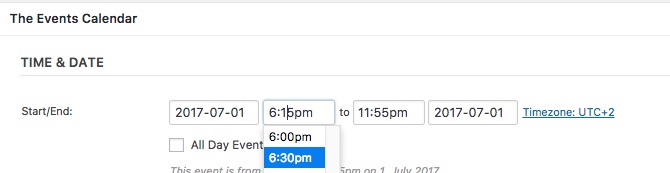
Let me know if that helps.
Have a great day!
Geoff B.
MemberGood evening Harsh and welcome to the Events Calendar forum!
Thank you for your interest in our products.
We’ll be glad to answer your questions.We need some custom feature so extensive customization is required and as you know not everytime we get exact job done. In that case, do you provide 100% refund before 30 days?
As long as you are within 30 days of your purchase, no matter what your reason is, you are entitled to a full refund.
Have a great day!
Geoff B.
MemberGood evening Mark,
Yes, you could totally do that.
But this will have to be accomplished via a function.
You could draw on the following for inspiration: https://gist.github.com/cliffordp/fc9b2df3c4d7cf062fdeYou also might want to read about this: https://theeventscalendar.com/knowledgebase/using-tribe_get_events/
Let me know how that goes.
Best regards,
Geoff B.MemberGood evening Paula,
I am glad the snippet worked.
To address your specific need, the only current solution is the snippet you mentioned did not work for you.
You could try again to apply the snippet in the functions.php file of your theme (without the PHP tag at the top): https://gist.github.com/cliffordp/66bf05df61ee269c60ff20d6f39e2cab#file-functions-php
The reason I am asking is because I just tested the snippet again with a default WordPress theme and it works.
Perhaps we should try to find out why it does not work for you ?
Could you please send me a copy of the latest version of your WordPress theme / child theme via a link to a .zip file link (stored Dropbox or Google Drive) so that I can run some tests on my end ? I recommend a private reply for that purpose.
Please ensure you are using the latest files as found on your actual website.
This way I will get access to any updates or customizations you might have made.Best regards,
Geoff B.
MemberGood evening George and thank you for writing back,
Based on your specific situation, I believe you have a couple of options:
- Make sure the .po and .mo language files found in /wp-content/languages/ or /wp-content/languages/plugins/ for the Events Calendar and the Events Calendar Pro are up to date and contain the latest string sets.
- Open up these files there and check for any fuzzy entries (if any, make them “unfuzzy). The language files found here will have total priority if there is not a string translation present.
- Repeat the same operation as above, but for WordPress language files in greek. The translation for certain elements (e.g.: Monday) might be handled by the WordPress language file.
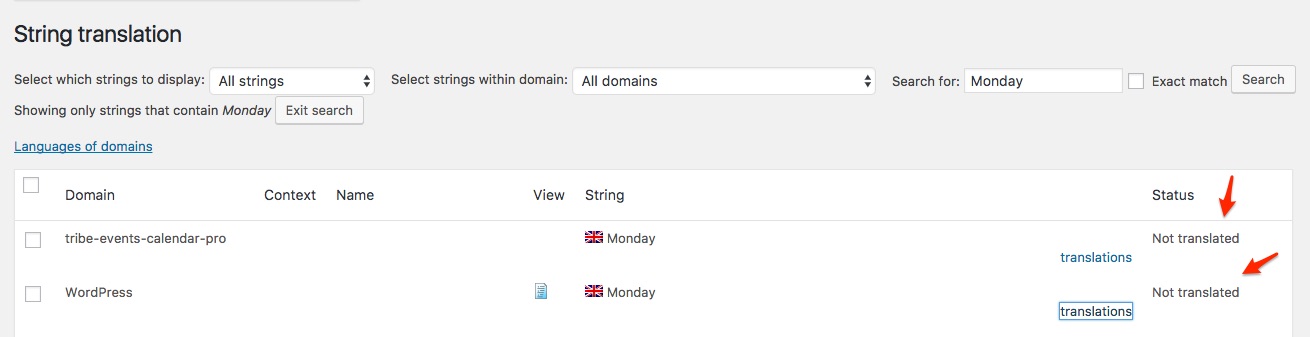
Perhaps, if you could send me a copy of your exact language files (all of the ones found under/wp-content/languages/), I could run a tests on my end.
Finally, you might want to clear WPML’s cache.
Head over to WPML > Support > Troubleshooting page.
Once you are there, you should see several cleanup buttons. I would recommend:
- Clearing WPML cache
- Using ALL the cleanup buttons on that page
- Re-saving your permalinks
Let me know how that goes.
Best regards,
Geoff B.MemberGood evening Mauro,
Thank you for writing back.
I truly apologize for the confusion. This is totally my bad.I got confused because this thread was posted in the pre-sales forum.
To get complete premium support, you need to:- Login to your account here: https://theeventscalendar.com/my-account/
- Use the Events Calendar Pro premium forums: https://theeventscalendar.com/support/forums/forum/events/events-calendar-pro/
This will allow us to exchange system information in a private manner with you.
Could you please open a thread in the premium forum mentioning this one ?
After opening it, could you also please send us a copy of the latest version of your WordPress theme / child theme via a link to a .zip file link (stored Dropbox or Google Drive) so that we can better recommend which file to tweak to get the same header and footer ? I recommend a private reply for that purpose.
In the meantime, my previous suggestion still stands (if you have not tried it yet).
Try adding the following CSS rule to your style.css file or in your Custom CSS metabox for the arrow:
.single-tribe_events .mk-post-next {

display: none;

}
Best regards,
Geoff B.
MemberGood evening Joseph and welcome back!
Thank you for reaching out to us.
I would love to help you with this topic.The short answer is yes. But you might need to do a bit of tweaking.
I would recommend reading and trying the following:
- https://theeventscalendar.com/knowledgebase/calendar-page-shows-event-title/
- https://theeventscalendar.com/knowledgebase/altering-or-removing-titles-on-calendar-views/
Could you also please send me a copy of the latest version of your WordPress theme / child theme via a link to a .zip file link (stored Dropbox or Google Drive) so that I can run some tests on my end ? I recommend a private reply for that purpose.
Please ensure you are using the latest files as found on your actual website.
This way I will get access to any updates or customizations you might have made.Let me know how that goes.
Best regards,
Geoff B.MemberGood evening Albert and welcome to the Events Calendar forum!
Thank you for your interest in our products.
We’ll be glad to answer your questions.I would definitely recommend trying things out in a staging / test environment if possible since this is such a big upgrade.
That being said, it should be smooth sailing for the most part.
The only thing that you will need to pay attention to is the migration from WooTickets to Event Tickets Plus.I highly recommend reading the following: https://theeventscalendar.com/knowledgebase/moving-to-event-tickets-plus/
Let me know how that goes.
Best regards,
Geoff B. -
AuthorPosts