
Home › Forums › Calendar Products › Events Calendar PRO › Incorrect language
- This topic has 12 replies, 2 voices, and was last updated 9 years, 4 months ago by
Michalis.
-
AuthorPosts
-
June 8, 2017 at 5:10 am #1295131
Michalis
ParticipantHi,
I installed “The Events Calendar on my website but in the specific page: http://kerynia.eu/newsite/events/ the language is english whereas it should be Greek. Any idea why this happens? I tried updating the language files in wp-content/plugins/the-events-calendar/lang and in wp-content/languages but nothing changes.
Thanks
June 9, 2017 at 10:34 pm #1296097Geoff B.
MemberGood evening George and welcome back!
Thank you for reaching out to us.
We are sorry to hear about the language not being greek on the calendar page.
I would love to help you with this topic.As a side note, I am also noticing that you are using WPML.
I highly recommend reading and using the following guides if you have not already:- https://theeventscalendar.com/knowledgebase/setting-up-the-events-calendar-with-wpml/
- https://theeventscalendar.com/knowledgebase/creating-translations-for-events-using-wpml/
When translation file strings are not kicking in, it is usually caused by one of the following things:
- Your translation files are not up to date
- You are using some customized translation files that have been placed in the /wp-content/languages/ or /wp-content/languages/plugins/ folder. These might not be updated and will override any other file.
- The strings are translated, but are considered “fuzzy”
In the first 2 cases, the solution is to update your translation files using the pot file. You can do this by using the Poedit software and heading to Catalog > Update from pot file.
In the last case, you will need to make them “unfuzzy” using Poedit.
It could also be caused by the fact that the Greek language file is currently incomplete (around 40%).
I highly recommend reading the 3 following articles on translation:
- https://theeventscalendar.com/knowledgebase/translating-the-events-calendar/
- https://theeventscalendar.com/knowledgebase/how-to-override-plugin-language-files/
- https://theeventscalendar.com/knowledgebase/incomplete-translations/
Finally, it will depend on your settings under WPML > Theme and plugins localization.
I highly recommend one of the first 2 settings at the top of the page.Worst case scenario, you can always translate the missing strings using WPML string translation.
Let me know how that goes.
Best regards,
Geoff B.June 11, 2017 at 11:34 pm #1296540ParticipantThis reply is private.
June 12, 2017 at 11:11 pm #1297032MemberGood evening George and thank you for writing back,
Based on your specific situation, I believe you have a couple of options:
- Make sure the .po and .mo language files found in /wp-content/languages/ or /wp-content/languages/plugins/ for the Events Calendar and the Events Calendar Pro are up to date and contain the latest string sets.
- Open up these files there and check for any fuzzy entries (if any, make them “unfuzzy). The language files found here will have total priority if there is not a string translation present.
- Repeat the same operation as above, but for WordPress language files in greek. The translation for certain elements (e.g.: Monday) might be handled by the WordPress language file.
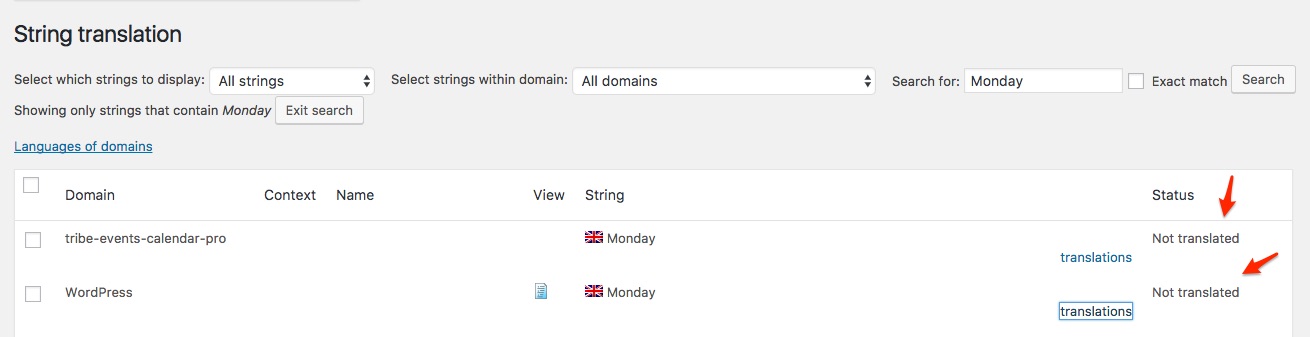
Perhaps, if you could send me a copy of your exact language files (all of the ones found under/wp-content/languages/), I could run a tests on my end.
Finally, you might want to clear WPML’s cache.
Head over to WPML > Support > Troubleshooting page.
Once you are there, you should see several cleanup buttons. I would recommend:
- Clearing WPML cache
- Using ALL the cleanup buttons on that page
- Re-saving your permalinks
Let me know how that goes.
Best regards,
Geoff B.June 12, 2017 at 11:49 pm #1297040ParticipantHi,
I tried clearing the cache by using all buttons in the troubleshooting page but that did not do any difference.
I am attaching you all translation files for WordPress, The Events Calendar & The Events Calendar Pro.
I open all files in poedit and i can see that all contain greek translations that should be displayed in the calendar in front end. Also as i mentioned before same files are being used in other websites of ours and display the translations in front end without issues.
It would be better if you could just login in the website and investigate yourself. It is in demo mode if that is what concerns you.
June 14, 2017 at 9:20 am #1297826MemberGood afternoon George,
Thank you for the files.
As I suspected, these language files are really in need for an updated (a lot of obsolete and a lot of new strings).I totally understand that this works fine on your other sites, but I believe we should focus on making this specific site work. What is probably going on is that the other sites are not as impacted by these older language files than a fresh new install.
Either way, this leaves you with the following options:
- Update these language files using Poedit and the “Update from POT” option, making sure that all strings are cleared and are not fuzzy.
- If you do not have personalized translation, after a backup, you could simply erase the language files found under /wp-content/languages/ or /wp-content/languages/plugins/ (note that there should be only 1 set of files in there) which will result in wp-content/plugins/the-events-calendar/lang/ AND wp-content/plugins/events-calendar-pro/lang/ files (which are up to date) to kick-in
- Simply use string translation to “fill in the gaps” (with your current WPML setting, string translation has the top priority).
Let me know how that goes.
Best regards,
Geoff B.June 15, 2017 at 11:12 pm #1298965ParticipantHi,
I really do not understand what needs to be done here.
1. Which language files should i update via Poedit? i provided you with 3 sets of languages in my last response. I open all 3 files in Poedit and all look ok. What do you mean by fuzzy? Please give more specific steps or even screenshots if possible. We are wasting a lot of time here. You only reply once a day and sometimes not everyday. This is a serious issue for us and need to resolve it asap.
2. I do not have such a path /wp-content/languages/plugins/. I only have on folder under wp-content/languages which is “themes”.
3. I do not want to translate the string in WPML usting string translation in any case. This is the reason we are using language files.
In your last response you said that the language files i provided are really in need for an updated (a lot of obsolete and a lot of new strings). How can you tell that? I mentioned already that i am copying these files from other sites that work perfectly.
Any let me know specific steps of what needs to be done so that i can fix the issue.
Thanks
June 20, 2017 at 12:23 am #1300345MemberGood evening George,
First off I want to apologize for the delay answering.
I am sorry that my answer generated more confusion. This certainly was not my intent.1. Which language files should i update via Poedit? i provided you with 3 sets of languages in my last response. I open all 3 files in Poedit and all look ok. What do you mean by fuzzy?
To update a language file via Poedit, please watch the following video: https://www.youtube.com/watch?v=Jz8MY_K1P38
Both the Events Calendar and the Events Calendar Pro language files you have provided are in need of an update. They look “OK”, but when you update them with the latest pot file, you will notice that hundred of strings are in either obsolete or new.
Fuzzy strings are explained very well here: https://www.gnu.org/software/gettext/manual/html_node/Fuzzy-Entries.html
2. I do not have such a path /wp-content/languages/plugins/. I only have on folder under wp-content/languages which is “themes”.
I had assumed that you had sent me the language files found in /wp-content/languages/ or any of it’s subdirectory. The reason for this is because I had specifically asked for that here: https://theeventscalendar.com/support/forums/topic/incorrect-language/#post-1297032
Since it appears that you are not using that folder at all for your translations, we can forget about that option altogether. However, please note that if there are any files in there at a later time and these files pertain to the Events Calendar priority, they will have top priority over the others.
3. I do not want to translate the string in WPML usting string translation in any case. This is the reason we are using language files
I totally understand what you want to do (although I must say, this would be the fastest way to fix things).
The issue you are facing here is your setting in WPML (see screenshot)
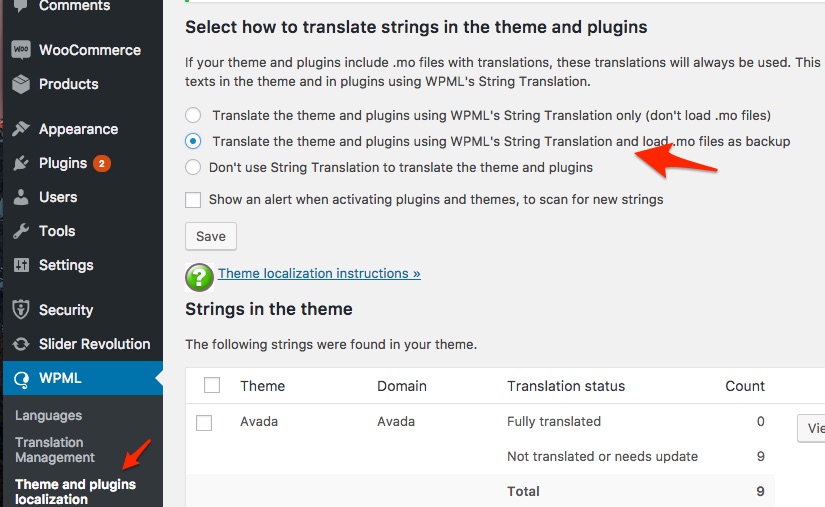
The way this is set up, WPML WILL look at string translation first and try to resort to the language files if it can’t find anything.
The combination of this setting AND the language files not being updated is probably what is causing issues here.
So the solutions remain the following:
- Use a different setting under theme and plugins localization (the last one) AND make sure you are using the latest version of our language files OR an update language file
- Use the same setting as currently AND make sure you are using the latest version of our language files OR an update language file
- Using string translation will instantly fix your issue.
Either way, as I was previously mentioning, there is little to be gained from the fact that this works well on other installs. In fact, it’s really not recommended to just carry language files over from one install to the next unless you are really comfortable with updating the language files.
Perhaps you might benefit from watching a few videos to get a hang of how Poedit and language files with WordPress work. It’s not that involved and you could become a true language files ninja in no time.
Best regards,
Geoff B.
Just to clarify, I am truly looking forward to resolution (just as much as you are).
June 20, 2017 at 6:53 am #1300461ParticipantHi,
– Where can i get the latest POT file?
– i did provide you with the language file located in /wp-content/languages/. It is called el.po and el.mo
– the WPML radio button selected is the option i am using in all my websites. Although i changed it but nothing happened.June 20, 2017 at 8:13 pm #1300882MemberGood evening George,
Thank you for bearing with me as we go through the ropes of language files customization together.
– Where can i get the latest POT file?
The latest POT file is located here:
- /wp-content/plugins/the-events-calendar/lang/
- /wp-content/plugins/events-calendar-pro/lang/
Another option to get the very latest language file is to grab them from here http://translations.theeventscalendar.com/projects
You will need to download the po and the mo files separately.
– i did provide you with the language file located in /wp-content/languages/. It is called el.po and el.mo
Correct and thank you. I thought that the other language files (the-events-calendar-el.po and tribe-events-calendar-pro-el.po) came from there or one of the subdirectories.
But as I said, this is my bad. Let’s focus on getting the language files in order.
– the WPML radio button selected is the option i am using in all my websites. Although i changed it but nothing happened.
I believe you. But, based on my extensive WPML experience, you cannot truly base yourself on another environment for troubleshooting purposes.
WPML tends to be sticky in the way it handles strings and language files.
Sometimes this means re-saving the permalinks and clearing all caches (including WPML’s cache) several times
Hang in there!
Geoff B.
June 21, 2017 at 12:28 am #1300915ParticipantI manage to solve the issue using the method you can see in the screenshot provided.
I went to WPML – String Translation – Import/Export .po.
There i selected the already uploaded .po file that is located in the events calendar plugin lang folder.
The same procedure i did for the default translations of wordpres because some of the calendar’s translations (such as months, days etc) are based on the wordpress lang file.
And now i can see the calendar translated in greek
June 21, 2017 at 6:23 pm #1301485MemberGood evening George,
This is pretty awesome!
I am super stoked that you managed to find a workaround.Thank you for sharing your solution for everyone’s benefit.
You are welcome back in our support forums any time 🙂
For now, I am going to close this thread.
Have a great week!
Geoff B.
-
AuthorPosts
- The topic ‘Incorrect language’ is closed to new replies.