

Forum Replies Created
-
AuthorPosts
-
Geoff
MemberHey Mike,
Yeah, our Business level license is technically not designed to recognize a multisite network. As a result, the messaging can indeed be misleading and there is definitely room for improvement on our end to clean that up.
That said, the plugins are indeed registered to your sites and you should continue to receive automatic updates and access to support, despite what the messages say.
Sorry for the confusion there, but I hope this helps explain things a bit!
Geoff
MemberHi Viktor,
Thanks for getting in touch!
I have to honest and say I have never heard of or used Klarna Checkout.
That said, I can say with confidence that we have not tested it out on our own. What we do offer is a full refund on all our products within 30 days of purchase. That should give you a good amount of time to try it out and see if it will integrate well for you. And, of course, if it doesn’t we’d be happy to honor our refund policy as long as you request it within 30 days of purchase.
Sorry I don’t have a definitive answer for you, but does this at least help? Please let me know. 🙂
Cheers!
GeoffMemberThis reply is private.
MemberHi Martin,
Thanks for writing in and sorry you’re bumping into this issue, where attendee meta does not display in the WordPress admin when tickets are purchased.
This is indeed something we are aware of and working to fix. I checked on the ticket we have for it in our system and it appears that it is currently being tested and planned for release in Event Tickets Plus 4.4.3, which is the next maintenance release on our schedule.
While I do not have a specific date for the release, it should be very soon and within the next week if all things go smoothly. I’ve added a note in the ticket and will mark this thread Pending Fix so we will be sure to follow up with you when the update releases.
Thanks for your patience while we work on this!
Geoff
MemberHi Crystal,
Ack, well that is egg on our face! Thanks for the heads up. The feature to add organizers in the Community Events form does indeed work, but there is a Javascript conflict in the theme we are using for the demo. We’ve gotta fix that for sure.
In the meantime, I spun up a test site and made a little screencast for you on how that feature does work:
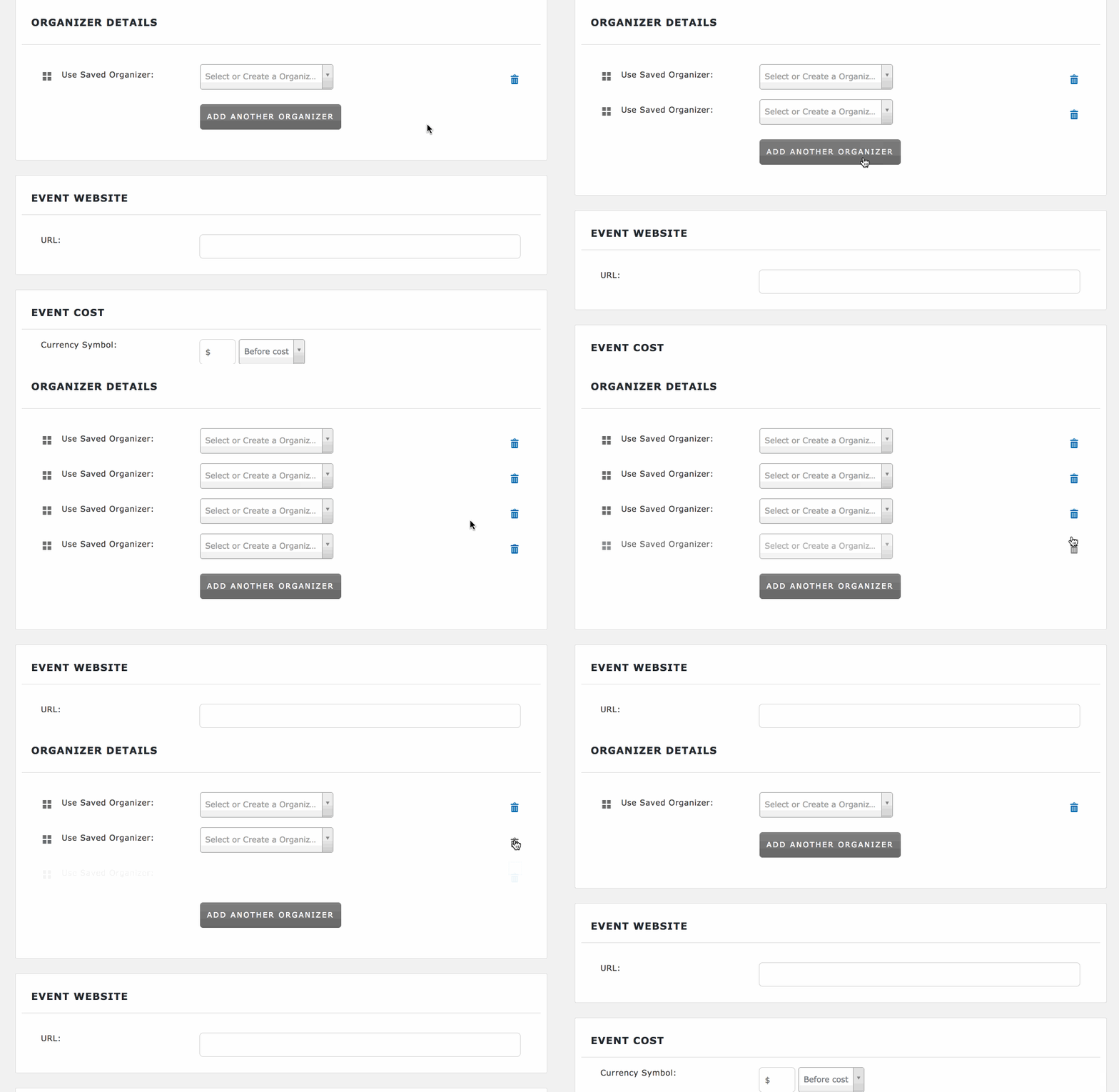
Does this help answer your question? Please let me know. 🙂
Cheers!
GeoffMemberHi Tristan,
Thanks for getting in touch and sorry for the trouble here with heading sizes!
Our plugins do not add data attributes to HTML tags like that in the content editor. Is it possible that the theme or another installed plugin is doing that? If so, I would recommend reaching out to the theme or plugin author for tips on how to disable that feature.
The best way to test for sure if to follow the steps outline in this guide:
That will walk you through a process of switching to a default WordPress theme and deactivating all non-Modern Tribe plugins. Doing that will allow you to (1) confirm that the data attributes are not in effect in a default WordPress installation where only our plugins are active and (2) re-reactivate the theme and each plugin on-by-one to see where the data attribute injection is coming from.
Will you please give that a try and let me know the results?
Thanks so much!
GeoffMarch 8, 2017 at 7:26 am in reply to: How is it possible to develop a calendar with ‘departments’ in stead of events. #1251011MemberHi Roy,
Thanks for getting in touch!
Great question. In The Events Calendar, we use Event Categories to group similar events together and you could use those as departments. And, if you use the Filter Bar add-on, then you can have a bar at the top of the screen that allows your visitors to filter the calendar events by a specific category/department.
That’s not going to look exactly the same as the example you provided, but does give you one path for accomplishing something similar.
Events Calendar PRO allows you to create custom fields for events. So, for example, you could create a custom field called “Department” and then use the Filter Bar add-on to allow visitors to filter events on the calendar by that custom field.
Does this make sense and will it work for you? Please let me know. 🙂
Cheers!
GeoffMemberHi Kindra,
Will you tell me what category you are referring to and how you are currently attempting to hide it from the calendar views? That will help me test around on your site a bit and see if I can’t come up with some suggestions.
I do want to note that we are fairly limited in being able to support custom development. That said, I’m absolutely happy to help guide you here as best I can!
Cheers,
GeoffMemberHi Mekhael,
I have to admit that I’m still having a bit of a tough time understanding the issue as you’ve described it so far.
It is super odd that you are unable to edit events, especially if you were able to create them initially. However, here’s how I understand the issue so far:
- You log into WordPress
- You navigate to the Events screen
- You click “Edit” on an event post
- Nothing happens — the page seems to infinitely load but the post editor never displays
Is that correct? If so, will you please try two things for me:
- Publish a new event — does WordPress allow you to do this, or does the post editor never load?
- Test for conflicts — please follow the steps outline in this guide. They will ask you to switch to a default WordPress theme (like Twenty Seventeen) and deactivate all other non-Modern Tribe plugins to see whether the issue still happens.
Please give those two things a try and let me know what the results are. Again, screenshots would be super helpful.
I’m still not understanding the HTML issue you are describing. Will you please send me two links:
- A link to an event on your site where the HTML looks correct
- A link to an event on your site where the HTML looks incorrect
And, when you send those to me, please tell me what the difference between the two screens is that I should look for.
Thanks for your patience while we figure this out together!
Geoff
MemberHi Andy,
Happy to hear this has helped!
You can create a new WooCommerce order from the WooCommerce > Orders screen in WordPress when taking orders over the phone. Creating an order where a ticket is purchased will reduce the ticket stock.
Did you have any other questions about the support between recurring events and tickets? If so, please let me know and I would be happy to help as best I can.
Cheers,
GeoffMarch 8, 2017 at 6:51 am in reply to: Can I import events in bulk from my Facebook Events page? #1250988MemberHi Tim,
I’m sorry, I’m afraid it does not. It is possible to have both Event Aggregator and Facebook Events active together to have access to those import options.
Since this thread is starting to deviate slightly from the main topic, I want to encourage any additional questions to be opened in a new thread — that will keep the conversation on topic and ensure that everyone gets direct answers to their questions.
Thanks!
GeoffMemberHi Niecolas,
Sorry to see you go, but I am more than happy to help you with a refund.
I’ve gone ahead and issued a refund for your orders and the funds should be back in your account within 5-10 business days.
Sorry our plugins were not a fit for you, but I hope you will consider us down the road for future projects.
Cheers and thanks for your support,
Geoff
MemberHey Carol and thanks for getting in touch!
We’d be happy to help — but I do want to note that our pre-sales forum is used to answer questions about purchasing our premium plugins.
If you’re looking for technical support, it would be awesome if you could post your question to our WordPress.org support forum. And, when you do, will you please provide a link to you site so we can see the issue you’re describing?
Or, if you already have an active license for one of premium plugins, will you please log into your account and post your topic to our premium support forum instead?
Thanks so much!
Geoff
MemberThis reply is private.
MemberThis reply is private.
-
AuthorPosts