
Home › Forums › Calendar Products › Events Calendar PRO › Event Pro Calendar
- This topic has 11 replies, 2 voices, and was last updated 9 years, 6 months ago by
Andy.
-
AuthorPosts
-
March 3, 2017 at 4:14 am #1248869
Andy
ParticipantHI I recently upgraded to the pro version but I now have a few issues with re occurring events:
1. I have set a maximum number of 6 spaces for one of the courses I offer, but the pro calendar has set this at 7? I don’t know why I can’t set this to 6. If I lower the number it just defaults to 7.
2. When someone buys a course that is set up as a recurring event the total numbers come off all the recurring events rather than the specific event?
3. When someone buys any event the dates of the event don’t come through?
Any help would be gratefully received.
March 3, 2017 at 8:34 am #1249011Geoff
MemberHey Andy,
Thanks for getting in touch and sorry for the issues here with recurring events and tickets!
I think the trouble is stemming from the fact that the recurring events feature does not support Event Tickets or Event Tickets Plus. That is indeed a feature we are working on but there is no support for it yet.
In other words, everything you are describing is consistent with the incompatibility between recurring events and tickets.
Sorry for the bad news, but does this at least help shed light on what’s happening?
Thanks,
GeoffMarch 3, 2017 at 8:38 am #1249117ParticipantGeoff
Thanks for the reply, thats a real shame as its the only reason I upgraded to the pro version to save me time inputting all events individually.
When do you think this feature this will be launched?
If I revert back to inputting dates individually, how do I solve the issue of no dates showing when I receive a booking email?
Many thanks
Andy
-
This reply was modified 9 years, 7 months ago by
March 3, 2017 at 3:55 pm #1249302MemberHey Andy,
Yeah, so sorry to disappoint you with that news. I’m honestly not sure when that functionality will be released. We’re in the process of restructuring how recurring events works as a whole for the sole purpose of being able to support tickets. As you might imagine, that’s a huge lift and something that will take some time. In the meantime, I’d suggest adding your vote to the feature request, which will also allow you to subscribe to notifications when we post updates on the progress.
The date of the event is actually not usually in the ticket email. You can add that with this free extension though:
Cheers!
GeoffMarch 6, 2017 at 1:21 am #1249739ParticipantGeoff
Thanks for the link, as I will know have to input all my events into the diary individually can you tell me is there a quick and easy way for this?
Andy
March 6, 2017 at 6:55 am #1249841MemberHi Andy,
Thanks for following up — I hope you had a great weekend!
The easiest way to convert your recurring events into individual evens is to click the “Edit Single” link beneath the title of the event in WordPress:
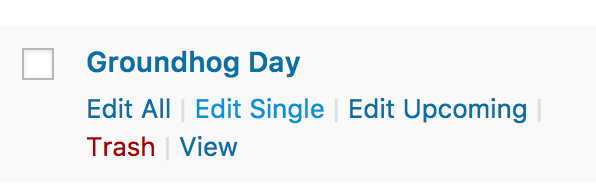
Clicking that link will open a dialog window asking you if you are sure you want to edit the post because doing so will break the event out of the recurring series and make it an individual event. You can do that for each event.
Does this make sense and will it work for you? Please let me know.
Thanks!
GeoffMarch 8, 2017 at 5:51 am #1250981ParticipantGeoff
Many thanks for that, one final thing you might be able to help me with. When I take a booking over the phone how can I adjust the ticket online to show that I have one less space available?
Andy
March 8, 2017 at 6:59 am #1250992MemberHi Andy,
Happy to hear this has helped!
You can create a new WooCommerce order from the WooCommerce > Orders screen in WordPress when taking orders over the phone. Creating an order where a ticket is purchased will reduce the ticket stock.
Did you have any other questions about the support between recurring events and tickets? If so, please let me know and I would be happy to help as best I can.
Cheers,
GeoffMarch 13, 2017 at 12:32 pm #1253457ParticipantGeoff
Thanks for all your help, I seem to have another issue since I have put that software on the site. I am no longer receiving emails for course bookings on set dates. Any ideas.
Thanks
Andy
March 13, 2017 at 3:54 pm #1253566MemberHi Andy,
Thanks for following up!
That sounds like it could be more related to WooCommerce than Event Tickets Plus. The reason being that all order confirmation emails that you would receive as an administrator are powered by WooCommerce. Event Tickets Plus merely send the ticket email to the customer.
That said, I would suggest checking to confirm those emails are not ending up in a spam/junk folder. I would also try setting up other products in WooCommerce, making some test purchases and seeing if you receive email notifications for those purchases before reaching out to WooCommerce support.
We’re starting to veer away from the original topic of this thread, which about the support between tickets and recurring events. If you have other questions about that, I’d be happy to answer as best I can. If you have other questions, it would be awesome if you would consider opening a new thread — that will allow us to keep this conversation focused.
Thanks so much!
GeoffApril 4, 2017 at 9:35 am #1264227Support Droid
KeymasterHey there! This thread has been pretty quiet for the last three weeks, so we’re going to go ahead and close it to avoid confusion with other topics. If you’re still looking for help with this, please do open a new thread, reference this one and we’d be more than happy to continue the conversation over there.
Thanks so much!
The Events Calendar Support Team -
This reply was modified 9 years, 7 months ago by
-
AuthorPosts
- The topic ‘Event Pro Calendar’ is closed to new replies.